





 本文介绍了MongoDB的基本操作,包括数据库的创建与管理、数据的增删改查等核心功能,并推荐了一款实用的可视化工具。
1.MongoDB bin目录介绍
mongo.exe:客户端,支持js语法
mongod.exe:服务端
mongodump.exe:备份工具
mongorestore.exe:恢复工具
mongoexport.exe:导出工具
mongoimport.exe:导入工具
mongostat.exe:实时性能监控工具
mongotop.exe:跟踪MongDB实例读写时间工具
2.mongo.exe操作数据库
上节我们已经把mongodb装为windos服务了,所以可以简单启动
D:\MongoDB\Server\3.2\bin>net start mongodb
请求的服务已经启动。

请键入 NET HELPMSG 2182 以获得更多的帮助。


D:\MongoDB\Server\3.2\bin>
D:\MongoDB\Server\3.2\bin>mongo
2016-03-31T10:07:22.043+0800 I CONTROL  [main] Hotfix KB2731284 or later update
is not installed, will zero-out data files
MongoDB shell version: 3.2.4
connecting to: test
Server has startup warnings:
2016-03-31T09:50:33.443+0800 I CONTROL  [initandlisten]
2016-03-31T09:50:33.444+0800 I CONTROL  [initandlisten] ** WARNING: This 32-bit
MongoDB binary is deprecated
2016-03-31T09:50:33.444+0800 I CONTROL  [initandlisten]
2016-03-31T09:50:33.444+0800 I CONTROL  [initandlisten]
2016-03-31T09:50:33.444+0800 I CONTROL  [initandlisten] ** NOTE: This is a 32 bi
t MongoDB binary.
2016-03-31T09:50:33.444+0800 I CONTROL  [initandlisten] **       32 bit builds a
re limited to less than 2GB of data (or less with --journal).
2016-03-31T09:50:33.444+0800 I CONTROL  [initandlisten] **       Note that journ
aling defaults to off for 32 bit and is currently off.
2016-03-31T09:50:33.444+0800 I CONTROL  [initandlisten] **       See http://doch
ub.mongodb.org/core/32bit
2016-03-31T09:50:33.444+0800 I CONTROL  [initandlisten]
> 1+1
2
>
3.MongoDB基本语法
查看数据库:show dbs
> show dbs
local  0.078GB
test   0.078GB
>
新建数据库:use 表名(新建数据库必须进行此库相关的操作,否则不会创建)
> use first
switched to db first
> show dbs
local  0.078GB
test   0.078GB
插入数据:db.表名.insert(数据)
> db.first.insert({name:"tom",age:"12"})
WriteResult({ "nInserted" : 1 })
> show dbs
first  0.078GB
local  0.078GB
test   0.078GB
>
查询表中的所有数据:db.表名.find()
> db.first.find()
{ "_id" : ObjectId("56fc8e6d58257d7101dfafa0"), "name" : "tom", "age" : "12" }
>
修改数据:db.表名.update({"条件字段名":"字段值"},{$set:{"要修改的字段名":"修改后的字段值"}});
> db.first.update({name:"tom"},{$set: {age:13}})
WriteResult({ "nMatched" : 1, "nUpserted" : 0, "nModified" : 0 })
> db.first.find()
{ "_id" : ObjectId("56fc8e6d58257d7101dfafa0"), "name" : "tom", "age" : 13 }
>
批量插入数据:
> for(var i=1;i<10;i++){db.first.insert({name:"tom"+i,age:i}); }
WriteResult({ "nInserted" : 1 })
> db.first.find()
{ "_id" : ObjectId("56fc8e6d58257d7101dfafa0"), "name" : "tom", "age" : 13 }
{ "_id" : ObjectId("56fc907858257d7101dfafa1"), "name" : "tom1", "age" : 1 }
{ "_id" : ObjectId("56fc907858257d7101dfafa2"), "name" : "tom2", "age" : 2 }
{ "_id" : ObjectId("56fc907858257d7101dfafa3"), "name" : "tom3", "age" : 3 }
{ "_id" : ObjectId("56fc907858257d7101dfafa4"), "name" : "tom4", "age" : 4 }
{ "_id" : ObjectId("56fc907858257d7101dfafa5"), "name" : "tom5", "age" : 5 }
{ "_id" : ObjectId("56fc907858257d7101dfafa6"), "name" : "tom6", "age" : 6 }
{ "_id" : ObjectId("56fc907858257d7101dfafa7"), "name" : "tom7", "age" : 7 }
{ "_id" : ObjectId("56fc907858257d7101dfafa8"), "name" : "tom8", "age" : 8 }
{ "_id" : ObjectId("56fc907858257d7101dfafa9"), "name" : "tom9", "age" : 9 }
>
按条件查询(支持多条件):db.表名.find(条件);
> db.first.find({name:"tom1"})
{ "_id" : ObjectId("56fc907858257d7101dfafa1"), "name" : "tom1", "age" : 1 }
> db.first.find({"$or":[{name:"tom1"},{name:"tom2"}]})
{ "_id" : ObjectId("56fc907858257d7101dfafa1"), "name" : "tom1", "age" : 1 }
{ "_id" : ObjectId("56fc907858257d7101dfafa2"), "name" : "tom2", "age" : 2 }
>
删除数据:db.表名.remove(条件)
> db.first.remove({name:"tom1"})
WriteResult({ "nRemoved" : 1 })
> db.first.find()
{ "_id" : ObjectId("56fc8e6d58257d7101dfafa0"), "name" : "tom", "age" : 13 }
{ "_id" : ObjectId("56fc907858257d7101dfafa2"), "name" : "tom2", "age" : 2 }
{ "_id" : ObjectId("56fc907858257d7101dfafa3"), "name" : "tom3", "age" : 3 }
{ "_id" : ObjectId("56fc907858257d7101dfafa4"), "name" : "tom4", "age" : 4 }
{ "_id" : ObjectId("56fc907858257d7101dfafa5"), "name" : "tom5", "age" : 5 }
{ "_id" : ObjectId("56fc907858257d7101dfafa6"), "name" : "tom6", "age" : 6 }
{ "_id" : ObjectId("56fc907858257d7101dfafa7"), "name" : "tom7", "age" : 7 }
{ "_id" : ObjectId("56fc907858257d7101dfafa8"), "name" : "tom8", "age" : 8 }
{ "_id" : ObjectId("56fc907858257d7101dfafa9"), "name" : "tom9", "age" : 9 }
>切换数据库:use 表名
删除当前数据库:db.dropDatabase()
> db
first
> use test
switched to db test
> db
test
> use first
switched to db first
> db.dropDatabase()
{ "dropped" : "first", "ok" : 1 }
> show dbs
local  0.078GB
test   0.078GB
>
介绍的应该能满足基本操作,具体请看API
MongoDBAPI:
http://api.mongodb.org/
4.可视化工具
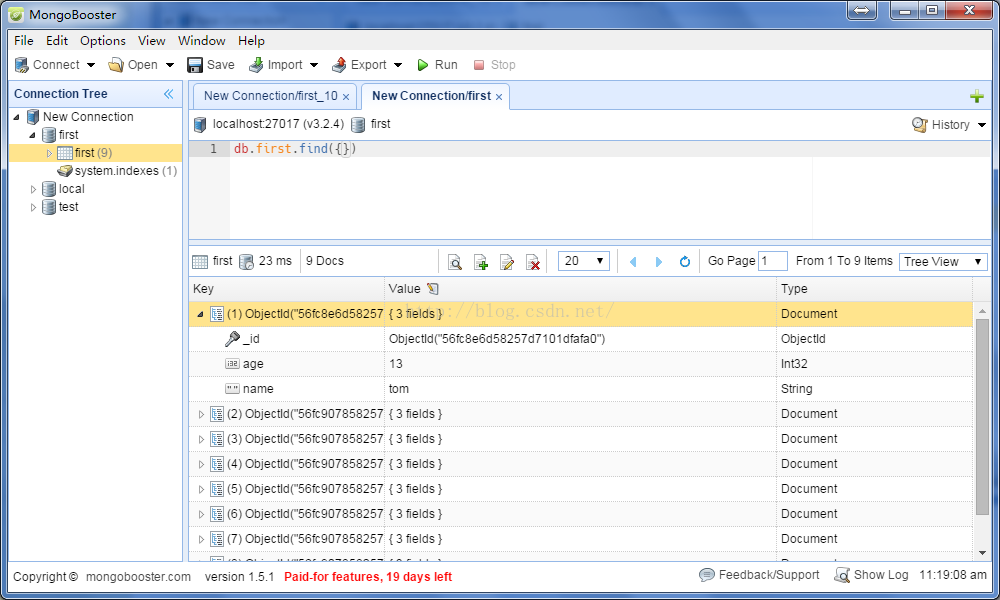
是不是觉得控制台写代码太太太太难受了,所以我们需要一个可视化工具
我用的是MongoBooster 安装非常的简单






 扫一扫
扫一扫


 2438
2438

 被折叠的 条评论
为什么被折叠?
被折叠的 条评论
为什么被折叠?
 到【灌水乐园】发言





