





 本文介绍CppCheck,一个用于检查C/C++代码安全性和健壮性的静态代码检查工具。它能发现编译器无法检查到的潜在bug,包括溢出等问题。文中提供了GUI方式、命令行方式和集成到IDE开发环境中的使用方法,如VS和QtCreator。通过集成,开发者可以方便地检测代码错误并进行修复。
CppCheck是一个C/C++代码缺陷静态检查工具。不同于C/C++编译器及其它分析工具,CppCheck只检查编译器检查不出来的bug,不检查语法错误。所谓静态代码检查就是使用一个工具检查我们写的代码是否安全和健壮,是否有隐藏的问题。
比如无意间写了这样的代码:
int n = 10;
char* buffer = new char[n];
buffer[n] = 0;
这完全是符合语法规范的,但是静态代码检查工具会提示此处会溢出。也就是说,它是一个更加严格的编译器。目前
使用比较广泛的C/C++静态代码检查工具有cppcheck 和 pc-lint等。
pc-lint是资格最老,最强力的代码检查工具,但是是收费软件,并且配置起来有一点点麻烦。
CppCheck 是免费的开源软件。使用起来也很方便。
从 http://cppcheck.sourceforge.net/ 下载最新的cppcheck。
使用方式:
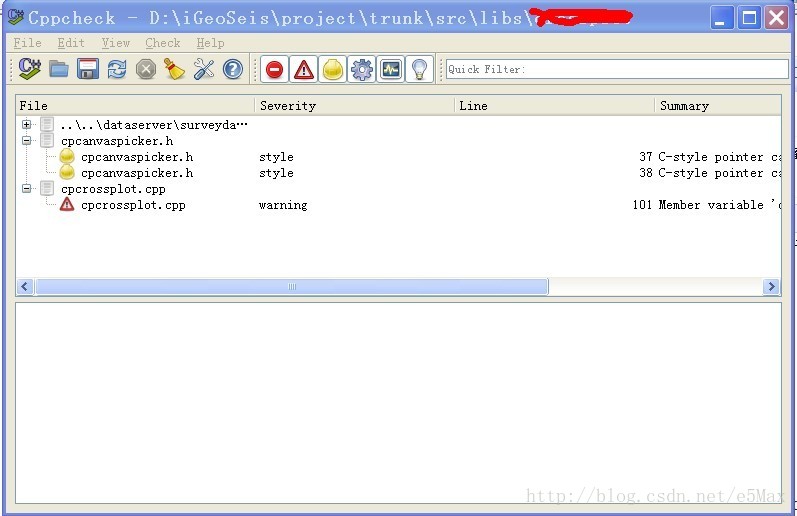
一、GUI方式:安装完就可以使用里面的cppcheck-gui来检测代码。界面如下:
二、命令行方式:
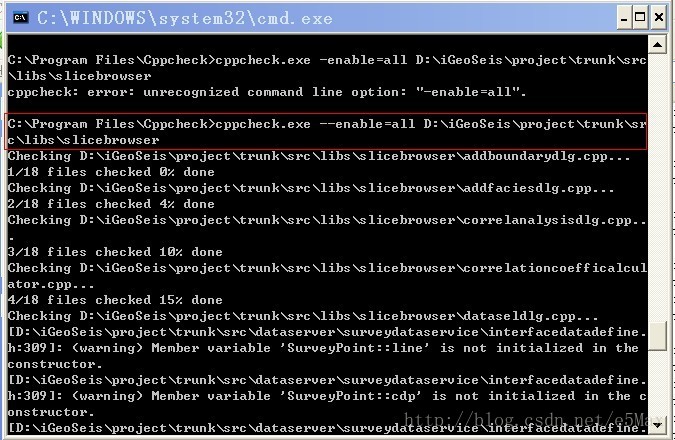
三、集成到IDE开发环境中使用:
1、VS
参考这里(http://avitebskiy.blogspot.tw/2012/10/poor-mans-visual-studio-cppcheck.html),可以方便的把cppcheck嵌入到vs,然后可以方便的对一个文件进行检查,而且支持错误跳转。
- click the Add button
- set the Title, for example Cppcheck
- set Command to C:\Program Files (x86)\Cppcheck\cppcheck.exe
- set Arguments to --quiet --verbose --template=vs $(ItemPath)
- set Initial Directory to $(ItemDir)
- make sure Use Output window checkbox is enabled
- click on the Move Up button repeatedly until your entry is at the top of the list, this will make it easier to identify you new command as you can count on it being calledTools.ExternalCommand1
- click OK.
2、Qt Creator
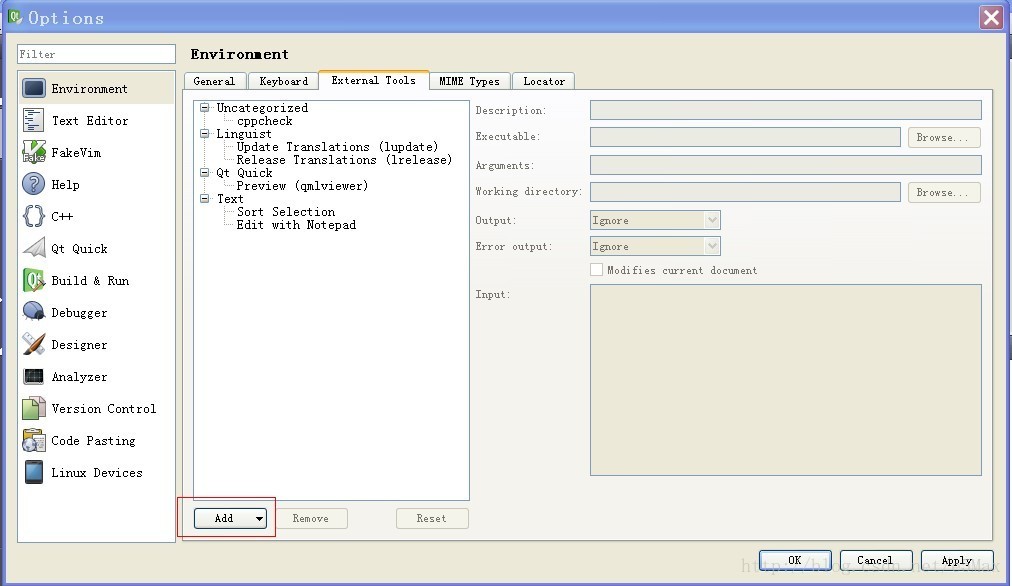
在QtCreator中点击:tools=>external=>config...=>add 弹出如下对话框:
填入下列参数:
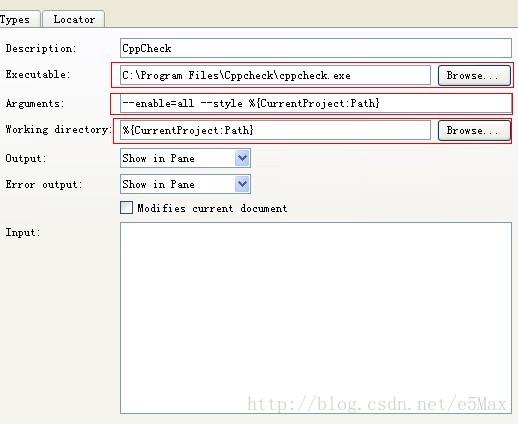
设置完后就可以用cppcheck检查指定目录下的代码文件:tools=>external=>cppcheck 开始检查。
参考文章: http://www.cnblogs.com/lancidie/archive/2013/04/13/3019505.html
以下这篇文章也非常详细:http://blog.csdn.net/akof1314/article/details/7477014





 扫一扫
扫一扫


 1045
1045

 被折叠的 条评论
为什么被折叠?
被折叠的 条评论
为什么被折叠?
 到【灌水乐园】发言





