 Hibernate入门教程



一、下载 Hibernate 下载地址:http://hibernate.org/orm/downloads/
二、将解压缩路径中 lib 路径下的 required、jpa 子目录下所有 JAR 包添加到应用的类加载路径中。(数据库操作别忘了加入 JDBC 驱动)
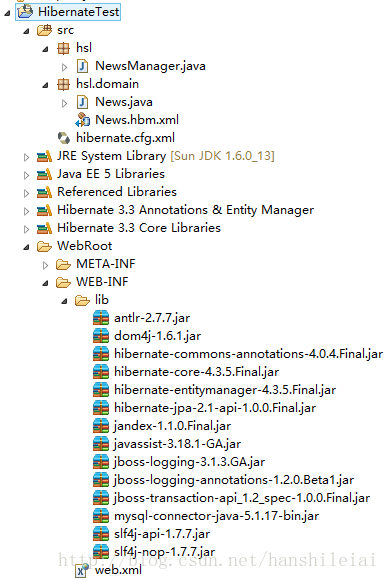
三、Hibernate 的数据库操作
1. 低侵入式设计 PO (persistant object) 持久对象类: src\hsl\domain\News.java 代码如下:
package hsl.domain;

public class News {
	// 消息类的标识属性
	private Integer id;
	// 消息标题
	private String title;
	// 消息内容
	private String content;

	// id属性的setter和getter方法
	public void setId(Integer id) {
		this.id = id;
	}

	public Integer getId() {
		return this.id;
	}

	// title属性的setter和getter方法
	public void setTitle(String title) {
		this.title = title;
	}

	public String getTitle() {
		return this.title;
	}

	// content属性的setter和getter方法
	public void setContent(String content) {
		this.content = content;
	}

	public String getContent() {
		return this.content;
	}
}
2. 为使以上 PO 类具备持久化操作的能力,这里 Hibernate 采用 XML 映射文件 src\hsl\domain\News.hbm.xml 代码如下:
<?xml version="1.0" encoding="gb2312"?>
	<!-- 指定Hiberante3映射文件的DTD信息 -->
<!DOCTYPE hibernate-mapping PUBLIC
	"-//Hibernate/Hibernate Mapping DTD 3.0//EN"
	"http://www.hibernate.org/dtd/hibernate-mapping-3.0.dtd">
	<!-- hibernate-mapping是映射文件的根元素 -->
<hibernate-mapping package="hsl.domain">
	<!-- 每个class元素对应一个持久化对象 -->
	<class name="News" table="news_table">
		<!-- id元素定义持久化类的标识属性 -->
		<id name="id">
			<!-- 指定主键生成策略 -->
			<generator class="identity" />
		</id>
		<!-- property元素定义常规属性 -->
		<property name="title" />
		<property name="content" />
	</class>
</hibernate-mapping>
3. Hibernate 配置文件 src \hibernate.cfg.xml 代码如下:
<?xml version="1.0" encoding="GBK"?>
<!-- 指定Hibernate配置文件的DTD信息 -->
<!DOCTYPE hibernate-configuration PUBLIC
	"-//Hibernate/Hibernate Configuration DTD 3.0//EN"
	"http://www.hibernate.org/dtd/hibernate-configuration-3.0.dtd">
<!-- hibernate- configuration是连接配置文件的根元素 -->
<hibernate-configuration>
	<session-factory>
		<!-- 指定连接数据库所用的驱动 -->
		<property name="connection.driver_class">com.mysql.jdbc.Driver</property>
		<!-- 指定连接数据库的url,hibernate连接的数据库名 -->
		<property name="connection.url">jdbc:mysql://localhost/hibernate</property>
		<!-- 指定连接数据库的编码 -->
		<property name="connection.characterEncoding">utf8</property>
		<!-- 指定连接数据库的用户名 -->
		<property name="connection.username">root</property>
		<!-- 指定连接数据库的密码 -->
		<property name="connection.password">8656216</property>
		<!-- 指定连接池里最大连接数 -->
		<property name="hibernate.c3p0.max_size">20</property>
		<!-- 指定连接池里最小连接数 -->
		<property name="hibernate.c3p0.min_size">1</property>
		<!-- 指定连接池里连接的超时时长 -->
		<property name="hibernate.c3p0.timeout">5000</property>
		<!-- 指定连接池里最大缓存多少个Statement对象 -->
		<property name="hibernate.c3p0.max_statements">100</property>
		<property name="hibernate.c3p0.idle_test_period">3000</property>
		<property name="hibernate.c3p0.acquire_increment">2</property>
		<property name="hibernate.c3p0.validate">true</property>
		<!-- 指定数据库方言 -->
		<!--<property name="dialect">org.hibernate.dialect.MySQLInnoDBDialect</property>-->
		<property name="dialect">org.hibernate.dialect.MySQLDialect</property>

		<!-- 根据需要自动创建数据表 -->
		<property name="hbm2ddl.auto">update</property>
		<!-- 显示Hibernate持久化操作所生成的SQL -->
		<property name="show_sql">true</property>
		<!-- 将SQL脚本进行格式化后再输出 -->
		<property name="hibernate.format_sql">true</property>
		<!-- 罗列所有的映射文件 -->
		<mapping resource="hsl/domain/News.hbm.xml"/>
	</session-factory>
</hibernate-configuration>
4. 由于上面的程序需要使用 C3P0 连接池,因此我们还需要将下载的 hibernate-release-4.3.5.Final\lib\optional\c3p0 目录下的JAR 包也添加到系统的类加载路径下。
除此之外,由于Hibernate 3.6及以上版本都使用 SLF4J 作为日志工具,我们可以登录 http://www.slf4j.org/download.html,下载 SLF4J 日志工具slf4j-1.7.7.zip,将解压目录下的 slf4j-api-1.7.7.jar 和 slf4j-nop-1.7.7.jar 这两个JAR 包也添加到系统的类加载路径下。
5. 测试信息数据插入数据库 src\hsl\NewsManager.java 代码如下:
package hsl;

import org.hibernate.*;
import org.hibernate.cfg.*;
import hsl.domain.*;

public class NewsManager {
	@SuppressWarnings("deprecation")
	public static void main(String[] args) throws Exception {
		// 实例化Configuration,
		Configuration conf = new Configuration()
		// 下面方法默认加载hibernate.cfg.xml文件
				.configure();
		// 以Configuration创建SessionFactory
		SessionFactory sf = conf.buildSessionFactory();
		// 创建Session
		Session sess = sf.openSession();
		// 开始事务
		Transaction tx = sess.beginTransaction();
		// 创建消息实例
		News n = new News();
		// 设置消息标题和消息内容
		n.setTitle("中国风");
		n.setContent("中国风," + "网站地址hanshilei.3322.org");
		// 保存消息
		sess.save(n);
		// 提交事务
		tx.commit();
		// 关闭Session
		sess.close();
		sf.close();
	}
}
项目名上右键--〉myeclipse-->add hibernate capabilites -->next-->hibernate config file --> existing -->选择现有工程存在的hibernate配置文件--> next --> 不生成factory class --> end
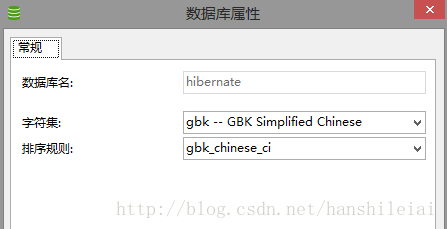
6. 在 mysql 数据库里创建对应数据库 hibernate 并运行程序 NewsManager.java
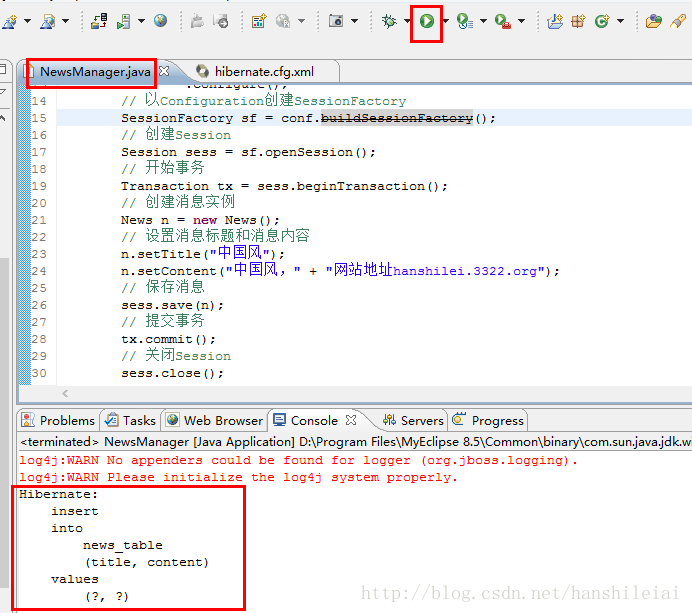
运行 src\hsl\NewsManager.java 文件得到结果
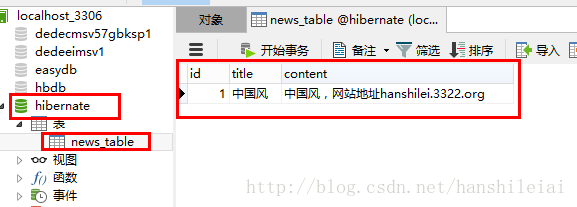
查看数据库如下:





 扫一扫
扫一扫


 1035
1035


 被折叠的 条评论
为什么被折叠?
被折叠的 条评论
为什么被折叠?
 到【灌水乐园】发言




