





 本文通过一个简单的实例展示了如何在Android中使用GestureDetector检测左右滑动和上下滑动手势,并在日志中记录这些手势事件。
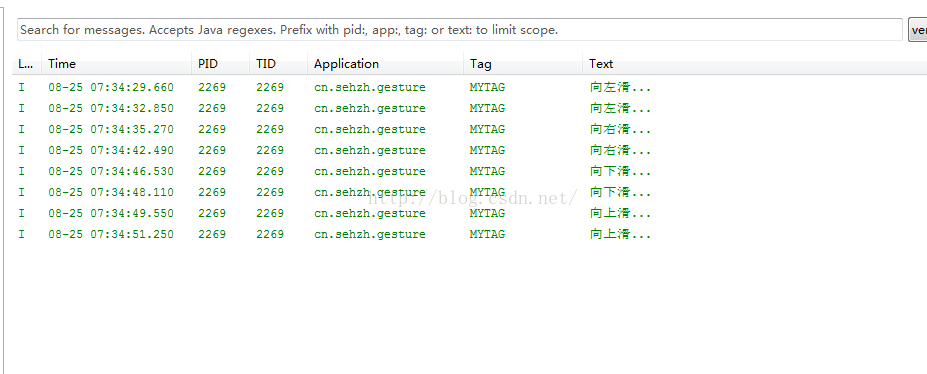
在这个例子中,我们只为演示对手势的检测,对于检测出的手势不做特殊处理,只在日志打印出检测到的结果。
1.activity_main.xml
<RelativeLayout xmlns:android="http://schemas.android.com/apk/res/android"
    xmlns:tools="http://schemas.android.com/tools"
    android:layout_width="match_parent"
    android:layout_height="match_parent"
    android:paddingBottom="@dimen/activity_vertical_margin"
    android:paddingLeft="@dimen/activity_horizontal_margin"
    android:paddingRight="@dimen/activity_horizontal_margin"
    android:paddingTop="@dimen/activity_vertical_margin"
    tools:context="cn.sehzh.gesture.MainActivity" >

    <TextView
        android:layout_width="wrap_content"
        android:layout_height="wrap_content"
        android:text="@string/hello_world" />

</RelativeLayout>
2.MainActivity
package cn.sehzh.gesture;

import android.app.Activity;
import android.os.Bundle;
import android.util.Log;
import android.view.GestureDetector;
import android.view.GestureDetector.OnGestureListener;
import android.view.MotionEvent;

public class MainActivity extends Activity {
	protected static final float FLIP_DISTANCE = 50;
	GestureDetector mDetector;

	@Override
	protected void onCreate(Bundle savedInstanceState) {
		super.onCreate(savedInstanceState);
		setContentView(R.layout.activity_main);

		mDetector = new GestureDetector(this, new OnGestureListener() {

			@Override
			public boolean onSingleTapUp(MotionEvent e) {
				// TODO Auto-generated method stub
				return false;
			}

			@Override
			public void onShowPress(MotionEvent e) {
				// TODO Auto-generated method stub

			}

			@Override
			public boolean onScroll(MotionEvent e1, MotionEvent e2, float distanceX, float distanceY) {
				// TODO Auto-generated method stub
				return false;
			}

			@Override
			public void onLongPress(MotionEvent e) {
				// TODO Auto-generated method stub

			}

			/**
			 *
			 * e1 The first down motion event that started the fling. e2 The
			 * move motion event that triggered the current onFling.
			 */
			@Override
			public boolean onFling(MotionEvent e1, MotionEvent e2, float velocityX, float velocityY) {
				if (e1.getX() - e2.getX() > FLIP_DISTANCE) {
					Log.i("MYTAG", "向左滑...");
					return true;
				}
				if (e2.getX() - e1.getX() > FLIP_DISTANCE) {
					Log.i("MYTAG", "向右滑...");
					return true;
				}
				if (e1.getY() - e2.getY() > FLIP_DISTANCE) {
					Log.i("MYTAG", "向上滑...");
					return true;
				}
				if (e2.getY() - e1.getY() > FLIP_DISTANCE) {
					Log.i("MYTAG", "向下滑...");
					return true;
				}

				Log.d("TAG", e2.getX() + " " + e2.getY());

				return false;
			}

			@Override
			public boolean onDown(MotionEvent e) {
				// TODO Auto-generated method stub
				return false;
			}
		});
	}

	@Override
	public boolean onTouchEvent(MotionEvent event) {
		return mDetector.onTouchEvent(event);
	}
}
3.日志结果





 扫一扫
扫一扫


 601
601

 被折叠的 条评论
为什么被折叠?
被折叠的 条评论
为什么被折叠?
 到【灌水乐园】发言





