





新浪围脖>@o蜗牛快跑o 企鹅交流群>79642549
- 适用于Windows和linux执行机,与os无关
- 命令行容易扩展,比如上集成到jenkins平台,用命令行更加容易
- 适用于高并发测试,测试开始时,console定期打印统计数据(默认30秒一次),减少cpu消耗,提高执行机并发能力
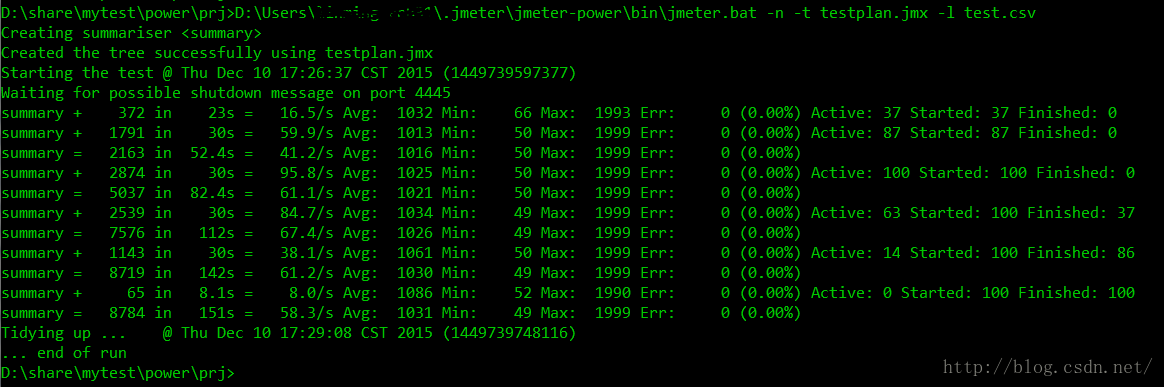
常用格式:jmeter_home/bin/jmeter -n -t testplan.jmx -l test.csv
summary + 是增量报告
summary = 是总量报告
看看下图结果,这样的数据统计在一些场景上,对结果数据分析有很大的帮助
官网原文如下:
2.4.4 Non-GUI Mode (Command Line mode)
For non-interactive testing, you may choose to run JMeter without the GUI. To do so, use the following command options:
-n This specifies JMeter is to run in non-gui mode
-t [name of JMX file that contains the Test Plan].
-l [name of JTL file to log sample results to].
-j [name of JMeter run log file].
-r Run the test in the servers specified by the JMeter property "remote_hosts"
-R [list of remote servers] Run the test in the specified remote servers
The script also lets you specify the optional firewall/proxy server information:
-H [proxy server hostname or ip address]
-P [proxy server port]
Example: jmeter -n -t my_test.jmx -l log.jtl -H my.proxy.server -P 8000
If the property jmeterengine.stopfail.system.exit is set to true (default is false), then JMeter will invoke System.exit(1) if it cannot stop all threads. Normally this is not necessary.





 扫一扫
扫一扫


 906
906

 被折叠的 条评论
为什么被折叠?
被折叠的 条评论
为什么被折叠?
 到【灌水乐园】发言





