


 本文介绍了一种使用jQuery和CSS来美化HTML文件输入框的方法,并提供了完整的代码示例,包括HTML结构、jQuery交互逻辑及CSS样式。
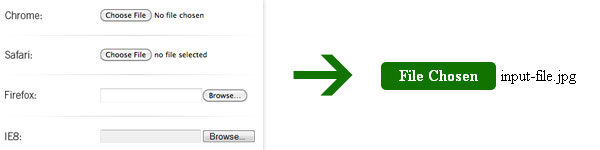
HTML markup
<div class="file-wrapper">
    <input type="file" />
    <span class="button">Choose a file</span>
</div>
jQuery
<script type="text/javascript" src="jquery.js"></script>
<script type="text/javascript">
var SITE = SITE || {};

SITE.fileInputs = function() {
  var $this = $(this),
      $val = $this.val(),
      valArray = $val.split('\'),
      newVal = valArray[valArray.length-1],
      $button = $this.siblings('.button'),
      $fakeFile = $this.siblings('.file-holder');
  if(newVal !== '') {
    $button.text('File Chosen');
    if($fakeFile.length === 0) {
      $button.after('<span class="file-holder">' + newVal + '</span>');
    } else {
      $fakeFile.text(newVal);
    }
  }
};

$(document).ready(function() {
  $('.file-wrapper input[type=file]').bind('change focus click', SITE.fileInputs);
});
</script>
Css
<style type="text/css">
.file-wrapper {
    position: relative;
    display: inline-block;
    overflow: hidden;
    cursor: pointer;
}
.file-wrapper input {
    position: absolute;
    top: 0;
    right: 0;
    filter: alpha(opacity=1);
    opacity: 0.01;
    -moz-opacity: 0.01;
    cursor: pointer;
}
.file-wrapper .button {
    color: #fff;
    background: #117300;
    padding: 4px 18px;
    margin-right: 5px;
    border-radius: 5px;
    -moz-border-radius: 5px;
    -webkit-border-radius: 5px;
    display: inline-block;
    font-weight: bold;
    cursor: pointer;
}
.file-holder{
    color: #000;
}
</style>
实例:http://1stwebmagazine.com/demo/styling-input-file-with-jquery-and-css.html
原著:http://1stwebmagazine.com/styling-input-file-with-jquery-and-css





 扫一扫
扫一扫


 1万+
1万+

 被折叠的 条评论
为什么被折叠?
被折叠的 条评论
为什么被折叠?
 到【灌水乐园】发言





