




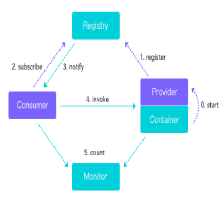
 本文介绍Hessian轻量级RPC框架的使用方法,包括Maven依赖配置、服务接口定义及实现、web.xml配置以及客户端调用过程。
一、hessian的maven信息:


- <dependency>
- <groupId>com.caucho</groupId>
- <artifactId>hessian</artifactId>
- <version>4.0.38</version>
- </dependency>
二、入门示例,以web方式提供对外接口
(1)服务接口:
- package com.tianjunwei.hessian.server;
- public interface HelloService {
- public String helloWorld(String message);
- }
- package com.tianjunwei.hessian.server;
- public class HelloServiceImpl implements HelloService{
- @Override
- public String helloWorld(String message) {
- return "hello," + message;
- }
- }
- <web-app>
- <servlet>
- <servlet-name>hessian-service</servlet-name>
- <servlet-class>
- com.caucho.hessian.server.HessianServlet
- </servlet-class>
- <init-param>
- <param-name>home-class</param-name>
- <param-value>
- <!-- 服务实现类 -->
- com.tianjunwei.hessian.server.HelloServiceImpl
- </param-value>
- </init-param>
- <init-param>
- <param-name>home-api</param-name>
- <!-- 服务接口 -->
- <param-value>com.tianjunwei.hessian.server.HelloService</param-value>
- </init-param>
- </servlet>
- <servlet-mapping>
- <servlet-name>hessian-service</servlet-name>
- <url-pattern>/hessian</url-pattern>
- </servlet-mapping>
- </web-app>
第(3)步中,通过配置servlet,这样就可以通过发布的http进行访问,根据Hessian提供的机制,这样就可以通过url进行服务调用。
- package com.tianjunwei.hessian.client;
- import java.net.MalformedURLException;
- import com.caucho.hessian.client.HessianProxyFactory;
- import com.tianjunwei.hessian.server.HelloService;
- public class HelloServiceMain {
- public static void main(String [] args) throws MalformedURLException{
- String url = "http://localhost:8080/hessian";
- System.out.println(url);
- HessianProxyFactory factory = new HessianProxyFactory();
- HelloService helloService = (HelloService) factory.create(HelloService.class, url);
- System.out.println(helloService.helloWorld("jimmy"));
- }
- }
运行结果:
http://localhost:8080/hessian
hello,jimmy





 扫一扫
扫一扫


 3758
3758

 被折叠的 条评论
为什么被折叠?
被折叠的 条评论
为什么被折叠?
 到【灌水乐园】发言





