


 ASP.NET2.0雷霆之怒盗链者的祝福【月儿原创】
ASP.NET2.0雷霆之怒盗链者的祝福
作者:清清月儿
主页:http://blog.csdn.net/21aspnet/ 时间:2007.3.28
所谓盗链就是指其他网站把我们站点的文件链接帖到他们站上,这样白白占用我们的带宽。访问对于网站盗链行为,是非常不道德的。要实现防盗链,我们就得在IIS处理URL时拦截。
效果图:
未加防盗链之前:hm是我的机器名,用http://hm/myweb/default.aspx和http://localhost/myweb/default访问结果一样。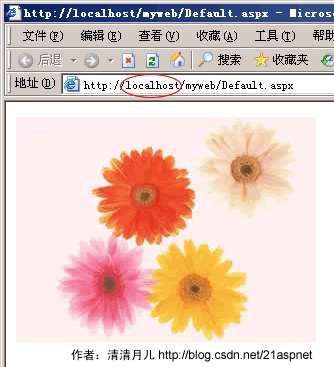 这幅图片是任人宰割的。
加了防盗链之后虽然还是同一个网站但是http://hm/myweb/default.aspx已经不能访问那副花卉图片,被以下图片替代: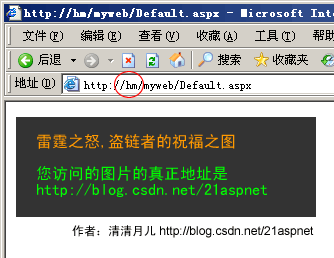
加了防盗链之后用localhost还是正常的!http://localhost/myweb/default访问结果一样。
原理:
其实hm是我的机器,但是由于服务器域名是localhost所以即使是同一个网站也不能访问,所以就更别说
www.其他网站域名.com这样的网站偷取我们的资源。关键就是IIS对所有的请求进行过滤看看是不是本站域名的。
全部代码:
Web.Config
<?xml version="1.0"?>
<!--
注意: 除了手动编辑此文件以外,您还可以使用
Web 管理工具来配置应用程序的设置。可以使用 Visual Studio 中的
“网站”->“Asp.Net 配置”选项。
设置和注释的完整列表在
machine.config.comments 中,该文件通常位于
/Windows/Microsoft.Net/Framework/v2.x/Config 中
-->
<configuration>
<appSettings/>
<connectionStrings/>
<system.web>
<httpHandlers>
<add verb="*" path="*.jpg" type="myhandler,App_Code"/>
</httpHandlers>
<!--
设置 compilation debug="true" 将调试符号插入
已编译的页面中。但由于这会
影响性能,因此只在开发过程中将此值
设置为 true。
-->
<compilation debug="true"/>
<!--
通过 <authentication> 节可以配置 ASP.NET 使用的
安全身份验证模式,
以标识传入的用户。
-->
<authentication mode="Windows"/>
<!--
如果在执行请求的过程中出现未处理的错误,
则通过 <customErrors> 节可以配置相应的处理步骤。具体说来,
开发人员通过该节可以配置
要显示的 html 错误页
以代替错误堆栈跟踪。
<customErrors mode="RemoteOnly" defaultRedirect="GenericErrorPage.htm">
<error statusCode="403" redirect="NoAccess.htm" />
<error statusCode="404" redirect="FileNotFound.htm" />
</customErrors>
-->
</system.web>
</configuration>
myhandler.cs 新建myhandler.cs 类时系统提示你要放入App_Code中
using System;
using System.Web;
/// <summary>
/// myhandler 的摘要说明
/// </summary>
public class myhandler : IHttpHandler
{
public void ProcessRequest(HttpContext context)
{
string FileName = context.Server.MapPath(context.Request.FilePath);
if (context.Request.UrlReferrer.Host == null)
{
context.Response.ContentType = "image/JPEG";
context.Response.WriteFile("~/no.gif");//被替换图片
}
else
{
if (context.Request.UrlReferrer.Host.IndexOf("localhost") > -1)//这里是你的域名
{
context.Response.ContentType = "image/JPEG";
context.Response.WriteFile(FileName);
}
else
{
context.Response.ContentType = "image/JPEG";
context.Response.WriteFile("~/no.gif");
}
}
}
public bool IsReusable
{
get { return true; }
}
public myhandler()
{
}
}
Default.aspx
<!DOCTYPE html PUBLIC "-//W3C//DTD XHTML 1.0 Transitional//EN" "http://www.w3.org/TR/xhtml1/DTD/xhtml1-transitional.dtd">
<html xmlns="http://www.w3.org/1999/xhtml" >
<head runat="server">
<title>清清月儿http://blog.csdn.net/21aspnet</title>
</head>
<body>
<form id="form1" runat="server">
<div>
<img src="pic130.jpg" /></div>
</form>
</body>
</html>
pic130.jpg
no.gif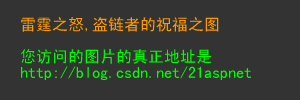
IIS的配置: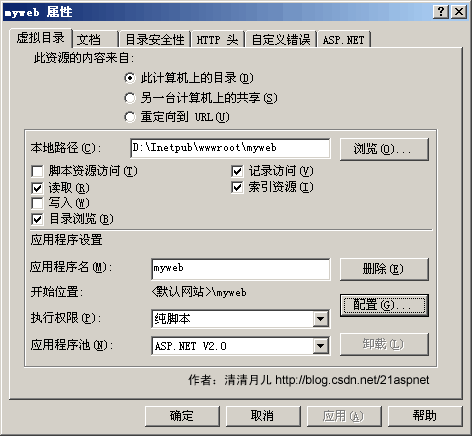
配置应用程序扩展:添加一个.jpg的扩展!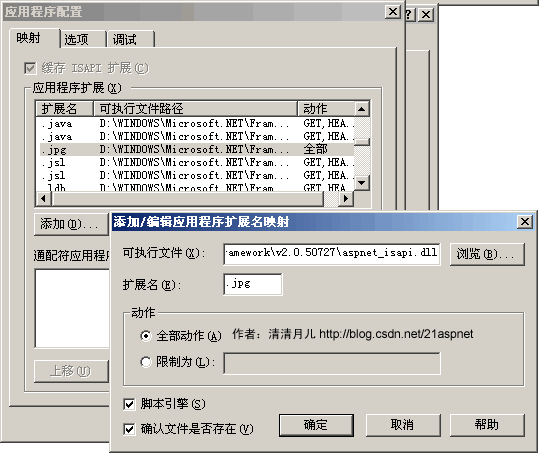
注意:在本地的context.Request.UrlReferrer.Host就是localhost,
我开始以为http://localhost/A/和http://localhost/B/是不同的context.Request.UrlReferrer.Host,那就是大错特错。http://localhost/A/和http://localhost/B/的context.Request.UrlReferrer.Host都是localhost,所以测试一个用localhost,所以,本地测试用机器名例如我的是hm测试即可。经过处理后用机器名访问就不行,虽然还是同一个站点,同一个文件,此处请多注意。
下面是怎么防rar文件不从主站下载:方法和图片类似,不过下载我们强迫他们到我们站点。
1、 首先创建一个类库项目ClassLibrary1:
using System;
using System.Web; // 引用System.Web组件
public class MyHandler : IHttpHandler
{
public MyHandler()
{
}
#region IHttpHandler 成员
public void ProcessRequest(HttpContext context)
{
// 跳转到WebForm1.aspx,由WebForm1.aspx输出rar文件
HttpResponse response = context.Response;
response.Redirect("../manage/downloads.aspx");
}
public bool IsReusable
{
get
{
// TODO: 添加 MyHandler.IsReusable getter 实现
return true;
}
}
#endregion
}
2、 在配置文件Web.config文件节点里增加如下节点:
<httpHandlers>
<add verb="*" path="*.rar" type="myhandler,App_Code"/>
</httpHandlers>
3、 在WebForm1.aspx里增加一个文本为“下载”的Button,其Click事件如下:
注意别忘记了using System.IO;
private void Button1_Click(object sender, System.EventArgs e)
{
FileInfo file = new System.IO.FileInfo(Server.MapPath("1.rar"));
Response.Clear();
Response.AddHeader("Content-Disposition", "filename=" + file.Name);
Response.AddHeader("Content-Length", file.Length.ToString());
string fileExtension = file.Extension;
// 根据文件后缀指定文件的Mime类型
switch (fileExtension)
{
case ".mp3":
Response.ContentType = "audio/mpeg3";
break;
case "mpeg":
Response.ContentType = "video/mpeg";
break;
case "jpg":
Response.ContentType = "image/jpeg";
break;
case "........等等":
Response.ContentType = "....";
break;
default:
Response.ContentType = "application/octet-stream";
break;
}
Response.WriteFile(file.FullName);
Response.End();
}
4、 最后一步就是在IIS里增加一个应用程序扩展。在“默认网站”->“属性”->“主目录”->“配置”。在弹出的“应用程序配置”窗口里按“添加”,在弹出的“添加/编辑应用程序扩展名映射”窗口里“可执行文件”选择C:/WINDOWS/Microsoft.NET/Framework/v2.0.50727/aspnet_isapi.dll,在扩展名里输入“.rar”,然后确定即可。
5、 在IE里输入http://localhost/web/1.rar,会立即跳转到http://localhost/web/WebForm1.aspx,然后按WebForm1.aspx的“下载”按钮就可以下载1.rar了。
Trackback: http://tb.blog.csdn.net/TrackBack.aspx?PostId=1544484





 2万+
2万+


 被折叠的 条评论
为什么被折叠?
被折叠的 条评论
为什么被折叠?
 到【灌水乐园】发言





