


功能,可以分析HTML源码
后续可自行加分析C语言等
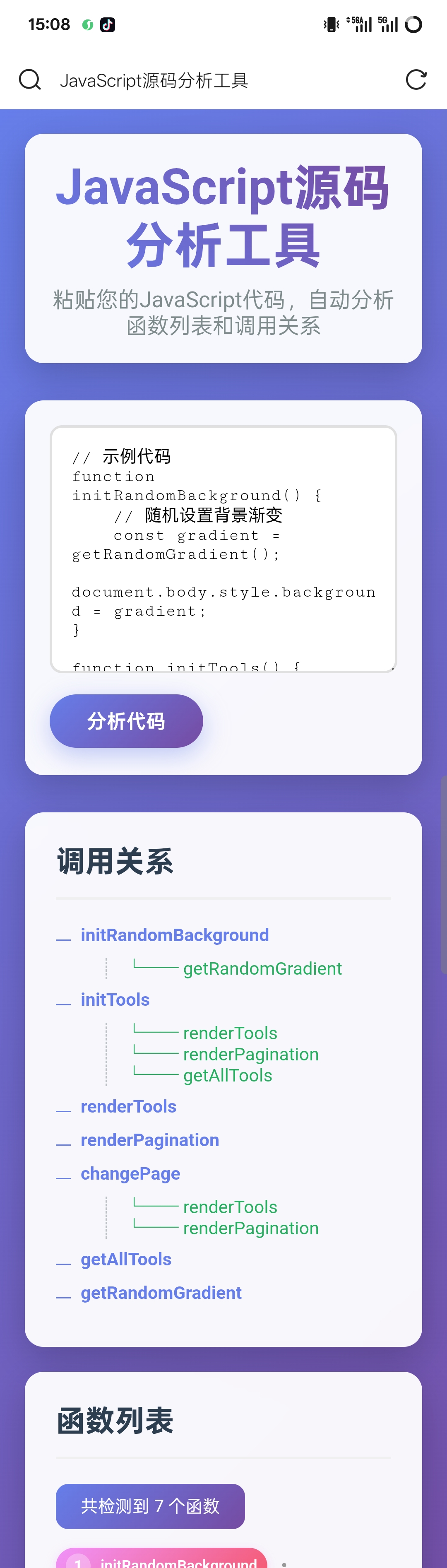
<!DOCTYPE html>
<html lang="zh-CN">
<head>
<meta charset="UTF-8">
<meta name="viewport" content="width=device-width, initial-scale=1.0">
<title>JavaScript源码分析工具</title>
<style>
* {
box-sizing: border-box;
margin: 0;
padding: 0;
font-family: 'Segoe UI', Tahoma, Geneva, Verdana, sans-serif;
}
body {
background: linear-gradient(135deg, #667eea 0%, #764ba2 100%);
min-height: 100vh;
padding: 20px;
color: #333;
}
.container {
max-width: 1400px;
margin: 0 auto;
}
header {
text-align: center;
margin-bottom: 30px;
padding: 20px;
background: rgba(255, 255, 255, 0.95);
border-radius: 15px;
box-shadow: 0 10px 30px rgba(0, 0, 0, 0.2);
backdrop-filter: blur(10px);
}
h1 {
color: #2c3e50;
margin-bottom: 10px;
font-size: 2.5rem;
background: linear-gradient(45deg, #667eea, #764ba2);
-webkit-background-clip: text;
-webkit-text-fill-color: transparent;
background-clip: text;
}
.description {
color: #7f8c8d;
font-size: 1.1rem;
}
.input-section {
background: rgba(255, 255, 255, 0.95);
border-radius: 15px;
padding: 20px;
margin-bottom: 30px;
box-shadow: 0 10px 30px rgba(0, 0, 0, 0.2);
backdrop-filter: blur(10px);
}
textarea {
width: 100%;
height: 200px;
padding: 15px;
border: 2px solid #e0e0e0;
border-radius: 10px;
font-family: 'Courier New', monospace;
font-size: 14px;
resize: vertical;
margin-bottom: 15px;
transition: all 0.3s ease;
}
textarea:focus {
outline: none;
border-color: #667eea;
box-shadow: 0 0 0 3px rgba(102, 126, 234, 0.1);
}
button {
background: linear-gradient(135deg, #667eea, #764ba2);
color: white;
border: none;
padding: 12px 30px;
border-radius: 50px;
cursor: pointer;
font-size: 16px;
font-weight: 600;
transition: all 0.3s ease;
box-shadow: 0 4px 15px rgba(102, 126, 234, 0.3);
}
button:hover {
transform: translateY(-2px);
box-shadow: 0 6px 20px rgba(102, 126, 234, 0.4);
}
.results-section {
display: flex;
flex-direction: column;
gap: 20px;
}
.card {
background: rgba(255, 255, 255, 0.95);
border-radius: 15px;
padding: 25px;
box-shadow: 0 10px 30px rgba(0, 0, 0, 0.2);
backdrop-filter: blur(10px);
overflow: hidden;
}
.card h2 {
color: #2c3e50;
margin-bottom: 20px;
padding-bottom: 15px;
border-bottom: 2px solid #f0f0f0;
font-size: 1.5rem;
}
.call-tree {
font-family: 'Courier New', monospace;
font-size: 0.9rem;
}
.tree-node {
margin: 8px 0;
padding-left: 20px;
position: relative;
}
.tree-node::before {
content: '';
position: absolute;
left: 0;
top: 12px;
width: 12px;
height: 1px;
background: #667eea;
}
.tree-root {
font-weight: bold;
color: #667eea;
margin-bottom: 10px;
}
.tree-branch {
margin-left: 20px;
border-left: 1px dashed #bdc3c7;
padding-left: 15px;
}
.tree-leaf {
color: #27ae60;
}
/* 新的函数列表样式 - 文章式紧凑布局 */
.function-list {
display: flex;
flex-wrap: wrap;
gap: 10px;
align-items: center;
line-height: 1.8;
}
.function-item {
display: inline-flex;
align-items: center;
background: linear-gradient(135deg, #f093fb 0%, #f5576c 100%);
color: white;
padding: 6px 12px;
border-radius: 20px;
font-size: 14px;
font-weight: 500;
transition: all 0.3s ease;
cursor: pointer;
position: relative;
box-shadow: 0 2px 8px rgba(240, 147, 251, 0.3);
}
.function-item:hover {
transform: translateY(-2px);
box-shadow: 0 4px 12px rgba(240, 147, 251, 0.4);
}
.function-number {
display: inline-block;
background: rgba(255, 255, 255, 0.3);
color: white;
width: 20px;
height: 20px;
border-radius: 50%;
text-align: center;
line-height: 20px;
font-size: 12px;
font-weight: bold;
margin-right: 8px;
}
.function-name {
font-weight: 600;
}
.function-line {
font-size: 12px;
opacity: 0.9;
margin-left: 5px;
}
.function-separator {
color: #999;
margin: 0 5px;
font-size: 16px;
}
.comment {
color: #95a5a6;
font-style: italic;
margin-left: 10px;
}
.error {
color: #e74c3c;
background: #fadbd8;
padding: 10px;
border-radius: 5px;
margin-top: 10px;
display: none;
}
.stats-info {
background: linear-gradient(135deg, #667eea, #764ba2);
color: white;
padding: 10px 20px;
border-radius: 10px;
margin-bottom: 15px;
display: inline-block;
font-size: 14px;
}
@media (max-width: 768px) {
.function-list {
gap: 8px;
}
.function-item {
font-size: 13px;
padding: 5px 10px;
}
}
@media (max-width: 480px) {
.function-list {
gap: 6px;
}
.function-item {
font-size: 12px;
padding: 4px 8px;
}
.function-line {
display: none;
}
}
</style>
</head>
<body>
<div class="container">
<header>
<h1>JavaScript源码分析工具</h1>
<p class="description">粘贴您的JavaScript代码,自动分析函数列表和调用关系</p>
</header>
<section class="input-section">
<textarea id="codeInput" placeholder="请将您的JavaScript源码粘贴到这里..."></textarea>
<button id="analyzeBtn">分析代码</button>
<div id="errorMessage" class="error"></div>
</section>
<section class="results-section">
<div class="card">
<h2>调用关系</h2>
<div id="callTree" class="call-tree">
<div class="tree-node">分析后将显示调用关系树</div>
</div>
</div>
<div class="card">
<h2>函数列表</h2>
<div id="statsInfo" class="stats-info" style="display: none;"></div>
<div id="functionList" class="function-list">
<div class="function-item">分析后将显示函数列表</div>
</div>
</div>
</section>
</div>
<script>
document.getElementById('analyzeBtn').addEventListener('click', function() {
const codeInput = document.getElementById('codeInput').value;
const errorMessage = document.getElementById('errorMessage');
if (!codeInput.trim()) {
showError('请输入JavaScript代码');
return;
}
try {
const analysisResult = analyzeCode(codeInput);
displayFunctionList(analysisResult.functions);
displayCallTree(analysisResult.callTree);
errorMessage.style.display = 'none';
} catch (error) {
showError('代码分析出错: ' + error.message);
}
});
function showError(message) {
const errorMessage = document.getElementById('errorMessage');
errorMessage.textContent = message;
errorMessage.style.display = 'block';
}
function analyzeCode(code) {
// 清理代码:移除注释
const cleanedCode = code
.replace(/\/\*[\s\S]*?\*\//g, '') // 移除多行注释
.replace(/\/\/.*$/gm, '') // 移除单行注释
.trim();
// 提取函数定义
const functionRegex = /(?:function\s+(\w+)\s*\([^)]*\)|(?:const|let|var)\s+(\w+)\s*=\s*function\s*\([^)]*\)|(?:const|let|var)\s+(\w+)\s*=\s*\([^)]*\)\s*=>)/g;
const functions = [];
let match;
// 获取所有行
const lines = code.split('\n');
while ((match = functionRegex.exec(cleanedCode)) !== null) {
const functionName = match[1] || match[2] || match[3];
if (functionName) {
// 查找函数在源代码中的行号
const functionDefIndex = match.index;
let lineNumber = 1;
let currentIndex = 0;
for (let i = 0; i < lines.length; i++) {
currentIndex += lines[i].length + 1; // +1 用于换行符
if (currentIndex > functionDefIndex) {
lineNumber = i + 1;
break;
}
}
functions.push({
name: functionName,
line: lineNumber
});
}
}
// 构建调用关系树
const callTree = buildCallTree(cleanedCode, functions);
return {
functions: functions,
callTree: callTree
};
}
function buildCallTree(code, functions) {
const tree = {};
const functionNames = functions.map(f => f.name);
// 分析每个函数的调用关系
functions.forEach(func => {
const funcBody = extractFunctionBody(code, func.name);
tree[func.name] = findCalledFunctions(funcBody, functionNames);
});
return tree;
}
function extractFunctionBody(code, functionName) {
// 简化版函数体提取 - 实际应用中需要更复杂的解析
const funcRegex = new RegExp(`(?:function\\s+${functionName}|(?:const|let|var)\\s+${functionName}\\s*=\\s*(?:function|\\([^)]*\\)\\s*=>))\\s*(\\([^)]*\\))\\s*\\{`);
const match = funcRegex.exec(code);
if (!match) return '';
const startIndex = match.index + match[0].length;
let braceCount = 1;
let currentIndex = startIndex;
while (braceCount > 0 && currentIndex < code.length) {
if (code[currentIndex] === '{') braceCount++;
if (code[currentIndex] === '}') braceCount--;
currentIndex++;
}
return code.substring(startIndex, currentIndex - 1);
}
function findCalledFunctions(funcBody, functionNames) {
const calls = [];
functionNames.forEach(name => {
// 简单的调用匹配 - 实际应用中需要更精确的解析
const callRegex = new RegExp(`\\b${name}\\s*\\(`, 'g');
if (callRegex.test(funcBody)) {
calls.push(name);
}
});
return calls;
}
function displayFunctionList(functions) {
const functionList = document.getElementById('functionList');
const statsInfo = document.getElementById('statsInfo');
functionList.innerHTML = '';
if (functions.length === 0) {
functionList.innerHTML = '<div class="function-item">未检测到函数定义</div>';
statsInfo.style.display = 'none';
return;
}
// 显示统计信息
statsInfo.textContent = `共检测到 ${functions.length} 个函数`;
statsInfo.style.display = 'inline-block';
// 创建函数列表
functions.forEach((func, index) => {
const item = document.createElement('div');
item.className = 'function-item';
item.innerHTML = `
<span class="function-number">${index + 1}</span>
<span class="function-name">${func.name}</span>
<span class="function-line">(行${func.line})</span>
`;
// 添加点击事件,可以高亮显示或跳转到对应行
item.addEventListener('click', function() {
// 可以添加更多交互功能
this.style.transform = 'scale(1.1)';
setTimeout(() => {
this.style.transform = '';
}, 200);
});
functionList.appendChild(item);
// 添加分隔符(除了最后一个)
if (index < functions.length - 1) {
const separator = document.createElement('span');
separator.className = 'function-separator';
separator.textContent = '•';
functionList.appendChild(separator);
}
});
}
function displayCallTree(callTree) {
const callTreeElement = document.getElementById('callTree');
callTreeElement.innerHTML = '';
if (Object.keys(callTree).length === 0) {
callTreeElement.innerHTML = '<div class="tree-node">未检测到调用关系</div>';
return;
}
// 构建调用树显示
Object.keys(callTree).forEach(funcName => {
const calls = callTree[funcName];
const node = document.createElement('div');
node.className = 'tree-node';
const root = document.createElement('div');
root.className = 'tree-root';
root.textContent = funcName;
node.appendChild(root);
if (calls.length > 0) {
const branch = document.createElement('div');
branch.className = 'tree-branch';
calls.forEach(calledFunc => {
const leaf = document.createElement('div');
leaf.className = 'tree-leaf';
leaf.textContent = `└── ${calledFunc}`;
branch.appendChild(leaf);
});
node.appendChild(branch);
}
callTreeElement.appendChild(node);
});
}
// 示例代码加载
document.addEventListener('DOMContentLoaded', function() {
const exampleCode = `// 示例代码
function initRandomBackground() {
// 随机设置背景渐变
const gradient = getRandomGradient();
document.body.style.background = gradient;
}
function initTools() {
// 初始化工具列表
const tools = getAllTools();
renderTools(tools);
renderPagination();
}
function renderTools(tools) {
// 渲染当前页工具卡片
console.log('渲染工具卡片');
}
function renderPagination() {
// 渲染分页按钮
console.log('渲染分页');
}
function changePage(page) {
// 切换页码
renderTools();
renderPagination();
}
function getAllTools() {
// 返回全部工具
return [];
}
function getRandomGradient() {
// 返回随机渐变
return 'linear-gradient(45deg, red, blue)';
}
// 事件监听器
window.addEventListener('load', function() {
initRandomBackground();
initTools();
});
document.addEventListener('keydown', function(e) {
if (e.key === 'ArrowLeft') {
changePage('prev');
} else if (e.key === 'ArrowRight') {
changePage('next');
}
});`;
document.getElementById('codeInput').value = exampleCode;
});
</script>
</body>
</html>





 扫一扫
扫一扫


 1238
1238

 被折叠的 条评论
为什么被折叠?
被折叠的 条评论
为什么被折叠?
 到【灌水乐园】发言





