


1.用户
1.1 用户信息
MySQL中的用户都存储在系统数据库mysql的user表中
mysql> use mysql;
Reading table information for completion of table and column names
You can turn off this feature to get a quicker startup with -A
Database changed

mysql> select host,user,authentication_string from user;
+-----------+---------------+-------------------------------------------+
| host      | user          | authentication_string                     |
+-----------+---------------+-------------------------------------------+
| localhost | root          | *826426064C0E94FC9E9D392F9F9732C30E355FF8 |
| localhost | mysql.session | *THISISNOTAVALIDPASSWORDTHATCANBEUSEDHERE |
| localhost | mysql.sys     | *THISISNOTAVALIDPASSWORDTHATCANBEUSEDHERE |
+-----------+---------------+-------------------------------------------+
3 rows in set (0.00 sec)

--可以通过desc user初步查看一下表结构
字段解释:
select * from user\G
- host: 表示这个用户可以从哪个主机登陆,如果是localhost,表示只能从本机登陆
- user: 用户名
- authentication_string: 用户密码通过password函数加密后的
- *_priv: 用户拥有的权限
1.2 用户创建
语法:
create user '用户名'@'登陆主机/ip' identified by '密码';
案例:
mysql> create user 'lin'@'localhost' identified by '12345678';
Query OK, 0 rows affected (0.00 sec)

mysql> select user,host,authentication_string from user;
+---------------+-----------+-------------------------------------------+
| user          | host      | authentication_string                     |
+---------------+-----------+-------------------------------------------+
| root          | localhost | *********                                 |
| mysql.session | localhost | *THISISNOTAVALIDPASSWORDTHATCANBEUSEDHERE |
| mysql.sys     | localhost | *THISISNOTAVALIDPASSWORDTHATCANBEUSEDHERE |
| lin           | localhost | *84AAC12F54AB666ECFC2A83C676908C8BBC381B1 |
+---------------+-----------+-------------------------------------------+
4 rows in set (0.00 sec)
补充:
1.完成相关操作后,即可使用新账号和新密码进行登录。
2.备注:MySQL 密码设置报错处理
- 报错现象:由于 MySQL 自身认证等级较高,设置简单密码时可能触发报错,提示信息为:ERROR 1819 (HY000): Your password does not satisfy the current policy requirements
- 解决方案:参考链接 https://blog.csdn.net/zhanaolu4821/article/details/93622812
- 查看密码要求:执行命令 SHOW VARIABLES LIKE 'validate_password%';,可自行操作尝试。
3.新增用户注意事项:不要轻易添加允许从任意地址登录的用户。
1.3 删除用户
语法:
drop user '用户名'@'主机名';
案例:
mysql> select user,host,authentication_string from user;
+---------------+-----------+-------------------------------------------+
| user          | host      | authentication_string                     |
+---------------+-----------+-------------------------------------------+
| root          | localhost | ********                                  |
| mysql.session | localhost | *THISISNOTAVALIDPASSWORDTHATCANBEUSEDHERE |
| mysql.sys     | localhost | *THISISNOTAVALIDPASSWORDTHATCANBEUSEDHERE |
| lin           | localhost | *84AAC12F54AB666ECFC2A83C676908C8BBC381B1 |
+---------------+-----------+-------------------------------------------+
4 rows in set (0.00 sec)

mysql> drop user lin; --尝试删除
ERROR 1396 (HY000): Operation DROP USER failed for 'lin'@'%' -- 直接给个用户名是不能删除的,它默认是%(表示所有地方可以登陆的用户)

mysql> drop user 'lin'@'localhost'; --删除用户
Query OK, 0 rows affected (0.00 sec)
1.4 修改用户密码
语法:
-
自己改自己密码
set password=password('新的密码');
-
root用户修改指定用户的密码
set password for '用户名'@'主机名'=password('新的密码');
2.数据库的权限
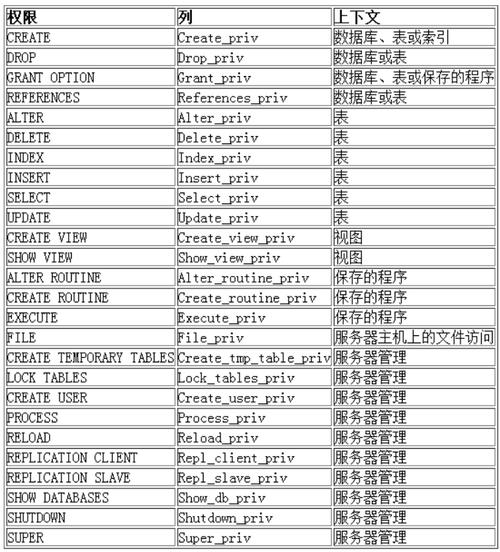
MySQL数据库提供的权限列表:
2.1 给用户授权
刚创建的用户没有任何权限,需要给用户授权。
语法:
grant 权限列表 on 库.对象名 to '用户名'@'登陆位置' [identified by '密码'];
说明:
-
权限列表,多个权限用逗号分开
grant select on ...

grant select, delete, create on ....

grant all [privileges] on ... -- 表示赋予该用户在该对象上的所有权限
- *.* : 代表本系统中的所有数据库的所有对象(表、视图、存储过程...)
- 库.* : 表示某个数据库中的所有数据对象(表,视图,存储过程等)
- identified by:可选。 如果用户存在,赋予权限的同时修改密码;如果该用户不存在,就是创建用户。
案例:
--使用root账号
--终端A
mysql> show databases;
+--------------------+
| Database           |
+--------------------+
| information_schema |
| 57test             |
| bit_index          |
| ccdata_pro         |
| innodb_test        |
| musicserver        |
| myisam_test        |
| mysql              |
| order_sys          |
| performance_schema |
| scott              |
| sys                |
| test               |
| vod_system         |
+--------------------+
14 rows in set (0.00 sec)

mysql> use test;
Database changed

mysql> show tables;
+----------------+
| Tables_in_test |
+----------------+
| account        |
| student        |
| user           |
+----------------+
3 rows in set (0.01 sec)

--给用户lin赋予test数据库下所有文件的select权限
mysql> grant select on test.* to 'lin'@'localhost';
Query OK, 0 rows affected (0.01 sec)


--使用whb账号
--终端B
mysql> show databases;
+--------------------+
| Database           |
+--------------------+
| information_schema |
+--------------------+
1 row in set (0.00 sec)

--暂停等root用户给whb赋完权之后,在查看
mysql> show databases;
+--------------------+
| Database           |
+--------------------+
| information_schema |
| test               | --赋完权之后,就能看到新的表
+--------------------+
2 rows in set (0.01 sec)

mysql> use test;
Reading table information for completion of table and column names
You can turn off this feature to get a quicker startup with -A
Database changed

mysql> show tables;
+----------------+
| Tables_in_test |
+----------------+
| account        |
| student        |
| user           |
+----------------+
3 rows in set (0.00 sec)

mysql> select * from account;
+----+--------+---------+
| id | name   | blance  |
+----+--------+---------+
| 2  | 李四   | 321.00  |
| 3  | 王五   | 5432.00 |
| 4  | 赵六   | 543.90  |
| 5  | 赵六   | 543.90  |
+----+--------+---------+
4 rows in set (0.00 sec)

--没有删除权限
mysql> delete from account;
ERROR 1142 (42000): DELETE command denied to user 'lin'@'localhost' for table
'account'

备注:特定用户现有查看权限
mysql> show grants for 'lin'@'%';
+-----------------------------------------------+
| Grants for lin@%                              |
+-----------------------------------------------+
| GRANT USAGE ON *.* TO 'lin'@'%'               |
| GRANT ALL PRIVILEGES ON `test`.* TO 'lin'@'%' |
+-----------------------------------------------+
2 rows in set (0.00 sec)

mysql> show grants for 'root'@'%';
+-------------------------------------------------------------+
| Grants for root@%                                           |
+-------------------------------------------------------------+
| GRANT ALL PRIVILEGES ON *.* TO 'root'@'%' WITH GRANT OPTION |
+-------------------------------------------------------------+
1 row in set (0.00 sec)
注意:如果发现赋权限后没有生效,执行如下指令flush privileges;
2.2 回收权限
语法:
revoke 权限列表 on 库.对象名 from '用户名'@'登陆位置';
案例:
-- 回收lin对test数据库的所有权限
--root身份,终端A
mysql> revoke all on test.* from 'lin'@'localhost';
Query OK, 0 rows affected (0.00 sec)

--lin身份,终端B
mysql> show databases;
+--------------------+
| Database           |
+--------------------+
| information_schema |
| test               |
+--------------------+
2 rows in set (0.00 sec)

mysql> show databases;
+--------------------+
| Database           |
+--------------------+
| information_schema |
+--------------------+
1 row in set (0.00 sec)





 扫一扫
扫一扫


 723
723

 被折叠的 条评论
为什么被折叠?
被折叠的 条评论
为什么被折叠?
 到【灌水乐园】发言





