


 本文介绍如何利用CAReplicatorLayer在iOS应用中实现音乐动画效果,包括创建路径、添加动效、生成复制层等关键步骤。通过设置属性,可实现丰富的视觉反馈,增强用户体验。
序
CAReplicatorLayer可以复制自己子层的layer,并且复制的出来的layer和原来的子layer拥有相同的动效。然后通过设置一些属性,就可以完成很酷的效果,非常强大。。
效果

love_music.gif
Demo
建议先下载demo,再结合下面的分析,会好理解点。地址https://github.com/Resory/RYReplicatorLayer
逻辑
- 本文主要讲述love动效的制作。music动效可参照love动效注释。
- 首先我们要得到一个love路径,这个路径用UIBezierPath来制作。
- 然后生成一个UIView,它的layer加上CAKeyframeAnimation,而CAKeyframeAnimation的路径是love路径。
- 把UIView的layer加入CAReplicatorLayer。并对设置CAReplicatorLayer相应属性即可。
实现
-
love路径
UIBezierPath *tPath = [UIBezierPath bezierPath]; [tPath moveToPoint:CGPointMake(SYS_DEVICE_WIDTH/2.0, 200)]; [tPath addQuadCurveToPoint:CGPointMake(SYS_DEVICE_WIDTH/2.0, 400) controlPoint:CGPointMake(SYS_DEVICE_WIDTH/2.0 + 200, 20)]; [tPath addQuadCurveToPoint:CGPointMake(SYS_DEVICE_WIDTH/2.0, 200) controlPoint:CGPointMake(SYS_DEVICE_WIDTH/2.0 - 200, 20)]; [tPath closePath]; -
生成一个UIView
UIView *tView = [[UIView alloc] initWithFrame:CGRectMake(0, 0, 10, 10)]; tView.center = CGPointMake(SYS_DEVICE_WIDTH/2.0, 200); tView.layer.cornerRadius = 5; tView.backgroundColor = [UIColor colorWithRed:1.0 green:1.0 blue:1.0 alpha:1.0]; -
给UIView添加上CAKeyframeAnimation动效
CAKeyframeAnimation *loveAnimation = [CAKeyframeAnimation animationWithKeyPath:@"position"]; loveAnimation.path = tPath.CGPath; loveAnimation.duration = 8; loveAnimation.repeatCount = MAXFLOAT; [tView.layer addAnimation:loveAnimation forKey:@"loveAnimation"]; -
生成一个CAReplicatorLayer,并把UIView的layer加入其中
_loveLayer = [CAReplicatorLayer layer]; _loveLayer.instanceCount = 40; // 复制39个子layer+原本的子layer共40个layer _loveLayer.instanceDelay = 0.2; // 每隔0.2出现一个layer _loveLayer.instanceColor = [UIColor colorWithRed:1.0 green:1.0 blue:1.0 alpha:1.0].CGColor; _loveLayer.instanceGreenOffset = -0.03; // 颜色值递减。 _loveLayer.instanceRedOffset = -0.02; // 颜色值递减。 _loveLayer.instanceBlueOffset = -0.01; // 颜色值递减。 - [_loveLayer addSublayer:tView.layer];
[self.view.layer addSublayer:_loveLayer];
末
-
CAReplicatorLayer里面还有一个instanceTransform属性,musicLayer就是用它的instanceTransform属性做的。所以还有很多效果可以做。就看你脑洞够不够大了。
-
如果你有疑问或者发现错误请留言给我。3Q~~
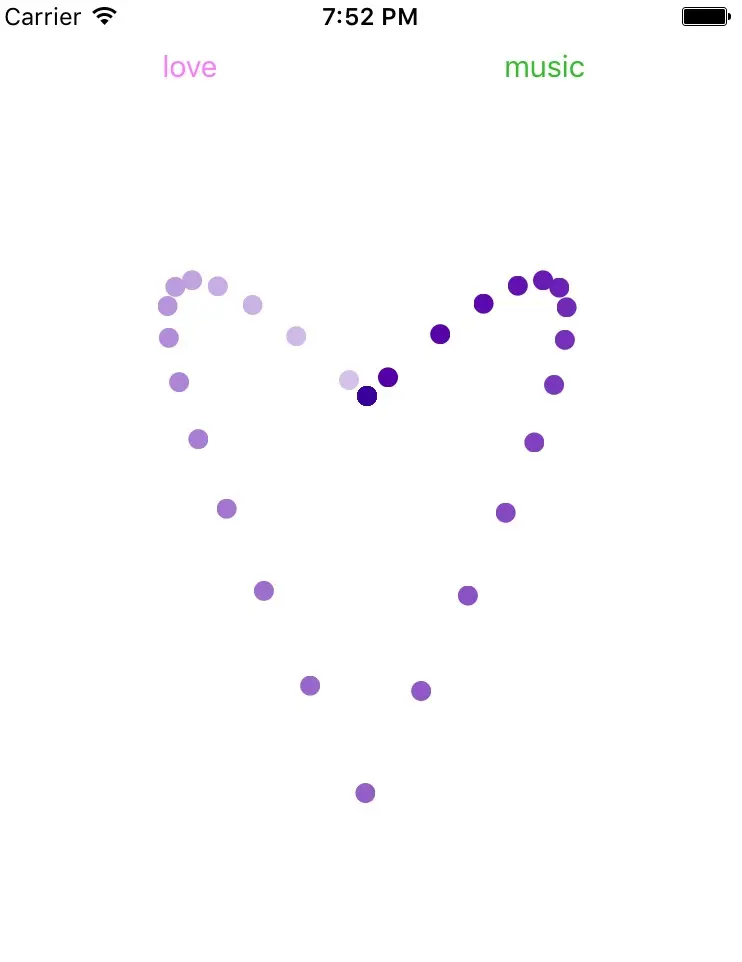
- 补一张图,不然文章没图片。。
//创建path
UIBezierPath *p11 = [UIBezierPath bezierPath];
[p11 setLineWidth:2.0];
[p11 moveToPoint:(CGPointMake(100, 200))];
[p11 addLineToPoint:(CGPointMake(150, 200))];
[p11 addLineToPoint:(CGPointMake(175, 150))];//zhong
p11.lineCapStyle = kCGLineCapSquare;
p11.lineJoinStyle = kCGLineJoinMiter;
[p11 addLineToPoint:(CGPointMake(200, 200))];
[p11 addLineToPoint:(CGPointMake(250, 200))];
[p11 addLineToPoint:(CGPointMake(210, 230))];
[p11 addLineToPoint:(CGPointMake(235, 275))];
[p11 addLineToPoint:(CGPointMake(175, 250))];//
[p11 addLineToPoint:(CGPointMake(115, 275))];
[p11 addLineToPoint:(CGPointMake(140, 230))];
[p11 closePath];
CALayer *tView = [[CALayer alloc] init];
tView.frame = CGRectMake(0, 0, 10, 10);
// tView.position = CGPointMake(self.view.frame.size.width/2, 400);
tView.cornerRadius = 5;
tView.backgroundColor = [UIColor whiteColor].CGColor;
tView.opacity = 0.1;
//移动Animation
CAKeyframeAnimation *loveAnimation = [CAKeyframeAnimation animationWithKeyPath:@"position"];
loveAnimation.path = p11.CGPath;
loveAnimation.duration = 10;
loveAnimation.repeatCount = MAXFLOAT;
//缩放Animation
CABasicAnimation *scaleAnimation = [CABasicAnimation animationWithKeyPath:@"transform"];
scaleAnimation.fromValue = [NSValue valueWithCATransform3D:CATransform3DIdentity];
scaleAnimation.toValue = [NSValue valueWithCATransform3D:(CATransform3DMakeScale(0.15, 0.15, 1.0))];
scaleAnimation.duration = 1;
scaleAnimation.repeatCount = MAXFLOAT;
//透明度Animation
CABasicAnimation *opacityAnimation = [CABasicAnimation animationWithKeyPath:@"opacity"];
opacityAnimation.duration = 10;
opacityAnimation.toValue = @(1.0);
opacityAnimation.fillMode = kCAFillModeForwards;
//组动画
CAAnimationGroup *group = [CAAnimationGroup animation];
group.animations = @[loveAnimation,scaleAnimation,opacityAnimation];
group.duration = 10;
group.repeatCount = MAXFLOAT;
[tView addAnimation:group forKey:nil];
CAReplicatorLayer *loveLayer = [CAReplicatorLayer layer];
loveLayer.instanceCount = 40;
loveLayer.instanceDelay = 0.2;
loveLayer.instanceColor = [UIColor greenColor].CGColor;
loveLayer.instanceGreenOffset = -0.01;
loveLayer.instanceRedOffset = -0.01;
loveLayer.instanceBlueOffset = -0.01;
[loveLayer addSublayer:tView];
[self.view.layer addSublayer:loveLayer];
音乐动画
_musicLayer = [CAReplicatorLayer layer];
_musicLayer.frame = CGRectMake(0, 0, 60, 80);
_musicLayer.position = self.view.center;
_musicLayer.instanceCount = 3;
_musicLayer.instanceTransform = CATransform3DMakeTranslation(20, 0, 0); //每个layer的间距。
_musicLayer.instanceDelay = 0.2;
_musicLayer.backgroundColor = [UIColor whiteColor].CGColor;
_musicLayer.masksToBounds = YES;
[self.view.layer addSublayer:_musicLayer];
CALayer *tLayer = [CALayer layer];
tLayer.frame = CGRectMake(10, 100, 10, 30);
tLayer.backgroundColor = [UIColor redColor].CGColor;
[_musicLayer addSublayer:tLayer];
CABasicAnimation *musicAnimation = [CABasicAnimation animationWithKeyPath:@"position.y"];
musicAnimation.duration = 0.35;
musicAnimation.fromValue = @(100);
musicAnimation.toValue = @(75);
musicAnimation.autoreverses = YES;
musicAnimation.repeatCount = MAXFLOAT;
[tLayer addAnimation:musicAnimation forKey:@"musicAnimation"];
UIBezierPath *p11 = [UIBezierPath bezierPath];
[p11 setLineWidth:2.0];
[p11 moveToPoint:(CGPointMake(100, 200))];
[p11 addLineToPoint:(CGPointMake(150, 200))];
[p11 addLineToPoint:(CGPointMake(175, 150))];//zhong
p11.lineCapStyle = kCGLineCapSquare;
p11.lineJoinStyle = kCGLineJoinMiter;
[p11 addLineToPoint:(CGPointMake(200, 200))];
[p11 addLineToPoint:(CGPointMake(250, 200))];
[p11 addLineToPoint:(CGPointMake(210, 230))];
[p11 addLineToPoint:(CGPointMake(235, 275))];
[p11 addLineToPoint:(CGPointMake(175, 250))];//
[p11 addLineToPoint:(CGPointMake(115, 275))];
[p11 addLineToPoint:(CGPointMake(140, 230))];
[p11 closePath];
CALayer *tView = [[CALayer alloc] init];
tView.frame = CGRectMake(0, 0, 10, 10);
// tView.position = CGPointMake(self.view.frame.size.width/2, 400);
tView.cornerRadius = 5;
tView.backgroundColor = [UIColor whiteColor].CGColor;
tView.opacity = 0.1;
//移动Animation
CAKeyframeAnimation *loveAnimation = [CAKeyframeAnimation animationWithKeyPath:@"position"];
loveAnimation.path = p11.CGPath;
loveAnimation.duration = 10;
loveAnimation.repeatCount = MAXFLOAT;
//缩放Animation
CABasicAnimation *scaleAnimation = [CABasicAnimation animationWithKeyPath:@"transform"];
scaleAnimation.fromValue = [NSValue valueWithCATransform3D:CATransform3DIdentity];
scaleAnimation.toValue = [NSValue valueWithCATransform3D:(CATransform3DMakeScale(0.15, 0.15, 1.0))];
scaleAnimation.duration = 1;
scaleAnimation.repeatCount = MAXFLOAT;
//透明度Animation
CABasicAnimation *opacityAnimation = [CABasicAnimation animationWithKeyPath:@"opacity"];
opacityAnimation.duration = 10;
opacityAnimation.toValue = @(1.0);
opacityAnimation.fillMode = kCAFillModeForwards;
//组动画
CAAnimationGroup *group = [CAAnimationGroup animation];
group.animations = @[loveAnimation,scaleAnimation,opacityAnimation];
group.duration = 10;
group.repeatCount = MAXFLOAT;
[tView addAnimation:group forKey:nil];
CAReplicatorLayer *loveLayer = [CAReplicatorLayer layer];
loveLayer.instanceCount = 40;
loveLayer.instanceDelay = 0.2;
loveLayer.instanceColor = [UIColor greenColor].CGColor;
loveLayer.instanceGreenOffset = -0.01;
loveLayer.instanceRedOffset = -0.01;
loveLayer.instanceBlueOffset = -0.01;
[loveLayer addSublayer:tView];
[self.view.layer addSublayer:loveLayer];
音乐动画
_musicLayer = [CAReplicatorLayer layer];
_musicLayer.frame = CGRectMake(0, 0, 60, 80);
_musicLayer.position = self.view.center;
_musicLayer.instanceCount = 3;
_musicLayer.instanceTransform = CATransform3DMakeTranslation(20, 0, 0); //每个layer的间距。
_musicLayer.instanceDelay = 0.2;
_musicLayer.backgroundColor = [UIColor whiteColor].CGColor;
_musicLayer.masksToBounds = YES;
[self.view.layer addSublayer:_musicLayer];
CALayer *tLayer = [CALayer layer];
tLayer.frame = CGRectMake(10, 100, 10, 30);
tLayer.backgroundColor = [UIColor redColor].CGColor;
[_musicLayer addSublayer:tLayer];
CABasicAnimation *musicAnimation = [CABasicAnimation animationWithKeyPath:@"position.y"];
musicAnimation.duration = 0.35;
musicAnimation.fromValue = @(100);
musicAnimation.toValue = @(75);
musicAnimation.autoreverses = YES;
musicAnimation.repeatCount = MAXFLOAT;
[tLayer addAnimation:musicAnimation forKey:@"musicAnimation"];





 扫一扫
扫一扫


 3672
3672

 被折叠的 条评论
为什么被折叠?
被折叠的 条评论
为什么被折叠?
 到【灌水乐园】发言





