Circuit Breaker:Hystrix Clients

https://cloud.spring.io/spring-cloud-netflix/multi/multi__circuit_breaker_hystrix_clients.html

3. Circuit Breaker: Hystrix Clients

Netflix创建了一个实现断路器模式的名为Hystrix的库,说明Hystrix是Netflix的一个类库,Netflix还是挺伟大的,

他开源了很多有用的类库,然后Hystrix他实现了断路器模式,在微服务架构中呢,通常会有很多层的服务调用,multiple layers,

什么叫多层呢,譬如B是A的消费者,C是B的消费者,那这是不是就很多层了,有一个请求请求C,大致可以这样理解

Netflix has created a library called Hystrix that implements the circuit breaker pattern.

In a microservice architecture, it is common to have multiple layers of service calls,

as shown in the following example:

A service failure in the lower level of services can cause cascading failure all the way up to

the user.

When calls to a particular service exceed circuitBreaker.requestVolumeThreshold (default: 20 requests)

 and the failure percentage is greater than circuitBreaker.errorThresholdPercentage (default: >50%)

 in a rolling window defined by metrics.rollingStats.timeInMilliseconds (default: 10 seconds),

 the circuit opens and the call is not made. In cases of error and an open circuit,

 a fallback can be provided by the developer.

什么叫lower level呢,A相当于B的话他就是lower level,B相当于C/D的话也是lower level,这是更底层的一个服务,

他叫lower level,底层失败可能会造成级联的失败,然后一直到用户的请求,也就是所谓的雪崩效应,当对特定服务的

调用,达到了特定的阈值,断路器他就会打开,然后请求他就不请求了,Hystrix它是5秒钟失败20次,他就会打开断路器,

他说在断路器打开的情况下,一个回退机制可以由开发人员提供,浏览器有一个请求,API他依赖了ABCDE,这个服务B挂掉了,

开发人员在这里提供一个机制,API就调用fallback的,他就不请求B了
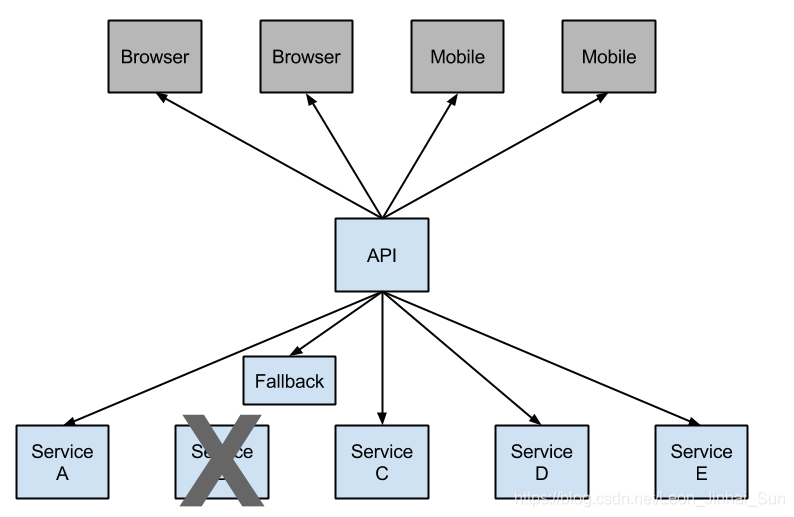
Having an open circuit stops cascading failures and allows overwhelmed or failing services time to

recover. The fallback can be another Hystrix protected call, static data, or a sensible empty value.

Fallbacks may be chained so that the first fallback makes some other business call,

which in turn falls back to static data.

他说有一个断路器,他可以阻止级联的失败,就是给出一定的时间,让服务自己去修复,可以简单的这样理解,他这回退

机制Hystrix保护的一个调用,或者说一个静态的数据,或者一个空值,fallback可以是另外一个请求,静态数据或者干脆

给一个空算了,回退可能是chain,像过滤器有filter chain,他可以理解为链条一样的东西,我可以打这样的一个比方,因此

第一个回退机制,它会make other business call,执行一些其它的业务请求,这些业务请求还是变成静态数据,就是断路器模式

它是怎么样玩的,这个简介还是太简单了,本身懂断路器的话就不需要这个简介,如果不懂的话,这边写的这么简单,他还是不懂,

3.1 How to Include Hystrix

https://cloud.spring.io/spring-cloud-netflix/multi/multi__circuit_breaker_hystrix_clients.html

我们已经形成了一个规律了,你想有什么,那就加starter,事实也是这样的

To include Hystrix in your project, use the starter with a group ID of org.springframework.cloud

and a artifact ID of spring-cloud-starter-netflix-hystrix. See the Spring Cloud Project page

for details on setting up your build system with the current Spring Cloud Release Train.

https://spring.io/projects/spring-cloud

@SpringBootApplication
@EnableCircuitBreaker
public class Application {

    public static void main(String[] args) {
        new SpringApplicationBuilder(Application.class).web(true).run(args);
    }

}

其实就是加@EnableCircuitBreaker这么一个注解

@Component
public class StoreIntegration {

    @HystrixCommand(fallbackMethod = "defaultStores")
    public Object getStores(Map<String, Object> parameters) {
        //do stuff that might fail
    }

    public Object defaultStores(Map<String, Object> parameters) {
        return /* something useful */;
    }
}

The @HystrixCommand is provided by a Netflix contrib library called “javanica”.

先看一下“javanica”是什么

https://github.com/Netflix/Hystrix/tree/master/hystrix-contrib/hystrix-javanica

它是hystrix的一个子项目

<dependency>
    <groupId>com.netflix.hystrix</groupId>
    <artifactId>hystrix-javanica</artifactId>
    <version>x.y.z</version>
</dependency>

然后加上一个切面

<aspects>
        ...
        <aspect name="com.netflix.hystrix.contrib.javanica.aop.aspectj.HystrixCommandAspect"/>
        ...
</aspects>

然后通过AOP的语法去切面,然后你调用的时候就可以这么来了

@Configuration
public class HystrixConfiguration {

  @Bean
  public HystrixCommandAspect hystrixAspect() {
    return new HystrixCommandAspect();
  }

}

当你写的时候也可以写@HystrixCommand

public class UserService {
...
    @HystrixCommand
    public User getUserById(String id) {
        return userResource.getUserById(id);
    }
}
...

这个东西它是干嘛的呢,他说Java语言有一个非常牛逼的优势,就是相对于其他的语言,譬如说反射,譬如说注解,

都是用注解和反射去实现他,他引入了一个明显的解决方案,其实就是为Hystrix做了一些改进呗

Java language has a great advantages over other languages such as reflection and annotations.

All modern frameworks such as Spring, Hibernate, myBatis and etc. seek to use this advantages

to the maximum. The idea of introduction annotations in Hystrix is obvious solution for improvement.

https://github.com/Netflix/Hystrix

这是Hystrix github的首页,那我们点过去

https://github.com/Netflix/Hystrix/wiki

https://github.com/Netflix/Hystrix/wiki/How-To-Use

How To Use

Hystrix本来是怎么用的

public class CommandHelloWorld extends HystrixCommand<String> {

    private final String name;

    public CommandHelloWorld(String name) {
        super(HystrixCommandGroupKey.Factory.asKey("ExampleGroup"));
        this.name = name;
    }

    @Override
    protected String run() {
        // a real example would do work like a network call here
        return "Hello " + name + "!";
    }
}

他写一个类实现HystrixCommand,然后加一个泛型,然后他实现观察者

public class CommandHelloWorld extends HystrixObservableCommand<String> {

    private final String name;

    public CommandHelloWorld(String name) {
        super(HystrixCommandGroupKey.Factory.asKey("ExampleGroup"));
        this.name = name;
    }

    @Override
    protected Observable<String> construct() {
        return Observable.create(new Observable.OnSubscribe<String>() {
            @Override
            public void call(Subscriber<? super String> observer) {
                try {
                    if (!observer.isUnsubscribed()) {
                        // a real example would do work like a network call here
                        observer.onNext("Hello");
                        observer.onNext(name + "!");
                        observer.onCompleted();
                    }
                } catch (Exception e) {
                    observer.onError(e);
                }
            }
         } ).subscribeOn(Schedulers.io());
    }
}

Synchronous Execution

同步的

Asynchronous Execution

异步的

总的来说这个代码还是很麻烦的,那javanica他做了一些改进

Spring Cloud automatically wraps Spring beans with that annotation in a proxy that is connected to

the Hystrix circuit breaker. The circuit breaker calculates when to open and close the circuit

and what to do in case of a failure.

他说Spring Cloud自动将Java Bean和注解,封装到连接断路器的代理中,断路器什么时候打开,打开或者关闭这个

断路器,以及在失败的时候做什么

To configure the @HystrixCommand you can use the commandProperties attribute with a list of

@HystrixProperty annotations. See here for more details. See the Hystrix wiki for details

on the properties available.

如果你想配置@HystrixCommand,你可以用@HystrixProperty这个注解,然后用这个注解的属性,属性的详细信息,

你看Hystrix wiki

https://github.com/Netflix/Hystrix/tree/master/hystrix-contrib/hystrix-javanica#configuration

microservice-consumer-movie-ribbon-with-hystrix

首先是加上依赖,

<dependency>
	<groupId>org.springframework.cloud</groupId>
	<artifactId>spring-cloud-starter-hystrix</artifactId>
</dependency>

启动类上加注解@EnableCircuitBreaker

@SpringBootApplication
@EnableEurekaClient
@EnableCircuitBreaker
public class ConsumerMovieRibbonApplication {

  @Bean
  @LoadBalanced
  public RestTemplate restTemplate() {
    return new RestTemplate();
  }

  public static void main(String[] args) {
    SpringApplication.run(ConsumerMovieRibbonApplication.class, args);
  }
}

方法上面加注解, @HystrixCommand(fallbackMethod = "defaultStores")

@GetMapping("/movie/{id}")
@HystrixCommand(fallbackMethod = "findByIdFallback")
public User findById(@PathVariable Long id) {
	// http://localhost:7900/simple/
	// VIP virtual IP
	// HAProxy Heartbeat
	 return this.restTemplate
	 .getForObject("http://microservice-simple-provider-user/simple/" + id, User.class);
}

譬如我要对这个方法加注解,

那我这边就得写一个fallback,注意参数非得是一样的,

public User findByIdFallback(Long id) {
  User user = new User();
  user.setId(0L);
  return user;
}

首先你这边有参数的是Long,那你也得是Long,然后返回值是User,那你这边也得是User方法名你随便写,就是你的参数和

返回值一定跟原方法是一致的,

10.40.8.152:8761/

localhost:8010/movie/1

因为hystrix的默认超时时间是1秒,你如果一秒钟都没有得到响应的话,他就会认为你的服务有问题,直接给你进fallback

方法了,第一次进了Hytrix的fallback方法,这种问题不一定会出现,这可能跟机器的配置,还有网络都会有关系,原因也有

分析过,就是你的请求时间,他默认是1秒钟,1秒钟如果都没有得到响应的话,他就进Hystrix的fallback方法了,现在是正常的

状态,我可以正常的进入到这里,现在我想让他进怎么办呢,我把User停掉,User挂掉了,就是所谓的lower level

A service failure in the lower level of services can cause cascading failure all the way up

to the user.

相对于Movie服务,用户服务就是他的Lower level,我的lower level挂掉了,断了一秒钟他就进这里了,进来,他再转一秒钟

又进这里了,多试几次,你会发现他不转了,根本就不转,现在根本也不进这里了,

localhost:8010/hystrix.stream

如果他要是要发请求的话,它是要转的,说明他就没有去请求这个远程的服务
<?xml version="1.0" encoding="UTF-8"?>
<project xmlns="http://maven.apache.org/POM/4.0.0"
xmlns:xsi="http://www.w3.org/2001/XMLSchema-instance"
	xsi:schemaLocation="http://maven.apache.org/POM/4.0.0
http://maven.apache.org/xsd/maven-4.0.0.xsd">
	<modelVersion>4.0.0</modelVersion>
	<groupId>com.learn</groupId>
	<artifactId>microservice-consumer-movie-ribbon-with-hystrix</artifactId>
	<version>0.0.1-SNAPSHOT</version>
	<packaging>jar</packaging>

	<name>microservice-simple-consumer-movie</name>
	<description>Demo project for Spring Boot</description>

  <parent>
    <groupId>cn.learn</groupId>
    <artifactId>microcloud02</artifactId>
    <version>0.0.1</version>
  </parent>

	<properties>
		<project.build.sourceEncoding>UTF-8</project.build.sourceEncoding>
		<project.reporting.outputEncoding>UTF-8</project.reporting.outputEncoding>
		<java.version>1.8</java.version>
	</properties>

	<dependencies>
		<dependency>
			<groupId>org.springframework.boot</groupId>
			<artifactId>spring-boot-starter-web</artifactId>
		</dependency>

		<dependency>
			<groupId>org.springframework.boot</groupId>
			<artifactId>spring-boot-starter-test</artifactId>
			<scope>test</scope>
		</dependency>
		<dependency>
			<groupId>org.springframework.boot</groupId>
			<artifactId>spring-boot-starter-data-redis</artifactId>
		</dependency>
		<dependency>
			<groupId>org.springframework.cloud</groupId>
			<artifactId>spring-cloud-starter-eureka</artifactId>
		</dependency>
        <dependency>
            <groupId>org.springframework.boot</groupId>
            <artifactId>spring-boot-starter-actuator</artifactId>
        </dependency>
        <dependency>
            <groupId>org.springframework.cloud</groupId>
            <artifactId>spring-cloud-starter-hystrix</artifactId>
        </dependency>
	</dependencies>

	<build>
		<plugins>
			<plugin>
				<groupId>org.springframework.boot</groupId>
				<artifactId>spring-boot-maven-plugin</artifactId>
			</plugin>
		</plugins>
	</build>


</project>
#debug=true
server.port=8010

eureka.client.serviceUrl.defaultZone=http://admin:1234@10.40.8.152:8761/eureka

spring.application.name=microservice-consumer-movie-Hystrix
eureka.instance.prefer-ip-address=true
eureka.instance.instance-id=${spring.application.name}:${spring.cloud.client.ipAddress}:${spring.application.instance_id:${server.port}}
eureka.client.healthcheck.enabled=true
spring.redis.host=10.40.8.152
spring.redis.password=aztech
spring.redis.port=6379

microservice-simple-provider-user.ribbon.NFLoadBalancerRuleClassName=com.netflix.loadbalancer.RandomRule
package com.learn.cloud.controller;

import org.springframework.beans.factory.annotation.Autowired;
import org.springframework.web.bind.annotation.GetMapping;
import org.springframework.web.bind.annotation.PathVariable;
import org.springframework.web.bind.annotation.RestController;
import org.springframework.web.client.RestTemplate;

import com.learn.cloud.entity.User;
import com.netflix.hystrix.contrib.javanica.annotation.HystrixCommand;

@RestController
public class MovieController {
  @Autowired
  private RestTemplate restTemplate;

  @GetMapping("/movie/{id}")
  @HystrixCommand(fallbackMethod = "findByIdFallback")
  public User findById(@PathVariable Long id) {
    // http://localhost:7900/simple/
    // VIP virtual IP
    // HAProxy Heartbeat
	 return this.restTemplate.getForObject("http://microservice-simple-provider-user/simple/" + id, User.class);
  }

  public User findByIdFallback(Long id) {
	  User user = new User();
	  user.setId(0L);
	  return user;
  }

}
package com.learn.cloud;

import org.springframework.boot.SpringApplication;
import org.springframework.boot.autoconfigure.SpringBootApplication;
import org.springframework.cloud.client.circuitbreaker.EnableCircuitBreaker;
import org.springframework.cloud.client.loadbalancer.LoadBalanced;
import org.springframework.cloud.netflix.eureka.EnableEurekaClient;
import org.springframework.context.annotation.Bean;
import org.springframework.web.client.RestTemplate;

@SpringBootApplication
@EnableEurekaClient
@EnableCircuitBreaker
public class ConsumerMovieHystrixApplication {

  @Bean
  @LoadBalanced
  public RestTemplate restTemplate() {
    return new RestTemplate();
  }

  public static void main(String[] args) {
    SpringApplication.run(ConsumerMovieHystrixApplication.class, args);
  }
}


 本文介绍Hystrix作为Netflix开源的断路器库在微服务架构中的应用,包括如何防止级联故障、实现服务调用的超时和容错机制。通过Spring Cloud集成Hystrix,使用@EnableCircuitBreaker注解启用断路器,演示了如何配置@HystrixCommand注解以定义回退方法,以及如何处理服务失败的情况。





 扫一扫
扫一扫


 3774
3774

 被折叠的 条评论
为什么被折叠?
被折叠的 条评论
为什么被折叠?
 到【灌水乐园】发言





