


摘要
本文介绍在SpringBoot 2.7.18中集成Elasticsearch、Logstash、Kibana的步骤,简单展示了ES增删改查的API用法,测试Logstash日志收集,并实现Kibana数据看板可视化分析日志。
示例步骤
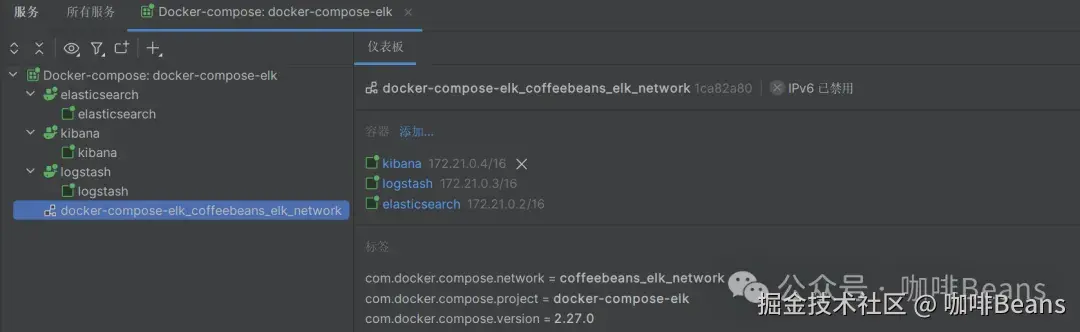
1) 启动docker中的elk服务
我这里logstash通信地址是192.168.233.129:4560
2) 引入依赖
<dependencies>
    <!--我这里sprinboot用的2.7.18 es9.0.3服务调save接口时会有报错 但不影响逻辑生效-->
    <!-- Spring Data Elasticsearch -->
    <dependency>
        <groupId>org.springframework.boot</groupId>
        <artifactId>spring-boot-starter-data-elasticsearch</artifactId>
    </dependency>
    <!-- Elasticsearch Rest High Level Client -->
    <dependency>
        <groupId>org.elasticsearch.client</groupId>
        <artifactId>elasticsearch-rest-high-level-client</artifactId>
    </dependency>
    <!--集成logstash 版本有讲究 不然会报错-->
    <dependency>
        <groupId>ch.qos.logback</groupId>
        <artifactId>logback-classic</artifactId>
        <version>1.2.11</version>
    </dependency>
    <dependency>
        <groupId>net.logstash.logback</groupId>
        <artifactId>logstash-logback-encoder</artifactId>
        <version>6.6</version>
    </dependency>
    <dependency>
        <groupId>org.projectlombok</groupId>
        <artifactId>lombok</artifactId>
    </dependency>
    <dependency>
        <groupId>org.springframework.boot</groupId>
        <artifactId>spring-boot-starter-test</artifactId>
    </dependency>
</dependencies>
3)配置连接ES(据说过时了,写法仅供参考)
package org.coffeebeans.config;

import org.apache.http.HttpHost;
import org.apache.http.auth.AuthScope;
import org.apache.http.auth.UsernamePasswordCredentials;
import org.apache.http.client.CredentialsProvider;
import org.apache.http.impl.client.BasicCredentialsProvider;
import org.elasticsearch.client.RestClient;
import org.elasticsearch.client.RestHighLevelClient;
import org.springframework.beans.factory.annotation.Value;
import org.springframework.context.annotation.Bean;
import org.springframework.context.annotation.Configuration;
import org.springframework.data.elasticsearch.core.ElasticsearchOperations;
import org.springframework.data.elasticsearch.core.ElasticsearchRestTemplate;

@Configuration
public class ElasticsearchConfig {

    @Value("${spring.data.elasticsearch.rest.uris}")
    private String elasticsearchUrl;

    @Value("${spring.data.elasticsearch.rest.username}")
    private String username;

    @Value("${spring.data.elasticsearch.rest.password}")
    private String password;

    @Bean
    public RestHighLevelClient restHighLevelClient() {
        final CredentialsProvider credentialsProvider = new BasicCredentialsProvider();
        credentialsProvider.setCredentials(AuthScope.ANY, new UsernamePasswordCredentials(username, password));

        return new RestHighLevelClient(
                RestClient.builder(new HttpHost("192.168.233.129", 9200, "http"))
                        .setHttpClientConfigCallback(httpClientBuilder ->
 最低0.47元/天 解锁文章






 扫一扫
扫一扫


 1万+
1万+

 被折叠的 条评论
为什么被折叠?
被折叠的 条评论
为什么被折叠?
 到【灌水乐园】发言





