centos安装nginx

1.进入临时文件夹里(随便一个都行)

1

cd /tmp/

2.下载并安装nginx压缩包

1

wget http://nginx.org/download/nginx-1.23.3.tar.gz

3.解压该压缩包

1

tar -xvf nginx-1.23.3.tar.gz

4.创建目标文件夹

1

cd /tmp/nginx-1.23.3

5.(默认会安装在/usr/local/nginx)这里通过configure命令指定安装目录

1

./configure --prefix=/data/nginx

6.编译安装

1

make && make install

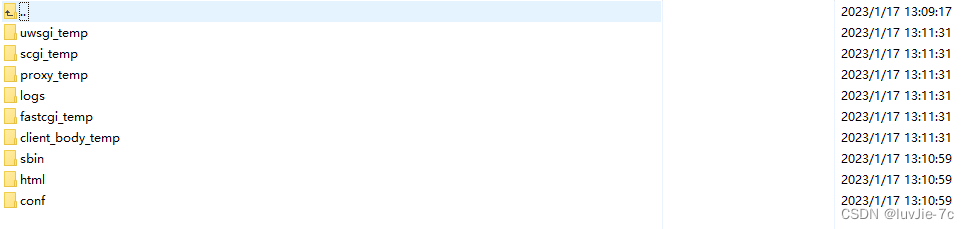
7.最后生成的文件夹具体如下

二、SSL模块安装(SSL证书)用于htpps请求  没此需求可略过

1

./configure --prefix=/data/nginx --with-http_ssl_module

三、运行

1.进入nginx下的sbin目录

1

cd /data/nginx/sbin

2.执行启动

1

./nginx

3.查看nginx是否启动

1

ps -ef | grep nginx

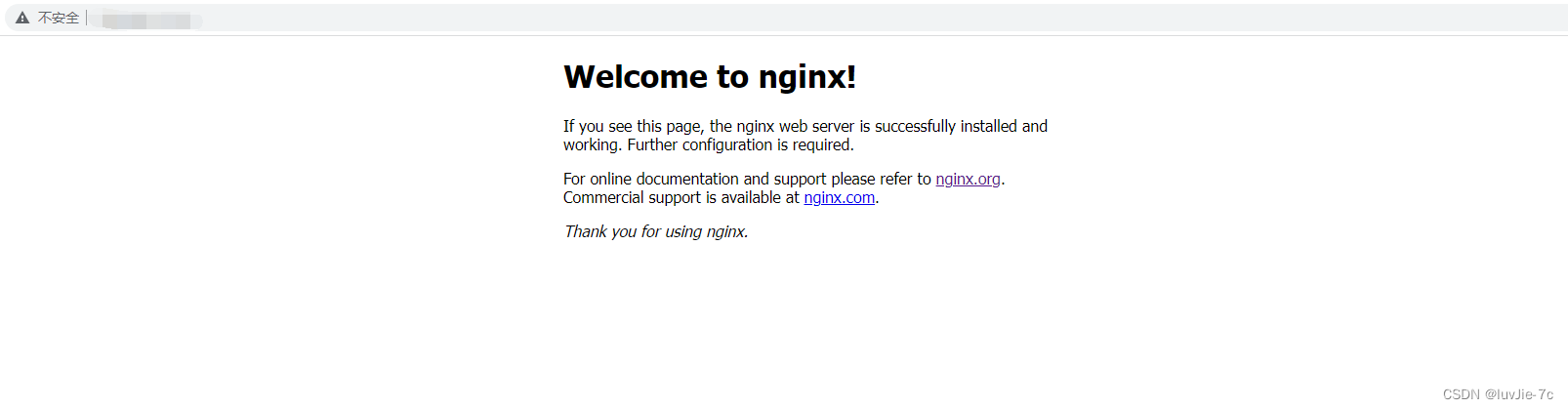
4.浏览器访问你的IP(如下就是成功了)

四、卸载

1.查看nginx是否运行

1

ps aux | grep nginx

2.进入nginx下的sbin目录

1

cd /data/nginx/sbin

3.停止nginx运行

1

./nginx -s stop

4.查看与Nginx有关的文件夹

1

find / -name nginx

5.删除与Nginx有关的文件

1

rm -rf file /data/nginx*

6.再查看

1

find / -name nginx*

7.卸载Nginx的依赖

1

yum remove nginx

五、Nginx的基本操作命令

1.进入nginx下的sbin目录

1

cd /data/nginx/sbin

2.启动

1

./nginx

3.关闭 

1

./nginx -s stop

4.重启 

1

./nginx -s reload

六、配置成系统服务

1.创建nginx.service文件

1

vim /usr/lib/systemd/system/nginx.service

2.nginx.service文件中写入内容

1

2

3

4

5

6

7

8

9

10

11

12

13

14

15

16

[Unit]

Description=nginx web service

Documentation=http://nginx.org/en/docs/

After=network.target


[Service]

Type=forking

PIDFile=/data/nginx/logs/nginx.pid

ExecStartPre=/data/nginx/sbin/nginx -t -c /data/nginx/conf/nginx.conf

ExecStart=/data/nginx/sbin/nginx

ExecReload=/data/nginx/sbin/nginx -s reload

ExecStop=/data/nginx/sbin/nginx -s stop

PrivateTmp=true


[Install]

WantedBy=default.target

3.改权限

1

chmod 755 /usr/lib/systemd/system/nginx.service

4.文件生效  

1

systemctl daemon-reload

5.设置开机自启 

1

systemctl enable nginx.service

七、系统服务操作Nginx基本命令

1.启动

1

systemctl start nginx

2.停止

1

systemctl stop nginx

3.重启

1

systemctl restart nginx

4.重新加载配置文件

1

systemctl reload nginx

5. 查看Nginx状态

1

systemctl status nginx

6.开机自动

1

systemctl enable nginx

八、nginx.conf文件基本配置详解

1

2

3

4

5

6

7

8

9

10

11

12

13

14

15

16

17

18

19

20

21

22

23

24

25

26

27

28

29

30

31

32

33

34

35

36

37

38

39

40

41

42

43

44

45

46

47

48

49

50

51

52

53

54

55

56

57

58

59

60

61

62

63

64

65

66

67

68

69

70

71

72

73

74

75

76

77

78

79

80

81

82

83

84

85

86

87

88

89

90

91

92

93

94

95

96

97

98

99

100

101

102

103

104

105

106

107

108

109

110

111

112

113

114

115

116

117

118

119

120

121

122

123

124

125

126

127

#user  nobody;

#进程的数量

worker_processes  1;

#错误日志:存放路径

#error_log  logs/error.log;

#error_log  logs/error.log  notice;

#error_log  logs/error.log  info;

#进程标识符

#pid        logs/nginx.pid;


events {

    worker_connections  1024;

}


#设定http服务器,利用它的反向代理功能提供负载均衡支持

http {

    include       mime.types;

    default_type  application/octet-stream;


    #log_format  main  '$remote_addr - $remote_user [$time_local] "$request" '

    #                  '$status $body_bytes_sent "$http_referer" '

    #                  '"$http_user_agent" "$http_x_forwarded_for"';


    #access_log  logs/access.log  main;


    sendfile        on;

    #tcp_nopush     on;


    #超时时间

    #keepalive_timeout  0;

    keepalive_timeout  65;


    #gzip  on;


    #配置虚拟机

    server {

        listen       8585;#监听端口

        server_name  localhost;#主机ip

        #请求转发

        location / {

            proxy_pass http://localhost:8001;

        }


        location /app{

            try_files $uri $uri/ /app/index.html;

        }


        #charset koi8-r;


        #access_log  logs/host.access.log  main;


        location / {

            root   html;

            index  index.html index.htm;

        }


        #error_page  404              /404.html;


        # redirect server error pages to the static page /50x.html

        #

        error_page   500 502 503 504  /50x.html;

        location = /50x.html {

            root   html;

        }


        # proxy the PHP scripts to Apache listening on 127.0.0.1:80

        #

        #location ~ \.php$ {

        #    proxy_pass   http://127.0.0.1;

        #}


        # pass the PHP scripts to FastCGI server listening on 127.0.0.1:9000

        #

        #location ~ \.php$ {

        #    root           html;

        #    fastcgi_pass   127.0.0.1:9000;

        #    fastcgi_index  index.php;

        #    fastcgi_param  SCRIPT_FILENAME  /scripts$fastcgi_script_name;

        #    include        fastcgi_params;

        #}


        # deny access to .htaccess files, if Apache's document root

        # concurs with nginx's one

        #

        #location ~ /\.ht {

        #    deny  all;

        #}

    }


    # another virtual host using mix of IP-, name-, and port-based configuration

    #

    #server {

    #    listen       8000;

    #    listen       somename:8080;

    #    server_name  somename  alias  another.alias;


    #    location / {

    #        root   html;

    #        index  index.html index.htm;

    #    }

    #}


    # HTTPS server

    #

    #server {

    #    listen       443 ssl;

    #    server_name  localhost;


    #    ssl_certificate      cert.pem;

    #    ssl_certificate_key  cert.key;


    #    ssl_session_cache    shared:SSL:1m;

    #    ssl_session_timeout  5m;


    #    ssl_ciphers  HIGH:!aNULL:!MD5;

    #    ssl_prefer_server_ciphers  on;


    #    location / {

    #        root   html;

    #        index  index.html index.htm;

    #    }

    #}


}

评论
成就一亿技术人!
拼手气红包6.0元
还能输入1000个字符
 
红包 添加红包
表情包 插入表情
 条评论被折叠 查看
添加红包

请填写红包祝福语或标题

红包个数最小为10个

红包金额最低5元

当前余额3.43前往充值 >
需支付:10.00
成就一亿技术人!
领取后你会自动成为博主和红包主的粉丝 规则
hope_wisdom
发出的红包
实付
使用余额支付
点击重新获取
扫码支付
钱包余额 0

抵扣说明:

1.余额是钱包充值的虚拟货币,按照1:1的比例进行支付金额的抵扣。
2.余额无法直接购买下载,可以购买VIP、付费专栏及课程。

余额充值