



导航
前言
上篇文章已经讲完了NPOI导出excel的实例,现在补充一篇NPOI导入实例。想了解NPOI导出功能的,可以查阅上一篇文章。
使用前准备
首先得引用剩下三个dll文件到自己项目
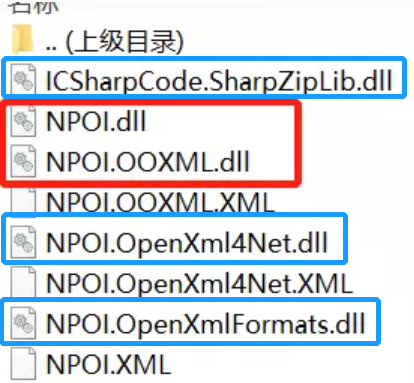
红色框两个dll是导出excel文件使用的,蓝色框三个dll是导入excel文件使用的。
引用完后就需要将这些类using进来
using NPOI;
using NPOI.SS.UserModel;
using NPOI.HSSF.UserModel;
using NPOI.XSSF.UserModel;
这样就可以开始愉快使用NPOI的导入功能了。
前台代码
<html xmlns="http://www.w3.org/1999/xhtml">
<head runat="server">
<meta http-equiv="Content-Type" content="text/html; charset=utf-8"/>
    <title></title>
</head>
<body>
    <form id="form1" runat="server">
      <div>
      <asp:FileUpload ID="FileUpload1" runat="server" />
      <asp:Button ID="Button1" runat="server"  Text="导入" οnclick="ImportExcel_Click" />
     </div>
    </form>
</body>
后台CS代码
/// <summary>
/// 导入事件
/// </summary>
/// <param name="sender"></param>
/// <param name="e"></param>
protected void btnImport_Click(object sender, EventArgs e)
{
    bool flag = false;
    string connectString= "server=tiantiankaixing;database=Test;trusted_connection=sspi";
    string filepath = GetExcel();
    if (!string.IsNullOrEmpty(filepath))
    {
        DataTable dt = ExcelToTable(filepath);
        if (dt != null)
        {
            flag = DataTableToSQLServer(dt,connectString);
        }
    }

    if (flag)
    {
        Response.Write("<script>alert('导入成功!')</script>");
    }
    else
    {
        Response.Write("<script>alert('导入失败,请使用标准模板excel导入!')</script>");
    }
}

/// <summary>
/// Excel导入成Datable
/// </summary>
/// <param name="file">导入路径(包含文件名与扩展名)</param>
/// <returns></returns>
public DataTable ExcelToTable(string file)
{
    DataTable dt = new DataTable();
    IWorkbook workbook;
    string fileExt = Path.GetExtension(file).ToLower();
    using (FileStream fs = new FileStream(file, FileMode.Open, FileAccess.Read))
    {
        //XSSFWorkbook 适用XLSX格式,HSSFWorkbook 适用XLS格式
        if (fileExt == ".xlsx") { workbook = new XSSFWorkbook(fs); } else if (fileExt == ".xls") { workbook = new HSSFWorkbook(fs); } else { workbook = null; }
        if (workbook == null) { return null; }
        ISheet sheet = workbook.GetSheetAt(0);

        //表头
        IRow header = sheet.GetRow(sheet.FirstRowNum);
        List<int> columns = new List<int>();
        for (int i = 0; i < header.LastCellNum; i++)
        {
            object obj = GetValueType(header.GetCell(i));
            if (obj == null || obj.ToString() == string.Empty)
            {
                dt.Columns.Add(new DataColumn("Columns" + i.ToString()));
            }
            else
                dt.Columns.Add(new DataColumn(obj.ToString()));
            columns.Add(i);
        }
        //数据
        for (int i = sheet.FirstRowNum + 1; i <= sheet.LastRowNum; i++)
        {
            DataRow dr = dt.NewRow();
            bool hasValue = false;
            foreach (int j in columns)
            {
                dr[j] = GetValueType(sheet.GetRow(i).GetCell(j));
                if (dr[j] != null && dr[j].ToString() != string.Empty)
                {
                    hasValue = true;
                }
            }
            if (hasValue)
            {
                dt.Rows.Add(dr);
            }
        }
    }
    return dt;
}

/// <summary>
/// Datable导出成Excel
/// </summary>
/// <param name="dt"></param>
/// <param name="file">导出路径(包括文件名与扩展名)</param>
public void TableToExcel(DataTable dt, string file)
{
    IWorkbook workbook;
    string fileExt = Path.GetExtension(file).ToLower();
    if (fileExt == ".xlsx") { workbook = new XSSFWorkbook(); } else if (fileExt == ".xls") { workbook = new HSSFWorkbook(); } else { workbook = null; }
    if (workbook == null) { return; }
    ISheet sheet = string.IsNullOrEmpty(dt.TableName) ? workbook.CreateSheet("Sheet1") : workbook.CreateSheet(dt.TableName);

    //表头
    IRow row = sheet.CreateRow(0);
    for (int i = 0; i < dt.Columns.Count; i++)
    {
        ICell cell = row.CreateCell(i);
        cell.SetCellValue(dt.Columns[i].ColumnName);
    }

    //数据
    for (int i = 0; i < dt.Rows.Count; i++)
    {
        IRow row1 = sheet.CreateRow(i + 1);
        for (int j = 0; j < dt.Columns.Count; j++)
        {
            ICell cell = row1.CreateCell(j);
            cell.SetCellValue(dt.Rows[i][j].ToString());
        }
    }

    //转为字节数组
    MemoryStream stream = new MemoryStream();
    workbook.Write(stream);
    var buf = stream.ToArray();

    //保存为Excel文件
    using (FileStream fs = new FileStream(file, FileMode.Create, FileAccess.Write))
    {
        fs.Write(buf, 0, buf.Length);
        fs.Flush();
    }
}

/// <summary>
/// 获取单元格类型
/// </summary>
/// <param name="cell"></param>
/// <returns></returns>
private object GetValueType(ICell cell)
{
    if (cell == null)
        return null;
    switch (cell.CellType)
    {
        case CellType.Blank: //BLANK:
            return null;
        case CellType.Boolean: //BOOLEAN:
            return cell.BooleanCellValue;
        case CellType.Numeric: //NUMERIC:
            return cell.NumericCellValue;
        case CellType.String: //STRING:
            return cell.StringCellValue;
        case CellType.Error: //ERROR:
            return cell.ErrorCellValue;
        case CellType.Formula: //FORMULA:
        default:
            return "=" + cell.CellFormula;
    }
}

//获得完整的上传文件路径
 protected string GetExcel()
  {
    string fileUrl = "";
    #region 文件上传
    try
    {
        //全名
        string excelFile = this.fulImport.PostedFile.FileName;
        //获取文件名(不包括扩展名)
        string fileName = Path.GetFileNameWithoutExtension(fulImport.PostedFile.FileName);
        //扩展名
        string extentionName = excelFile.Substring(excelFile.LastIndexOf(".") + 1);
        if (fileName == "" || fileName == null)
        {
            Response.Write("<script>alert('请先选择Excel文件!')</script>");
            return null;
        }
        if (extentionName == "xls" || extentionName == "xlsx")
        {
        //浏览器安全性限制 无法直接获取客户端文件的真实路径,将文件上传到服务器端 然后获取文件源路径
        // 设置上传路径将文件保存到服务器
        string dateTime = DateTime.Now.Date.ToString("yyyyMMdd");
        string time = DateTime.Now.ToShortTimeString().Replace(":", "");
        string newFileName = dateTime + time + DateTime.Now.Millisecond.ToString() + ".xls"; ;
        //自己创建的文件夹 位置随意 合理即可
        fileUrl = Server.MapPath("..\\excel") + "\\" + newFileName;
        this.fulImport.PostedFile.SaveAs(fileUrl);
        //Response.Write("<script>alert('已经上传到服务器文件夹')</script>");
        return fileUrl;
        }
        else
        {
          Response.Write("<script>alert('您上传的不是Excel文件!')</script>");
          return null;
        }


    }
    catch
    {
        Response.Write("<script>alert('数据上传失败,请重新导入')</script>");
        return null;
    }
    #endregion

  }

/// <summary>
/// 导入货物商品到数据库
/// </summary>
/// <param name="dt"></param>
/// <param name="connectString"></param>
/// <returns></returns>
public bool DataTableToSQLServer(DataTable dt,string connectString)
        {
            string connectionString = connectString;
            bool flag = false;

            using (SqlConnection destinationConnection = new SqlConnection(connectionString))
            {
                destinationConnection.Open();

                using (SqlBulkCopy bulkCopy = new SqlBulkCopy(destinationConnection))
                {
                    try
                    {

                        bulkCopy.DestinationTableName = "checkinout";//要插入的表的表名
                        bulkCopy.BatchSize = dt.Rows.Count;
                        bulkCopy.ColumnMappings.Add("ID", "ID");//映射字段名 DataTable列名 ,数据库 对应的列名
                        bulkCopy.ColumnMappings.Add("TIME", "TIME");

                        bulkCopy.WriteToServer(dt);
                        flag=true;
                    }
                    catch (Exception ex)
                    {
                        flag = false;
                    }
                    finally
                    {
                        return flag;
                    }
                }
            }
        }
配置文件
<connectionStrings>
   <add name="sqlConStr" connectionString ="server=tiantiankaixing;database=新建数据库;trusted_connection=sspi"/>
</connectionStrings>
作者:NewForMe
链接:https://www.jianshu.com/p/ba9eea022efd
来源:简书
著作权归作者所有。商业转载请联系作者获得授权,非商业转载请注明出处。





 扫一扫
扫一扫


 850
850


 到【灌水乐园】发言



