



0、启动端口
0.1、操作系统环境变量优先级最高
如果在操作系统中配置了环境变量 HOST 和 PORT ,那么本地调试时操作系统环境变量优先级最高(即会覆盖项目中单独的指定)
HOST=127.0.0.1
PORT=8082
0.1.1、Mac 修改操作系统环境变量
vim ~/.bash_profile
source .bash_profile
0.2、在项目中指定启动端口和变量
0.2.1、/config/index.js 中修改 port 和 host
host: process.env.HOST, // 会被 环境变量 HOST 覆盖,当然你可以直接指定用环境变量 process.env.HOST
port: 8080, // 会被环境变量 PORT 覆盖, 如果端口被占用,会随机指定一个未占用的,当然你可以直接指定用环境变量 process.env.PORT
1、前后端分离
Vue作为前端项目,可以独立部署,也可以通过整合直接放入到后端项目中。
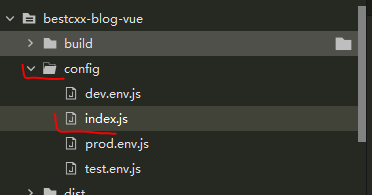
考虑到前后端分离需要指定端口,这里需要强调需要下面的包
/build 和 /config 使用命令行方式生成代码会自动有这个部分
2、VUE 发起网络请求
借助 axios ,我们可以发起网络请求,这是一个不可避免的场景
3、最佳实践
3.1、安装 axios
npm i axios -S
3.2、封装本地 网络请求api
可以参考 https://github.com/lenve/vhr/blob/master/vuehr/src/utils/api.js
demo 里路径为
src/utils/api.js
import axios from 'axios'
import {Message} from 'element-ui';
import router from '../router'
import {mymessage} from './mymessgae.js';

axios.interceptors.response.use(success => {
    if (success.status && success.status == 200 && success.data.status == 500) {
        Message.error({message: success.data.msg})
        return;
    }
    if (success.data.msg) {
        Message.success({message: success.data.msg})
    }
    return success.data;
}, error => {
    if (error.response.status == 504 ) {
        Message.error({message: '服务器内部错误'})
    } else if(error.response.status == 404){
	Message.error({message: '路径不存在'})
}else if (error.response.status == 403) {
        Message.error({message: '权限不足,请联系管理员'})
    } else if (error.response.status == 401) {
        mymessage.error({message: error.response.data.msg ? error.response.data.msg : '尚未登录,请登录'})
        router.replace('/');
    } else {
        if (error.response.data.msg) {
            Message.error({message: error.response.data.msg})
        } else {
            Message.error({message: '未知错误!'})
        }
    }
    return;
})
//可以设置基础访问地址
//let base = 'http://localhost:8080/';
let base = '';

export const postKeyValueRequest = (url, params) => {
    return axios({
        method: 'post',
        url: `${base}${url}`,
        data: params,
        transformRequest: [function (data) {
            let ret = '';
            for (let i in data) {
                ret += encodeURIComponent(i) + '=' + encodeURIComponent(data[i]) + '&'
            }
            return ret;
        }],
        headers: {
            'Content-Type': 'application/x-www-form-urlencoded'
        }
    });
}
export const postRequest = (url, params) => {
    return axios({
        method: 'post',
        url: `${base}${url}`,
        data: params
    })
}
export const putRequest = (url, params) => {
    return axios({
        method: 'put',
        url: `${base}${url}`,
        data: params
    })
}
export const getRequest = (url, params) => {
    return axios({
        method: 'get',
        url: `${base}${url}`,
        params: params
    })
}
export const deleteRequest = (url, params) => {
    return axios({
        method: 'delete',
        url: `${base}${url}`,
        params: params
    })
}
src/utils/mymessgae.js
import {
    Message
} from 'element-ui';
const showMessage = Symbol('showMessage')
class JavaboyMessage {
    [showMessage](type, options, single) {
        if (single) {
            if (document.getElementsByClassName('el-message').length === 0) {
                Message[type](options)
            }
        } else {
            Message[type](options)
        }
    }
    info(options, single = true) {
        this[showMessage]('info', options, single)
    }
    warning(options, single = true) {
        this[showMessage]('warning', options, single)
    }
    error(options, single = true) {
        this[showMessage]('error', options, single)
    }
    success(options, single = true) {
        this[showMessage]('success', options, single)
    }
}
export const mymessage = new JavaboyMessage();
3.3、在 main.js 引入 axios
以 property 的形式引入
import {getRequest} from './utils/api'
import {postRequest} from './utils/api'
import {deleteRequest} from './utils/api'
import {putRequest} from './utils/api'
Vue.prototype.getRequest = getRequest;
Vue.prototype.postRequest = postRequest;
Vue.prototype.deleteRequest = deleteRequest;
Vue.prototype.putRequest = putRequest;
3.4、配置代理
3.4.1、本地配置
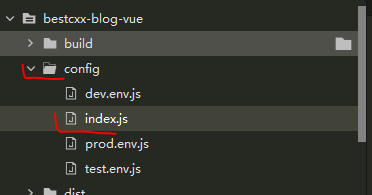
使用 vue init webpack [项目名称] 命令行方式初始化的 Vue 项目会有 config/index.js 文件
需要注意的是,Vue 是通过代理模式来进行网络请求的,这里不可避免的涉及到跨域的问题,需要后端支持跨域请求。
此外,Vue的代理模式访问在浏览器中是看不到 url 的变化的。
比如 Vue 的启动端口为 ip1:8080
后端服务端口为 ip2:8081,那么访问后端时,Vue代码层面依旧是访问ip1:8080,其会自动把影响配置映射到ip2:端口上
- 修改 config/index.js 中proxyTable 内容如下
Vue 中 /blog/开头的请求会被映射到 http://localhost:8081/blog/
注意确保 Vue 请求的路径是 Vue 的ip和端口
即
Vue 代码请求
http://localhost:8080/blog/aaa
后端会根据 路径中 blog 将请求映射到
http://localhost:8081/blog/aaa
注意指定了Vue 启动端口、后端服务和端口
proxyTable: {

          //这里的代理配置只对 dev 环境生效,正式环境需要借助 nginx
          '/blog': {
            //target: process.env.VUE_APP_BASEURL,  //这里后台的地址模拟的;应该填写你们真实的后台接口
            target: 'http://127.0.0.1:8081/', //这里后台的地址模拟的;应该填写你们真实的后台接口
            //target: 'http://www.baidu.com/',  //这里后台的地址模拟的;应该填写你们真实的后台接口
            changOrigin: true, //允许跨域
            pathRewrite: {
              /* 重写路径,当我们在浏览器中看到请求的地址为:http://localhost:vue端口/blog/aaa 时
                实际上访问的地址是:http://localhost:后端端口/blog/aaa,因为重写了 /blog
               */
              '^/blog': '/blog'
            }
          },
          '/sockjs-node/*': {
            target: 'ws://127.0.0.1:8082', //这里后台的地址模拟的;应该填写你们真实的后台接口
            ws: false
          }
        },
- 完整内容
注意指定了Vue 启动端口、后端服务和端口
'use strict'
// Template version: 1.3.1
// see http://vuejs-templates.github.io/webpack for documentation.

const path = require('path')

module.exports = {
  dev: {

    // Paths
    assetsSubDirectory: 'static',
    assetsPublicPath: '/',
    proxyTable: {

          //这里的代理配置只对 dev 环境生效,正式环境需要借助 nginx
          '/blog': {
            //target: process.env.VUE_APP_BASEURL,  //这里后台的地址模拟的;应该填写你们真实的后台接口
            target: 'http://127.0.0.1:8081/', //这里后台的地址模拟的;应该填写你们真实的后台接口
            //target: 'http://www.baidu.com/',  //这里后台的地址模拟的;应该填写你们真实的后台接口
            changOrigin: true, //允许跨域
            pathRewrite: {
              /* 重写路径,当我们在浏览器中看到请求的地址为:http://localhost:vue端口/blog/aaa 时
                实际上访问的地址是:http://localhost:后端端口/blog/aaa,因为重写了 /blog
               */
              '^/blog': '/blog'
            }
          },
          '/sockjs-node/*': {
            target: 'ws://127.0.0.1:8082', //这里后台的地址模拟的;应该填写你们真实的后台接口
            ws: false
          }
        },


    // Various Dev Server settings
    host: process.env.HOST, // 会被 环境变量 HOST 覆盖,当然你可以直接指定用环境变量 process.env.HOST
    port: 8080, // 会被环境变量 PORT 覆盖, 如果端口被占用,会随机指定一个未占用的,当然你可以直接指定用环境变量 process.env.PORT
    autoOpenBrowser: false,
    errorOverlay: true,
    notifyOnErrors: true,
    poll: false, // https://webpack.js.org/configuration/dev-server/#devserver-watchoptions-


    /**
     * Source Maps
     */

    // https://webpack.js.org/configuration/devtool/#development
    devtool: 'cheap-module-eval-source-map',

    // If you have problems debugging vue-files in devtools,
    // set this to false - it *may* help
    // https://vue-loader.vuejs.org/en/options.html#cachebusting
    cacheBusting: true,

    cssSourceMap: true
  },

  build: {
    // Template for index.html
    index: path.resolve(__dirname, '../dist/index.html'),

    // Paths
    assetsRoot: path.resolve(__dirname, '../dist'),
    assetsSubDirectory: 'static',
    assetsPublicPath: '/',

    /**
     * Source Maps
     */

    productionSourceMap: true,
    // https://webpack.js.org/configuration/devtool/#production
    devtool: '#source-map',

    // Gzip off by default as many popular static hosts such as
    // Surge or Netlify already gzip all static assets for you.
    // Before setting to `true`, make sure to:
    // npm install --save-dev compression-webpack-plugin
    productionGzip: false,
    productionGzipExtensions: ['js', 'css'],

    // Run the build command with an extra argument to
    // View the bundle analyzer report after build finishes:
    // `npm run build --report`
    // Set to `true` or `false` to always turn it on or off
    bundleAnalyzerReport: process.env.npm_config_report
  }
}
3.4.2、远程 nginx 配置
nginx/conf/nginx.conf 文件中设置代理,规则同上,当我们访问
www.bestcxx.cn 时,会被转到http://localhost:8080/blog
 server {
            listen       80;
            server_name  www.bestcxx.cn;

            #charset koi8-r;

            #access_log  logs/host.access.log  main;

            location / {
               root   /usr/local/vue/blog-vue/dist;
               index  index.html;
            }
            location  /blog/ {
                    #rewrite  ^/blog/(.*)$ /$1 break;
                    proxy_pass http://localhost:8080;
            }
     }
3.5、后端服务未启动Vue控制台报错内容
[HPM] Error occurred while trying to proxy request /blog/login from 127.0.0.1:8080 to http://127.0.0.1:8081/ (ECONNREFUSED) (https://nodejs.org/api/errors.html#errors_common_system_er
rors)
3.6、跨域不生效
3.6.1、后端设置
尝试运行 npm run dev
后端也需要配置
import org.springframework.context.annotation.Bean;
import org.springframework.context.annotation.Configuration;
import org.springframework.web.servlet.config.annotation.CorsRegistry;
import org.springframework.web.servlet.config.annotation.WebMvcConfigurer;

@Configuration
public class BeanConfig {

    @Bean
    public WebMvcConfigurer crosConfigurer(){
        return new WebMvcConfigurer () {
            @Override
            public void addCorsMappings(CorsRegistry registry) {
                registry.addMapping("/")
                        .allowedOrigins("*")
                        .allowedMethods("GET", "POST", "DELETE", "PUT", "OPTIONS")
                        .allowCredentials(true).maxAge(3600);

            }
        };
    }
}
3.7、发起网络请求的Vue demo
<template>

  <el-form ref="form" :model="form" label-width="80px">
    <el-form-item label="username">
      <el-input v-model="form.username"></el-input>
    </el-form-item>
    <el-form-item>
      <el-button type="primary" @click="submitClick">立即创建</el-button>
      <el-button>取消</el-button>
    </el-form-item>
  </el-form>
</template>

<script>
  export default {
    data() {
      return {
        form: {
          username: '必填',
          password: ''
        }
      }
    },
    methods: {
      submitClick() {
        var _this = this;
        this.loading = true;
        this.postRequest('blog/login', {
          username: this.form.username,
          password: this.form.password
        }).then(resp => {
          _this.loading = false;
          console.log('resp=' + resp);
          if (resp && resp.code == 0) {
            var data = resp.data;
            //_this.$store.commit('/blog/login', data.obj);
            var path = _this.$route.query.redirect;
            // _this.$router.replace({
            //   path: path == '/' || path == undifined ? '/home' : path
            // });

            let routeUrl = this.$router.resolve({
              path: "/anotherpath",
              query: {
                param: "参数值"
              }
            });
            //打开新页面,如果需要打开新页面 _blank
            window.open(routeUrl.href, '_self');
          } else {
            //展示提示信息
            {
              message: resp.msg
            };
          }

        });
      }
    }
  }
</script>
<style></style>
3.8、axios的拦截器:自动添加表头/校验
https://www.jianshu.com/p/ff8541e0976a
https://www.jianshu.com/p/5aa48d82760d
3.9、解决序列化问题 qs 插件
https://my.oschina.net/u/4337072/blog/3333130
4、精细化治理
从实践看,业界当前流程的做法是 单文本文件->调用独立业务api.js->调用底层api.js,因此这里我们提供一个更好的实践思路
4.1、axois 的 api 具体化为 /utils/request.js
其内容和上面的 /utils/api.js 一致
import axios from 'axios'
import {Message} from 'element-ui';
import router from '../router'
import {mymessage} from './mymessgae.js';

axios.interceptors.response.use(success => {
    if (success.status && success.status == 200 && success.data.status == 500) {
        Message.error({message: success.data.msg})
        return;
    }
    if (success.data.msg) {
        Message.success({message: success.data.msg})
    }
    return success.data;
}, error => {
    if (error.response.status == 504 || error.response.status == 404) {
        Message.error({message: '服务器异常'})
    } else if (error.response.status == 403) {
        Message.error({message: '权限不足,请联系管理员'})
    } else if (error.response.status == 401) {
        mymessage.error({message: error.response.data.msg ? error.response.data.msg : '尚未登录,请登录'})
        router.replace('/');
    } else {
        if (error.response.data.msg) {
            Message.error({message: error.response.data.msg})
        } else {
            Message.error({message: '未知错误!'})
        }
    }
    return;
})

let base = '';

export const postKeyValueRequest = (url, params) => {
    return axios({
        method: 'post',
        url: `${base}${url}`,
        data: params,
        transformRequest: [function (data) {
            let ret = '';
            for (let i in data) {
                ret += encodeURIComponent(i) + '=' + encodeURIComponent(data[i]) + '&'
            }
            return ret;
        }],
        headers: {
            'Content-Type': 'application/x-www-form-urlencoded'
        }
    });
}
export const postRequest = (url, params) => {
    return axios({
        method: 'post',
        url: `${base}${url}`,
        data: params
    })
}
export const putRequest = (url, params) => {
    return axios({
        method: 'put',
        url: `${base}${url}`,
        data: params
    })
}
export const getRequest = (url, params) => {
    return axios({
        method: 'get',
        url: `${base}${url}`,
        params: params
    })
}
export const deleteRequest = (url, params) => {
    return axios({
        method: 'delete',
        url: `${base}${url}`,
        params: params
    })
}
4.2、mymessgae.js 保持不变
参考本文上面案例
4.3、为业务提供独立 api
比如为登陆提供 登陆 接口
/api/login.js,可以看到对全局变量 postRequest 进行了二次封装
export function loginRequest (params) {
  return this.postRequest('blog/login', params);
}
4.4、main.js
4.3中 postRequest 需要单独声明为全局变量才能可以直接被子文件使用。
同样 loginRequest 如果想以 this.loginRequest 的方式自由使用也需要声明为全局变量。
import {getRequest,postRequest,deleteRequest,putRequest} from './utils/request'
import {loginRequest} from "./api/login"

 Vue.prototype.postRequest = postRequest;
 Vue.prototype.$loginRequest = loginRequest;
4.5、调用
使用业务层自己的方法直接调用即可
4.5.1、原始方式(易读性差)
 //this.postRequest('blog/login', {
        this.$loginRequest({
          username: this.form.username,
          password: this.form.password
        }).then(resp => {
4.5.2、async+await 方式(易读性高)
不再使用 then,在发起请求最近的外层函数增加 async ,方法结果使用 let result= await 原函数 方式即可
methods: {
      submitclick(formname) {
        this.$refs[formname].validate(async (valid) => {
          if (!valid) {
            console.log("error submit")
            this.$message({
              message: '请输入正确的参数',
              type: 'warning'
            });

            return false;
          } else {
            var _this = this;
            this.loading = true;
            let resp = await this.loginrequest({
              username: this.form.username,
              password: this.form.password
            })
            _this.loading = false;
            console.log(resp);
            if (resp && resp.access_token) {
              _this.cookie.setcookie(resp);
              _this.store.commit('setaccesstoken', _this.cookie.getcookie("access_token"));
              localstorage.setitem("access_token", _this.cookie.getcookie("access_token"));

              let loginresp = await this.logininforequest({
                access_token: _this.cookie.getcookie("access_token")
              });
              _this.loading = false;
              console.log(loginresp);
              if (loginresp && loginresp.user_name) {
                _this.$store.commit("setusername", loginresp.user_name);
                localstorage.setitem("user_name", loginresp.user_name);
              }

              var path = _this.$route.query.redirect;
              _this.$router.replace({
                path: (path == '/' || path == undefined ? '/index' : path)
              });

              //如果需要携带参数
              // let routeurl = this.$router.resolve({
              //   path: "/helloworld",
              //   query: {
              //     name: "testhomepage"
              //   }
              // });

              //_blank _self 选择在本页开,还是新起一页
              window.open(_this.$router.href, '_self');

              this.loading = false
            } else {
              message: "未知异常";
            }


          }
        });

      }
    }
5、独立部署 Vue 项目(nginx反向代理后端请求)
首先运行 npm run build
E:\gitWork\bestcxx-blog-vue>npm run build
然后在项目目录得到
E:\gitWork\bestcxx-blog-vue\dist
将 dist 整个文件夹复制到 生产环境
/usr/local/vue/blog-vue/dist
然后在nginx 配置代理地址
 server {
            listen       80;
            server_name  www.bestcxx.cn;

            #charset koi8-r;

            #access_log  logs/host.access.log  main;

            location / {
               root   /usr/local/vue/blog-vue/dist;
               index  index.html;
            }
            location  /blog/ {
                    #rewrite  ^/blog/(.*)$ /$1 break;
                    proxy_pass http://localhost:8080;
            }
     }
之后重启nginx更多nginx操作查看
/usr/local/nginx/sbin/nginx -c /usr/local/nginx-1.8.1/conf/nginx.conf -s reload
验证
/usr/local/nginx/sbin/nginx -c /usr/local/nginx-1.8.1/conf/nginx.conf -t





 扫一扫
扫一扫


 394
394

 被折叠的 条评论
为什么被折叠?
被折叠的 条评论
为什么被折叠?
 到【灌水乐园】发言





