



 本文详细介绍如何在Vue项目中使用vue-preview组件实现图片预览功能,包括安装、配置、使用及样式调整,帮助开发者快速上手。
1.项目中安装组件
npm i vue-preview -S
2.main.js中引入插件,挂载到Vue
import VuePreview from 'vue-preview';
Vue.use(VuePreview);
3.在组件中使用,代码如下(代码中数据为假数据,调后台接口请在methods中自行添加代码):
<!--缩略图区域-->
<template>
    <div class="photoinfo-container">
        <div class="thumbs">
            <vue-preview :slides="list" class="imgPrev"></vue-preview>
        </div>
    </div>
</template>
<script>
    //listTmp中各字段含义:
    //src:缩略图点开后图片
    //msrc:缩略图
    //w:缩略图点开后的宽度
    //h:缩略图点开后的高度
    var listTmp = [
        {
            src:"https://f12.baidu.com/it/u=1958490809,1691334580&fm=72",
            msrc:"https://f12.baidu.com/it/u=1958490809,1691334580&fm=72",
            w:600,
            h:400
        },
        {
            src:"https://ss2.bdstatic.com/70cFvnSh_Q1YnxGkpoWK1HF6hhy/it/u=547934426,2187279168&fm=15&gp=0.jpg",
            msrc:"https://ss2.bdstatic.com/70cFvnSh_Q1YnxGkpoWK1HF6hhy/it/u=547934426,2187279168&fm=15&gp=0.jpg",
            w:600,
            h:400
        },
        {
            src:"http://img.lanrentuku.com/img/allimg/1506/5-1506151506080-L.jpg",
            msrc:"http://img.lanrentuku.com/img/allimg/1506/5-1506151506080-L.jpg",
            w:600,
            h:400
        }
    ];
    export default {
        data(){
            return {
                list:listTmp//缩略图的数组
            }
        },
        methods:{

        }
    }
</script>

<style lang="scss">
<!--样式可以通过chrome的开发者工具,右键检查点击图片进行查看html样式的结构,style标签中不要使用scoped-->
    .photoinfo-container{
        .thumbs{
            .imgPrev{
                .my-gallery{
                    figure{
                        display: inline-block;
                        margin: 8px;
                    }
                    img{
                        width: 80px;
                        height: 60px;
                    }
                }
            }
        }
    }
</style>
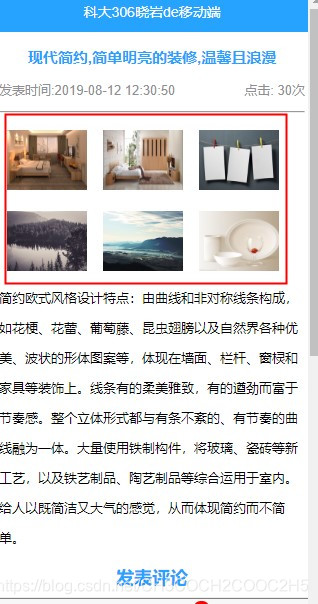
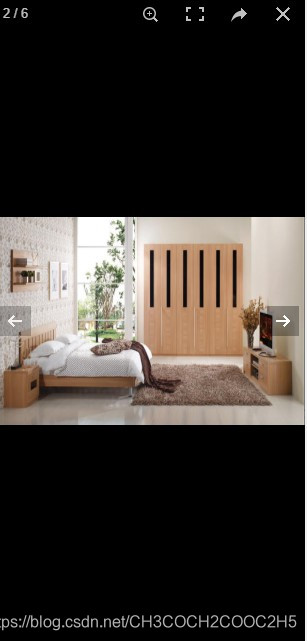
4.运行效果如图:





 扫一扫
扫一扫


 1万+
1万+


 到【灌水乐园】发言



