

dwz前端实现双击<tr>标签栏,在其下面展现指定参数(比如交易汇总数据)

本文介绍如何使用DWZ前端框架实现表格行双击展开详细信息的功能,通过jQuery监听双击事件,调用后端接口获取数据并动态生成HTML展示交易汇总详情。

     首先,实现效果如图所示:

      前端框架dwz,页面<tr>标签里:

      <tr  ptip="双击查看交易汇总" target="id" rel="${list.ID}" details_url="/interBus_dl/?                       spm=${encryption("/Merchantallinfo/merchantClick")}&emerno=${(list.EMERNO)!}" class="details1" promptid="${(list.EMERNO)}">

     ptip为鼠标悬浮提示,details_url为指定发送的后端url地址,class="details1" 为jquery选择器。

       js代码:

    <script type="text/javascript">
 $(document).ready(function()
    { 
        $(".details1").die().live("dblclick",function(){
            var mytr=$(this);
            if(mytr.next().attr("class")=="details_info"){
                mytr.next().toggle();
            }else{
                var url=mytr.attr("details_url");
                var html=" <tr class='details_info' ><td style='background-color:#FFE7BA;' colspan="+mytr.children().size()+"> ";
                $.ajax({
                  url:url,
                  type:"get",
                  success:function(data){
                     for(var key in data)  {
                         html+="<label style='padding-right: 20px'>"+key+":"+data[key]+"</label>";
                     }
                     html+="</td></tr>";
                     mytr.after(html);
                    }
                });
            }
        });
    });
</script>

后端返回map数据:会展现key和value值:

/**
     * 
     *********************************************************.<br>
     * [方法] merchantClick <br>
     * [描述] TODO(查询交易汇总) <br>
     * [参数] TODO(对参数的描述) <br>
     * [返回] Map <br>
     * [时间] 2018-12-19 下午3:31:40 <br>
     * [作者] 郭太东 【gtd】
     *********************************************************.<br>
     */
    @SuppressWarnings("all")
    @RequestMapping("/merchantClick")
     public @ResponseBody Map merchantClick() {
        String emerno = this.getParameter("emerno");
        mes.put("emerno", emerno);
        Map map=new HashMap();
        List<Map<String, Object>> list = MerchantallinfoService.getList("selectMerTrans",mes);
        //第一个为空
        if(list.get(0)==null || list.get(0).equals("")){
            map.put("支付宝微信交易总额", "0元");
            //第二个为空
            if(list.get(1)==null || list.get(1).equals("")){
                map.put("银联支付交易总额", "0元");
            }else{
                //第二个不为空
                map.put("银联支付交易总额", list.get(1).get("fee")==null?"0":list.get(1).get("fee") +"元");
            }
        }else{
            //第一个不为空
            map.put("支付宝微信交易总额", list.get(0).get("fee")==null?"0":list.get(0).get("fee") +"元");
            if(list.get(1)==null || list.get(1).equals("")){
                //第二个为空
                map.put("银联支付交易总额", "0元");
            }else{
                //第二个不为空
                map.put("银联支付交易总额", list.get(1).get("fee")==null?"0":list.get(1).get("fee") +"元");
            }
        }
        return map;
     }

注意:(重点)这是我们公司自己的一个数据加密传输算法,用到的传值数据,必须在指定位置给与解密,否则会报空指针异常。
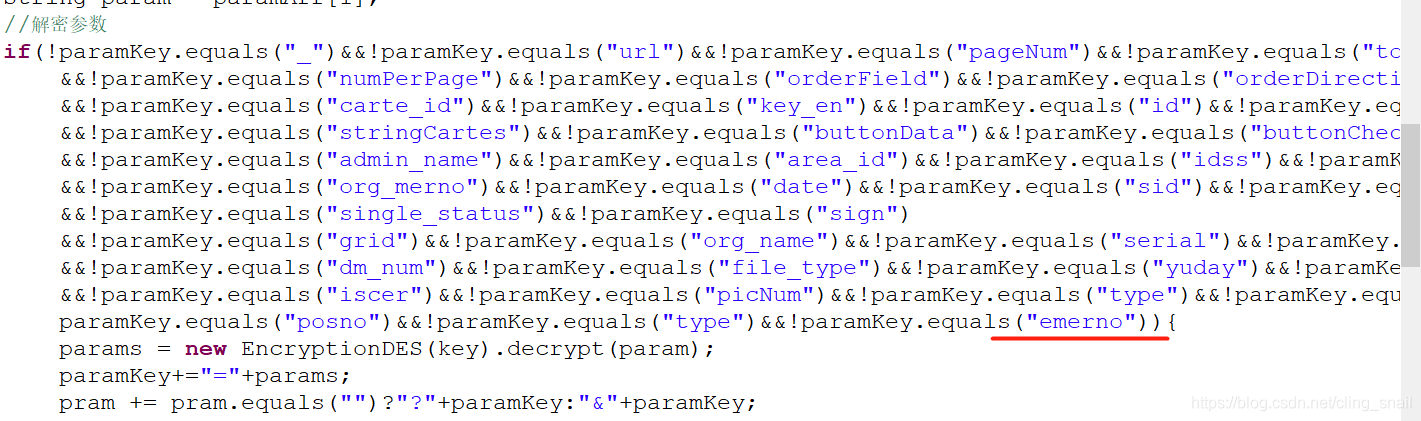
我自己就是忘了这个坑,然后被自己蠢浪费了好久时间。


<php> $affected_tooling = is_array($list['affected_tooling']) ? $list['affected_tooling'] : explode(',', $list['affected_tooling']); </php> <!DOCTYPE html> <html lang="zh-CN"> <head> <meta charset="UTF-8"> <title>Internal Engineering Change Notice (ECN) Requests</title> <style> .container { margin: auto; border: 1px solid #ccc; padding: 20px 20px 0px 20px; font-family: Arial, sans-serif; } h2 { text-align: center; } .header { display: flex; /* justify-content: space-between; */ align-items: center; margin-bottom: 20px; } .header-info { font-size: 14px; } .form-group { display: flex; margin-bottom: 15px; } /* 容器样式 */ .form-row { justify-content: space-between; /* 让子元素分布在两侧 */ display: flex; gap: 5px; /* 列之间的间距 */ margin-bottom: 15px; } .form-row .form-group { display: flex; } label { display: inline-block; width: 300px; font-weight: normal; } input[type="text"], input[type="date"], input[type="time"] { width: 200px; padding: 5px; } .checkbox-group { display: flex; align-items: center; } /* 控制复选框组内部间距 */ .checkbox-group label { margin-right: 5px; /* 每个复选框之间的间距 */ width: 60px; } .checkbox-group label { font-weight: normal; margin-right: 5px; } .section { margin-top: 20px; padding-top: 10px; border-top: 1px solid #ccc; } .footer { margin-top: 30px; display: flex; justify-content: space-between; font-size: 12px; color: #555; } .col { display: flex; align-items: center; white-space: nowrap; } .col input[type="text"] { padding: 2px; box-sizing: border-box; } .col label { white-space: nowrap; margin-right: 1px; } .approval-table { width: 100%; border-collapse: collapse; margin-bottom: 20px; font-weight: normal; } .approval-table th, .approval-table td { padding: 10px; border: 1px solid #ccc; vertical-align: top; } .approval-table th { background-color: #f5f5f5; text-align: left; } .checkbox-container { display: flex; flex-wrap: wrap; gap: 15px; } .checkbox-row { display: flex; align-items: center; gap: 10px; flex: 0 0 48%; /* 控制每行两个选项 */ } .checkbox-row.full-width { flex: 0 0 100%; /* Others 行占满整行 */ } .checkbox-row input[type="text"] { flex: 1; padding: 5px; width: 200px; } .checkbox-row label { font-weight: normal; white-space: nowrap; } .footer-page-break { /*分页,兼容旧浏览器*/ page-break-after: always; } .center-text { display: flex; justify-content: center; /* 水平居中 */ align-items: center; /* 垂直居中 */ } label span { font-weight: normal; text-decoration: underline; } </style> </head> <body> <div> <div class="center-text"> <div style="width:980px;text-align:left;"> <div class="container" layoutH="56"> <div class="header" style="display: flex; justify-content: space-between; align-items: center;"> <img src="__PUBLIC__/Images/logo.gif" alt="Logo" style="height: 50px;"> <strong>TCN No:{$list.tcn_no} </strong> </div> <div class="header" style="justify-content: center;"> <h2>Tooling Change Notice (TCN)</h2> </div> <div class="form-group"> <!-- 第一列:Requested by --> <div class="col"> <label>Requested by #:<span>{$list.requested_by}</span></label> </div> <!-- 第二列:单选 --> <div class="col checkbox-group" style="justify-content: flex-start; padding-left: 5px;"> <label> <input type="radio" name="requested_department" id="ME" value="ME" <if condition="$list.requested_department eq 'ME'">checked</if>/> <label for="ME" style="margin-left: 1px;">ME</label> </label> <label> <input type="radio" name="requested_department" id="PE" value="PE" <if condition="$list.requested_department eq 'PE'">checked</if>/> <label for="PE" style="margin-left: 1px;">PE</label> </label> <label> <input type="radio" name="requested_department" id="QA" value="QA" <if condition="$list.requested_department eq 'QA'">checked</if> /> <label for="QA" style="margin-left: 1px;">QA</label> </label> <label> <input type="radio" name="requested_department" id="PMC" value="PMC" <if condition="$list.requested_department eq 'PMC'">checked</if> /> <label for="PMC" style="margin-left: 1px;">PMC</label> </label> </div> </div> <!-- 下一行:Date --> <div style="margin-top: 15px;"> <label>Issue Date (MM/DD/YYYY):<span>{$list.issue_date}</span></label> </div> <div class="section"> <h4>Part A: General Project and Change Information (Fill by Requestor):</h4> <div class="form-row"> <label>PNG Part No.:<span>{$list.png_part_no}</span></label> <label style="margin-left: 10px;">Customer:<span>{$list.customer}</span></label> <div class="form-group"> <label>W/O:<span>{$list.wo}</span></label> </div> </div> </div> <div class="section"> <h4>Part B: Change Description (Fill by Requestor):</h4> <div class="form-group"> <label>Purpose:</label> <div class="col"> <label> <input type="radio" name="purpose_option" id="Tooling Update" value="Tooling Update" <if condition="$list.purpose_option eq 'Tooling Update'">checked</if> /> <label for="Tooling Update" style="margin-left: 1px;width: 100px;">Tooling Update</label> </label> <label> <input type="radio" name="purpose_option" id="Test tooling" value="Test tooling" <if condition="$list.purpose_option eq 'Test tooling'">checked</if>/> <label for="Test tooling" style="margin-left: 1px;">Test tooling</label> </label> <label> <input type="radio" name="purpose_option" id="Rework tooling" value="Rework tooling" <if condition="$list.purpose_option eq 'Rework tooling'">checked</if> /> <label for="Rework tooling" style="margin-left: 1px;">Rework tooling</label> </label> </div> </div> <div class="form-group"> <label>Reason of change:</label> <textarea name="reason_of_change" id="reason_of_change" rows="3" cols="82" lookupGroup="LookupCCEmail" look_name="LookupCCEmail.orgName">{$list.reason_of_change}</textarea> </div> <div class="form-group"> <label>Tooling change description:</label> <textarea name="tooling_change_description" id="tooling_change_description" rows="3" cols="82" lookupGroup="LookupCCEmail" look_name="LookupCCEmail.orgName">{$list.tooling_change_description}</textarea> </div> <div class="form-group" style="display: block;"> <label style="width: 300px;">Remarks / Affected process:</label> <h5>Affected tooling:</h5> <div class="checkbox-container"> <!-- 每行两个复选框 --> <div class="checkbox-row"> <input name="affected_tooling[]" type="checkbox" id="inner_ldi" value="inner_ldi" <if condition="in_array('inner_ldi', $affected_tooling)"> checked="checked"</if>> <label for="inner_ldi">Inner LDI program</label> </div> <div class="checkbox-row"> <input name="affected_tooling[]" type="checkbox" id="inner_aoi" value="inner_aoi" <if condition="in_array('inner_aoi', $affected_tooling)" >checked</if>> <label for="inner_aoi">Inner layer AOI</label> </div> <div class="checkbox-row"> <input name="affected_tooling[]" type="checkbox" id="pluritec" value="pluritec" <if condition="in_array('pluritec', $affected_tooling)" >checked</if>> <label for="pluritec">Pluritec program</label> </div> <div class="checkbox-row"> <input name="affected_tooling[]" type="checkbox" id="conformal_mask" value="conformal_mask" <if condition="in_array('conformal_mask', $affected_tooling)">checked</if>> <label for="conformal_mask">Conformal mask LDI program</label> </div> <div class="checkbox-row"> <input name="affected_tooling[]" type="checkbox" id="drill" value="drill" <if condition="in_array('drill', $affected_tooling)" >checked</if>> <label for="drill">Drill program</label> </div> <div class="checkbox-row"> <input name="affected_tooling[]" type="checkbox" id="hole_laser" value="hole_laser" <if condition="in_array('hole_laser', $affected_tooling)" >checked</if>> <label for="hole_laser">Hole / Laser AOI & Hole counter program</label> </div> <div class="checkbox-row"> <input name="affected_tooling[]" type="checkbox" id="buttonplate" value="buttonplate" <if condition="in_array('buttonplate', $affected_tooling)" >checked</if>> <label for="buttonplate">Buttonplate / Copper fill LDI program</label> </div> <div class="checkbox-row"> <input name="affected_tooling[]" type="checkbox" id="outer_ldi" value="outer_ldi" <if condition="in_array('outer_ldi', $affected_tooling)" >checked</if>> <label for="outer_ldi">Outer LDI program</label> </div> <div class="checkbox-row"> <input name="affected_tooling[]" type="checkbox" id="outer_aoi" value="outer_aoi" <if condition="in_array('outer_aoi', $affected_tooling)" >checked</if>> <label for="outer_aoi">Outer layer AOI</label> </div> <div class="checkbox-row"> <input name="affected_tooling[]" type="checkbox" id="solder_mask_di" value="solder_mask_di" <if condition="in_array('solder_mask_di', $affected_tooling)">checked</if>> <label for="solder_mask_di">Solder mask DI program</label> </div> <div class="checkbox-row"> <input name="affected_tooling[]" type="checkbox" id="solder_mask_avi" value="solder_mask_avi" <if condition="in_array('solder_mask_avi', $affected_tooling)">checked</if>> <label for="solder_mask_avi">Solder mask AVI</label> </div> <div class="checkbox-row"> <input name="affected_tooling[]" type="checkbox" id="solder_stencil" value="solder_stencil" <if condition="in_array('solder_stencil', $affected_tooling)">checked</if>> <label for="solder_stencil">Solder mask stencil / printing jig</label> </div> <div class="checkbox-row"> <input name="affected_tooling[]" type="checkbox" id="via_filling" value="via_filling" <if condition="in_array('via_filling', $affected_tooling)" >checked</if>> <label for="via_filling">Via filling tool</label> </div> <div class="checkbox-row"> <input name="affected_tooling[]" type="checkbox" id="inkjet" value="inkjet" <if condition="in_array('inkjet', $affected_tooling)" >checked</if>> <label for="inkjet">Inkjet</label> </div> <div class="checkbox-row"> <input name="affected_tooling[]" type="checkbox" id="laser_mark" value="laser_mark" <if condition="in_array('laser_mark', $affected_tooling)" >checked</if>> <label for="laser_mark">Laser mark</label> </div> <div class="checkbox-row"> <input name="affected_tooling[]" type="checkbox" id="routing" value="routing" <if condition="in_array('routing', $affected_tooling)" >checked</if>> <label for="routing">Routing program</label> </div> <div class="checkbox-row"> <input name="affected_tooling[]" type="checkbox" id="etest" value="etest" <if condition="in_array('etest', $affected_tooling)" >checked</if>> <label for="etest">E-Test program / Fixture</label> </div> <!-- Others 行 --> <div class="checkbox-row full-width"> <input name="affected_tooling[]" type="checkbox" id="others_checkbox" value="others_checkbox" <if condition="in_array('others_checkbox', $affected_tooling)">checked</if>> <label for="others_checkbox">Others<span style="margin-left: 10px;">{$list.others_input}</span></label> </div> </div> </div> </div> <div class="section"> <h4>Part C: Running change schedule: (Follow PMC schedule)</h4> <div class="col"> <input type="checkbox" id="running_change_date_option" name="running_change_date_option" <if condition="$list.running_change_date_option" >checked</if>> <label style="width: 400px;margin-left: 10px;" for="running_change_wo_option">Running Change Effective Date & Time:<span>{$list.running_change_date}</span></label> </div> <div class="col"> <input type="checkbox" id="running_change_wo_option" name="running_change_wo_option" <if condition="$list.running_change_wo_option" >checked</if>> <label style="width: 400px;margin-left: 10px;" for="running_change_wo_option">Running Change Effective W/O:<span>{$list.running_change_wo}</span></label> </div> </div> <div class="section"> <h4>Part D: Approval</h4> <table class="approval-table"> <tr> <td>P.E</td> <td>M.E</td> <td>QA</td> </tr> <tr> <td>Date (MM/DD/YYYY):<br> <input type="date" name="pe_approve_date" value="{$list.pe_approve_date}"> <input type="time" name="pe_approve_time" value="{$list.pe_approve_time}"> </td> <td>Date (MM/DD/YYYY):<br> <input type="date" name="me_approve_date" value="{$list.me_approve_date}"> <input type="time" name="me_approve_time" value="{$list.me_approve_time}"> </td> <td>Date (MM/DD/YYYY):<br> <input type="date" name="qa_approve_date" value="{$list.qa_approve_date}"> <input type="time" name="qa_approve_time" value="{$list.qa_approve_time}"> </td> </tr> </table> <div class="footer" style="margin-top: 1px;">Remark:Tooling update only need PE manager approval</div> </div> <div class="footer"> <div>Form No. PEF-005</div> <div>Version: A/2</div> <div>Effective Date: 09/09/2024</div> </div> <div class="footer-page-break"></div> <div class="header" style="display: flex; justify-content: space-between; align-items: center;"> <img src="__PUBLIC__/Images/logo.gif" alt="Logo" style="height: 50px;"> <strong>TCN No: {$list.tcn_no_2} </div> <div class="header" style="justify-content: center;"> <h2>Tooling Change Notice (TCN)</h2> </div> <div class="footer"> <div>Form No. PEF-020</div> <div>Version: A/2</div> <div>Effective Date: 10/28/2024</div> </div> <div class="footer-page-break"></div> <div class="header" style="display: flex; justify-content: space-between; align-items: center;"> <img src="__PUBLIC__/Images/logo.gif" alt="Logo" style="height: 50px;"> <strong>TCN No: ______________ </div> <div class="header" style="justify-content: center;"> <h2>Tooling Change Notice (TCN)</h2> </div> <table class="approval-table"> <thead> <tr> <th>Affected Tooling</th> <th>Recall Tooling PIC</th> <th>Date</th> <th>PIC Signature</th> <th>Confirmed By PE</th> <th>PE Signature</th> <th>Prod.Signature</th> <th>Remarks</th> </tr> </thead> <tbody> <tr> <td>Inner LDI</td> <td></td> <td></td> <td></td> <td></td> <td></td> <td></td> <td></td> </tr> <tr> <td>Inner AOI</td> <td></td> <td></td> <td></td> <td></td> <td></td> <td></td> <td></td> </tr> <tr> <td>Pluritec</td> <td></td> <td></td> <td></td> <td></td> <td></td> <td></td> <td></td> </tr> <tr> <td>Conf. mask LDI</td> <td></td> <td></td> <td></td> <td></td> <td></td> <td></td> <td></td> </tr> <tr> <td>Drill program</td> <td></td> <td></td> <td></td> <td></td> <td></td> <td></td> <td></td> </tr> <tr> <td>Hole / Laser AOI and Hole counter</td> <td></td> <td></td> <td></td> <td></td> <td></td> <td></td> <td></td> </tr> <tr> <td>Buttonplate / Copper fill LDI</td> <td></td> <td></td> <td></td> <td></td> <td></td> <td></td> <td></td> </tr> <tr> <td>Outer LDI</td> <td></td> <td></td> <td></td> <td></td> <td></td> <td></td> <td></td> </tr> <tr> <td>Outer AOI</td> <td></td> <td></td> <td></td> <td></td> <td></td> <td></td> <td></td> </tr> <tr> <td>Solder mask</td> <td></td> <td></td> <td></td> <td></td> <td></td> <td></td> <td></td> </tr> <tr> <td>DI</td> <td></td> <td></td> <td></td> <td></td> <td></td> <td></td> <td></td> </tr> <tr> <td>SM AVI</td> <td></td> <td></td> <td></td> <td></td> <td></td> <td></td> <td></td> </tr> <tr> <td>SM Stencil/Jig</td> <td></td> <td></td> <td></td> <td></td> <td></td> <td></td> <td></td> </tr> <tr> <td>RVF Tool</td> <td></td> <td></td> <td></td> <td></td> <td></td> <td></td> <td></td> </tr> <tr> <td>Inkjet</td> <td></td> <td></td> <td></td> <td></td> <td></td> <td></td> <td></td> </tr> <tr> <td>Laser mark</td> <td></td> <td></td> <td></td> <td></td> <td></td> <td></td> <td></td> </tr> <tr> <td>Routing</td> <td></td> <td></td> <td></td> <td></td> <td></td> <td></td> <td></td> </tr> <tr> <td>E-test</td> <td></td> <td></td> <td></td> <td></td> <td></td> <td></td> <td></td> </tr> <tr> <td>Others</td> <td></td> <td></td> <td></td> <td></td> <td></td> <td></td> <td></td> </tr> </tbody> </table> <div class="footer"> <div>Form No. PEF-020</div> <div>Version: A/2</div> <div>Effective Date: 10/28/2024</div> </div> </div> </div> </div> <div class="formBar"> <ul> <li><div class="button"> <div class="buttonContent"><button type="button" onclick="navTab.closeCurrentTab()">关闭</button></div></div></li> <li><div class="buttonActive"><div class="buttonContent"><button type="button" onclick="print()">{$Think.lang.print}</button></div></div></li> </ul> </div> </div> </body> </html> <script language="javascript" type="text/javascript" src="__PUBLIC__/dwz/js/autosize.min.js"></script> <script language="JavaScript"> function print(){ //$("div#myPrintArea").printArea(); window.open('__URL__/printtable/id/{$list.id}'); } $(document).ready(function () { // 禁止所有 radio 按钮被点击修改 $('input[type="radio"]').each(function () { $(this).data('waschecked', $(this).is(':checked')); // 保存原始状态 $(this).on('click', function (e) { e.preventDefault(); // 阻止默认行为 return false; }); }); }); </script> 以上html页面怎么在浏览器打印的时候,左右两边内容显示不全
07-29
<!DOCTYPE html> <html lang="zh-CN"> <head> <meta charset="UTF-8"> <title>Internal Engineering Change Notice (ECN) Request - View</title> <style> .container { margin: auto; border: 1px solid #ccc; padding: 20px 20px 0px 20px; font-family: Arial, sans-serif; } .container h2 { text-align: center; } .header { display: flex; align-items: center; margin-bottom: 20px; } .header-info { font-size: 14px; } .form-group { display: flex; margin-bottom: 15px; } .container label { display: inline-block; width: 300px; font-weight: bold; } input[type="text"], input[type="date"], input[type="time"], textarea { width: 200px; padding: 5px; } .checkbox-group { display: flex; align-items: center; } .checkbox-group label { margin-right: 10px; font-weight: normal; margin-right: 5px; /* 控制每个复选框之间的间距 */ width: 60px; } .section { margin-top: 20px; padding-top: 10px; border-top: 1px solid #ccc; } .container .footer { margin-top: 30px; display: flex; justify-content: space-between; font-size: 12px; color: #555; } .row { display: flex; width: 100%; gap: 10px; } .col { display: flex; align-items: center; white-space: nowrap; } .col label { white-space: nowrap; margin-right: 1px; font-weight: bold; } .approval-table { width: 100%; border-collapse: collapse; margin-bottom: 20px; } .approval-table th, .approval-table td { padding: 10px; border: 1px solid #ccc; vertical-align: top; } .approval-table th { background-color: #f5f5f5; text-align: left; } .center-text { display: flex; justify-content: center; align-items: center; } label span { font-weight: normal; text-decoration: underline; } </style> </head> <body> <div> <div class="center-text"> <div style="width:980px;text-align:left;"> <div class="container" layoutH="56"> <input name="id" id="id" type="hidden" value="{$list.id}" /> <input name="navTabId" id="navTabId" type="hidden" value="{$navTabId}" /> <div class="header" style="display: flex; justify-content: space-between; align-items: center;"> <img src="__PUBLIC__/Images/logo.gif" alt="Logo"> <strong>Ref. No:{$list.ref_no} </strong> </div> <div class="header" style="justify-content: center;"> <h2 style="font-size: 32px;">Internal Engineering Change Notice (ECN) Requests</h2> </div> <div class="form-group"> <div class="col"> <label>Requested by #: <span>{$list.requested_by}</span></label> </div> <div class="col checkbox-group" style="justify-content: flex-start; padding-left: 5px;"> <label> <input type="radio" name="requested_department" <if condition="$list.requested_department eq 'ME'">checked</if> /> <label for="ME" style="margin-left: 1px;">ME</label> </label> <label> <input type="radio" name="requested_department" <if condition="$list.requested_department eq 'PE'">checked</if> /> <label for="PE" style="margin-left: 1px;">PE</label> </label> <label> <input type="radio" name="requested_department" <if condition="$list.requested_department eq 'QA'">checked</if> /> <label for="QA" style="margin-left: 1px;">QA</label> </label> <label> <input type="radio" name="requested_department" <if condition="$list.requested_department eq 'PMC'">checked</if> /> <label for="PMC" style="margin-left: 1px;">PMC</label> </label> </div> <div class="col" style="margin-left: 200px;"> <label style="width: 100px;">Ext. no: <span>{$list.ext_no}</span></label> </div> </div> <div style="margin-top: 15px;"> <label>Date (MM/DD/YYYY):<span>{$list.request_date|date='m/d/Y',###}</span></label> </div> <div class="section"> <h4 style="font-size: 20px;">Part A: General Project and Change Information (Fill by Requestor):</h4> <div style="margin-bottom: 15px;margin-top: 10px;"> <label>PNG Part No:<span>{$list.png_part_no}</span></label> <label style="margin-left: 10px;">Customer:<span>{$list.customer}</span></label> <label style="margin-left: 10px;">Customer code:<span>{$list.customer_code}</span></label> </div> <div class="form-group"> <label>Purpose / Reason of ECN:<span>{$list.purpose_reason}</span></label> </div> <div class="form-group"> <label style="width: 400px;margin-top: 5px;">Change area: Manufacturing Instruction(M.I.) #:</label> <div class="col checkbox-group" style="justify-content: flex-start; padding-left: 5px;"> <label><input type="radio" <if condition="$list.change_area_manufacturing eq 'YES'">checked</if> /> YES</label> <text>/</text> <label><input type="radio" <if condition="$list.change_area_manufacturing eq 'NO'">checked</if> /> NO</label> </div> <label style="margin-left: 100px;width: 100px;">Tooling#:</label> <div class="checkbox-group" style="justify-content: flex-start; padding-left: 5px;"> <label><input type="radio" <if condition="$list.tooling eq 'YES'">checked</if> /> YES</label> <text>/</text> <label><input type="radio" <if condition="$list.tooling eq 'NO'">checked</if> /> NO</label> </div> </div> </div> <div class="section"> <h4 style="font-size: 20px;">Part B: Change Description (Fill by Requestor):</h4> <div class="header" style="justify-content: center;"> <h2>ECN Change Details (add attachment if needed)</h2> </div> <div class="form-group"> <label style="width: 100px;">From:</label> <div>{$list.change_from}</div> </div> <div class="form-group"> <label style="width: 100px;">To:</label> <div>{$list.change_to}</div> </div> <label style="white-space: nowrap;">Involve Work Order in Production #:</label> <div class="form-group"> <label style="width: 80px;"><input type="radio" <if condition="$list.involve_work_order eq 'YES'">checked</if> /> YES -</label> <label style="width: 400px;"><input type="radio" <if condition="$list.request_change_date_option eq 'YES'">checked</if> />Request Change Date: <span>{$list.request_change_date|date='m/d/Y',###}</span>(MM/DD/YYYY) </label> <label style="margin-left: 50px;">Time: <span style="font-weight: normal;">{$list.request_change_time}(HH:MM)</span> </label> </div> <div class="form-group" style="margin-left: 80px;"> <label style="white-space: nowrap;width: 300px;"><input type="radio" <if condition="$list.implement_after_option eq 'YES'">checked</if> />Implement after * W/O / DC/Process <span>{$list.implement_after}</span></label> </div> <div class="form-group" style="margin-left: 80px;"> <label style="white-space: nowrap;width: 250px;"><input type="radio" <if condition="$list.assigned_by_pmc eq 'YES'">checked</if> />Assigned by PMC (Go to PartC)</label> </div> <div class="form-group"> <label style="white-space: nowrap;"><input type="radio" <if condition="$list.involve_work_order eq 'NO'">checked</if> />NO(Change date schedule byPE)</label> </div> <div class="form-group"> <label style="white-space: nowrap;">M.I & Tooling disposition by #:</label> <div class="checkbox-group" style="margin-left: 50px;"> <label style="width: 150px;"><input type="radio" <if condition="$list.mi_tooling_disposition_by eq 'New Part number'">checked</if> /> New Part number</label> <label style="width: 150px;"><input type="radio" <if condition="$list.mi_tooling_disposition_by eq 'Up-version'">checked</if> /> Up-version</label> <label style="width: 150px;"><input type="radio" <if condition="$list.mi_tooling_disposition_by eq 'Amendment'">checked</if> /> Amendment</label> </div> </div> </div> <div class="section"> <h4 style="font-size: 20px;">Part C: Running change schedule: (Fill by PMC)</h4> <div class="form-group" style="margin-top: 20px;"> <label style="width:400px;">Assign Change Date: <span>{$list.assign_change_date|date='m/d/Y',###}(MM/DD/YYYY)</span> </label> <label style="margin-left: 50px;">Time: <span>{$list.assign_change_time}(HH:MM)</span> </label> </div> </div> <div class="section"> <h4 style="font-size: 20px;">Part D: Approval</h4> <table class="approval-table"> <tr> <td>Department Manager of requestor: <span>{$list.department_manager_signature}</span></td> <td>M.E <br/><span>{$list.me_signature}</span></td> <td>P.E <br/><span>{$list.pe_signature}</span></td> <td>PMC <br/><span>{$list.pmc_signature}</span></td> <td>QA <br/><span>{$list.qa_signature}</span></td> </tr> <tr> <td>Date (MM/DD/YYYY):<span>{$list.department_manager_date|date='m/d/Y',###}</span></td> <td>Date (MM/DD/YYYY):<span>{$list.me_date|date='m/d/Y',###}</span></td> <td>Date (MM/DD/YYYY):<span>{$list.pe_date|date='m/d/Y',###}</span></td> <td>Date (MM/DD/YYYY):<span>{$list.pmc_date|date='m/d/Y',###}</span></td> <td>Date (MM/DD/YYYY):<span>{$list.qa_date|date='m/d/Y',###}</span></td> </tr> </table> </div> <div class="footer"> <div>Form No. PEF-005</div> <div>Version: A/2</div> <div>Effective Date: 09/09/2024</div> </div> </div> </div> </div> </div> </body> </html> <script language="javascript" type="text/javascript" src="__PUBLIC__/dwz/js/autosize.min.js"></script> <SCRIPT LANGUAGE="JavaScript"> $(document).ready(function () { $("#printbt").click(function(){ $("div#myPrintArea").printArea(); }); // 禁止所有 radio 按钮被点击修改 $('input[type="radio"]').each(function () { $(this).data('waschecked', $(this).is(':checked')); // 保存原始状态 $(this).on('click', function (e) { e.preventDefault(); // 阻止默认行为 return false; }); }); }); </script> part d的table表格部分超出了980px的宽度限制是为什么
07-27
​ 不想看那么多分析的,只想了解大概原理的可直接跳转到目录二。 想直接拿 最终解决办法的,请跳到目录四。 一、前提背景 1.直接向后台传值删除的批量操作 在使用Thinkphp 工作时,会发现若想获取所有选中的id,并进行批量删除操作时,会使用以下代码: 在选中复选框checkbox后,点击delete删除按钮,向后台控制器Action传输ids,然后在后台循环执行已经写好了的SQL删除语句,删除成功后向前端返回值。 <div> //删除按钮 <li><a class="delete" href="__URL__/foreverdelete/navTabId/{$module}" target="selectedTodo" callback="navTabAjax" title="delete" warn="{$Think.lang.select_item}" postType="string"rel="ids"><span>{$Think.lang.del_item}</span></a></li> //显示的list表格 <table class="table" width="100%" layoutH="111"> <thead> <tr> <th width="5"><input type="checkbox" group="ids" class="checkboxCtrl"></th> <th width="5" orderField="item_id" <if condition="$_REQUEST._order eq 'item_id'">class="{$_REQUEST._sort}"</if>>{$Think.lang.id}</th> <th width="300">Name</th> </tr> </thead> <tbody> <volist id="vo" name="list"> <tr target="sid_node" rel="{$vo['item_id']}" style="height: 27px;"> <td><input name="ids" value="{$vo['item_id']}" type="checkbox"></td> <td>{$vo['item_id']}</td> <td title="{$vo['NOTE']}">{$vo['ITEM_NAME']}</td> </tr> </volist> </tbody> </table> </div> 2.执行原理 以上代码能成功执行的原理: 是<a> 标签定义超链接向后台foreverdelete方法传值, target 用于控制链接点击后的行为,获取到我们选中的 checkbox的id值; 最后将一切操作放到后台控制器中执行; callback是回调逻辑,用于操作成功后的响应 targert和 callback 都是自定义属性target="selectedTodo" target 属性用于指定链接点击后操作的目标对象或作用域。在给定的代码中,target="selectedTodo" 表示该链接的操作将作用于一个名为 selectedTodo 的目标对象。这种机制通常用于与前端框架或库结合使用,例如 DWZ(一个基于 jQuery 的 UI 框架),用于实现特定的功能,如选中并删除多个条目。 在这种情况下,selectedTodo 是一个用于存储用户选择数据的变量或对象,当链接被点击时,这些数据会被传递给后端进行处理。该属性的值 selectedTodo 并不是标准 HTML 中定义的值,而是由前端框架或开发者自定义的标识符,用于触发特定的逻辑处理流程。 callback="navTabAjax" callback 属性用于指定链接点击后执行的回调函数。回调函数是一种在操作完成后执行的函数,通常用于处理异步操作的结果。在给定的代码中,callback="navTabAjax" 表示链接点击后会调用一个名为 navTabAjax 的回调函数。 该函数的作用包括:检查响应状态码是否为成功,重新加载指定的导航标签页(navTab),或关闭当前标签页等。通过 callback 属性,可以将链接的行为与特定的前端逻辑绑定在一起,从而实现更复杂的交互功能。 总结 3.缺陷 一切只能在后台进行固定操作,无法在页面进行操作时动态更改。 当我想实现批量更改数据操作:选中需要更改的->点击按钮->打开弹窗->输入我想要更改的值时->提交更改时。 target需要更改为 target=“dialog”,用于打开对应弹窗。但此时就会发现,缺少了selectedTodo,就无法获取到选中的checkbox的id,传值到后台。 二、通过按钮打开弹窗,并获取选中的所有id,进行批量更改操作 1.解决思路 经过尝试和思考,我最终选择通过点击时,调用JS方法拼接好id,然后向后台方法传值写入数据库中,mass_change方法从数据库获取ids,最后传给弹窗的方法。 <div> <li><a class="assign" href="__URL__/mass_change/navTabId/{$module}" target="dialog" mask="true" warn="{$Think.lang.select_item}" rel="mass_change" width="800" height="300" onclick="sendids()"><span>批量</span></a></li> </div> <script> function sendids(){ //得到chekbox对象 var checkbox = document.getElementsByName("ids"); var id =""; //当选中时,拿到它的value值,并拼起来 //需要注意的是,这样拼出来的id字符串,是以 ","结尾的,所以在使用的时候,应先将 ","去掉,也可在if中做判断 ,当为最后一个时,拼的时候不加 "," for ( var i = 0; i < checkbox.length; i++) { if(checkbox[i].checked){ id = id + checkbox[i].value+","; } } $.ajax({ type: "GET", url: '__URL__/get_mass/ids/'+id, dataType: "json", async: true, }); } </script> 2.注意事项 a按钮里传值的方法,和JS里传值的方法不能是同一个方法。 如果都是mass_change,这样子会出现,明明传输到ids了,但是你始终拿不到ids的值的情况。 原因在于:         点击按钮后,先是sendids()向mass_change 传入了ids值,你的后台显示能成功打印。                 然后 a标签打开弹窗又重新调用了一次mass_change 。 相当于执行了两次mass_change方法,所以第一次传输的ids值,自然无法在第二次调用时使用。 打开的弹窗就无法获取到传输的ids了。 3.实现方法 如前面所说,既然会执行两次mass_change()方法,导致无法正常获取ids,那我就用写两个方法:  先在js里向另一个自定义后台方法get_mass()传值,在get_mass方法里,将ids上传到数据表A中存储。 public function get_mass($ids){ $ids = rtrim($ids,','); //这里因为我的版本过老,我删除了设置数据库的sql ,大家需要自己补上 $sql_table = "INSERT INTO mass_change_table (id,ids) VALUES('NULL','$ids')"; $result = mysql_query($sql_table,$db); if($result){ $this->success('success'); }else{ $this->error("请重试"); } } 然后在从 mass_change里通过sql数据库,获取已经上传好的ids值,最后传值到弹窗中。 public function mass_change () { //这里因为我的版本过老,我删除了设置数据库的sql ,大家需要自己补上 $get_ids_sql = mysql_query("SELECT ids from mass_change_table order by id desc limit 1",$db); $res = mysql_fetch_array($get_ids_sql, MYSQL_ASSOC); //获取ids $ids = $res['ids']; $this->assign('ids',$ids); //需要的ids if ($this->_get("navTabId")) { //导航值 $this->assign("navTabId",$this->_get("navTabId")); } $this->display(); } 然后最后在弹窗里提交,到mass_update()里, 在mass_update()里 获取已经填好的表单值(其中就有ids),进行批量更改操作。 这样整体就能实现到通过按钮打开弹窗,并获取选中的所有id,进行批量更改的操作了。 三、思路解释 为什么我会选择用三个方法, 第一个方法上传ids到数据库,第二个方法获取ids传递到弹窗,第三个方法进行批量sql操作呢? 原因在于,我发现当我想使用cookie或$SESSION 存储传输过来的ids,然后再让mass_change通过cookie或$SESSION拿值时,一直拿不到,都是null。个人猜测可能和两次调用导致的。(若有懂的大哥们,可在评论区指出我的错误) 所以最后我只能使用上传数据库,用数据库保存ids数据,在从数据库获取ids数据的笨方法。 四、优化后的最终解决方法(效率最高最有效) 从前面的注意事项就可看出,其实只要我们能解决掉以下问题: (因为执行了两次mass_change方法,所以第一次传输的ids值,自然无法在第二次调用时使用。 打开的弹窗就无法获取到传输的ids了。) 就可以最有效的实现通过按钮打开弹窗,并获取选中的所有id,进行批量更改操作。 顺着这个思路走,我尝试不通过使用a标签里的DWZ方法 targer=‘dialog’ 来打开弹窗,而是直接使用 sendids()的JS方法来调用DWZ的弹窗。 这样就只会调用一次mass_change()方法,可以直接在第一次就把拼接到的is传输到后台控制器中,直接获取id,不需要在使用目录二里的笨方法,写到数据库上,能有效提高效率和响应速度。 1.优化后的前端HTML代码 <div> <li><a class="assign" href="javascript:void(0):" onclick="sendids()"><span>批量更改</span></a></li> </div> <script> function sendids(){ //得到chekbox对象 var checkbox = document.getElementsByName("ids"); var id =""; //当选中时,拿到它的value值,并拼起来 //需要注意的是,这样拼出来的id字符串,是以 ","结尾的,所以在使用的时候,应先将 ","去掉,也可在if中做判断 ,当为最后一个时,拼的时候不加 "," for ( var i = 0; i < checkbox.length; i++) { if(checkbox[i].checked){ id = id + checkbox[i].value+","; } } // 判断是否为空 if (!id) { alert("请至少选择一个项目"); return ; // 停止函数执行 } // 手动打开弹窗(使用 DWZ 的方式) 并传输拼接好的id $.pdialog.open("__URL__/mass_change/ids/"+id+"/navTabId/{$module}", "mass_change", "批量更改QR", { width: 600, height: 400, mask: true }); return false; // 阻止DWZ默认行为 } </script> 2.优化后的后端代码 public function mass_change () { $ids = rtrim($_REQUEST['ids'],','); $this->assign('ids',$ids); //传给mass_change页面 if ($this->_get("navTabId")) { $this->assign("navTabId",$this->_get("navTabId")); } $this->display(); } public function mc_update(){ $x= trim($_POST['你想传输过来的字段名']); // 看你自己要传什么数据 // 使用 explode 函数将字符串按逗号分割为数组,使用 implode 函数将数组重新组合为字符串,最后在前后加上引号。 $ids = "'" . implode("','", explode(",", $_POST['ids'])) . "'"; $dbname = C("数据库名"); $db=mysql_connect(C("DB_HOST"), C("DB_USER"), C("DB_PWD")) or die("Can not connect mysql database." . mysql_error()); MySQL_query("SET NAMES 'utf8'"); mysql_select_db($dbname,$db) or die("Could not select database"); $result = mysql_query("update语句,直接使用 in 来批量更改,不需要用循环语句",$db); if($result){ $this->success (L("operation_success")); }else{ $this->error('Error'); } } 若对你有帮助,请帮忙点赞收藏,感谢! ​请根据已编辑的文章内容,生成文章摘要
最新发布
08-26
评论
添加红包

请填写红包祝福语或标题

红包个数最小为10个

红包金额最低5元

当前余额3.43前往充值 >
需支付:10.00
成就一亿技术人!
领取后你会自动成为博主和红包主的粉丝 规则
hope_wisdom
发出的红包
实付
使用余额支付
点击重新获取
扫码支付
钱包余额 0

抵扣说明:

1.余额是钱包充值的虚拟货币,按照1:1的比例进行支付金额的抵扣。
2.余额无法直接购买下载,可以购买VIP、付费专栏及课程。

余额充值


