


参考博文链接:https://www.cnblogs.com/liubaihui/p/18524824
1.首先需要开通商家微信商户号,会获得三个密钥文件,商户ID等等信息进行绑定。
<dependency>
			<groupId>com.github.wechatpay-apiv3</groupId>
			<artifactId>wechatpay-java</artifactId>
			<version>0.2.10</version>
		</dependency>
(1).微信支付参数的配置类
package com.beiyin.mall.wxpay.config;

import com.wechat.pay.java.core.RSAAutoCertificateConfig;
import com.wechat.pay.java.core.util.IOUtil;
import com.wechat.pay.java.service.payments.jsapi.JsapiServiceExtension;
import com.wechat.pay.java.service.refund.RefundService;
import lombok.Data;
import lombok.extern.slf4j.Slf4j;
import org.springframework.boot.context.properties.ConfigurationProperties;
import org.springframework.context.annotation.Bean;
import org.springframework.context.annotation.Configuration;
import org.springframework.core.io.ClassPathResource;

import java.io.IOException;


/**
 * 微信支付的配置类
 */
@Slf4j
@Configuration
@Data
@ConfigurationProperties(prefix = "wx.pay")
public class WxPayConfig {


    //APPID
    private String appId;
    //mchid
    private String merchantId;
    //商户API私钥
    private String privateKey;
    //商户证书序列号
    private String merchantSerialNumber;
    //商户APIv3密钥
    private String apiV3Key;
    //回调地址
    private String notifyUrl;
    // RSA配置
    private RSAAutoCertificateConfig RSAConfig;

    // JSAPI支付
    private JsapiServiceExtension jsapiServiceExtension;

    // 退款
    private RefundService refundService;


    /**
     * 初始化配置
     */
    @Bean
    public void initWxPayConfig() throws IOException {


        this.RSAConfig = buildRSAAutoCertificateConfig();
        this.jsapiServiceExtension = buildJsapiServiceExtension(RSAConfig);
        this.refundService = buildRefundService(RSAConfig);
    }

    /**
     * 构建并使用自动更新平台证书的RSA配置
     * ClassPathResource("wxpay/apiclient_key.pem") 里面密钥的配置路径自己对应自己的文件路径
     * @return RSA配置
     */
    private RSAAutoCertificateConfig buildRSAAutoCertificateConfig() throws IOException {


        String privateKey = IOUtil.toString(new ClassPathResource("wxpay/apiclient_key.pem").getInputStream());
        return new RSAAutoCertificateConfig.Builder()
                .merchantId(merchantId)
                .privateKey(privateKey)
                .merchantSerialNumber(merchantSerialNumber)
                .apiV3Key(apiV3Key)
                .build();
    }

    // 构建JSAPI
    private JsapiServiceExtension buildJsapiServiceExtension(RSAAutoCertificateConfig config) {


        return new JsapiServiceExtension.Builder().config(config).build();
    }

    // 构建退款
    private RefundService buildRefundService(RSAAutoCertificateConfig config) {


        return new RefundService.Builder().config(config).build();
    }
}
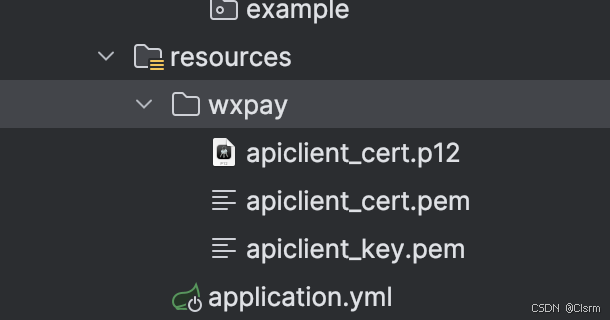
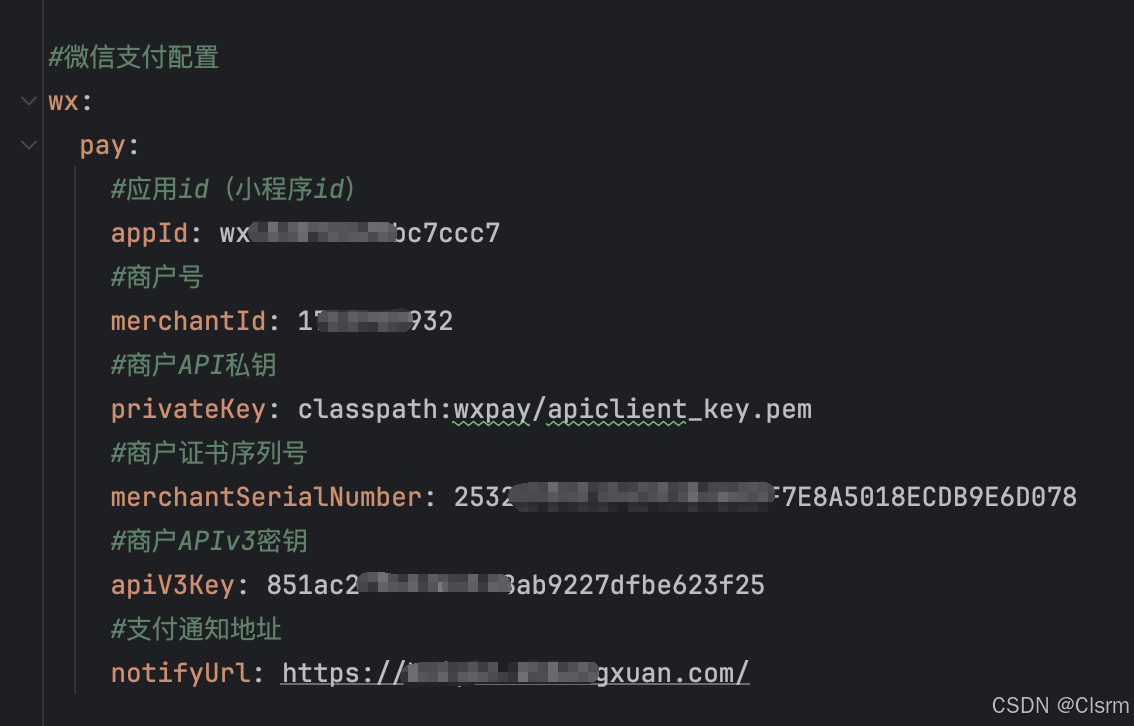
这里的密钥文件需要去商户号里面自行下载!!!
(2)controller类
package com.beiyin.mall.wxpay.controller;
import com.alibaba.fastjson.JSONObject;
import com.beiyin.mall.common.RespBean;
import com.beiyin.mall.wxpay.service.WxPayService;
import org.springframework.web.bind.annotation.*;
import javax.annotation.Resource;
import javax.servlet.http.HttpServletRequest;
import java.math.BigDecimal;
/**
* 微信支付
*/
@RestController
@RequestMapping("/wxPay")
public class WxPayController {
@Resource
private WxPayService wxPayService;
/**
* 下单
*/
@PostMapping("/create/IndentPayment")
public RespBean creationIndentPayment(@RequestBody JSONObject jsonObject, HttpServletRequest request) {
return RespBean.ok(wxPayService.weiXinPay(jsonObject,request));
}
/**
* 微信支付回调 JSAPI 下单回调
*
* @return 回调结果
*/
@PostMapping("/paymentCallback")
public RespBean wxPaymentCallback(HttpServletRequest request) {
return RespBean.ok(wxPayService.wxPaymentCallback(request));
}
/**
* 退款
*
* @param jsonObject
* @return 退款信息
*/
@PostMapping("/refundPayment")
public RespBean refundPayment(@RequestBody JSONObject jsonObject) throws Exception {
String orderId = jsonObject.getString("orderId");
return RespBean.ok(wxPayService.refundIndentPayment(orderId, null));
}
/**
* 退款回调
* @param request 请求
* @return 退款信息
*/
@PostMapping("/refundBlack")
public RespBean endRefundIndent(HttpServletRequest request) {
return RespBean.ok(wxPayService.getRefundNotification(request));
}
/**
* 支付后的回调轮询
* @param jsonObject 请求
* @return 退款信息
*/
@PostMapping("/paymentPoll")
public RespBean paymentPoll(@RequestBody JSONObject jsonObject) {
return  最低0.47元/天 解锁文章






 扫一扫
扫一扫


 3671
3671

 被折叠的 条评论
为什么被折叠?
被折叠的 条评论
为什么被折叠?
 到【灌水乐园】发言





