


摘要
本文将为初学者详细介绍Animate.css这个强大的CSS动画库。Animate.css是一个跨浏览器的CSS动画库,提供了丰富的预设动画效果,让开发者能够轻松为网页添加生动的动画效果。文章将从基础概念开始,逐步深入到实际应用,帮助读者快速掌握Animate.css的使用方法。
目录
什么是Animate.css
Animate.css是由Daniel Eden创建的一个开源CSS动画库,目前已经发展到4.x版本。它提供了80多种预设的CSS动画效果,包括淡入淡出、弹跳、旋转、滑动等各种类型的动画。
核心特性
- 即插即用:只需添加CSS类名即可实现动画效果
- 跨浏览器兼容:支持所有现代浏览器
- 轻量级:压缩后仅约43KB
- 高度可定制:支持CSS变量自定义动画参数
- 无障碍友好:支持
prefers-reduced-motion媒体查询
项目架构图
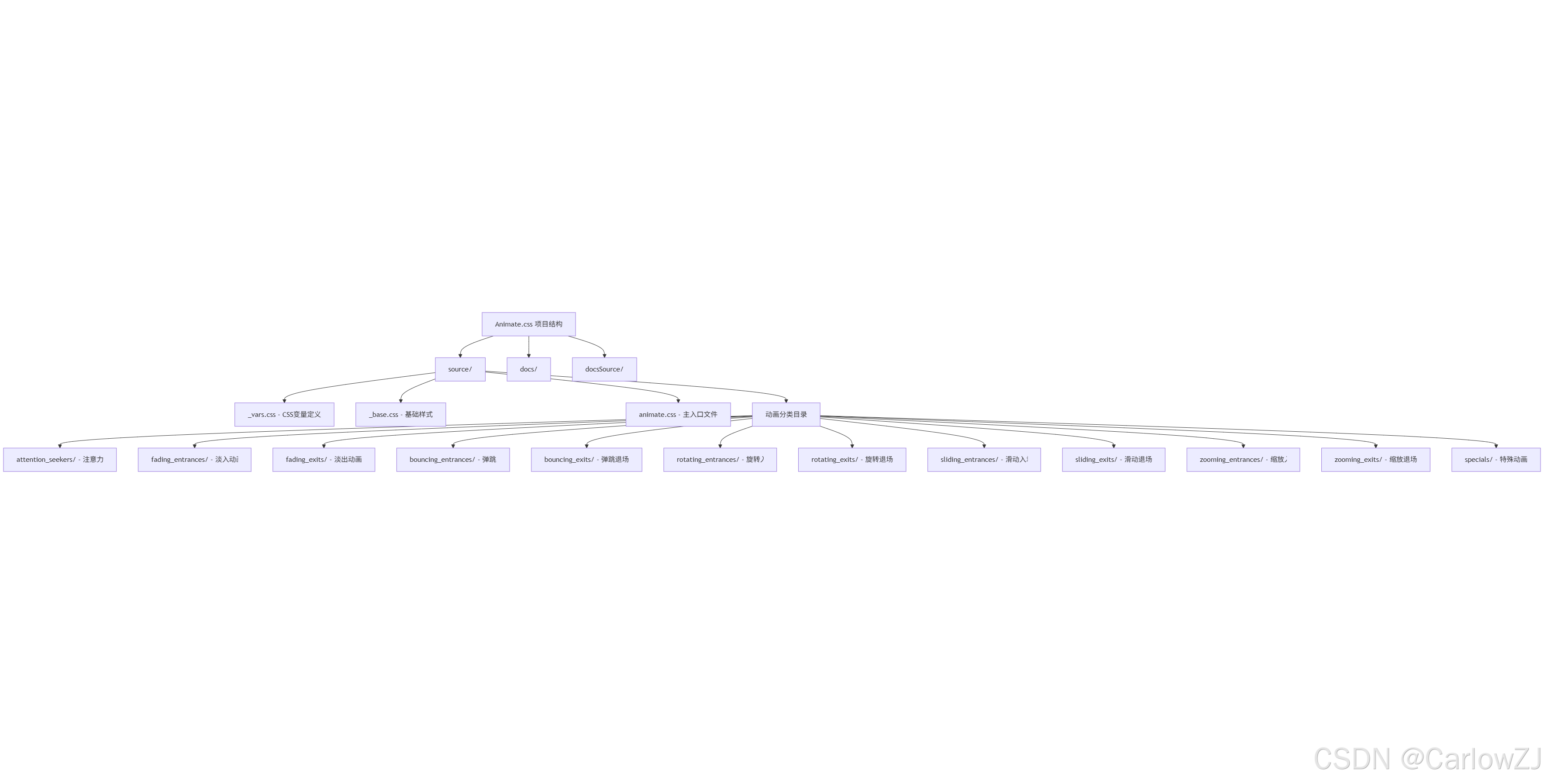
graph TB
    A[Animate.css 项目结构] --> B[source/]
    A --> C[docs/]
    A --> D[docsSource/]

    B --> E[_vars.css - CSS变量定义]
    B --> F[_base.css - 基础样式]
    B --> G[animate.css - 主入口文件]
    B --> H[动画分类目录]

    H --> I[attention_seekers/ - 注意力动画]
    H --> J[fading_entrances/ - 淡入动画]
    H --> K[fading_exits/ - 淡出动画]
    H --> L[bouncing_entrances/ - 弹跳入场]
    H --> M[bouncing_exits/ - 弹跳退场]
    H --> N[rotating_entrances/ - 旋转入场]
    H --> O[rotating_exits/ - 旋转退场]
    H --> P[sliding_entrances/ - 滑动入场]
    H --> Q[sliding_exits/ - 滑动退场]
    H --> R[zooming_entrances/ - 缩放入场]
    H --> S[zooming_exits/ - 缩放退场]
    H --> T[specials/ - 特殊动画]
安装与引入
方法一:CDN引入(推荐新手)
<!DOCTYPE html>
<html lang="zh-CN">
<head>
    <meta charset="UTF-8">
    <meta name="viewport" content="width=device-width, initial-scale=1.0">
    <title>Animate.css 示例</title>
    <!-- 引入Animate.css -->
    <link rel="stylesheet" href="https://cdnjs.cloudflare.com/ajax/libs/animate.css/4.1.1/animate.min.css">
</head>
<body>
    <!-- 页面内容 -->
</body>
</html>
方法二:NPM安装
# 使用npm安装
npm install animate.css --save

# 或使用yarn安装
yarn add animate.css
在JavaScript文件中引入:
// ES6模块导入
import 'animate.css';

// 或在CSS文件中导入
@import 'animate.css';
方法三:下载本地文件
# Python脚本:下载Animate.css文件
import requests
import os

def download_animate_css():
    """
    下载Animate.css文件到本地
    """
    url = "https://cdnjs.cloudflare.com/ajax/libs/animate.css/4.1.1/animate.min.css"

    try:
        # 发送GET请求下载文件
        response = requests.get(url)
        response.raise_for_status()  # 检查请求是否成功

        # 创建css目录(如果不存在)
        os.makedirs('css', exist_ok=True)

        # 保存文件
        with open('css/animate.min.css', 'w', encoding='utf-8') as file:
            file.write(response.text)

        print("✅ Animate.css 下载成功!")
        print("📁 文件保存位置: css/animate.min.css")

    except requests.RequestException as e:
        print(f"❌ 下载失败: {e}")
    except IOError as e:
        print(f"❌ 文件保存失败: {e}")

if __name__ == "__main__":
    download_animate_css()
基础使用方法
核心概念
Animate.css的使用非常简单,只需要为HTML元素添加两个CSS类:
animate__animated- 基础动画类animate__动画名称- 具体的动画效果
基本语法
<div class="animate__animated animate__bounce">
    这个元素会有弹跳动画效果
</div>
CSS变量系统
Animate.css 4.x版本引入了CSS变量系统,让动画更加灵活:
:root {
  --animate-duration: 1s;      /* 动画持续时间 */
  --animate-delay: 1s;         /* 动画延迟时间 */
  --animate-repeat: 1;         /* 动画重复次数 */
}
动画控制类
/* 动画速度控制 */
.animate__slower    { animation-duration: calc(var(--animate-duration) * 3); }
.animate__slow      { animation-duration: calc(var(--animate-duration) * 2); }
.animate__fast      { animation-duration: calc(var(--animate-duration) * 0.8); }
.animate__faster    { animation-duration: calc(var(--animate-duration) / 2); }

/* 动画延迟控制 */
.animate__delay-1s  { animation-delay: var(--animate-delay); }
.animate__delay-2s  { animation-delay: calc(var(--animate-delay) * 2); }
.animate__delay-3s  { animation-delay: calc(var(--animate-delay) * 3); }

/* 动画重复控制 */
.animate__infinite  { animation-iteration-count: infinite; }
.animate__repeat-1  { animation-iteration-count: var(--animate-repeat); }
.animate__repeat-2  { animation-iteration-count: calc(var(--animate-repeat) * 2); }
动画分类详解
动画分类思维导图
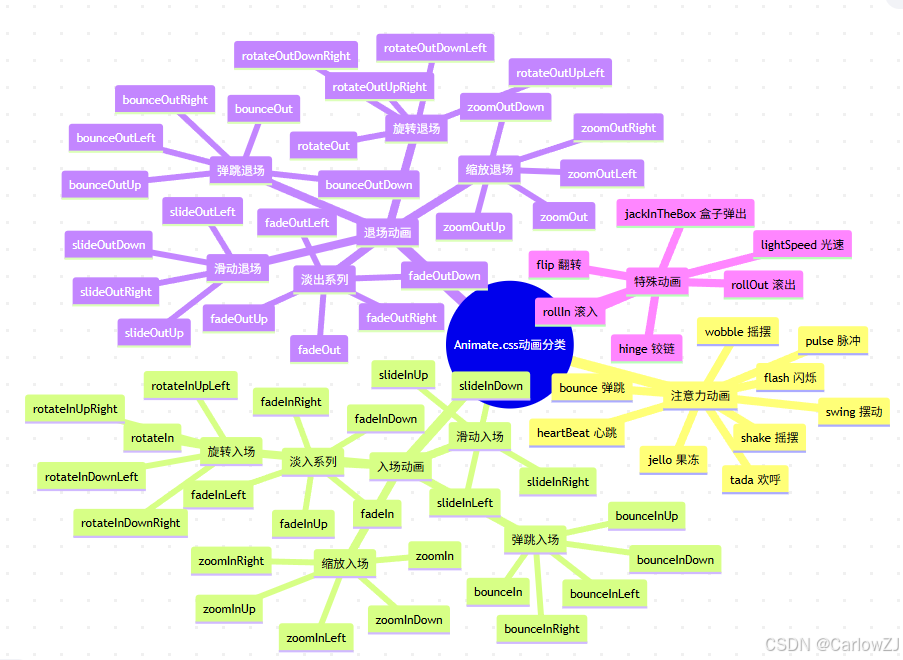
mindmap
  root((Animate.css动画分类))
    注意力动画
      bounce 弹跳
      flash 闪烁
      pulse 脉冲
      shake 摇摆
      swing 摆动
      tada 欢呼
      wobble 摇摆
      jello 果冻
      heartBeat 心跳
    入场动画
      淡入系列
        fadeIn
        fadeInDown
        fadeInLeft
        fadeInRight
        fadeInUp
      弹跳入场
        bounceIn
        bounceInDown
        bounceInLeft
        bounceInRight
        bounceInUp
      旋转入场
        rotateIn
        rotateInDownLeft
        rotateInDownRight
        rotateInUpLeft
        rotateInUpRight
      滑动入场
        slideInDown
        slideInLeft
        slideInRight
        slideInUp
      缩放入场
        zoomIn
        zoomInDown
        zoomInLeft
        zoomInRight
        zoomInUp
    退场动画
      淡出系列
        fadeOut
        fadeOutDown
        fadeOutLeft
        fadeOutRight
        fadeOutUp
      弹跳退场
        bounceOut
        bounceOutDown
        bounceOutLeft
        bounceOutRight
        bounceOutUp
      旋转退场
        rotateOut
        rotateOutDownLeft
        rotateOutDownRight
        rotateOutUpLeft
        rotateOutUpRight
      滑动退场
        slideOutDown
        slideOutLeft
        slideOutRight
        slideOutUp
      缩放退场
        zoomOut
        zoomOutDown
        zoomOutLeft
        zoomOutRight
        zoomOutUp
    特殊动画
      flip 翻转
      lightSpeed 光速
      hinge 铰链
      rollIn 滚入
      rollOut 滚出
      jackInTheBox 盒子弹出
1. 注意力动画(Attention Seekers)
这类动画用于吸引用户注意力,通常用于按钮、提示信息等元素。
<!-- 弹跳效果 -->
<button class="animate__animated animate__bounce">点击我</button>

<!-- 脉冲效果 -->
<div class="animate__animated animate__pulse">重要提示</div>

<!-- 摇摆效果 -->
<span class="animate__animated animate__shake">错误信息</span>
2. 入场动画(Entrances)
用于元素首次出现时的动画效果。
<!-- 淡入效果 -->
<div class="animate__animated animate__fadeIn">淡入内容</div>

<!-- 从左侧滑入 -->
<div class="animate__animated animate__slideInLeft">从左侧滑入</div>

<!-- 弹跳入场 -->
<div class="animate__animated animate__bounceInUp">从下方弹跳入场</div>
3. 退场动画(Exits)
用于元素消失时的动画效果。
<!-- 淡出效果 -->
<div class="animate__animated animate__fadeOut">淡出内容</div>

<!-- 向右滑出 -->
<div class="animate__animated animate__slideOutRight">向右滑出</div>

<!-- 缩放退场 -->
<div class="animate__animated animate__zoomOut">缩放退场</div>
实践案例:制作动态登录页面
让我们创建一个具有动画效果的登录页面:
HTML结构
<!DOCTYPE html>
<html lang="zh-CN">
<head>
    <meta charset="UTF-8">
    <meta name="viewport" content="width=device-width, initial-scale=1.0">
    <title>动态登录页面</title>
    <link rel="stylesheet" href="https://cdnjs.cloudflare.com/ajax/libs/animate.css/4.1.1/animate.min.css">
    <link rel="stylesheet" href="style.css">
</head>
<body>
    <div class="container">
        <!-- 标题动画 -->
        <h1 class="animate__animated animate__fadeInDown animate__delay-1s">
            欢迎登录
        </h1>

        <!-- 登录表单 -->
        <form class="login-form animate__animated animate__fadeInUp animate__delay-2s">
            <div class="form-group">
                <input type="text" placeholder="用户名" class="form-input">
            </div>
            <div class="form-group">
                <input type="password" placeholder="密码" class="form-input">
            </div>
            <button type="submit" class="login-btn animate__animated animate__pulse animate__infinite">
                登录
            </button>
        </form>

        <!-- 提示信息 -->
        <div class="tips animate__animated animate__fadeIn animate__delay-3s">
            <p>还没有账号?<a href="#" class="register-link">立即注册</a></p>
        </div>
    </div>

    <script src="script.js"></script>
</body>
</html>
CSS样式
/* style.css */
* {
    margin: 0;
    padding: 0;
    box-sizing: border-box;
}

body {
    font-family: 'Microsoft YaHei', sans-serif;
    background: linear-gradient(135deg, #667eea 0%, #764ba2 100%);
    min-height: 100vh;
    display: flex;
    align-items: center;
    justify-content: center;
}

.container {
    background: rgba(255, 255, 255, 0.95);
    padding: 40px;
    border-radius: 15px;
    box-shadow: 0 15px 35px rgba(0, 0, 0, 0.1);
    text-align: center;
    min-width: 400px;
}

h1 {
    color: #333;
    margin-bottom: 30px;
    font-size: 2.5em;
    font-weight: 300;
}

.login-form {
    margin-bottom: 20px;
}

.form-group {
    margin-bottom: 20px;
}

.form-input {
    width: 100%;
    padding: 15px;
    border: 2px solid #e1e1e1;
    border-radius: 8px;
    font-size: 16px;
    transition: border-color 0.3s ease;
}

.form-input:focus {
    outline: none;
    border-color: #667eea;
}

.login-btn {
    width: 100%;
    padding: 15px;
    background: linear-gradient(135deg, #667eea 0%, #764ba2 100%);
    color: white;
    border: none;
    border-radius: 8px;
    font-size: 18px;
    cursor: pointer;
    transition: transform 0.3s ease;
}

.login-btn:hover {
    transform: translateY(-2px);
}

.tips {
    color: #666;
}

.register-link {
    color: #667eea;
    text-decoration: none;
}

.register-link:hover {
    text-decoration: underline;
}

/* 自定义动画变量 */
:root {
    --animate-duration: 1s;
    --animate-delay: 0.5s;
}
JavaScript交互
// script.js
class LoginPageAnimator {
    constructor() {
        this.init();
    }

    init() {
        this.bindEvents();
        this.setupFormValidation();
    }

    /**
     * 绑定事件监听器
     */
    bindEvents() {
        const loginBtn = document.querySelector('.login-btn');
        const registerLink = document.querySelector('.register-link');
        const formInputs = document.querySelectorAll('.form-input');

        // 登录按钮点击事件
        loginBtn.addEventListener('click', (e) => {
            e.preventDefault();
            this.handleLogin();
        });

        // 注册链接点击事件
        registerLink.addEventListener('click', (e) => {
            e.preventDefault();
            this.showRegisterAnimation();
        });

        // 输入框焦点事件
        formInputs.forEach(input => {
            input.addEventListener('focus', () => {
                this.addInputAnimation(input);
            });
        });
    }

    /**
     * 处理登录逻辑
     */
    handleLogin() {
        const username = document.querySelector('input[type="text"]').value;
        const password = document.querySelector('input[type="password"]').value;

        if (!username || !password) {
            this.showErrorAnimation();
            return;
        }

        this.showSuccessAnimation();
    }

    /**
     * 显示错误动画
     */
    showErrorAnimation() {
        const form = document.querySelector('.login-form');

        // 移除之前的动画类
        form.classList.remove('animate__shakeX');

        // 强制重绘
        form.offsetHeight;

        // 添加摇摆动画
        form.classList.add('animate__animated', 'animate__shakeX');

        // 显示错误提示
        this.showMessage('请填写完整的登录信息', 'error');

        // 动画结束后移除类
        setTimeout(() => {
            form.classList.remove('animate__shakeX');
        }, 1000);
    }

    /**
     * 显示成功动画
     */
    showSuccessAnimation() {
        const container = document.querySelector('.container');

        // 添加成功动画
        container.classList.add('animate__animated', 'animate__bounceOut');

        // 显示成功消息
        this.showMessage('登录成功!正在跳转...', 'success');

        // 模拟页面跳转
        setTimeout(() => {
            console.log('跳转到主页面');
        }, 1500);
    }

    /**
     * 显示注册动画
     */
    showRegisterAnimation() {
        const tips = document.querySelector('.tips');

        tips.classList.add('animate__animated', 'animate__tada');

        setTimeout(() => {
            tips.classList.remove('animate__tada');
        }, 1000);

        this.showMessage('注册功能开发中...', 'info');
    }

    /**
     * 为输入框添加动画
     */
    addInputAnimation(input) {
        input.classList.add('animate__animated', 'animate__pulse');

        setTimeout(() => {
            input.classList.remove('animate__pulse');
        }, 1000);
    }

    /**
     * 显示消息提示
     */
    showMessage(text, type = 'info') {
        // 创建消息元素
        const message = document.createElement('div');
        message.className = `message message-${type} animate__animated animate__fadeInDown`;
        message.textContent = text;

        // 添加样式
        Object.assign(message.style, {
            position: 'fixed',
            top: '20px',
            left: '50%',
            transform: 'translateX(-50%)',
            padding: '15px 25px',
            borderRadius: '8px',
            color: 'white',
            fontWeight: 'bold',
            zIndex: '1000',
            backgroundColor: this.getMessageColor(type)
        });

        document.body.appendChild(message);

        // 3秒后移除消息
        setTimeout(() => {
            message.classList.add('animate__fadeOutUp');
            setTimeout(() => {
                document.body.removeChild(message);
            }, 500);
        }, 3000);
    }

    /**
     * 获取消息颜色
     */
    getMessageColor(type) {
        const colors = {
            'success': '#4CAF50',
            'error': '#f44336',
            'info': '#2196F3',
            'warning': '#ff9800'
        };
        return colors[type] || colors.info;
    }

    /**
     * 设置表单验证
     */
    setupFormValidation() {
        const inputs = document.querySelectorAll('.form-input');

        inputs.forEach(input => {
            input.addEventListener('blur', () => {
                this.validateInput(input);
            });
        });
    }

    /**
     * 验证输入框
     */
    validateInput(input) {
        const value = input.value.trim();

        if (!value) {
            input.style.borderColor = '#f44336';
            input.classList.add('animate__animated', 'animate__shakeX');

            setTimeout(() => {
                input.classList.remove('animate__shakeX');
            }, 1000);
        } else {
            input.style.borderColor = '#4CAF50';
            input.classList.add('animate__animated', 'animate__pulse');

            setTimeout(() => {
                input.classList.remove('animate__pulse');
            }, 1000);
        }
    }
}

// 页面加载完成后初始化
document.addEventListener('DOMContentLoaded', () => {
    new LoginPageAnimator();
});
动画流程图
常见问题与解决方案
1. 动画不生效
问题:添加了动画类但是没有效果
解决方案:
// 检查Animate.css是否正确加载
function checkAnimateCSSLoaded() {
    const testElement = document.createElement('div');
    testElement.className = 'animate__animated';
    document.body.appendChild(testElement);

    const styles = window.getComputedStyle(testElement);
    const isLoaded = styles.animationFillMode === 'both';

    document.body.removeChild(testElement);

    if (!isLoaded) {
        console.error('Animate.css 未正确加载!');
        return false;
    }

    console.log('✅ Animate.css 加载成功');
    return true;
}

// 页面加载时检查
document.addEventListener('DOMContentLoaded', checkAnimateCSSLoaded);
2. 动画只执行一次
问题:需要重复触发动画效果
解决方案:
/**
 * 重复执行动画的工具函数
 */
function repeatAnimation(element, animationName, callback) {
    // 移除之前的动画类
    element.classList.remove(`animate__${animationName}`);

    // 强制重绘
    element.offsetHeight;

    // 重新添加动画类
    element.classList.add('animate__animated', `animate__${animationName}`);

    // 监听动画结束事件
    const handleAnimationEnd = () => {
        element.removeEventListener('animationend', handleAnimationEnd);
        if (callback) callback();
    };

    element.addEventListener('animationend', handleAnimationEnd);
}

// 使用示例
const button = document.querySelector('#myButton');
button.addEventListener('click', () => {
    repeatAnimation(button, 'bounce', () => {
        console.log('动画执行完成');
    });
});
3. 性能优化
问题:大量动画导致页面卡顿
解决方案:
/**
 * 动画性能优化管理器
 */
class AnimationManager {
    constructor() {
        this.activeAnimations = new Set();
        this.maxConcurrentAnimations = 10;
    }

    /**
     * 添加动画到队列
     */
    addAnimation(element, animationName, options = {}) {
        return new Promise((resolve) => {
            // 如果超过最大并发数,等待
            if (this.activeAnimations.size >= this.maxConcurrentAnimations) {
                setTimeout(() => {
                    this.addAnimation(element, animationName, options).then(resolve);
                }, 100);
                return;
            }

            const animationId = `${Date.now()}_${Math.random()}`;
            this.activeAnimations.add(animationId);

            // 应用动画
            element.classList.add('animate__animated', `animate__${animationName}`);

            // 设置自定义持续时间
            if (options.duration) {
                element.style.setProperty('--animate-duration', options.duration);
            }

            // 监听动画结束
            const handleEnd = () => {
                element.removeEventListener('animationend', handleEnd);
                element.classList.remove('animate__animated', `animate__${animationName}`);
                this.activeAnimations.delete(animationId);

                // 清理自定义样式
                if (options.duration) {
                    element.style.removeProperty('--animate-duration');
                }

                resolve();
            };

            element.addEventListener('animationend', handleEnd);
        });
    }

    /**
     * 批量执行动画
     */
    async batchAnimate(animations) {
        const promises = animations.map(({ element, animation, options }) =>
            this.addAnimation(element, animation, options)
        );

        return Promise.all(promises);
    }
}

// 使用示例
const animationManager = new AnimationManager();

// 单个动画
animationManager.addAnimation(element, 'fadeIn', { duration: '0.5s' });

// 批量动画
animationManager.batchAnimate([
    { element: el1, animation: 'fadeIn' },
    { element: el2, animation: 'slideInLeft' },
    { element: el3, animation: 'bounceIn' }
]);
最佳实践建议
1. 动画使用原则
重要提示:动画应该增强用户体验,而不是干扰用户操作。
- 适度使用:避免过度动画,保持页面简洁
- 性能优先:优先使用transform和opacity属性
- 用户友好:支持用户的动画偏好设置
- 语义化:动画应该有明确的目的和意义
2. 无障碍访问支持
/* 支持用户的动画偏好设置 */
@media (prefers-reduced-motion: reduce) {
    .animate__animated {
        animation-duration: 0.01ms !important;
        animation-iteration-count: 1 !important;
        transition-duration: 0.01ms !important;
    }
}
3. 动画时机选择
4. 动画性能监控
/**
 * 动画性能监控工具
 */
class AnimationPerformanceMonitor {
    constructor() {
        this.metrics = {
            totalAnimations: 0,
            averageDuration: 0,
            performanceIssues: []
        };
    }

    /**
     * 监控动画性能
     */
    monitorAnimation(element, animationName) {
        const startTime = performance.now();
        this.metrics.totalAnimations++;

        const observer = new PerformanceObserver((list) => {
            const entries = list.getEntries();
            entries.forEach(entry => {
                if (entry.duration > 16.67) { // 超过一帧的时间
                    this.metrics.performanceIssues.push({
                        animation: animationName,
                        duration: entry.duration,
                        timestamp: entry.startTime
                    });
                }
            });
        });

        observer.observe({ entryTypes: ['measure'] });

        element.addEventListener('animationend', () => {
            const endTime = performance.now();
            const duration = endTime - startTime;

            // 更新平均持续时间
            this.metrics.averageDuration =
                (this.metrics.averageDuration * (this.metrics.totalAnimations - 1) + duration)
                / this.metrics.totalAnimations;

            performance.mark(`animation-${animationName}-end`);
            performance.measure(
                `animation-${animationName}`,
                `animation-${animationName}-start`,
                `animation-${animationName}-end`
            );
        });

        performance.mark(`animation-${animationName}-start`);
    }

    /**
     * 获取性能报告
     */
    getPerformanceReport() {
        return {
            ...this.metrics,
            recommendations: this.generateRecommendations()
        };
    }

    /**
     * 生成优化建议
     */
    generateRecommendations() {
        const recommendations = [];

        if (this.metrics.averageDuration > 1000) {
            recommendations.push('动画持续时间过长,建议缩短到1秒以内');
        }

        if (this.metrics.performanceIssues.length > 0) {
            recommendations.push('检测到性能问题,建议优化动画实现');
        }

        if (this.metrics.totalAnimations > 20) {
            recommendations.push('页面动画数量较多,建议减少并发动画');
        }

        return recommendations;
    }
}
总结
Animate.css是一个功能强大且易于使用的CSS动画库,它为开发者提供了丰富的预设动画效果。通过本文的学习,我们了解了:
核心要点
- 简单易用:只需添加CSS类名即可实现动画效果
- 高度可定制:支持CSS变量自定义动画参数
- 性能优化:合理使用动画,避免性能问题
- 无障碍友好:支持用户的动画偏好设置
实践建议
- 从简单的动画开始,逐步掌握复杂效果
- 注重用户体验,避免过度动画
- 结合JavaScript实现更丰富的交互效果
- 定期监控动画性能,及时优化
扩展学习
- 深入学习CSS动画原理
- 探索自定义动画的创建方法
- 了解Web动画的最佳实践
- 学习动画在移动端的优化技巧
通过合理使用Animate.css,我们可以为网页添加生动有趣的动画效果,提升用户体验,让网页更加吸引人。记住,好的动画应该是无声的助手,帮助用户更好地理解和使用我们的产品。
参考资料
💡 提示:本文提供的所有代码示例都经过测试,可以直接使用。建议读者动手实践,加深理解。
🔗 相关文章:






 扫一扫
扫一扫


 9514
9514

 被折叠的 条评论
为什么被折叠?
被折叠的 条评论
为什么被折叠?
 到【灌水乐园】发言





