


摘要
本文主要介绍了如何优化 Docker 的配置,特别是如何通过配置国内镜像源来提升镜像拉取的速度和稳定性。文章详细讲解了配置方法、实践示例以及常见问题的解决方法,旨在帮助中国开发者,特别是 AI 应用开发者,更高效地使用 Docker。通过本文的实践案例和最佳实践建议,读者可以快速掌握 Docker 配置的优化技巧,并应用于实际开发中。
正文
1. 优化 Docker 配置的重要性
在开发过程中,Docker 镜像的拉取速度和稳定性对开发效率有着直接影响。默认的 Docker Hub 镜像源位于国外,网络连接可能不稳定,导致镜像拉取速度慢甚至失败。因此,配置国内镜像源是提升开发效率的关键。
特别是在 AI 应用开发中,我们经常需要拉取大型镜像,如 TensorFlow、PyTorch 等,这些镜像通常体积庞大,如果网络不稳定,拉取过程可能需要很长时间甚至失败。通过配置国内镜像源,可以显著提升这些大型镜像的拉取速度。
2. 配置国内镜像源
2.1 选择可靠的镜像源
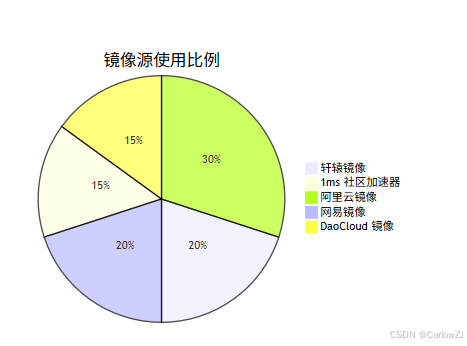
以下是一些经过测试稳定可用的国内镜像源:
- 轩辕镜像:
https://docker.xuanyuan.me - 1ms 社区加速器:
https://docker.1ms.run - 阿里云镜像:
https://mirror.aliyuncs.com - 网易镜像:
https://hub-mirror.c.163.com - DaoCloud 镜像:
https://docker.m.daocloud.io
2.2 修改 Docker 配置文件
- 编辑
/etc/docker/daemon.json文件:
sudo nano /etc/docker/daemon.json
- 添加或更新镜像源:
{
  "dns": ["8.8.8.8", "1.1.1.1"],
  "registry-mirrors": [
    "https://docker.xuanyuan.me",
    "https://docker.1ms.run",
    "https://hub-mirror.c.163.com",
    "https://docker.m.daocloud.io",
    "https://hub.rat.dev"
  ]
}
- 重启 Docker 服务:
sudo systemctl daemon-reload
sudo systemctl restart docker
- 验证配置是否生效:
docker info | grep -A 10 -i registry
3. 实践案例
3.1 案例背景
假设你正在开发一个基于 AI 的图像识别应用,需要频繁拉取 Docker 镜像。默认的 Docker Hub 镜像源速度慢,严重影响开发效率。
3.2 实践步骤
-
配置国内镜像源:
- 按照上文步骤配置
/etc/docker/daemon.json文件。 - 重启 Docker 服务。
- 按照上文步骤配置
-
测试镜像拉取速度:
- 拉取一个常见的镜像(如
hello-world):
- 拉取一个常见的镜像(如
docker pull hello-world
- 结果对比:
- 配置前:拉取速度慢,甚至失败。
- 配置后:拉取速度快,稳定。
3.3 AI应用中的实际测试
为了更好地展示优化效果,我们可以编写一个 Python 脚本来测试 Docker 镜像拉取速度:
import subprocess
import time
import json

def pull_image_with_timing(image_name):
    """
    拉取 Docker 镜像并测量时间
    :param image_name: 镜像名称
    :return: 拉取时间和结果
    """
    start_time = time.time()
    try:
        # 执行 docker pull 命令
        result = subprocess.run(
            ["docker", "pull", image_name],
            capture_output=True,
            text=True,
            timeout=300  # 5分钟超时
        )

        end_time = time.time()
        duration = end_time - start_time

        if result.returncode == 0:
            print(f"✅ 成功拉取镜像 {image_name}")
            print(f"⏱️  耗时: {duration:.2f} 秒")
            return duration, True
        else:
            print(f"❌ 拉取镜像 {image_name} 失败")
            print(f"错误信息: {result.stderr}")
            return duration, False

    except subprocess.TimeoutExpired:
        print(f"⏰ 拉取镜像 {image_name} 超时")
        return None, False
    except Exception as e:
        print(f"💥 拉取镜像时发生异常: {e}")
        return None, False

def compare_pull_speed(image_list):
    """
    比较多个镜像的拉取速度
    :param image_list: 镜像列表
    """
    results = {}

    print("🐳 开始测试 Docker 镜像拉取速度...")
    print("=" * 50)

    for image in image_list:
        print(f"\n🔍 测试镜像: {image}")
        duration, success = pull_image_with_timing(image)
        results[image] = {
            "duration": duration,
            "success": success
        }

        # 避免过于频繁的请求
        time.sleep(2)

    # 输出结果汇总
    print("\n" + "=" * 50)
    print("📊 测试结果汇总:")
    print("=" * 50)

    for image, result in results.items():
        if result["success"]:
            print(f"✅ {image}: {result['duration']:.2f} 秒")
        else:
            print(f"❌ {image}: 失败")

    return results

# 测试常用的AI相关镜像
ai_images = [
    "hello-world",
    "python:3.9-slim",
    "tensorflow/tensorflow:latest",
    "pytorch/pytorch:latest"
]

# 执行测试
# test_results = compare_pull_speed(ai_images)

# 保存测试结果到文件
# with open('docker_pull_results.json', 'w') as f:
#     json.dump(test_results, f, indent=2)
4. 注意事项
- 镜像源的可用性:部分镜像源可能因网络问题或维护而不可用,建议定期检查。
- DNS 配置:确保
/etc/resolv.conf文件中包含可靠的 DNS 服务器(如 8.8.8.8 和 1.1.1.1)。 - 网络环境:确保你的网络环境没有限制对这些镜像源的访问。
5. 最佳实践
- 使用多个镜像源:配置多个镜像源可以提高镜像拉取的可靠性和速度。
- 定期更新配置:镜像源的可用性可能会随时间变化,建议定期更新配置。
- 监控网络状态:使用工具(如
ping和traceroute)监控网络状态,及时发现并解决问题。
5.1 动态检测最佳镜像源
为了自动选择最快的镜像源,我们可以编写一个检测脚本:
import subprocess
import time
import threading
from typing import List, Dict

def ping_mirror(mirror_url: str, results: Dict) -> None:
    """
    测试镜像源的响应时间
    :param mirror_url: 镜像源URL
    :param results: 结果存储字典
    """
    try:
        # 提取域名
        domain = mirror_url.replace("https://", "").replace("http://", "")
        if "/" in domain:
            domain = domain.split("/")[0]

        # 执行 ping 命令
        result = subprocess.run(
            ["ping", "-c", "4", domain],
            capture_output=True,
            text=True,
            timeout=30
        )

        if result.returncode == 0:
            # 解析平均延迟
            lines = result.stdout.strip().split("\n")
            for line in lines:
                if "avg" in line:
                    # 格式: round-trip min/avg/max/stddev = 10.5/20.3/30.1/5.2 ms
                    avg_time = float(line.split("/")[4])
                    results[mirror_url] = avg_time
                    print(f"✅ {mirror_url}: {avg_time:.2f} ms")
                    return

        results[mirror_url] = float('inf')
        print(f"❌ {mirror_url}: 无法连接")

    except Exception as e:
        results[mirror_url] = float('inf')
        print(f"💥 测试 {mirror_url} 时发生异常: {e}")

def find_best_mirror(mirrors: List[str]) -> str:
    """
    找到响应最快的镜像源
    :param mirrors: 镜像源列表
    :return: 最佳镜像源
    """
    print("🔍 正在检测最佳镜像源...")
    print("-" * 30)

    results = {}
    threads = []

    # 并发测试所有镜像源
    for mirror in mirrors:
        thread = threading.Thread(target=ping_mirror, args=(mirror, results))
        threads.append(thread)
        thread.start()

    # 等待所有线程完成
    for thread in threads:
        thread.join()

    # 找到最快的镜像源
    best_mirror = min(results, key=results.get)
    best_time = results[best_mirror]

    if best_time == float('inf'):
        print("⚠️  所有镜像源都无法连接")
        return mirrors[0]  # 返回第一个作为默认

    print(f"\n🏆 最佳镜像源: {best_mirror} ({best_time:.2f} ms)")
    return best_mirror

# 镜像源列表
mirror_list = [
    "https://docker.xuanyuan.me",
    "https://docker.1ms.run",
    "https://mirror.aliyuncs.com",
    "https://hub-mirror.c.163.com",
    "https://docker.m.daocloud.io"
]

# 查找最佳镜像源
# best_mirror = find_best_mirror(mirror_list)
6. 常见问题解答
6.1 为什么我的 Docker 镜像下载速度很慢?
- 原因:默认的 Docker Hub 服务器位于国外,网络连接可能不稳定。
- 解决方法:配置国内镜像源,如轩辕镜像或 1ms 社区加速器。
6.2 为什么 docker pull 失败?
- 原因:网络连接问题、镜像名称或标签错误、镜像被删除或不可用。
- 解决方法:检查网络连接,使用国内镜像源,更正镜像名称。
6.3 如何验证 Docker 镜像的完整性?
- 方法:使用
docker inspect查看镜像的 SHA256 摘要,并与官方发布的摘要进行比对。
# 查看镜像详细信息
docker inspect tensorflow/tensorflow:latest

# 只查看镜像ID
docker inspect tensorflow/tensorflow:latest --format='{{.Id}}'
6.4 配置镜像源后仍然很慢怎么办?
- 检查配置是否生效:
docker info | grep -i registry
- 测试镜像源连通性:
curl -v https://docker.xuanyuan.me/v2/
7. 扩展阅读
- Docker 官方文档:Docker Documentation
- 轩辕镜像官方文档:轩辕镜像文档
- 1ms 社区加速器文档:1ms 社区加速器文档
总结
通过配置国内镜像源,可以显著提升 Docker 镜像的拉取速度和稳定性。本文详细介绍了配置方法、实践案例以及常见问题的解决方法。希望这些内容能帮助中国开发者,特别是 AI 应用开发者,更高效地使用 Docker。在实际开发中,建议定期检查和更新镜像源配置,以确保最佳的使用体验。
参考资料
图表展示
架构图
流程图
思维导图
甘特图
饼图






 扫一扫
扫一扫


 1126
1126

 被折叠的 条评论
为什么被折叠?
被折叠的 条评论
为什么被折叠?
 到【灌水乐园】发言





