 C# Async Reader Monad


c#async await

In my previous article I described how to achieve the "Maybe" monad behavior using async/await operators. This time I am going to show how to implement another popular design pattern "Reader Monad" using the same techniques.
在上一篇文章中,我描述了如何使用async / await运算符实现“也许”单子行为。 这次,我将展示如何使用相同的技术来实现另一个流行的设计模式“ Reader Monad”。
That pattern allows implicit passing some context into some function without using function parameters or shared global objects and it can be considered as yet another way to implement dependency injection. For example:
该模式允许在不使用函数参数或共享全局对象的情况下,将某些上下文隐式传递到某个函数中,并且可以将其视为实现依赖项注入的另一种方法。 例如:
class Config { public string Template; }

public static async Task Main()
{
    Console.WriteLine(await GreetGuys().Apply(new Config {Template = "Hi, {0}!"}));
    //(Hi, John!, Hi, Jose!)

    Console.WriteLine(await GreetGuys().Apply(new Config {Template = "¡Hola, {0}!" }));
    //(¡Hola, John!, ¡Hola, Jose!)
}

//These functions do not have any link to any instance of the Config class.
public static async Reader<(string gJohn, string gJose)> GreetGuys()
    => (await Greet("John"), await Greet("Jose"));

static async Reader<string> Greet(string name)
    => string.Format(await ExtractTemplate(), name);

static async Reader<string> ExtractTemplate()
    => await Reader<string>.Read<Config>(c => c.Template);
经典的“读者” (Classic "Reader")
First, let's take a look at how the monad can be implemented without async/await operators:
首先,让我们看一下如何在没有异步/等待操作符的情况下实现monad:
public class Config { public string Template; }

public static class ClassicReader
{
    public static void Main()
    {
        var greeter = GreetGuys();

        Console.WriteLine(greeter.Apply(new Config{Template = "Hello, {0}"}));
        //(Hello, John, Hello, Jose)

        Console.WriteLine(greeter.Apply(new Config{Template = "¡Hola, {0}!" }));
        //(¡Hola, John!, ¡Hola, Jose!)
    }

    public static Reader<(string gJohn, string gJose), Config> GreetGuys() =>
        from toJohn in Greet("John")
        from toJose in Greet("Jose")
        select (toJohn, toJose);
        //Without using the query notation the code would look like this:
        //Greet("John")
        //    .SelectMany(
        //          toJohn => Greet("Jose"),
        //          (toJohn, toJose) => (toJohn, toJose))

    public static Reader<string, Config> Greet(string name)
        => new Reader<string, Config>(cfg => string.Format(cfg.Template, name));
}
(Reader)
(读者)
public class Reader<T, TCtx>
{
    private readonly Func<TCtx, T> _exec;

    public Reader(Func<TCtx, T> exec) => this._exec = exec;

    public T Apply(TCtx ctx) => this._exec(ctx);
}

public static class Reader
{
    public static Reader<TJoin, TCtx> SelectMany<TIn, TOut, TCtx, TJoin>(
        this Reader<TIn, TCtx> source,
        Func<TIn, Reader<TOut, TCtx>> bind,
        Func<TIn, TOut, TJoin> join)
    =>
        new Reader<TJoin, TCtx>(ctx =>
        {
            var inValue = source.Apply(ctx);
            var outValue = bind(inValue).Apply(ctx);
            return join(inValue, outValue);
        });
}
The code works but it does not look natural for C# developers. No wonder, because monads came from functional languages where a similar code can be written in a more concise way. However, the classic implementation helps understating the essence of the pattern — instead of immediate execution of some code it is put into a function which will be called when its context is ready.
该代码可以工作,但对于C#开发人员而言似乎并不自然。 难怪,因为monad来自功能语言,在这些语言中,可以更简洁的方式编写类似的代码。 但是,经典实现有助于低估模式的本质-而不是立即执行某些代码,而是将其放入一个函数,该函数在其上下文就绪时将被调用。
public static Reader<string, Config> Greet(string name)
    => new Reader<string, Config>(cfg => string.Format(cfg.Template, name));

//That is how the code would look like with explicit passing of context:
//public static string Greet(string name, Config cfg)
//    => string.Format(cfg.Template, name);
SelectMany can combine several such functions into a single one, so you can create a sub-routine whose execution will be deferred until its context is applied. On the other hand, that approach resembles writing asynchronous code where program execution is stopped if some async operation is running. When a result of the operation is ready the program execution will continued. An assumption arises that the C# infrastructure designed to work with asynchronous operations (async/await) could be somehow utilized in implementation of "Reader" monad and… the assumption is correct!
SelectMany可以将多个这样的功能组合为一个功能,因此您可以创建一个子程序,该子程序的执行将推迟到应用其上下文之前。 另一方面,该方法类似于编写异步代码,其中如果正在运行某些异步操作,则程序执行将停止。 操作结果准备就绪后,程序将继续执行。 出现这样一种假设,即设计用于异步操作( async / await )的C#基础结构可以在实现“ Reader” monad的过程中以某种方式利用,并且……这种假设是正确的!
异步“阅读器” (Async "Reader")
In my previous article I demonstrated how to get control over async/await operators using Generalized async return types. The same technique will be used this time. Let's start with "Reader" class which will be used as a result type of asynchronous operations:
在上一篇文章中,我演示了如何使用通用异步返回类型来控制异步/等待操作符。 这次将使用相同的技术。 让我们从“ Reader”类开始,该类将用作异步操作的结果类型:
[AsyncMethodBuilder(typeof(ReaderTaskMethodBuilder<>))]
public class Reader<T> : INotifyCompletion, IReader
{
...
The class has two different responsibilities (theoretically we could create 2 classes):
这个类有两个不同的职责(理论上我们可以创建两个类):
- Extracting some value form a context when the context is applied 应用上下文时从上下文中提取一些值
Creation of a linked list of Reader instances which will be used to distribute a context over a call hierarchy.
创建Reader实例的链接列表,该列表将用于在调用层次结构上分发上下文。
For each responsibility we will use a separate constructor:
对于每种职责,我们将使用单独的构造函数:
private readonly Func<object, T> _extractor;

//1. Used to extract some value from a context
public static Reader<T> Read<TCtx>(Func<TCtx, T> extractor)
    => new Reader<T>(ctx => extractor((TCtx)ctx));

private Reader(Func<object, T> exec) => this._extractor = exec;

//2. Used by ReaderTaskMethodBuilder in a compiler generated code
internal Reader() { }
When an instance of the Reader class is used as an argument of await operator the instance will receive a link to a continuation delegate which should be called only when an execution context is resolved and we can extract (from the context) some data which will be used in the continuation.
当Reader类的实例用作await运算符的参数时,该实例将收到指向延续委托的链接,只有在解析执行上下文时,才可以调用该链接,并且我们可以从上下文中提取一些数据在延续中使用。
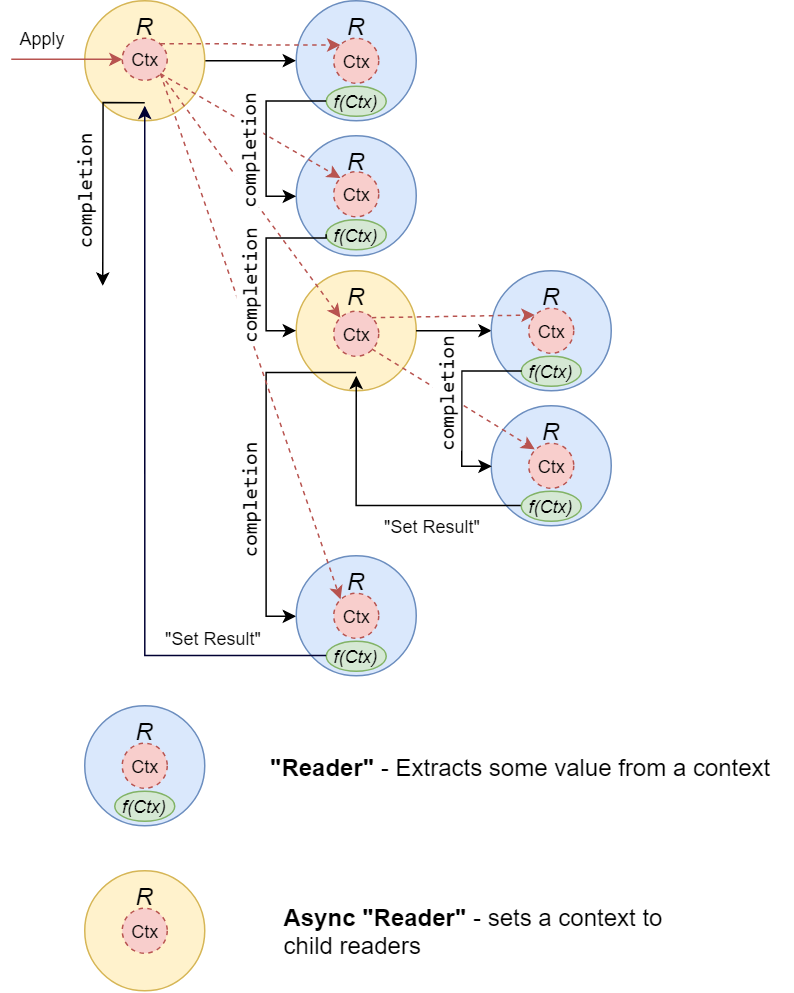
To create connections between parent and child "readers" let's create the method:
要在父级和子级“阅读器”之间创建连接,请创建方法:
private IReader _child;

internal void SetChild(IReader reader)
{
    this._child = reader;
    if (this._ctx != null)
    {
        this._child.SetCtx(this._ctx);
    }
}
which will be called inside ReaderTaskMethodBuilder:
这将在ReaderTaskMethodBuilder内部调用 :
public class ReaderTaskMethodBuilder<T>
{
    ...
    public void GenericAwaitOnCompleted<TAwaiter, TStateMachine>(
        ref TAwaiter awaiter,
        ref TStateMachine stateMachine)
        where TAwaiter : INotifyCompletion
        where TStateMachine : IAsyncStateMachine
    {
        if (awaiter is IReader reader)
        {
            this.Task.SetChild(reader);
        }
        awaiter.OnCompleted(stateMachine.MoveNext);
    }

    public Reader<T> Task { get; }
}
Inside SetChild method we call SetCtx which propagates a context down to a hierarchy and calls an extractor if it is defined:
在SetChild方法内部,我们调用SetCtx ,它将上下文传播到层次结构并调用提取器(如果已定义):
public void SetCtx(object ctx)
{
    this._ctx = ctx;
    if (this._ctx != null)
    {
        this._child?.SetCtx(this._ctx);

        if (this._extractor != null)
        {
            this.SetResult(this._extractor(this._ctx));
        }
    }
}
SetResult stores a value extracted from a context and calls a continuation:
SetResult存储从上下文中提取的值并调用延续:
internal void SetResult(T result)
{
    this._result = result;
    this.IsCompleted = true;
    this._continuation?.Invoke();
}
In the case when a Reader instance does not have an initialized "extractor" then SetResult is supposed to be called by ReaderTaskMethodBuilder when a generated state machine goes to its final state.
如果Reader实例没有初始化的“提取程序”,则当生成的状态机进入其最终状态时,应该由ReaderTaskMethodBuilder调用SetResult 。
Apply method just calls SetCtx
Apply方法仅调用SetCtx
public Reader<T> Apply(object ctx)
{
    this.SetCtx(ctx);
    return this;
}
You can find all the code on github (if it is still not blocked)
Now, I want to show a more realistic example of how the async Reader can be used:
现在,我想展示一个更实际的示例,说明如何使用异步阅读器 :
单击以展开示例 (Click to expand the example)
public static class ReaderTest
{
    public class Configuration
    {
        public readonly int DataBaseId;

        public readonly string GreetingTemplate;

        public readonly string NameFormat;

        public Configuration(int dataBaseId, string greetingTemplate, string nameFormat)
        {
            this.DataBaseId = dataBaseId;
            this.GreetingTemplate = greetingTemplate;
            this.NameFormat = nameFormat;
        }
    }

    public static async Task Main()
    {
        int[] ids = { 1, 2, 3 };

        Configuration[] configurations =
        {
            new Configuration(100, "Congratulations, {0}! You won {1}$!", "{0} {1}"),
            new Configuration(100, "¡Felicidades, {0}! Ganaste {1} $", "{0}"),
        };

        foreach (var configuration in configurations)
        {
            foreach (var userId in ids)
            {
                //The logic receives only a single explicit parameter - userId
                var logic = GetGreeting(userId);

                //The rest of parameters (database Id, templates) can be passed implicitly
                var greeting = await logic.Apply(configuration);

                Console.WriteLine(greeting)
            }
        }
        //Congratulations, John Smith! You won 110$!
        //Congratulations, Mary Louie! You won 30$!
        //Congratulations, Louis Slaughter! You won 47$!
        //¡Felicidades, John! Ganaste 110 $
        //¡Felicidades, Mary! Ganaste 30 $
        //¡Felicidades, Louis! Ganaste 47 $
    }

    private static async Reader<string> GetGreeting(int userId)
    {
        var template = await Reader<string>.Read<Configuration>(cfg => cfg.GreetingTemplate);

        var fullName = await GetFullName(userId);

        var win = await GetWin(userId);

        return string.Format(template, fullName, win);
    }

    private static async Reader<string> GetFullName(int userId)
    {
        var template = await Reader<string>.Read<Configuration>(cfg => cfg.NameFormat);

        var firstName = await GetFirstName(userId);
        var lastName = await GetLastName(userId);

        return string.Format(template, firstName, lastName);
    }

    private static async Reader<string> GetFirstName(int userId)
    {
        var dataBase = await GetDataBase();
        return await dataBase.GetFirstName(userId);
    }

    private static async Reader<string> GetLastName(int userId)
    {
        var dataBase = await GetDataBase();
        return await dataBase.GetLastName(userId);
    }

    private static async Reader<int> GetWin(int userId)
    {
        var dataBase = await GetDataBase();
        return await dataBase.GetWin(userId);
    }

    private static async Reader<Database> GetDataBase()
    {
        var dataBaseId = await Reader<int>.Read<Configuration>(cfg => cfg.DataBaseId);
        return Database.ConnectTo(dataBaseId);
    }
}

public class Database
{
    public static Database ConnectTo(int id)
    {
        if (id == 100)
        {
            return new Database();
        }
        throw new Exception("Wrong database");
    }

    private Database() { }

    private static readonly (int Id, string FirstName, string LastName, int Win)[] Data =
    {
        (1, "John","Smith", 110),
        (2, "Mary","Louie", 30),
        (3, "Louis","Slaughter", 47),
    };

    public async Task<string> GetFirstName(int id)
    {
        await Task.Delay(50);
        return Data.Single(i => i.Id == id).FirstName;
    }

    public async Task<string> GetLastName(int id)
    {
        await Task.Delay(50);
        return Data.Single(i => i.Id == id).LastName;
    }

    public async Task<int> GetWin(int id)
    {
        await Task.Delay(50);
        return Data.Single(i => i.Id == id).Win;
    }
}
The program shows greetings for some users but we do not know their names in advance since we have just their ids, so we need to read that information from a "database". To connect to the database we need to know some connection identifier and to create a greeting we need its template and… all the information is passed implicitly trough the async Reader.
该程序向某些用户显示问候语,但由于我们只有他们的ID,所以我们不事先知道他们的名字,因此我们需要从“数据库”中读取该信息。 要连接到数据库,我们需要知道一些连接标识符并创建问候语,我们需要其模板,然后…所有信息都通过异步Reader隐式传递。
异步“阅读器”的依赖注入 (Dependency Injection with Async "Reader")
In comparison with the classic implementation the async reader has a flaw — we cannot specify a type of a passed context. This limitation comes from the fact that C# compiler expects just a single generic type parameter in an async method builder class (maybe it will be fixed in future).
与经典实现相比,异步阅读器有一个缺陷-我们无法指定传递上下文的类型。 此限制来自以下事实:C#编译器仅期望异步方法构建器类中的单个泛型类型参数(也许将来会修复)。
On the other hand, I do not think it is critical since in a real life most probably some dependency injection container will be passed as a context:
另一方面,我认为这不是至关重要的,因为在现实生活中,很可能会将某些依赖项注入容器作为上下文传递:
public static class Reader
{
    public static Reader<TService> GetService<TService>() =>
        Reader<TService>.Read<IServiceProvider>(serviceProvider
            => (TService)serviceProvider
                .GetService(typeof(TService)));
}
...
private static async Reader<string> Greet(string userName)
{
var service = await Reader.GetService<IGreater>();
return service.GreetUser(userName);
}
...(here you can find a full example...)
Unlike the async "Maybe", which I did not recommend using in any production code (because of the issue with finally blocks), I would consider using the async Reader in real projects as a replacement of (or "in addition to") the traditional dependency injection approach (when all dependencies are passed into a class constructor) since the Reader has some advantages:
与不建议在任何生产代码中使用异步“ Maybe” (由于finally块存在问题)不同,我会考虑在实际项目中使用异步阅读器代替(或“除”)传统的依赖项注入方法(将所有依赖项都传递给类构造函数时),因为Reader具有一些优点:
- There is no need in class properties that store links to injected resources. Actually there is no need in classes at all — all logic can be be implemented in static methods. 在类属性中,不需要存储指向注入资源的链接。 实际上,根本不需要类-所有逻辑都可以在静态方法中实现。
Using the Reader will encourage creating non blocking code since all methods will be asynchronous and nothing will prevent developers using non blocking versions of input/output operations.
使用Reader会鼓励创建非阻塞代码,因为所有方法都是异步的,没有任何东西会阻止开发人员使用非阻塞版本的输入/输出操作。
Code will be a little bit more "readable" — each time we see the Reader as a result type of some method we will know that it requires access to some implicit context.
代码会更具“可读性”-每次我们将Reader作为某种方法的结果类型时,我们都会知道它需要访问某些隐式上下文。
The async Reader does not use reflection.
异步阅读器不使用反射。
Of course there might be some arguments against using the Reader but anyway, the main purpose of these articles is to show how the patterns, which were initially designed for functional languages, can be adopted to imperative style of coding which is believed to be simpler to understand by most people.
当然,可能会有一些反对使用Reader的争论,但是无论如何,这些文章的主要目的是展示最初为功能语言设计的模式如何可以被用于命令式的编码,该编码被认为更容易实现。被大多数人理解。
c#async await





 扫一扫
扫一扫


 437
437

 被折叠的 条评论
为什么被折叠?
被折叠的 条评论
为什么被折叠?
 到【灌水乐园】发言





