



 文章介绍了如何在Vue项目中使用el-checkbox-group组件,并详细展示了如何处理鼠标悬停、点击和选择范围操作的事件处理方法。
一个效果图,一段代码, 就这样吧。
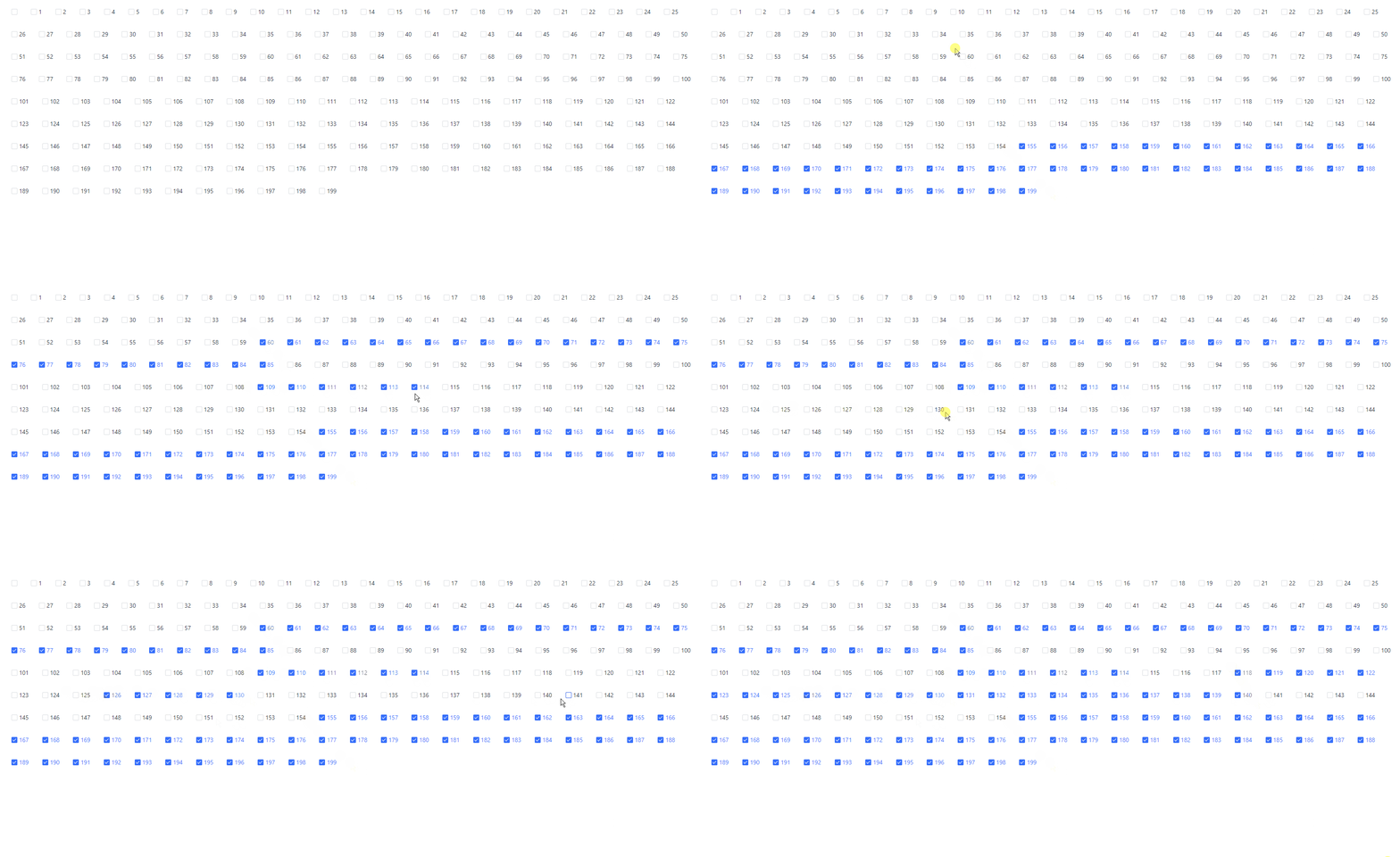
<template>
  <div
    ref="checkListRef"
    class="fizz-container h-full"
    @mouseup.stop="mouseupCon"
    @mousedown.stop="mousedownCon"
    @mouseover="mouseoverCon"
    @mouseout="mouseoutCon"
  >
    <el-checkbox-group :value="checkedList" class="user-select-auto">
      <el-checkbox
        v-for="(item, i) in checkArr"
        :key="item.id"
        :label="item.id"
        class="m-4"
        :data-index="i"
        @click.native.prevent.stop="checkItem(item.id)"
        >{{ item.label }}</el-checkbox
      >
    </el-checkbox-group>
  </div>
</template>

<script>
import { generateUUID } from '@/utils/utils'
const checkArr = new Array(200).fill(null).map((_, i) => {
  const id = generateUUID()
  return {
    id,
    value: id,
    label: i,
    checked: false,
  }
})
export default {
  data() {
    return {
      checkArr,
      checkedList: [],
      selectedIdList: [],
      isOver: false, // 是否在容器
      isDown: false, // 是否在容器按下状态
    }
  },
  methods: {
    mousedownCon() {
      this.isDown = true
    },
    mouseupCon() {
      if (this.isDown === false || this.isOver === false) {
        return
      }
      const sel = window.getSelection()
      console.log(sel)
      const { anchorNode, extentNode } = sel
      if (!anchorNode || !extentNode) {
        return
      }
      const { startIndex, endIndex } = this.getSEIndex(anchorNode, extentNode)
      if (startIndex === endIndex) {
        return
      }
      this.setChecked(startIndex, endIndex)
      this.isDown = false
      window.getSelection().removeAllRanges()
      this.selectedIdList = []
    },
    getSEIndex(anchorNode, extentNode) {
      let startDom = anchorNode
      let endDom = extentNode
      if (extentNode.classList && extentNode.classList.contains('el-checkbox__input')) {
        endDom = extentNode.parentElement
      } else if (extentNode.nodeName === '#text') {
        endDom = extentNode.parentElement.parentElement
      }
      if (anchorNode.classList && anchorNode.classList.contains('el-checkbox__input')) {
        startDom = anchorNode.parentElement
      } else if (anchorNode.nodeName === '#text') {
        startDom = anchorNode.parentElement.parentElement
      }

      let startIndex = Number(startDom.dataset.index)
      let endIndex = Number(endDom.dataset.index)
      if (parseInt(startIndex) > parseInt(endIndex)) {
        const temp = endIndex
        endIndex = startIndex
        startIndex = temp
      }
      return { startIndex, endIndex }
    },
    setChecked(startIndex, endIndex) {
      for (let i = startIndex; i < endIndex + 1; i++) {
        const id = this.checkArr[i].id
        const ind = this.checkedList.findIndex(x => x === id)
        if (ind > -1) {
          this.checkedList.splice(ind, 1)
        } else {
          this.checkedList.push(id)
        }
      }
      // const mergedArray = [...this.checkedList, ...this.selectedIdList].filter((value) => {
      //   return !array1.includes(value) || !array2.includes(value);
      // });

      // const mergedArray = [...new Set([...this.checkedList, ...this.selectedIdList])]
      // this.checkedList = mergedArray
    },
    mouseoutCon() {
      this.isOver = false
    },
    mouseoverCon() {
      this.isOver = true
    },
    checkItem(id) {
      const ind = this.checkedList.findIndex(x => x === id)
      if (ind > -1) {
        this.checkedList.splice(ind, 1)
      } else {
        this.checkedList.push(id)
      }
    },
  },
}
</script>
<style lang="less">
.el-checkbox {
  user-select: auto;
}
.user-select-none {
  user-select: none;
}
.user-select-auto {
  user-select: auto;
}
.el-checkbox__input {
  user-select: none;
}
.el-checkbox-group::selection {
  background-color: #fff;
  color: #206ef7;
}
.el-checkbox__label::selection {
  background: #fff;
  color: #206ef7;
}
</style>






 扫一扫
扫一扫


 1万+
1万+

 被折叠的 条评论
为什么被折叠?
被折叠的 条评论
为什么被折叠?
 到【灌水乐园】发言





