



 本文介绍了使用Vue和Vant库构建客服会话界面的方法,包括下拉加载历史会话、图片上传与预览功能、提示信息显示等功能。示例代码提供详细注释,方便理解和二次开发。2020年11月26日修复了PullRefresh组件与上滑查看历史对话冲突的问题,通过调整组件位置来解决。
<!--
 * @Author: your name
 * @Date: 2020-11-19 11:05:47
 * @LastEditTime: 2020-11-20 17:51:19
 * @LastEditors: Please set LastEditors
 * @Description: In User Settings Edit
 * @FilePath: \robotservice\robot-frontEnd-admin\src\views\client.vue
-->
<template>
  <div class="container-box">
    <NavBar
      title="电小二客服"
      :left-arrow="leftArrow"
      :fixed="true"
      class="nav-color"
    />
    <PullRefresh
      v-model="isLoading"
      class="pull-s"
      :pulling-text="pullText"
      :loosing-text="loosText"
      @refresh="onRefresh"
    >
      <div id="chat_content" class="chat-content" @click="() => {showMore = false}">
        <!-- recordContent 聊天记录数组-->
        <div v-for="(itemc, indexc) in recordContent" :key="indexc">
          <!-- 对方 -->
          <div v-if="itemc.MsgType === '2'" class="word">
            <img :src="itemc.headUrl">
            <div class="info">
              <!-- <p class="time">{{ itemc.nickName }} {{ itemc.timestamp }}</p> -->
              <div v-if="itemc.contentType === '1'" class="info-content p-10">{{ itemc.contactText }}</div>
              <div v-if="itemc.contentType === '2'" class="info-content p-10">
                <VanImage width="100" height="100" :src="itemc.contactImage" @click="imageClick" />
              </div>
              <div v-if="itemc.contentType === '3'" class="info-content">
                <div class="w-200">
                  <div class="d-guess">猜你想问</div>
                  <Cell v-for="(itemq, indexq) in itemc.contactList" :key="indexq" border :value="itemq.content" :is-link="true" />
                  <Cell border :center="true">
                    <div class="d-more">更多问题</div>
                  </Cell>
                </div>
              </div>
            </div>
          </div>
          <!-- 我的 -->
          <div v-if="itemc.MsgType === '1'" class="word-my">
            <div class="info">
              <!-- <p class="time">{{ itemc.nickName }} {{ itemc.timestamp }}</p> -->
              <div v-if="itemc.contentType === '1'" class="info-content p-10">{{ itemc.contactText }}</div>
              <div v-if="itemc.contentType === '2'" class="info-content p-10">
                <VanImage width="100" height="100" fit="contain" :src="itemc.contactImage" @click="imageClick" />
              </div>
              <div v-if="itemc.contentType === '3'" class="info-content">{{ itemc.contactText }}</div>
            </div>
            <img :src="itemc.headUrl">
          </div>
          <!--时间戳-->
          <div v-if="itemc.MsgType === '3'" class="d-stamp">
            <span v-if="itemc.lastPartTimeStamp !== ''" class="s-stamp">
              {{ itemc.lastPartTimeStamp }}
            </span>
            <span v-else class="s-close">
              您很长时间没说话,会话已结束
            </span>
          </div>
        </div>
      </div>
    </PullRefresh>
    <Search
      v-model="searchWords"
      show-action
      left-icon=""
      shape="square"
      background="#E2E3E5"
      placeholder="请输入搜索关键词"
      @search="onSearch"
    >
      <div slot="action" class="d-add" @click="() => {showMore = !showMore}">
        <Icon name="add-o" size="20" />
      </div>
    </Search>
    <div v-show="showMore" class="d-showMore">
      <div v-for="(conL, indexL) in iconList" :key="indexL" class="d-more-container">
        <Uploader>
          <div class="upload-div">
            <div class="d-more-box">
              <Icon :name="conL.icon" size="20" />
            </div>
            <span class="s-more-name">{{ conL.name }}</span>
          </div>
        </Uploader>
      </div>
      <div class="d-grow" />
    </div>
  </div>
</template>
<script>
import { PullRefresh, Search, NavBar, Image as VanImage, ImagePreview, Cell, Icon, Uploader } from 'vant'
export default {
  components: {
    PullRefresh,
    Search,
    NavBar,
    VanImage,
    Cell,
    Icon,
    Uploader
  },
  data() {
    return {
      isLoading: false,
      pullText: '下拉查看历史记录',
      loosText: '加载历史会话',
      leftArrow: false,
      showMore: false,
      searchWords: '',
      iconList: [
        {
          icon: 'photo',
          name: '发送图片'
        },
        {
          icon: 'printer',
          name: '发送文件'
        },
        {
          icon: 'more',
          name: '留言'
        }
      ],
      recordContent: [
        {
          MsgType: '1', // MsgType: 1 => customer 2 => service 3 => tips
          headUrl: 'http://192.168.100.202:80/group1/M00/00/04/wKhkyl-zPQ6AF3oCAAHc04qwej4332.jpg', // 头像url地址
          nickName: '我', // 昵称
          timestamp: '2020-11-19 12:12:12', // 时间戳
          contentType: '1', // contentType: 1 => Text 2 => image 3 => List
          contactText: 'how are you 哒哒哒哒哒哒的 防守打法士大夫撒地方',
          contactImage: '', // 图片地址
          contactList: [], // 提供选项列表
          lastPartTimeStamp: '' // 上一次会话时间戳
        },
        {
          MsgType: '2',
          headUrl: 'http://192.168.100.202:80/group1/M00/00/04/wKhkyl-zPQ6AF3oCAAHc04qwej4332.jpg',
          nickName: '刘二街',
          timestamp: '2020-11-19 12:13:14',
          contentType: '1',
          contactText: 'i am fine, thank you 哒哒哒哒哒哒的 防守打法士大夫撒地方',
          contactImage: '',
          contactList: [],
          lastPartTimeStamp: ''
        },
        { // 结束会话
          MsgType: '3',
          headUrl: '',
          nickName: '',
          timestamp: '',
          contentType: '',
          contactText: '',
          contactImage: '',
          contactList: [],
          lastPartTimeStamp: ''
        }
      ],
      historyContent: [
        {
          MsgType: '1',
          headUrl: 'http://192.168.100.202:80/group1/M00/00/04/wKhkyl-zPQ6AF3oCAAHc04qwej4332.jpg',
          nickName: '我',
          timestamp: '2020-11-18 08:12:12',
          contentType: '2',
          contactText: '故人西辞黄鹤楼',
          contactImage: 'https://img.yzcdn.cn/vant/cat.jpeg',
          contactList: [],
          lastPartTimeStamp: ''
        },
        {
          MsgType: '2',
          headUrl: 'http://192.168.100.202:80/group1/M00/00/04/wKhkyl-zPQ6AF3oCAAHc04qwej4332.jpg',
          nickName: '刘二街',
          timestamp: '2020-11-18 09:13:14',
          contentType: '3',
          contactText: '烟花三月下扬州',
          contactImage: '',
          contactList: [
            {
              content: '你想问这个吗',
              id: '1'
            },
            {
              content: '你想问那个吗',
              id: '2'
            },
            {
              content: '你到底想问什么呀',
              id: '3'
            }
          ],
          lastPartTimeStamp: '20/11/20 14:19:58'
        },
        { // 上一次会话时间戳 看lastPartTimeStamp是否为空
          MsgType: '3',
          headUrl: '',
          nickName: '',
          timestamp: '',
          contentType: '',
          contactText: '',
          contactImage: '',
          contactList: [],
          lastPartTimeStamp: '20/11/20 14:19:58'
        }
      ],
      sessionInput: {}
    }
  },
  methods: {
    onRefresh() {
      setTimeout(() => {
        this.isLoading = false
        let len = this.historyContent.length
        for (let i = len - 1; i >= 0; i--) {
          this.recordContent.unshift(this.historyContent[i])
        }
      }, 1000)
    },
    helloworld() {
      console.log('11')
    },
    onSearch(value) {
      if (value !== '') {
        this.sessionInput = {
          MsgType: '1',
          headUrl: 'http://192.168.100.202:80/group1/M00/00/04/wKhkyl-zPQ6AF3oCAAHc04qwej4332.jpg',
          nickName: '我',
          timestamp: this.getCurrentTimeStamp(),
          contentType: '1',
          contactText: value,
          contactList: [],
          lastPartTimeStamp: ''
        }
        this.searchWords = ''
        this.recordContent.push(this.sessionInput)
        this.sessionInput = {}
        this.scrollToBottom()
      }
    },
    getCurrentTimeStamp() {
      let myDate = new Date()
      let month = myDate.getMonth() + 1
      let day = myDate.getDate()
      let hour = myDate.getHours()
      let minute = myDate.getMinutes()
      let second = myDate.getSeconds()
      month = month.toString().length === 1 ? '0' + month : month
      day = day.toString().length === 1 ? '0' + day : day
      hour = hour.toString().length === 1 ? '0' + hour : hour
      minute = minute.toString().length === 1 ? '0' + minute : minute
      second = second.toString().length === 1 ? '0' + second : second
      let result =
        myDate.getFullYear() + '-' + month + '-' + day + ' ' + hour + ':' + minute + ':' + second
      return result
    },
    scrollToBottom() {
      this.$nextTick(() => {
        let container = this.$el.querySelector('#chat_content')
        container.scrollTop = container.scrollHeight
      })
    },
    imageClick(e) {
      console.log(e)
      let imgArr = []
      imgArr.push(e.target.currentSrc)
      ImagePreview(imgArr)
    }
  }
}
</script>
<style lang="scss" scoped>
.container-box {
  width: 100%;
  height: 100%;
  display: flex;
  flex-direction: column;
}
.chat-content {
  width: 100%;
  height: 100%;
  overflow-y: auto;
  padding: 20px;
  .word {
    display: flex;
    margin-bottom: 20px;
    img {
      width: 40px;
      height: 40px;
      border-radius: 50%;
    }
    .info {
      margin-left: 10px;
      .time {
        font-size: 12px;
        color: rgba(51, 51, 51, 0.8);
        margin: 0;
        height: 20px;
        line-height: 20px;
        margin-top: -5px;
      }
      .info-content {
        // padding: 10px;
        font-size: 14px;
        // background: rgb(66, 171, 219);
        border: 1px solid lightgray;
        border-radius: 5px;
        position: relative;
        margin-top: 8px;
        color: #333333;
      }
      //小三角形
      // .info-content::before {
      //   position: absolute;
      //   left: -8px;
      //   top: 8px;
      //   content: '';
      //   border-right: 10px solid rgb(66, 171, 219);
      //   border-top: 8px solid transparent;
      //   border-bottom: 8px solid transparent;
      // }
    }
  }

  .word-my {
    display: flex;
    justify-content: flex-end;
    margin-bottom: 20px;
    img {
      width: 40px;
      height: 40px;
      border-radius: 50%;
    }
    .info {
      // margin-left: 10px;
      text-align: right;
      .time {
        font-size: 12px;
        color: rgba(51, 51, 51, 0.8);
        margin: 0;
        height: 20px;
        line-height: 20px;
        margin-top: -5px;
        margin-right: 10px;
      }
      .info-content {
        max-width: 90%;
        // padding: 10px;
        font-size: 14px;
        float: right;
        margin-right: 10px;
        position: relative;
        margin-top: 8px;
        background: #E6F0FB;
        text-align: left;
        color: #5D6878;
        border: 1px solid lightgray;
        border-radius: 5px;
      }
      //小三角形
      // .info-content::after {
      //   position: absolute;
      //   right: -8px;
      //   top: 8px;
      //   content: '';
      //   border-left: 10px solid #a3f6ae;
      //   border-top: 8px solid transparent;
      //   border-bottom: 8px solid transparent;
      // }
    }
  }
}
.van-cell-group__title {
  padding: 8px 8px 4px;
  color: black;
}
.van-cell {
  padding: 5px 8px;
}
.upload-div {
  display: flex;
  flex-direction: column;
  justify-content: center;
  align-items: center;
}
.nav-color {
  background-color: #F7F8FA
}
.pull-s {
  flex-grow: 1;margin-top: 46px;
}
.p-10 {
  padding:10px;
}
.w-200 {
  width: 180px;
}
.d-guess {
  text-align: left;
  padding: 8px 8px;
  background-color: #F6F6F9;
}
.d-more {
  text-align: center;
  color:#4DA9FF;
}
.d-stamp {
  text-align: center;
  margin-bottom: 10px;
}
.s-stamp {
  background-color:#E2E3E5;
  padding: 4px 20px;
  font-size: 10px;
  border-radius: 4px;
  color: #fff;
}
.s-close {
  background-color:#E2E3E5;
  padding: 4px 20px;
  font-size: 10px;
  border-radius: 4px;
  color: #fff;
}
.d-add {
  display: flex;
  flex-direction: column;
}
.d-showMore {
  height: 60px;
  background-color:#E2E3E5;
  display: flex;
  flex-direction: row;
  justify-content: center;
  align-items: center;
  padding-left:10px;
}
.d-more-container {
  width: 60px;
  height: 100%;
  margin-right: 10px;
  display: flex;
  flex-direction: column;
  justify-content: center;
  align-items: center;
}
.d-more-box {
  width: 40px;
  height: 40px;
  display: flex;
  flex-direction: column;
  justify-content: center;
  align-items: center;
  background-color:#F7F8FA;
  margin-bottom:5px;
}
.s-more-name {
  font-size: 9px;
  margin-bottom: 5px;
  color:#333333;
}
.d-grow {
  flex-grow: 1;
}
</style>
界面图片
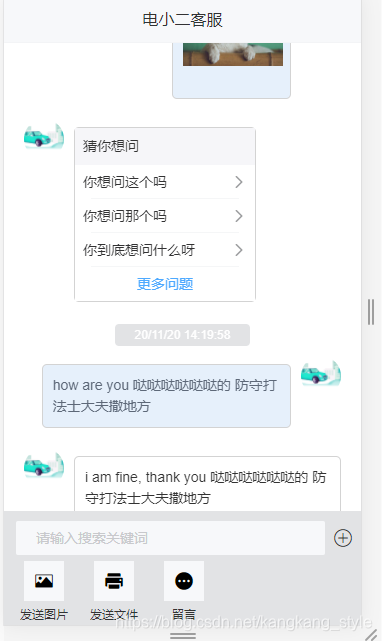 下拉加载历史会话
提供图片上传
会话图片提供预览功能
提供tips显示
vue + vant 可以直接运行 留档,方便以后使用
注释很详细,可以部分注释打开,又是一种界面风格
2020-11-26 发现问题,PullRefresh 每次上滑都会被触发,与上滑查看历史对话记录冲突。
解决办法,将PullRefresh与 对话内容容器chat-content 进行位置对换即可解决该问题。





 扫一扫
扫一扫


 2073
2073


 到【灌水乐园】发言



