


组件代码:myTab.vue
<template>
	<div class="tab-container">
		<van-tabs type="card" @click-tab="onclick">
			<van-tab v-for="item in periodsList" :name="item.value">
				<template #title>
					<div>{{item.text}}</div>
					<div>{{item.data}}</div>
				</template>
			</van-tab>

			<van-tab name="more">
				<template #title>
					<van-popover :actions="moreList" @select="onselect">
						<template #reference>
							<div>更多</div>
						</template>
					</van-popover>
				</template>
			</van-tab>
		</van-tabs>
		<div class="more">
			更多:{{currentAction.data}}
		</div>
	</div>
</template>

<script lang="ts" setup>
	import { computed, ref } from 'vue'

	export interface myTabsProps {
		overviewData ?: overviewData
	}
	export interface overviewData {
		oneMonth : number,
		twoMonth : number,
		threeMonth : number,
		fourMonth: number,
		fiveMonth: number,
		sixMonth: number
	}

	const props = withDefaults(defineProps<myTabsProps>(), {
		overviewData: () => ({
			oneMonth: 111,
			twoMonth: 222,
			threeMonth: 333,
			fourMonth: 444,
			fiveMonth: 555,
			sixMonth: 666
		})
	})


	const emit = defineEmits(['change'])

	const periodsList = computed(() => {
		return [
			{
				text: '1月',
				value: 'oneMonth',
				data: props.overviewData.oneMonth
			},
			{
				text: '2月',
				value: 'twoMonth',
				data: props.overviewData.twoMonth
			},
			{
				text: '3月',
				value: 'threeMonth',
				data: props.overviewData.threeMonth
			}
		]
	})

	const moreList = computed(() => {
		return [
			{
				text: '4月',
				value: 'fourMonth',
				data: props.overviewData.fourMonth
			},
			{
				text: '5月',
				value: 'fiveMonth',
				data: props.overviewData.fiveMonth
			},
			{
				text: '6月',
				value: 'sixMonth',
				data: props.overviewData.sixMonth
			}
		]
	})
	let currentAction = ref({
		text: '',
		value: 'oneMonth',
		data: 0
	})
	const onselect = (action) => {
		currentAction.value = action
		emit('change',action.value)
	}
	const onclick = (value) => {
		if(value.name!='more'){
			emit('change',value.name)
		}
	}
</script>

<style scoped>
	.tab-container {
		padding: 50px;
	}

	:deep(.van-tabs__wrap) {
		overflow: visible;
	}

	:deep(.van-tab__text--ellipsis) {
		display: flex;
		flex-direction: column;
	}

	:deep(.van-tabs__nav--card) {
		height: 50px;
	}
	.more {
		padding: 50px;
		margin: 0 auto;
	}
</style>
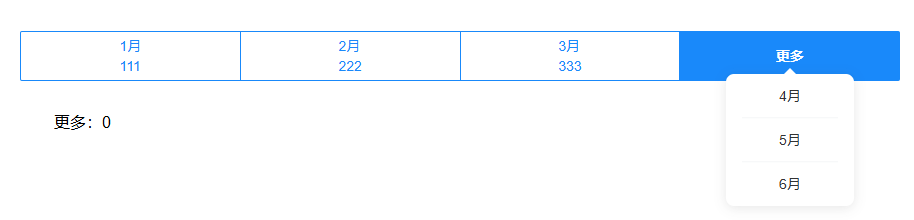
是一个自定义的tab,点击月份,触发change事件,把选择的月份传递给父组件,然后父组件根据月份来设置属性值。(实际项目中是从接口获取数据,本案例仅为演示效果)
App.vue代码:
<template>
	<myTabsVue @change="onchange" :overviewData="overviewData" />
</template>
<script setup>
import { ref } from 'vue'
import myTabsVue from './components/myTabs/myTabs.vue';
let overviewData = ref()
const onchange = (e) => {
    console.log(e);
    let data = 0;

    switch (e) {
        case 'oneMonth':
            data = 1;
            break;
        case 'twoMonth':
            data = 2;
            break;
        case 'threeMonth':
            data = 3;
            break;
        case 'fourMonth':
            data = 4;
            break;
        case 'fiveMonth':
            data = 5;
            break;
        case 'sixMonth':
            data = 6;
            break;
        default:
            data = 0;
    }

    overviewData.value = {
        oneMonth: data,
        twoMonth: data,
        threeMonth: data,
        fourMonth: data,
        fiveMonth: data,
        sixMonth: data
    };
};

</script>

<style></style>
我们把属性值overviewData通过computed传给periodList和moreList,然后通过其他转换方式,在template里显示overviewData里的数据值。
思路没问题,但是会发现视图更新总是滞后,比如点击2月,但是视图里显示的是1月份数据,即便是把computed换成watch,也无济于事。
经过多方面尝试,发现直接在template里使用属性变量即可解决视图更新不及时的问题。
以上代码需要把periodList循环里的<div>{{item.data}}</div>改成<div>{{overviewData[item.value]}}</div>;把更多里的{{currentAction.data}}改成{{overviewData[currentAction.value]}},通过overviewData的key来取值。
既然template里直接使用overviewData取值,那么periodList和moreList就不需要使用computed来获取overviewData了,设置为普通变量即可。
报错处理
如果通过key来取值报错,如下图,不能用于索引类型。

在定义type的时候,要允许使用索引,像这样修改,在第一个key里加string。
export interface overviewData {
	[oneMonth: string]: number,
	twoMonth: number,
	threeMonth: number,
	fourMonth: number,
	fiveMonth: number,
	sixMonth: number
}
修改后的完整代码:
<template>
	<div class="tab-container">
		<van-tabs type="card" @click-tab="onclick">
			<van-tab v-for="item in periodsList" :name="item.value">
				<template #title>
					<div>{{ item.text }}</div>
					<div>{{ overviewData[item.value] }}</div>
				</template>
			</van-tab>

			<van-tab name="more">
				<template #title>
					<van-popover :actions="moreList" @select="onselect">
						<template #reference>
							<div>更多</div>
						</template>
					</van-popover>
				</template>
			</van-tab>
		</van-tabs>
		<div class="more">
			更多:{{ overviewData[currentAction.value] }}
		</div>
	</div>
</template>

<script lang="ts" setup>
import { ref } from 'vue'

export interface myTabsProps {
	overviewData?: overviewData
}
export interface overviewData {
	[oneMonth: string]: number,
	twoMonth: number,
	threeMonth: number,
	fourMonth: number,
	fiveMonth: number,
	sixMonth: number
}

const props = withDefaults(defineProps<myTabsProps>(), {
	overviewData: () => ({
		oneMonth: 111,
		twoMonth: 222,
		threeMonth: 333,
		fourMonth: 444,
		fiveMonth: 555,
		sixMonth: 666
	})
})

const emit = defineEmits(['change'])

const periodsList = ref(
	[
		{
			text: '1月',
			value: 'oneMonth'
		},
		{
			text: '2月',
			value: 'twoMonth'
		},
		{
			text: '3月',
			value: 'threeMonth'
		}
	]
)

const moreList = ref([
	{
		text: '4月',
		value: 'fourMonth'
	},
	{
		text: '5月',
		value: 'fiveMonth'
	},
	{
		text: '6月',
		value: 'sixMonth'
	}
])
let currentAction = ref({
	text: '',
	value: 'oneMonth',
	data: 0
})
const onselect = (action) => {
	currentAction.value = action
	emit('change', action.value)
}
const onclick = (value) => {
	if (value.name != 'more') {
		emit('change', value.name)
	}
}
</script>

<style scoped>
.tab-container {
	padding: 50px;
}

:deep(.van-tabs__wrap) {
	overflow: visible;
}

:deep(.van-tab__text--ellipsis) {
	display: flex;
	flex-direction: column;
}

:deep(.van-tabs__nav--card) {
	height: 50px;
}

.more {
	padding: 50px;
	margin: 0 auto;
}
</style>





 扫一扫
扫一扫


 被折叠的 条评论
为什么被折叠?
被折叠的 条评论
为什么被折叠?
 到【灌水乐园】发言





