


 本文介绍了如何在MySQL中创建表并插入多条数据,包括非空约束和默认时间戳,以及使用pymysql连接。同时涵盖了MongoDB的查询、去重、正则搜索、索引和数据操作技巧,如聚合、更新和删除。还讨论了不同数据库类型的字段类型、约束和数据处理方法。
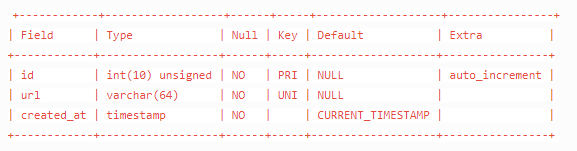
CREATE TABLE `crawler_hub` (
  `id` int(10) unsigned NOT NULL AUTO_INCREMENT,
  `url` varchar(64) NOT NULL,
  `created_at` timestamp NOT NULL DEFAULT CURRENT_TIMESTAMP,
  PRIMARY KEY (`id`),
  UNIQUE KEY `url` (`url`)
) ENGINE=MyISAM DEFAULT CHARSET=utf8
# 一次插入多条
INSERT INTO crawler_hub(url) VALUES ('https://news.sina.com.cn/china/'),('https://news.sina.com.cn/world/'),('https://mil.news.sina.com.cn/'),('http://sports.sina.com.cn/'),('https://finance.sina.com.cn/'),('https://ent.sina.com.cn/'),('https://tech.sina.com.cn/'),('http://blog.sina.com.cn/'),('http://sports.sina.com.cn/global/'),('http://sports.sina.com.cn/china/'),('http://sports.sina.com.cn/nba/'),('http://sports.sina.com.cn/cba/'),('http://sports.sina.com.cn/chess/'),('http://sports.sina.com.cn/tennis/'),('http://golf.sina.com.cn/'),('http://sports.sina.com.cn/esports/'),('https://auto.sina.com.cn/'),('http://f1.sina.com.cn/'),('http://run.sina.com.cn/'),('http://sports.sina.com.cn/z/womenfootball/'),('http://edu.sina.com.cn/'),('https://fashion.sina.com.cn/'),('http://eladies.sina.com.cn/'),('https://med.sina.com/'),('https://yongzhou.leju.com'),('http://blog.sina.com.cn/lm/history/'),('http://collection.sina.com.cn/'),('http://baby.sina.com.cn/'),('http://book.sina.com.cn/'),('http://fo.sina.com.cn/'),('https://games.sina.com.cn/'),('http://travel.sina.com.cn/');
Mysql查询返回字典形式
database = pymysql.connect(host="172.16.100.110", user="root", passwd="0u5SRsxeBN<.", db="jc_center",charset='utf8',cursorclass = pymysql.cursors.DictCursor)
Mysql正则查询
SELECT * FROM `fa_category_market_scene_dimension_new` WHERE dimension REGEXP '一般.*'
mysql 更新 | 删除
query4 = "delete from community_comment"
query5 = "UPDATE user SET HistorySessionList=null"
Mysql group by

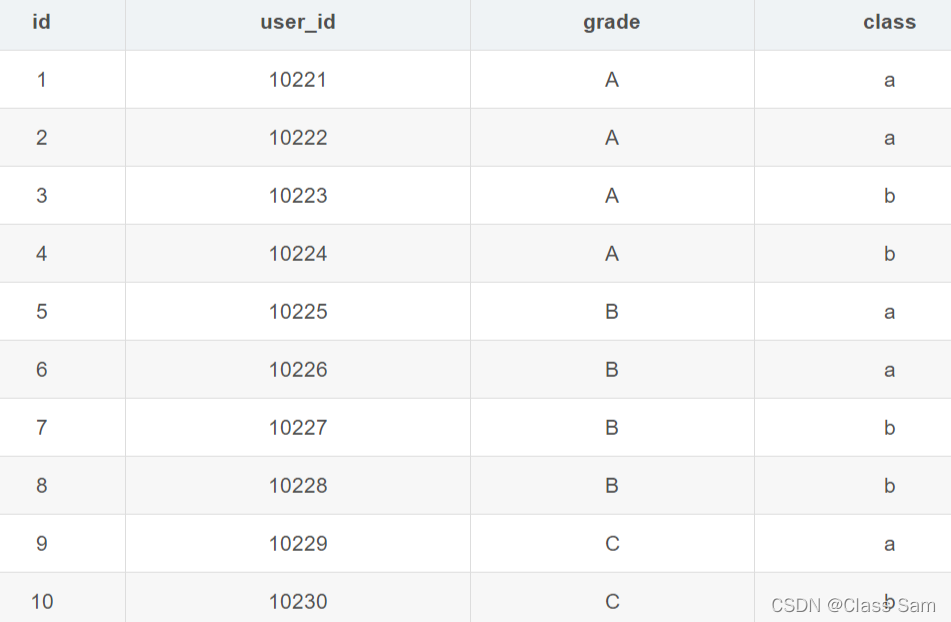
聚合函数(max、sum)
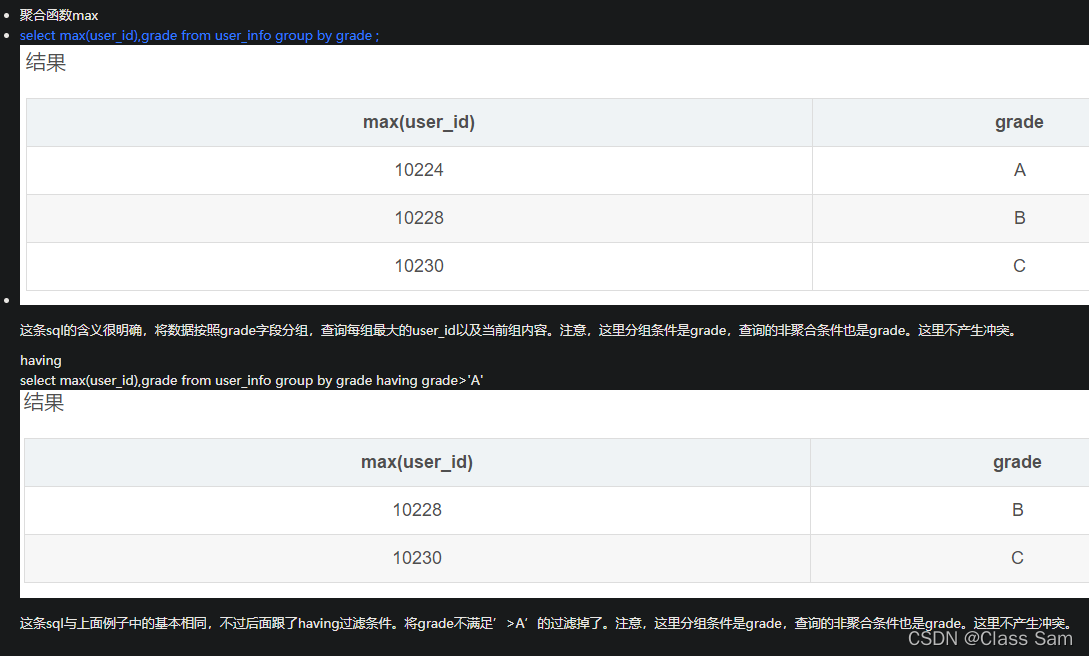
sum用法:select name,sum(id) from test group by name,number
插入无视重复
INSERT ignore INTO crawler_hub(url) VALUES ("https://news.qq.com/"),("https://new.qq.com/ch/antip/")
pymysql转移问题报错pymysql.err.ProgrammingError: (1064
# v1.0.0及以上
from pymysql.converters import escape_string
# v0.10.1及以下
from pymysql import escape_string

query = "INSERT IGNORE INTO monitor_shop_new_item_data (shop_name,shop_id,item_id,image,item_title,category_name,price,discount_price,sales_volume,stat_date) VALUES ('%s','%s','%s','%s','%s','%s','%s','%s','%s','%s')" % (
      shop_name,shop_id,item_id,image,escape_string(item_title),category_name,price,discount_price,sales_volume,stat_date)
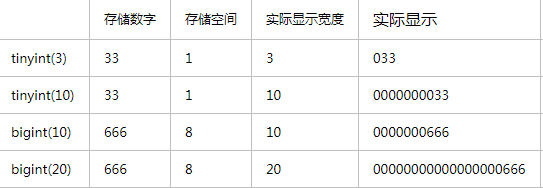
unsigned
无符号即无负数,用此类型可以增加数据长度
-666到666 -> 666*2
MySql:int(10) 与 int unsigned 之前的区别
# https://segmentfault.com/a/1190000023306375
int(10)
给 int 类型设置字节长度为 10,int 类型默认的值范围大小是:-2147483648和2147483647。

unsigned
设置 int 类型不能为负数。
mysql 去重查询

mysql结果以字典的形式返回(cursorclass=pymysql.cursors.DictCursor)
database = pymysql.connect(host="172.16.100.110", port=9927, user="root", passwd="123", db='yyjc',charset='utf8',cursorclass=pymysql.cursors.DictCursor)
MySQL非空约束(NOT NULL)
MySQL 非空约束(NOT NULL)指字段的值不能为空。对于使用了非空约束的字段,如果用户在添加数据时没有指定值,数据库系统就会报错。可以通过 CREATE TABLE 或 ALTER TABLE 语句实现。在表中某个列的定义后加上关键字 NOT NULL 作为限定词,来约束该列的取值不能为空。
DEFAULT CURRENT_TIMESTAMP
表示当插入数据的时候,该字段默认值为当前时间
PRIMARY KEY
在创建数据表时设置主键约束,既可以为表中的一个字段设置主键,也可以为表中多个字段设置联合主键。但是不论使用哪种方法,在一个表中主键只能有一个
UNIQUE KEY
唯一约束(Unique Key)是指所有记录中字段的值不能重复出现。例如,为 id 字段加上唯一性约束后,每条记录的 id 值都是唯一的,不能出现重复的情况。如果其中一条记录的 id 值为‘0001’,那么该表中就不能出现另一条记录的 id 值也为‘0001’
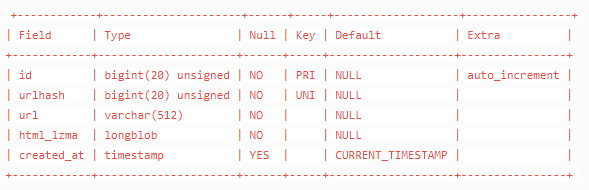
CREATE TABLE `crawler_html` (
  `id` bigint(20) unsigned NOT NULL AUTO_INCREMENT,
  `urlhash` bigint(20) unsigned NOT NULL COMMENT 'farmhash',
  `url` varchar(512) NOT NULL,
  `html_lzma` longblob NOT NULL,
  `created_at` timestamp NULL DEFAULT CURRENT_TIMESTAMP,
  PRIMARY KEY (`id`),
  UNIQUE KEY `urlhash` (`urlhash`)
) ENGINE=InnoDB DEFAULT CHARSET=utf8
查某字段是否存在
db.getCollection("market_goods_comment").find({'dimension_286': {'$exists': true}})
bigint(大整数)
https://www.cnblogs.com/ttaylor/p/14006992.html
COMMENT
创建新表的脚本中,
可在字段定义脚本中添加comment属性来添加注释
longblob
mysql数据库中有一种数据类型是longblob (lang binary large object),二进制大对象,是一个可以存储 二进制文件的容器。(例如html,xml等文件)
mysql-workbench的下载安装,使用
# 下载安装
sudo apt-get install mysql-workbench
# 使用
mysql-workbench
查看数据量
select count(*) from crawler_html
mongo数据库搜索,正则搜索 | 区间in搜索
搜索
db.getCollection("dmp_cate_crowd_data").find({category_name:'美容美体仪器>面部美容工具>光谱仪'})

正则搜索($i是指不区分大小写)
db.getCollection("dmp_cate_crowd_data").find({category_name:{$regex:".*美容美体仪器.*",$options:'$i'}})

// PHP
$collect->find(['goods_id'=>['$in'=>$ids],'date'=>['$regex'=>$regex_month.'.*','$options'=>'$i']])->toArray();

// pymongo
# 找出enterprise_verify_reason不为空或者nickname中带有有限公司的数据
need_synchronous_list = list(collection.find({"$or":[{"$and":[{"enterprise_verify_reason": {"$ne":None}},{"enterprise_verify_reason": {"$ne":""}}]},{"nickname":{"$regex":".*有限公司.*","$options":"$i"}}]}, {"_id": 1}))
mongo数据库数据查重
$group: 将集合中的文档分组,用于统计结果
$match: 过滤数据,只输出符合条件的文档
$sum: 计算总和, $sum:1 表示以一倍计数
db.集合名称.aggregate({$group:{ _id: '$字段', 自定义字段: {表达式: '$字段'}}})
(>) 大于 - $gt

db.dmp_cate_crowd_data.aggregate([{$group: { _id: {category_name: '$category_name', sub_dimension: '$sub_dimension', option_name: '$option_name'}, count: {$sum: 1}}},{$match: {count: {$gt: 1}}}])
#注意一下count是在$group

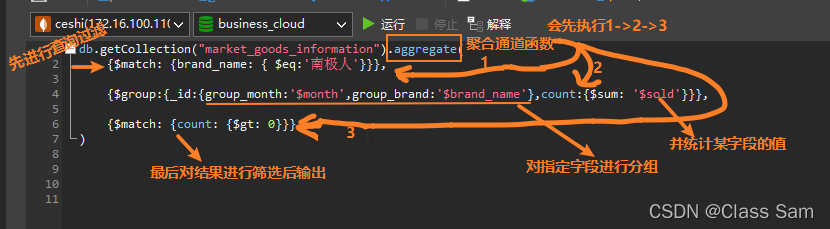
mongo先查询过滤后分组并统计某一字段
db.getCollection("market_goods_information").aggregate(
    {$match: {brand_name: { $eq:'南极人'}}},
	{$group:{_id:{group_month:'$month',group_brand:'$brand_name'},count:{$sum: '$sold'}}},
	{$match: {count: {$gt: 0}}}
)
mongo数据库删除重复数据
db.dmp_cate_crowd_data.aggregate([{$group: { _id: {category_name: '$category_name', sub_dimension: '$sub_dimension', option_name: '$option_name'}, count: {$sum: 1},dups: {$addToSet: '$_id'}}},{$match: {count: {$gt: 1}}}]).forEach(
function(doc){
        doc.dups.shift();
        db.getCollection('dmp_cate_crowd_data').remove(
            {
                _id: {
                    $in: doc.dups
                }
            }
        );
    })

// 如果报错Exceeded memory limit for $group, but didn't allow external sort说明默认的mongo限制内存不足,要加上allowDiskUse:true
db.market_goods_comment.aggregate([{$group: { _id: {id1: '$id'}, count: {$sum: 1}}},{$match: {count: {$gt: 1}}}],{allowDiskUse:true})


// 抖店数据的去重
db.youmiyoushu_doudian.aggregate([{$group: { _id: {sellerCompanyId: '$sellerCompanyId'}, count: {$sum: 1},dups: {$addToSet: '$_id'}}},{$match: {count: {$gt: 1}}}]).forEach(
function(doc){
        doc.dups.shift();
        db.getCollection('youmiyoushu_doudian').remove(
            {
                _id: {
                    $in: doc.dups
                }
            }
        );
    })
Mongo删除指定数据
db.getCollection("market_goods_comment").remove({'id':'90a8ef54280e'})
pymongo查询数据
client = MongoClient('172.16.100.110', 27017)
# test为数据库
db = client.business_cloud
# test为集合,相当于表名
collection = db.market_goods_comment
# 查询条件
myquery = {"brand_name": "PURE&MILD/泊美"}
# 默认返回_id,设为0则不返回,1为返回的字段
mydoc = collection.find(myquery,{ "_id": 0, "comment": 1, "user_nick": 1 })
for x in mydoc:
    print(x)
pymongo更新数据
myquery = {"id": comment_id}
newvalues = {"$set": {"comment_analysis": ""}}
collection.update_many(myquery, newvalues)
pymongo更新数据(数据存在则不操作,不存在则插入)
myquery = {"brand_id": 937396666, 'stat_date': '2021年 7月', 'category_id': 121450012}
newvalues = {"$setOnInsert":
    {"stat_date": "2021年 7月",
    "brand_name": "AdvanCell Works",
    "brand_id": 937396666,
    "category_id": 121450012,
    "category_name": "T区护理套装",
    "trade_amount": 359119,
    "trade_amount_ratio": -0.463654933691679, # 79-80
    "search_num": 9103,
    "visit_num": 98869,
    "uv_value": 3.63227098483852,
    "search_percent": 0.0920713267050339,
    "pay_rate": 0.0124160416907913,
    "buyer_num": 1228,
    "buyer_single_amount": 292.442182410423}}

collection.update_many(myquery, newvalues,upsert=True)
mongo更新数据(sql)
// 将数据库中所有的2021年 10月变更成2021年 9月
db.getCollection('dmp_brand_crowd_data').find({"stat_str": '2021年 10月'}).forEach(
   function(item){
       db.getCollection('dmp_brand_crowd_data').update({"stat_str": '2021年 10月'}, {"$set": {"stat_str": "2021年 9月"}})
   }
)
Mongo查询 条件->字段不为空
// PHP
$item_information = $collect->find(['month'=>$month,'category_id'=>$cid,'amount'=>['$ne'=>null],'sold'=>['$ne'=>null]])->toArray();

// Monog
db.getCollection("TM_CLUE1").find({company:{$ne:""},sales_money:{$gt:1000000}})
Mongo复合索引
//添加复合索引,name正序,age倒序
    db.userinfos.createIndex({"name":1,"age":-1})
//过滤条件为name,或包含name的查询会使用索引(索引的第一个字段)
    db.userinfos.find({name:'张三'}).explain()
    db.userinfos.find({name:"张三",level:10}).explain()
    db.userinfos.find({name:"张三",age:23}).explain()

//查询条件为age时,不会使用上边创建的索引,而是使用的全表扫描
db.userinfos.find({age:23}).explain()
参考网址:https://www.cnblogs.com/wyy1234/p/11032163.html
mongo 或查询 | in查询
// PHP
$row = $collect->find(['$or' =>[['brand_id'=>strval($brand_id)],['shop_id'=>['$in' => $shop_ids_tostr]]],'sold'=>['$ne'=> null],'cid'=>['$ne'=> null],'month'=>['$ne' => null],'price_wap'=>['$ne' => null]])->toArray();

// Mongo
myquery = {"$or":[{"company": {"$ne": ""}}, {"company": {"$ne": "null"}}]}
通过_id查询
from bson.objectid import ObjectId

collection.find({"_id":ObjectId("6256a1d7051da90fbc19f3f6")})
mongo排序查询
// 在数据库查询(-1是倒序,1是正序)
db.getCollection("sycm_sale_target").find({"shop_id":"291160065","data_month":"2022-04"}).sort({_id: -1}).limit(1)

// 通过pymongo查询
comments_result = list(collection.find({"shop_id":shop_id,"data_month":date_month}, projection={"_id":False,"data_month": True, "month_target_pay_amt": True, "crawl_time": True}).sort([("crwal_time",-1)]).limit(1))
pymongo插入数据
shop_id = request.args['shop_id']
new_target = json.loads(request.args['new_target'])

client = MongoClient('172.16.100.110', 27017)
db = client.fwjk
collection = db.sycm_sale_target
data_date = str(datetime.date.today())
insert_list = []
for n in new_target:
    data_month = n
    month_target_pay_amt = new_target[n]
    crawl_time = int(time.time())
    from_fwjk = 1
    insert_list.append({"shop_id":shop_id,"data_month":data_month,"month_target_pay_amt":month_target_pay_amt,"crawl_time":crawl_time,"from_fwjk":from_fwjk,"data_date":data_date})

collection.insert_many(insert_list)
pymongo and查询 | 不为空查询
need_synchronous_list = list(collection.find({"$and":[{"enterprise_verify_reason": {"$ne":None}},{"enterprise_verify_reason": {"$ne":""}}]}, {"_id": 0}))
pymongo时间段查询
need_synchronous_list = list(collection.find({"keyword": keyword,"create_time":{"$gt":ts-3600}}, {"_id": 0}))
一些遇到的问题
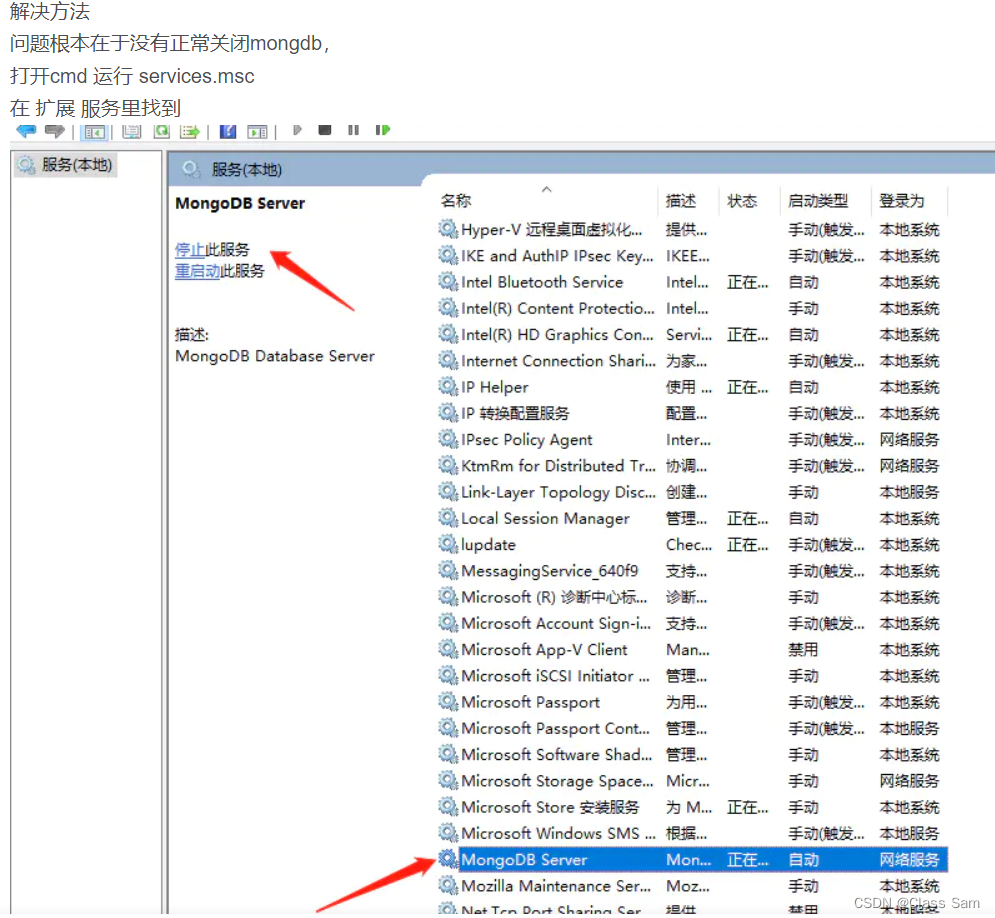
远程控制的那台机,没有正常关机再次启动的话,mongo会启动失败,当我到E:\mongo\bin下尝试启动服务的时候会提示,“msg”:"Automatically disabling TLS 1.0, to force-enable TLS 1.0 specify --sslDisabledProtocols ‘none’"类似这样的错误。
解决方法就是





 扫一扫
扫一扫


 966
966

 被折叠的 条评论
为什么被折叠?
被折叠的 条评论
为什么被折叠?
 到【灌水乐园】发言





