


项目需求:在一个弹出层中,选择近期时间和自定义时间
页面展示
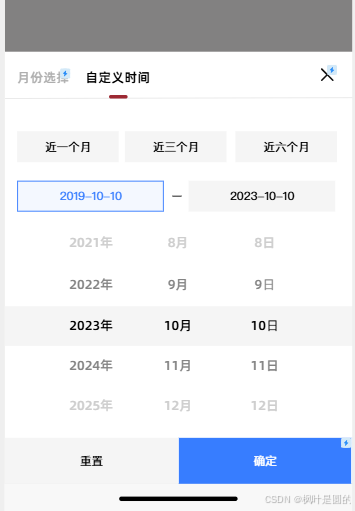
官方简介:picker-view | uni-app官网 相对于picker组件,picker-view拥有更强的灵活性。当需要对自定义选择的弹出方式和UI表现时,往往需要使用picker-view。
直接引用官网组件时,会出现天数不会改变,每个月的天数都一样是固定的,所以我根据自己的需求修改了数据并监听选择月和年时天数跟着改变。
一、HTML代码
只展示picker-view组件的代码
<picker-view :indicator-style="indicatorStyle" :value="pickerValue" @change="onPickerChange"
	class="picker-view">
	<picker-view-column>
		<view class="item" v-for="(item,index) in years" :key="index">{{item}}年</view>
	</picker-view-column>
	<picker-view-column>
		<view class="item" v-for="(item,index) in months" :key="index">{{item}}月</view>
	</picker-view-column>
	<picker-view-column>
		<view class="item" v-for="(item,index) in days" :key="index">{{item}}日</view>
	</picker-view-column>
</picker-view>
二、JS逻辑
// 设置选择器中间选中框的样式
const indicatorStyle = ref(`height: 50px;`);
// 选择器当前值(索引)
const pickerValue = ref([0, 0, 0])
// 时间数据
const years = ref([])
const months = ref([])
const days = ref([])
// 当前选择的值
const selectedYear = ref(0)
const selectedMonth = ref(0)
const selectedDay = ref(0)
// 初始日期(用于重置)
const initialYear = ref(0)
const initialMonth = ref(0)
const initialDay = ref(0)

// 初始化日期
const initDate = () => {
	const today = new Date();
	initialYear.value = today.getFullYear();
	initialMonth.value = today.getMonth() + 1; // 月份从0开始
	initialDay.value = today.getDate();
	// 设置初始选中值
	selectedYear.value = initialYear.value;
	selectedMonth.value = initialMonth.value;
	selectedDay.value = initialDay.value;
}
// 初始化选择器数据
const initPickers = () => {
	// 生成年份数据(当前年份前后10年)
	for (let i = initialYear.value - 10; i <= initialYear.value + 10; i++) {
		years.value.push(i);
	}
	// 生成月份数据
	for (let i = 1; i <= 12; i++) {
		months.value.push(i);
	}
	// 生成日期数据
	updateDays();
	// 设置初始选择索引
	pickerValue.value = [
		years.value.indexOf(initialYear.value),
		months.value.indexOf(initialMonth.value),
		days.value.indexOf(initialDay.value)
	];
}
// 更新日期数据(根据选中的年月)
const updateDays = () => {
	// 清空原有日期
	days.value = [];
	// 获取当月天数
	const daysInMonth = new Date(
		selectedYear.value,
		selectedMonth.value,
		0
	).getDate();
	// 生成日期数据
	for (let i = 1; i <= daysInMonth; i++) {
		days.value.push(i);
	}
	// 如果当前选择的日期大于当月天数,自动调整
	if (selectedDay.value > daysInMonth) {
		selectedDay.value = daysInMonth;
	}
}
// 选择器变化事件
const onPickerChange = (e) => {
	const val = e.detail.value;
	// 保存旧值用于比较
	const oldYear = selectedYear.value;
	const oldMonth = selectedMonth.value;
	// 更新选中值
	selectedYear.value = years.value[val[0]];
	selectedMonth.value = months.value[val[1]];
	// 如果年月有变化,需要重新计算天数
	if (oldYear !== selectedYear.value || oldMonth !== selectedMonth.value) {
		updateDays();
		// 确保日期索引有效
		selectedDay.value = days.value[val[2] >= days.value.length ? days.value.length - 1 : val[2]];
	} else {
		// 年月未变,直接更新日期
		selectedDay.value = days.value[val[2]];
	}
	// 更新选择器值
	pickerValue.value = val;
}





 扫一扫
扫一扫


 1817
1817

 被折叠的 条评论
为什么被折叠?
被折叠的 条评论
为什么被折叠?
 到【灌水乐园】发言





