


 本文介绍了用户可以通过点击按钮在最新资讯、点赞最多的帖子和个人爆料之间切换的功能。界面设计简洁,便于用户根据需求筛选内容。
<view class="page">
    <view class="btn">
      <view
        @click="show(1)"
        :style="{
          width: '150rpx',
		  marginRight: '10px',
        }"
        :class="index === 1 ? 'active' : 'active1'"
        >最新</view
      >
      <view
        @click="show(2)"
        :style="{
          width: '150rpx',
		  marginRight: '10px',
        }"
        :class="index === 2 ? 'active' : 'active1'"
        >最多点赞</view
      >
      <view
        @click="show(3)"
        :style="{
          width: '150rpx',
		  marginRight: '10px',
        }"
        :class="index === 3 ? 'active' : 'active1'"
        >我的爆料</view
      >
    </view>
    <!-- 所有资讯 -->
    <view v-show="index === 1 && isShow">1</view>

    <!-- 考级-->
    <view v-show="index === 2 && isShow">2</view>

    <!-- 考试 -->
    <view v-show="index === 3 && isShow">3</view>
  </view>
data() {
    return {
      // 控制切换按钮后按钮改变样式
      index: 1,
      // 控制点击按钮后子组件显示,再次点击隐藏
      isShow: true,
    }
   }
methods: {
    show(value) {
      this.index === value
        ? (this.isShow = this.isShow)
        : (this.isShow = true);
      this.index = value;
    },
}
.page {
  .btn {
    display: flex;
    flex-direction: row;
    .active {
      width: 80px;
      height: 26px;
      line-height: 26px;

      border-radius: 30px;
      background-color: rgba(90, 192, 207, 100);
      color: rgba(255, 255, 255, 100);
      font-size: 14px;
      text-align: center;
    }
    .active1 {
      width: 80px;
      height: 26px;
      line-height: 26px;
      border-radius: 30px;
      background-color: rgba(245, 245, 250, 100);
      color: rgba(111, 111, 111, 100);
      font-size: 14px;
      text-align: center;
    }
  }
}
效果图
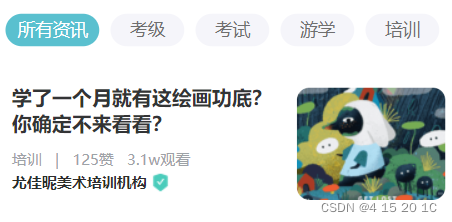
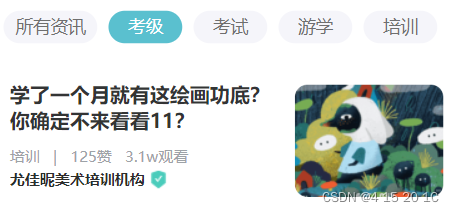
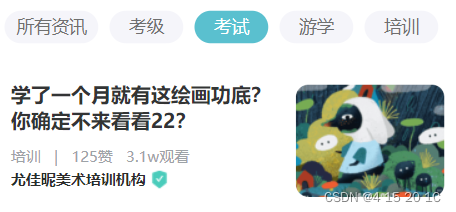





 扫一扫
扫一扫


 被折叠的 条评论
为什么被折叠?
被折叠的 条评论
为什么被折叠?
 到【灌水乐园】发言





