


由于官方网址访问,不了,东拼西凑终于搞出了的demo
创建一个子组件, 复制即可用
<template>
  <div>
    <div>
      <!-- 操作按钮 -->
      <Button @click="addNode" type="primary">添加</Button>
      <Button @click="editNode" type="success">编辑</Button>
      <Button @click="removeNode" type="error">删除</Button>
    </div>
    <table class="table ztree-table">
      <thead class="thead">
        <tr>
          <th >名称</th>
          <th >编号</th>
          <th >更新时间</th>
          <th >来源</th>
        </tr>
      </thead>
      <tbody>
        <tr>
          <td colspan="4">
            <ul id="ztree-table" class="ztree"></ul>
          </td>
        </tr>
      </tbody>
    </table>
  </div>
</template>

<script>
import '@ztree/ztree_v3/js/jquery-1.4.4.min'
import '@ztree/ztree_v3/js/jquery.ztree.all.min'
import '@ztree/ztree_v3/css/zTreeStyle/zTreeStyle.css'
// import '../tree/css/metroStyle.css'

export default {
  name: 'tree-table',
  props: {
    tabIndex: {
      type: Number,
      default () {
        return 0
      }
    },
    ztreeData: {
      type: Array,
      default () {
        return []
      }
    }
  },
  data () {
    return {
      treeObj: null,
      currentSelectedNode: null
    }
  },
  mounted () {
  },
  watch: {
    ztreeData (nVal, oVal) {
      if (nVal) {
        this.initZTreeTable()
      }
    }
  },
  methods: {
    initZTreeTable () {
      const setting = {
        async: {
          enable: true,
          url: '/app/courseParameter/getFirstAtage',
          autoParam: ['id=cpId'],
          otherParam: ['cardType', `${this.tabIndex}`],
          dataFilter: (treeId, parentNode, childNodes) => {
            console.log(treeId)
            console.log(parentNode)
            console.log(childNodes)
            if (childNodes.data.length > 0) {
              return childNodes
            }
          },
          type: 'get'
        },
        view: {
          showLine: false,
          showIcon: false,
          addDiyDom: this.addCustomDom
        },
        data: {
          simpleData: {
            enable: true
          }
        },
        callback: {
          onClick: this.onNodeClick
        }
      }
      // 示例静态数据
      const zNodes = [...this.ztreeData]

      this.treeObj = $.fn.zTree.init($('#ztree-table'), setting, zNodes)
    },
    addCustomDom (treeId, treeNode) {
      const aObj = $(`#${treeNode.tId}_a`)
      aObj.css('width', '100%')
      // <span class="custom-td" style="display:inline-block">${treeNode.name}</span>
      const tableContent = `
        <span class="custom-td" >${treeNode.cpCode || '无编号'}</span>
        <span class="custom-td" >${treeNode.cpUpdateTime || '未知时间'}</span>
        <span class="custom-td" >${treeNode.cpSource === 0 ? '平台数据' : '系统数据'}</span>
      `
      aObj.append(tableContent)
    },
    onNodeClick (event, treeId, treeNode) {
      this.currentSelectedNode = treeNode
    },
    addNode () {
      if (this.currentSelectedNode) {
        const newNode = {
          id: new Date().getTime(),
          pId: this.currentSelectedNode.id, // 将新节点作为选中节点的子节点
          name: '新节点',
          code: '新编号',
          updateTime: '2024-09-03',
          source: '系统D'
        }
        this.treeObj.addNodes(this.currentSelectedNode, newNode)
      } else {
        alert('请选择一个节点进行添加子节点')
      }
    },
    editNode () {
      if (this.currentSelectedNode) {
        this.currentSelectedNode.name = '已编辑节点'
        this.currentSelectedNode.code = '已编辑编号'
        this.currentSelectedNode.updateTime = '2024-09-03'
        this.currentSelectedNode.source = '已编辑来源'
        this.treeObj.updateNode(this.currentSelectedNode)
      } else {
        alert('请选择一个节点进行编辑')
      }
    },
    removeNode () {
      if (this.currentSelectedNode) {
        this.treeObj.removeNode(this.currentSelectedNode)
        this.currentSelectedNode = null
      } else {
        alert('请选择一个节点进行删除')
      }
    }
  }
}
</script>

<style scoped lang="less">
.ztree-table {
  width: 60%;
  margin-top: 20px;
  border-collapse: collapse;
}
.thead {
  background: #eee;
  height: 50px;
}
.ztree-table th,
.ztree-table td {
  width: 100px;
  padding: 8px;
  text-align: left;
}

.ztree-table .ztree {
  width: 100%;
}

.ztree-table .ztree li {
  margin: 0;
  padding: 0;
  list-style: none;
}

/deep/.ztree li {
  padding: 5px 0;
}

.level0 {
  /deep/ a {
    width: 100%;
  }
}
/deep/.node_name, /deep/.custom-td {
  width: 250px !important;
  display: inline-block;
  overflow: hidden;
  text-overflow: ellipsis;
  white-space: nowrap;
}
</style>
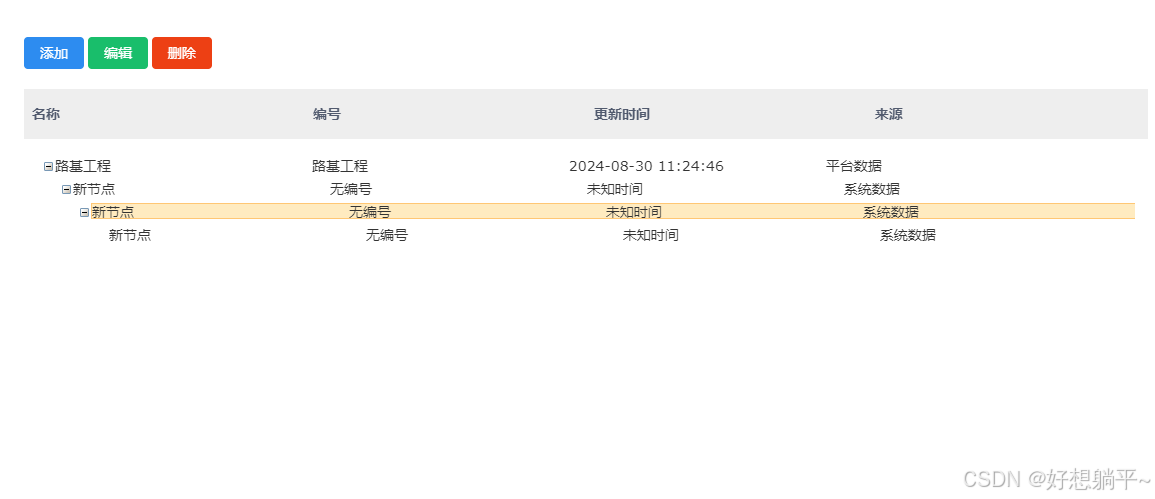
最后再来张效果图,样式有需要自己优化





 扫一扫
扫一扫


 1794
1794


 到【灌水乐园】发言




