



参考文献
SIP简介
最先是用于PyQt调用QT库的,慢慢发展成为C和C+ +库自动生成CPython绑定的工具。
一种最初的工具是SWIG,与SWIG不同的是,SIP专门设计用于将Python和C / C+ +集成在一起,并竭尽全力使集成尽可能紧密。
使用缘由
最初是直接向用Pyqt的Qt 设计师直接写插件(pyqt5在QT Designer中自定义插件),但是过程非常不友好,编写过程无错误提示,内容错误设计师无法识别,体验极差。
于是想用C++写设计师的插件给Pyqt调用,便发现了SIP。但是网上的教程大多是用make来编译的,我用make老是报错,而且很多无法实现最终结果,于是改成用nmake。
开始
1. 环境准备
- QT 5.9.1 MSVC2015(64bit) (ps:可以只安装构建环境, 不装编辑器 大约6G. )
- PYQT 5.9.1 (pip install pyqt5 ==5.9.1)
- PYTHON 3.6.4 (amd 64bit)
- SIP 4.19.8
2. 用QT创建一个共享库
Ctrn+N -> Library ->C++库
类型 共享库
名称 rab
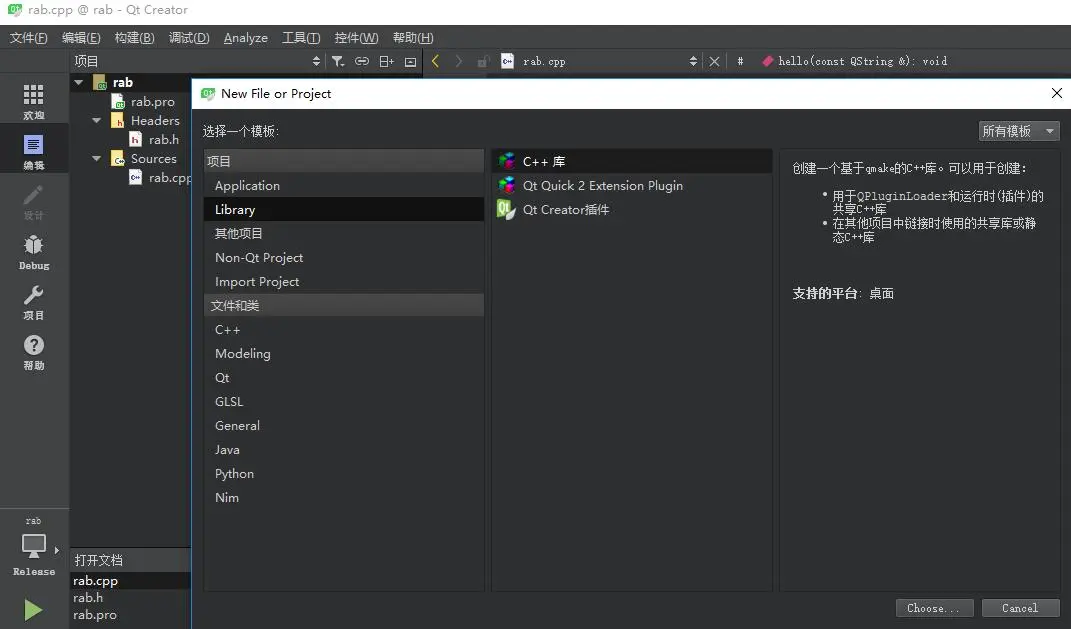
1.jpg
复制以下代码
//rab.pro

QT       -= gui

TARGET = rab
TEMPLATE = lib

DEFINES += RAB_LIBRARY

DEFINES += QT_DEPRECATED_WARNINGS

SOURCES += \
    rab.cpp

HEADERS += \
    rab.h

unix {
    target.path = /usr/lib
    INSTALLS += target
}
//rab.h

#ifndef RAB_H
#define RAB_H
#include <QString>
#include<QtCore/qtextcodec.h>
#include<iostream>
#include<QTextStream>
#if defined(RAB_LIBRARY)
#define RABSHARED_EXPORT __declspec(dllexport)
#else
#define RABSHARED_EXPORT __declspec(dllimport)
#endif
RABSHARED_EXPORT int len(const char* str);

RABSHARED_EXPORT void hello(const QString& s);
#endif
//rab.cpp

#include"rab.h"
int len(const char* str)
{
    QTextCodec* codec=QTextCodec::codecForName("utf-8");
    QTextCodec::setCodecForLocale(codec);
    return strlen(str);
}

void hello(const QString& s)
{
    QTextStream cin(stdin, QIODevice::ReadOnly);
    QTextStream cout(stdout, QIODevice::WriteOnly);
    QTextStream cerr(stderr, QIODevice::WriteOnly);

//   cout<<"*s:"<<*s<<endl;
   cout<<"s:"<<s<<endl;
//   cout<<"&s:"<<&s<<endl;
}
- 编译之后(VS2015 Release, 不要选择Debug)将文件夹复制到项目目录下,目录如下
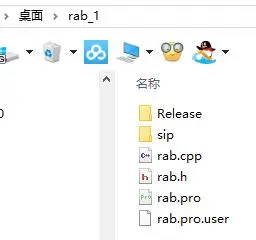
2.jpg
Release文件夹即为Qt编译结果,
- rab.dll是python调用时需要;
-
rab.lib是生成.pyd调用接口需要;
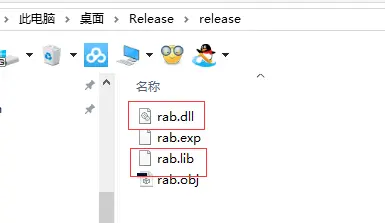
image.png
3. 编写rab.sip和configure.py
-
新建一个sip文件夹,在sip文件夹下编写 rab.sip文件 和 configure.py 文件。
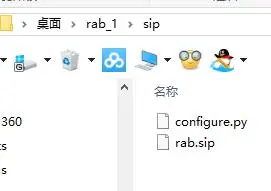
3.jpg
//rab.sip
// 对照rab.h文件
%Module(name=rab) #模块名
%Import QtGui/QtGuimod.sip #导入QT模块
%Import QtWidgets/QtWidgetsmod.sip
// %Import QtCore/qstring.sip
%UnitCode
    #include <rab.h>
%End
int len(const char* str);
void hello(const QString& s);
#configure.py
from PyQt5.QtCore import PYQT_CONFIGURATION as pyqt_config
from distutils import sysconfig
import os, sipconfig, sys ,shutil
#此处可不看 ↓
try:
    shutil.rmtree("../Release")
    shutil.copytree("D:/Personal/Desktop/Release", "../Release")
    shutil.rmtree("modules")
except:
    pass
#此处可不看 ↑

config = sipconfig.Configuration()
config.platform = "win32-msvc2015"
#QT路径
qt_path = 'C:/Qt/Qt5.9.1/5.9.1/msvc2015_64'
print('QT_DIR: %s' % qt_path)
#sip.exe路径
config.sip_bin ="C:/Users/Win_Lin/AppData/Local/Programs/Python/Python36/sip.exe"
#如果是pip install pyqt5安装的pyqt, 则不会有改文件夹, 如果要调用QT库,这个文件夹是必须要有的! 获取方法看下文。
config.default_sip_dir = "C:/Users/Win_Lin/AppData/Local/Programs/Python/Python36/Lib/site-packages/sip"

sip_files_dir=os.path.abspath(os.path.join("."))
sip_file = os.path.join(sip_files_dir, "rab.sip")

inc_dir=os.path.abspath(os.path.join(".","src"))
sip_files_dir=os.path.abspath(os.path.join(".","sip"))
output_dir =os.path.abspath(os.path.join(".", "modules"))
build_file="rab.sbf"
build_path = os.path.join(output_dir, build_file)

#sip构建命令
cmd=" ".join([
    config.sip_bin,
    pyqt_config['sip_flags'],

    '-I', sip_files_dir,
    '-I', config.default_sip_dir,
    '-I', config.sip_inc_dir,
    '-I', inc_dir,
    '-I', config.sip_bin,

    "-c", output_dir,
    "-b", build_path,
    sip_file,
])
os.makedirs("modules", exist_ok=True)
print(cmd)
#构建makefile文件
os.system(cmd)

makefile=sipconfig.SIPModuleMakefile(
    config,
    build_file,
    dir=output_dir,
    )

makefile.extra_include_dirs = [
    '../', '.',
    os.path.join(qt_path, 'include'),
    os.path.join(qt_path, 'include', 'ActiveQt'),
    os.path.join(qt_path, 'include', 'QtCore'),
    os.path.join(qt_path, 'include', 'QtGui'),
    os.path.join(qt_path, 'include', 'QtWidgets'),
]
#此处会用到release目录下的rab.lib及Qt的lib
makefile.extra_lib_dirs = [
    os.path.join('.', 'Release'),
    os.path.join('.', 'Release','release'),
    os.path.join('..', 'Release'),
    os.path.join('..', '..', 'Release'),
    os.path.join('..', 'Release', 'release'),
    os.path.join('..', '..', 'Release', 'release'),
    os.path.join(qt_path, 'lib'),
]

makefile.extra_libs = [
    'rab',
    'Qt5Core',
    'Qt5Gui',
    'Qt5Widgets',
    'Qt5AxBase',
    'Qt5AxContainer',
    'Qt5AxServer',
]

makefile.generate()
#复制rab.dll到各目录
shutil.copy("../Release/release/rab.dll", "modules/rab.dll")
#import python时需要此文件
shutil.copy("../Release/release/rab.dll",
"C:/Users/Win_Lin/AppData/Local/Programs/Python/Python36/Lib/site-packages/rab.dll")
#nmake需要头文件
shutil.copy("../rab.h", "modules/rab.h")
4. 构建
- 然后运行cmd命令
python configure.py

4.jpg
注意: 如果pyqt是用pip install pyqt5安装的, sip可能会报模块缺失。
- 解决方法: PyQt缺少文件下载处 (下载之后将SIP文件拖入 ...\Python3X\Lib\site-packages\ 文件夹下。)
此时在sip文件夹下生成文件夹modules , 进入modules
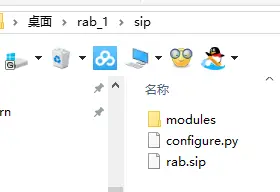
image.png
- 关键步骤 : 不可以直接在cmd中运行nmake,要打开
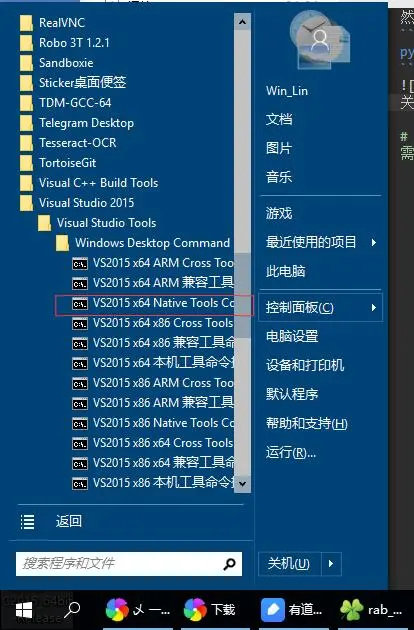
5.jpg
- (PS:后来我试了下配置nmake环境之后可以直接在cmd中用nmake, 如果比较懒还是用上面的吧。)
- 执行命令切换到modules目录
cd D:\Personal\Desktop\rab_1\sip\modules
d:
nmake
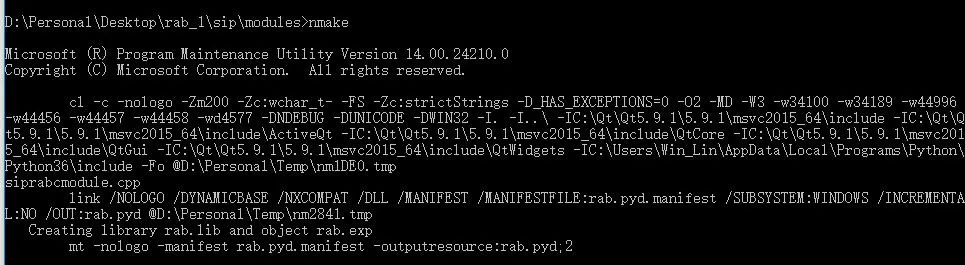
9.jpg
生成结果
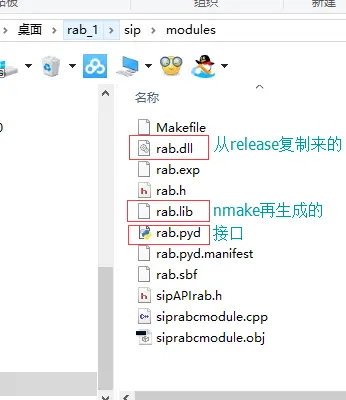
image.png
nmake install

10.jpg
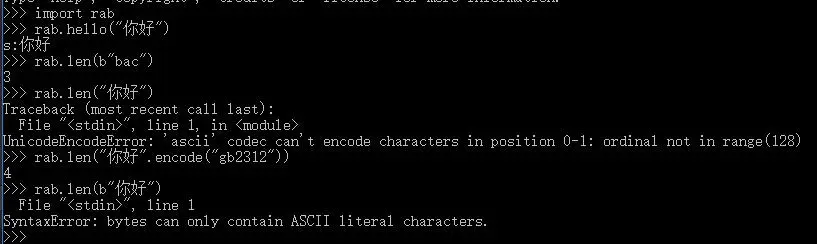
5. python测试
此时可以尝试cmd命令
import rab
rab.hello("你好")
rab.len(b'abc')
rab.len("你好".encode("gb2312"))
注意: 如果pyqt是用pip install pyqt5安装的, import rab 时可能报错:DLL找不到。
- 解决方法:将(...\Python\Python3X\Lib\site-packages\PyQt5\Qt\bin)文件夹下文件复制到(...\Python\Python3X\Lib\site-packages\PyQt5\)目录下
11.jpg
如有错误与疑点,请留言指正。
欢迎同道交流指点

QQ群 与 微信公众号
QQ群 : 246269919 ( 已满 )
432987409 (入群先看 本群须知 )
微信公众号:WoHowLearn
( 课件与代码在此 )
简书 : WoHowLearn
GitHub :
-https://github.com/892768447
-https://github.com/625781186
厚脸皮求关注打赏






 扫一扫
扫一扫


 1440
1440

 被折叠的 条评论
为什么被折叠?
被折叠的 条评论
为什么被折叠?
 到【灌水乐园】发言





