 解决Redis连接异常与CentOS7防火墙配置



 本文详细介绍了在使用Java连接Redis时遇到的JedisConnectionException错误,特别是当连接被拒绝时的解决方案。针对Linux和CentOS7系统,提供了关闭防火墙的临时及永久方法,包括使用systemctl命令进行firewalld服务的操作。
Exception in thread “main” redis.clients.jedis.exceptions.JedisConnectionException: java.net.ConnectException: Connection refused (Connection refused)
解决方法:
一、linux中配置redis,使用java连接测试时报错:
二、centos7的一些变化,firewalld替换iptables、systemctl 替换service
一、linux中配置redis,使用java连接测试时报错:
Exception in thread “main” redis.clients.jedis.exceptions.JedisConnectionException: java.net.ConnectException: Connection refused (Connection refused)
原因:
linux中的防火墙没有关闭,在终端中输入以下命令关闭防火墙即可:
1) Linux操作系统中永久性生效,重启后不会复原
开启: chkconfig iptables on

关闭: chkconfig iptables off
2) 即时生效,重启后复原
开启: service iptables start

关闭: service iptables stop
二、centos7的一些变化,firewalld替换iptables、systemctl 替换service
1.防火墙命令用firewalld取代了iptables了。
查看防火墙状态   systemctl status firewalld

临时关闭防火墙命令,reboot之后,防火墙自动起来。   systemctl stop firewalld

永久关闭防火墙命令。reboot之后,防火墙不会自动启动    systemctl disable firewalld

启动防火墙命令   systemctl enable firewalld
2.用systemctl 代替了service,不过为了向后兼容,centos7中,service还是可以用的。
如使用systemctl关闭防火墙

systemctl stop firewalld.service
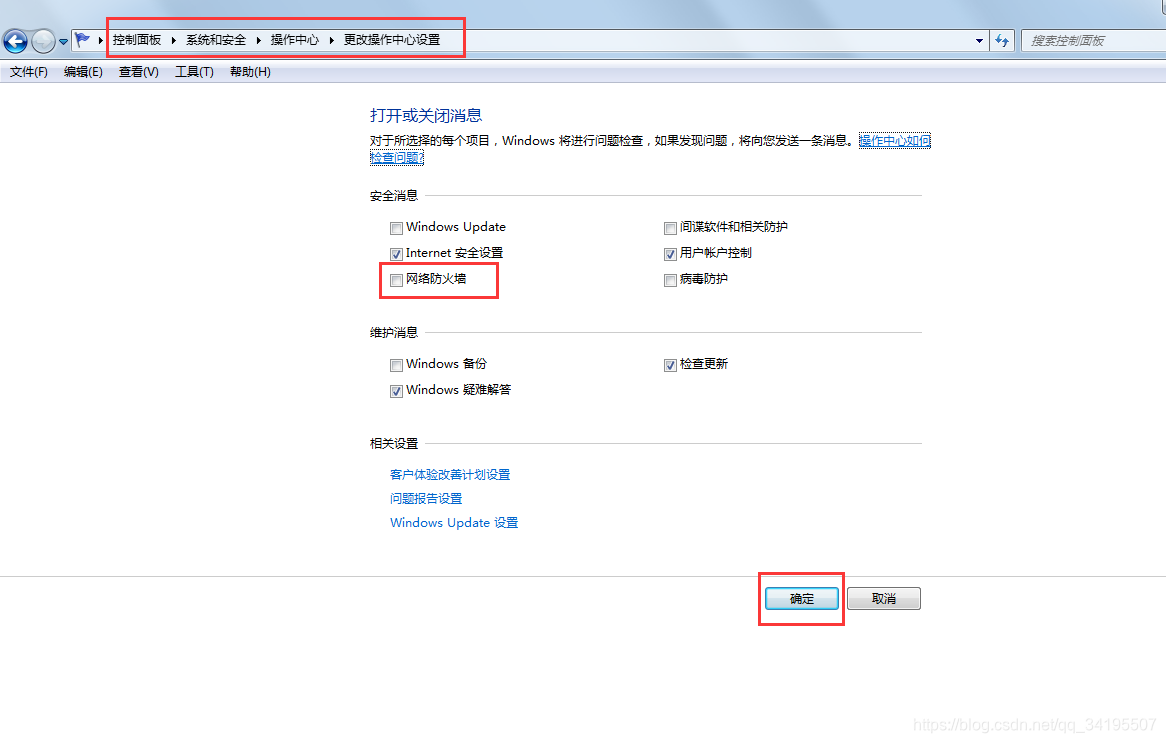
还要关闭本地电脑的防火墙





 扫一扫
扫一扫


 9599
9599

 被折叠的 条评论
为什么被折叠?
被折叠的 条评论
为什么被折叠?
 到【灌水乐园】发言





