


文章目录
⭐前言
大家好,我是yma16,本文分享 前端——富文本编辑实现选取输入判断变量(contenteditable+selection监听)。
contenteditable
全局属性 contenteditable 是一个枚举属性,表示元素是否可被用户编辑。如果可以,浏览器会修改元素的组件以允许编辑。
Selection
Selection 对象表示用户选择的文本范围或插入符号的当前位置。它代表页面中的文本选区,可能横跨多个元素。文本选区由用户拖拽鼠标经过文字而产生。
node系列往期文章
node_windows环境变量配置
node_npm发布包
linux_配置node
node_nvm安装配置
node笔记_http服务搭建(渲染html、json)
node笔记_读文件
node笔记_写文件
node笔记_连接mysql实现crud
node笔记_formidable实现前后端联调的文件上传
node笔记_koa框架介绍
node_koa路由
node_生成目录
node_读写excel
node笔记_读取目录的文件
node笔记——调用免费qq的smtp发送html格式邮箱
node实战——搭建带swagger接口文档的后端koa项目(node后端就业储备知识)
node实战——后端koa结合jwt连接mysql实现权限登录(node后端就业储备知识)
node实战——koa给邮件发送验证码并缓存到redis服务(node后端储备知识)
koa系列项目文章
前端vite+vue3结合后端node+koa——实现代码模板展示平台(支持模糊搜索+分页查询)
node+vue3+mysql前后分离开发范式——实现对数据库表的增删改查
node+vue3+mysql前后分离开发范式——实现视频文件上传并渲染
koa-vue性能监控到封装sdk系列文章
性能监控系统搭建——node_koa实现性能监控数据上报(第一章)
性能监控系统搭建——vue3实现性能监控数据展示(第二章)
性能监控计算——封装带性能计算并上报的npm包(第三章)
canvas系列文章
web canvas系列——快速入门上手绘制二维空间点、线、面
webgl canvas系列——快速加背景、抠图、加水印并下载图片
webgl canvas系列——animation中基本旋转、平移、缩放(模拟冒泡排序过程)
前端vue系列文章
vue3 + fastapi 实现选择目录所有文件自定义上传到服务器
前端vue2、vue3去掉url路由“ # ”号——nginx配置
csdn新星计划vue3+ts+antd赛道——利用inscode搭建vue3(ts)+antd前端模板
认识vite_vue3 初始化项目到打包
python_selenuim获取csdn新星赛道选手所在城市用echarts地图显示
让大模型分析csdn文章质量 —— 提取csdn博客评论在文心一言分析评论区内容
前端vue3——html2canvas给网站截图生成宣传海报
前端——html拖拽原理
前端 富文本编辑器原理——从javascript、html、css开始入门
前端老古董execCommand——操作 选中文本 样式
前端如何在30秒内实现吸管拾色器?
前端——原生Selection api操作选中文本 样式、取消样式(解决标签的无限嵌套问题)
前端 ——xml转json json转xml 实现 mjml 邮件内容转json,json转mjml
前端 ——youtube、tiktok视频封面获取并使用canvas合并封面和自定义播放按钮生成图片
前端gmail邮件加载动态样式——动态评分交互邮件可提交api
react_flow自定义节点、边——使用darg布局树状结构
⭐从deepseek获取思路
提示词:采用contenteditable+selection实现实现选取监听 当光标上输入 selection输入光标前存在{{ 输入光标后两个字符存在}} 就判断 是变量,弹出一个下拉选择框选择变量
变量输入检测与下拉选择实现
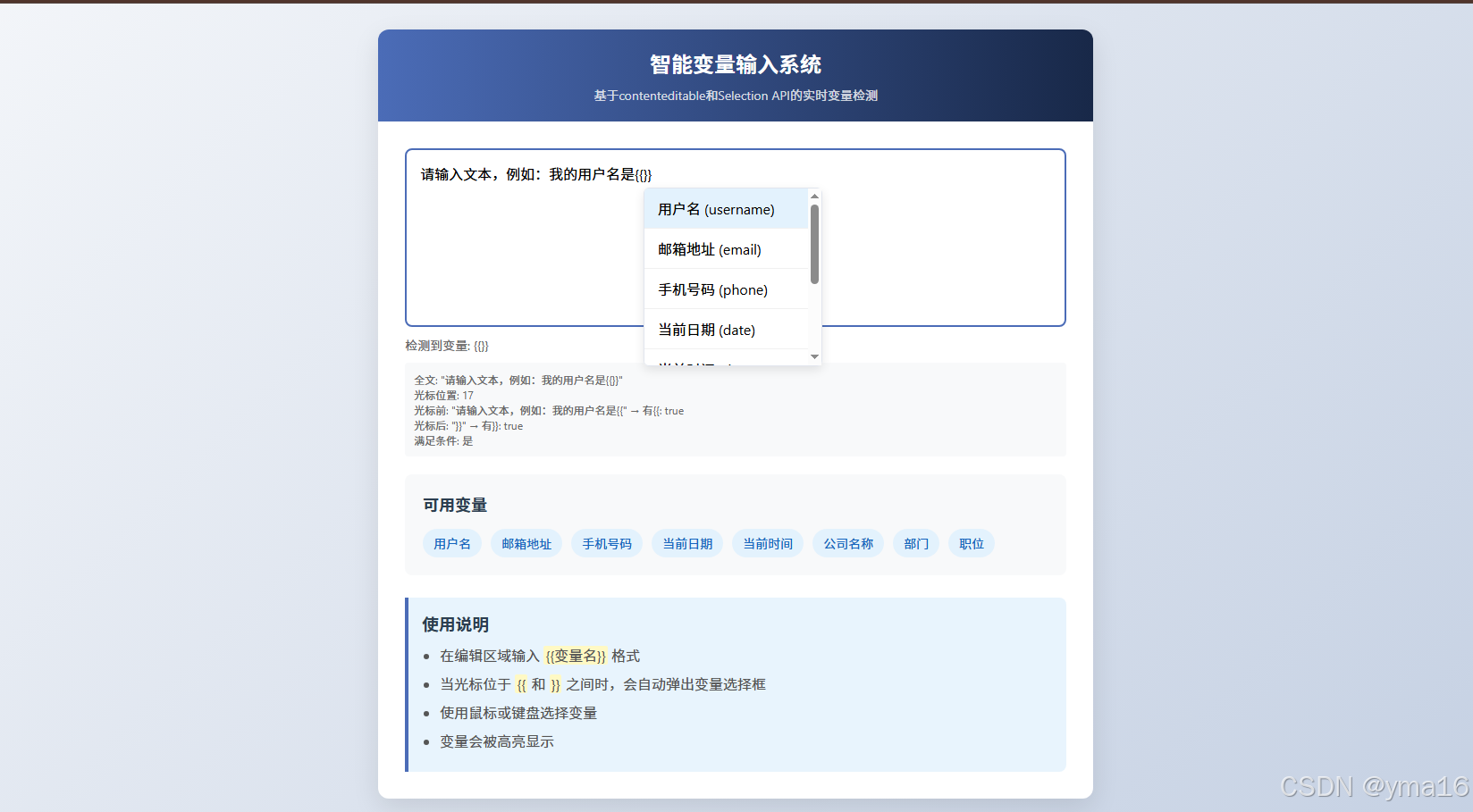
我将实现一个智能文本输入系统,当用户输入{{var}}格式的变量时,自动弹出下拉选择框供用户选择预定义变量。
思路分析
监听输入框的输入事件
检测光标位置前后是否有{{}}
当条件满足时,显示变量选择下拉框
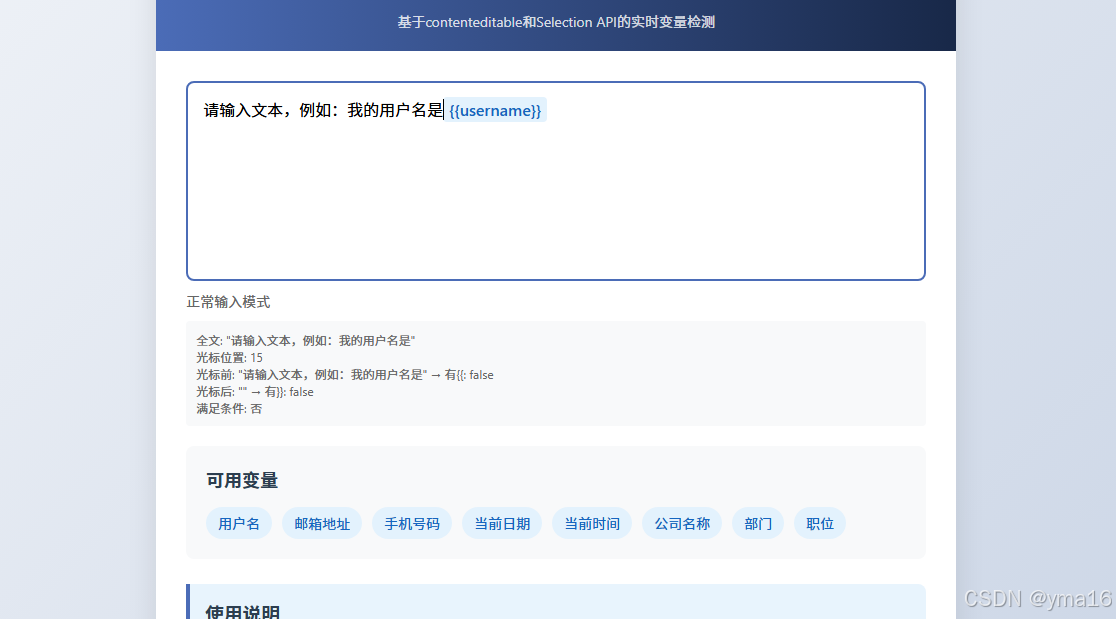
用户选择变量后,自动替换当前输入的变量占位符
<!DOCTYPE html>
<html lang="zh-CN">
<head>
<meta charset="UTF-8">
<meta name="viewport" content="width=device-width, initial-scale=1.0">
<title>智能变量输入系统</title>
<style>
* {
box-sizing: border-box;
margin: 0;
padding: 0;
font-family: 'Segoe UI', Tahoma, Geneva, Verdana, sans-serif;
}
body {
background: linear-gradient(135deg, #f5f7fa 0%, #c3cfe2 100%);
min-height: 100vh;
display: flex;
justify-content: center;
align-items: center;
padding: 20px;
}
.container {
width: 100%;
max-width: 800px;
background: white;
border-radius: 12px;
box-shadow: 0 10px 30px rgba(0, 0, 0, 0.1);
overflow: hidden;
}
.header {
background: linear-gradient(90deg, #4b6cb7 0%, #182848 100%);
color: white;
padding: 20px 30px;
text-align: center;
}
.header h1 {
font-size: 24px;
margin-bottom: 8px;
}
.header p {
opacity: 0.8;
font-size: 14px;
}
.content {
padding: 30px;
}
.input-container {
position: relative;
margin-bottom: 20px;
}
#editableDiv {
width: 100%;
min-height: 200px;
padding: 15px;
border: 2px solid #e1e5ee;
border-radius: 8px;
font-size: 16px;
line-height: 1.5;
overflow-y: auto;
outline: none;
transition: border-color 0.3s;
}
#editableDiv:focus {
border-color: #4b6cb7;
}
.variable {
background-color: #e3f2fd;
color: #1565c0;
padding: 2px 6px;
border-radius: 4px;
font-weight: 500;
}
.variables-panel {
background: #f8f9fa;
border-radius: 8px;
padding: 20px;
margin-top: 20px;
}
.variables-panel h3 {
margin-bottom: 15px;
color: #2c3e50;
font-size: 18px;
}
.variable-list {
display: flex;
flex-wrap: wrap;
gap: 10px;
}
.variable-tag {
background: #e3f2fd;
color: #1565c0;
padding: 6px 12px;
border-radius: 20px;
font-size: 14px;
cursor: pointer;
transition: all 0.2s;
}
.variable-tag:hover {
background: #bbdefb;
transform: translateY(-2px);
}
.dropdown {
position: fixed;
background: white;
border: 1px solid #e1e5ee;
border-radius: 6px;
box-shadow: 0 4px 12px rgba(0, 0, 0, 0.1);
max-height: 200px;
overflow-y: auto;
z-index: 1000;
display: none;
min-width: 200px;
}
.dropdown-item {
padding: 10px 15px;
cursor: pointer;
border-bottom: 1px solid #f0f0f0;
transition: background 0.2s;
}
.dropdown-item:hover {
background: #f5f7fa;
}
.dropdown-item.active {
background: #e3f2fd;
}
.dropdown-item:last-child {
border-bottom: none;
}
.instructions {
background: #e8f4fd;
border-left: 4px solid #4b6cb7;
padding: 15px;
margin-top: 25px;
border-radius: 0 8px 8px 0;
}
.instructions h3 {
color: #2c3e50;
margin-bottom: 10px;
}
.instructions ul {
padding-left: 20px;
}
.instructions li {
margin-bottom: 8px;
color: #555;
}
.highlight {
background-color: #fff9c4;
padding: 0 2px;
border-radius: 2px;
}
.status {
margin-top: 10px;
font-size: 14px;
color: #666;
min-height: 20px;
}
.debug {
margin-top: 10px;
padding: 10px;
background: #f8f9fa;
border-radius: 4px;
font-size: 12px;
color: #666;
}
</style>
</head>
<body>
<div class="container">
<div class="header">
<h1>智能变量输入系统</h1>
<p>基于contenteditable和Selection API的实时变量检测</p>
</div>
<div class="content">
<div class="input-container">
<div id="editableDiv" contenteditable="true">请输入文本,例如:我的用户名是{{username}}</div>
<div id="dropdown" class="dropdown"></div>
<div id="status" class="status">等待输入...</div>
<div id="debug" class="debug"></div>
</div>
<div class="variables-panel">
<h3>可用变量</h3>
<div class="variable-list">
<div class="variable-tag" data-variable="username">用户名</div>
<div class="variable-tag" data-variable="email">邮箱地址</div>
<div class="variable-tag" data-variable="phone">手机号码</div>
<div class="variable-tag" data-variable="date">当前日期</div>
<div class="variable-tag" data-variable="time">当前时间</div>
<div class="variable-tag" data-variable="company">公司名称</div>
<div class="variable-tag" data-variable="department">部门</div>
<div class="variable-tag" data-variable="position">职位</div>
</div>
</div>
<div class="instructions">
<h3>使用说明</h3>
<ul>
<li>在编辑区域输入 <span class="highlight">{{变量名}}</span> 格式</li>
<li>当光标位于 <span class="highlight">{{</span> 和 <span class="highlight">}}</span> 之间时,会自动弹出变量选择框</li>
<li>使用鼠标或键盘选择变量</li>
<li>变量会被高亮显示</li>
</ul>
</div>
</div>
</div>
<script>
document.addEventListener('DOMContentLoaded', function() {
const editableDiv = document.getElementById('editableDiv');
const dropdown = document.getElementById('dropdown');
const status = document.getElementById('status');
const debug = document.getElementById('debug');
const variableTags = document.querySelectorAll('.variable-tag');
// 预定义变量
const variables = {
'username': '用户名',
'email': '邮箱地址',
'phone': '手机号码',
'date': '当前日期',
'time': '当前时间',
'company': '公司名称',
'department': '部门',
'position': '职位'
};
let isChecking = false;
// 监听所有可能改变内容或光标位置的事件
editableDiv.addEventListener('input', checkForVariable);
editableDiv.addEventListener('keyup', checkForVariable);
editableDiv.addEventListener('click', checkForVariable);
document.addEventListener('selectionchange', checkForVariable);
// 键盘事件处理
editableDiv.addEventListener('keydown', function(e) {
if (dropdown.style.display === 'block') {
handleDropdownKeyboard(e);
}
});
// 点击变量标签
variableTags.forEach(tag => {
tag.addEventListener('click', function() {
insertVariable(this.dataset.variable);
});
});
// 点击其他地方隐藏下拉框
document.addEventListener('click', function(e) {
if (!dropdown.contains(e.target) && e.target !== editableDiv) {
hideDropdown();
}
});
// 检查变量格式
function checkForVariable() {
if (isChecking) return;
isChecking = true;
setTimeout(() => {
const sel = window.getSelection();
if (sel.rangeCount === 0) {
isChecking = false;
return;
}
const range = sel.getRangeAt(0);
const container = range.commonAncestorContainer;
if (!editableDiv.contains(container)) {
isChecking = false;
return;
}
// 获取光标位置
const cursorPos = range.startOffset;
let textNode = container;
// 确保是文本节点
if (textNode.nodeType !== Node.TEXT_NODE) {
textNode = findTextNodeAtCursor(range);
if (!textNode) {
hideDropdown();
isChecking = false;
return;
}
}
const fullText = textNode.textContent;
// 检查光标前2个字符是否有 {{
const beforeCursor = fullText.substring(0, cursorPos);
const hasOpenBrace = beforeCursor.endsWith('{{');
// 检查光标后2个字符是否有 }}
const afterCursor = fullText.substring(cursorPos);
const hasCloseBrace = afterCursor.startsWith('}}');
updateDebugInfo(fullText, cursorPos, hasOpenBrace, hasCloseBrace);
// 如果同时满足条件,显示下拉框
if (hasOpenBrace && hasCloseBrace) {
// 获取变量名(光标位置的内容)
const varStart = beforeCursor.lastIndexOf('{{') + 2;
const varEnd = cursorPos + 2; // }} 的位置
const variableName = fullText.substring(varStart, cursorPos);
showDropdown(variableName, textNode, varStart, varEnd);
status.textContent = `检测到变量: {{${variableName}}}`;
} else {
hideDropdown();
status.textContent = '正常输入模式';
}
isChecking = false;
}, 10);
}
// 处理下拉框键盘事件
function handleDropdownKeyboard(e) {
const items = dropdown.querySelectorAll('.dropdown-item');
const activeItem = dropdown.querySelector('.dropdown-item.active');
switch(e.key) {
case 'ArrowDown':
e.preventDefault();
if (!activeItem) {
items[0]?.classList.add('active');
} else {
const next = activeItem.nextElementSibling;
if (next) {
activeItem.classList.remove('active');
next.classList.add('active');
}
}
break;
case 'ArrowUp':
e.preventDefault();
if (activeItem) {
const prev = activeItem.previousElementSibling;
if (prev) {
activeItem.classList.remove('active');
prev.classList.add('active');
}
}
break;
case 'Enter':
e.preventDefault();
if (activeItem) {
selectVariable(activeItem.dataset.variable);
}
break;
case 'Escape':
e.preventDefault();
hideDropdown();
break;
}
}
// 查找光标所在的文本节点
function findTextNodeAtCursor(range) {
let node = range.startContainer;
if (node.nodeType === Node.TEXT_NODE) {
return node;
}
// 在元素中查找文本节点
const walker = document.createTreeWalker(
node,
NodeFilter.SHOW_TEXT,
null,
false
);
let textNode = null;
while (walker.nextNode()) {
const currentNode = walker.currentNode;
const nodeRange = document.createRange();
nodeRange.selectNodeContents(currentNode);
if (range.compareBoundaryPoints(Range.START_TO_START, nodeRange) >= 0 &&
range.compareBoundaryPoints(Range.END_TO_END, nodeRange) <= 0) {
textNode = currentNode;
break;
}
}
return textNode;
}
// 显示下拉框
function showDropdown(variableName, textNode, startPos, endPos) {
dropdown.innerHTML = '';
// 过滤匹配的变量
const matchedVars = Object.keys(variables).filter(v =>
v.toLowerCase().includes(variableName.toLowerCase())
);
// 如果没有匹配项,显示所有变量
const displayVars = matchedVars.length > 0 ? matchedVars : Object.keys(variables);
// 创建下拉选项
displayVars.forEach(variable => {
const item = document.createElement('div');
item.className = 'dropdown-item';
item.textContent = `${variables[variable]} (${variable})`;
item.dataset.variable = variable;
item.addEventListener('click', () => selectVariable(variable));
dropdown.appendChild(item);
});
// 保存当前变量范围信息
dropdown._currentVariable = {
textNode,
startPos,
endPos,
originalText: textNode.textContent
};
// 定位下拉框
positionDropdown();
dropdown.style.display = 'block';
// 高亮第一个选项
const firstItem = dropdown.querySelector('.dropdown-item');
if (firstItem) firstItem.classList.add('active');
}
// 定位下拉框
function positionDropdown() {
const sel = window.getSelection();
if (sel.rangeCount === 0) return;
const range = sel.getRangeAt(0);
const rect = range.getBoundingClientRect();
if (rect.width === 0 && rect.height === 0) {
const tempRange = range.cloneRange();
tempRange.collapse(false);
const tempRect = tempRange.getBoundingClientRect();
dropdown.style.top = `${tempRect.bottom + window.scrollY + 5}px`;
dropdown.style.left = `${tempRect.left + window.scrollX}px`;
} else {
dropdown.style.top = `${rect.bottom + window.scrollY + 5}px`;
dropdown.style.left = `${rect.left + window.scrollX}px`;
}
}
// 隐藏下拉框
function hideDropdown() {
dropdown.style.display = 'none';
dropdown._currentVariable = null;
}
// 选择变量
function selectVariable(variable) {
if (!dropdown._currentVariable) return;
const { textNode, startPos, endPos, originalText } = dropdown._currentVariable;
// 创建变量元素
const variableElement = document.createElement('span');
variableElement.className = 'variable';
variableElement.textContent = `{{${variable}}}`;
variableElement.dataset.variable = variable;
// 替换文本
const beforeText = originalText.substring(0, startPos);
const afterText = originalText.substring(endPos);
// 创建文档片段
const fragment = document.createDocumentFragment();
if (beforeText) fragment.appendChild(document.createTextNode(beforeText));
fragment.appendChild(variableElement);
if (afterText) fragment.appendChild(document.createTextNode(afterText));
// 替换内容
textNode.parentNode.replaceChild(fragment, textNode);
// 移动光标到变量后
const range = document.createRange();
range.setStartAfter(variableElement);
range.collapse(true);
const sel = window.getSelection();
sel.removeAllRanges();
sel.addRange(range);
hideDropdown();
status.textContent = `已插入变量: {{${variable}}}`;
editableDiv.focus();
}
// 插入变量(从标签点击)
function insertVariable(variable) {
const sel = window.getSelection();
if (sel.rangeCount === 0) return;
const range = sel.getRangeAt(0);
// 创建变量元素
const variableElement = document.createElement('span');
variableElement.className = 'variable';
variableElement.textContent = `{{${variable}}}`;
variableElement.dataset.variable = variable;
// 插入变量
range.insertNode(variableElement);
// 移动光标到变量后
const newRange = document.createRange();
newRange.setStartAfter(variableElement);
newRange.collapse(true);
sel.removeAllRanges();
sel.addRange(newRange);
editableDiv.focus();
status.textContent = `已插入变量: {{${variable}}}`;
}
// 更新调试信息
function updateDebugInfo(fullText, cursorPos, hasOpenBrace, hasCloseBrace) {
const before = fullText.substring(0, cursorPos);
const after = fullText.substring(cursorPos);
let debugText = `全文: "${fullText}"<br>`;
debugText += `光标位置: ${cursorPos}<br>`;
debugText += `光标前: "${before}" → 有{{: ${hasOpenBrace}<br>`;
debugText += `光标后: "${after}" → 有}}: ${hasCloseBrace}<br>`;
debugText += `满足条件: ${hasOpenBrace && hasCloseBrace ? '是' : '否'}`;
debug.innerHTML = debugText;
}
});
</script>
</body>
</html>
运行效果
⭐结束
本文分享到这结束,如有错误或者不足之处欢迎指出!

👍 点赞,是我创作的动力!
⭐️ 收藏,是我努力的方向!
✏️ 评论,是我进步的财富!
💖 最后,感谢你的阅读!





 扫一扫
扫一扫


 1296
1296

 被折叠的 条评论
为什么被折叠?
被折叠的 条评论
为什么被折叠?
 到【灌水乐园】发言





