



 本文介绍如何使用Docker快速部署Nginx作为文件下载服务器,包括配置nginx.conf文件及容器启动步骤。
前提条件:需要在系统中安装docker运行环境
如果系统中没有安装docker,可以参考这篇文章CentOS快速搭建docker运行环境进行安装
一、概述
这篇文章介绍使用docker搭建nginx文件下载服务器,主要有两个步骤:
- 在宿主机配置
nginx.conf文件 - 挂载宿主机的
nginx.conf文件和下载路径到容器的对应路径
二、配置步骤
1、在宿主机配置nginx.conf文件
我这里直接在/root/nginx目录下面创建nginx.conf文件
[root@sweet-action-1 nginx]# pwd
/root/nginx
[root@sweet-action-1 nginx]# ll
total 8
drwxr-xr-x 2 root root 4096 Aug 15 02:54 download
-rw-r--r-- 1 root root 1628 Aug 15 02:49 nginx.conf
nginx.conf文件的内容如下:
user nginx;
worker_processes auto;
error_log /var/log/nginx/error.log;
pid /run/nginx.pid;
include /usr/share/nginx/modules/*.conf;
events {
    worker_connections 1024;
}
http {
    log_format  main  '$remote_addr - $remote_user [$time_local] "$request" '
                      '$status $body_bytes_sent "$http_referer" '
                      '"$http_user_agent" "$http_x_forwarded_for"';
    access_log  /var/log/nginx/access.log  main;
    sendfile            on;
    tcp_nopush          on;
    tcp_nodelay         on;
    keepalive_timeout   65;
    types_hash_max_size 2048;
    default_type        application/octet-stream;
    # Load modular configuration files from the /etc/nginx/conf.d directory.
    # See http://nginx.org/en/docs/ngx_core_module.html#include
    # for more information.
    include /etc/nginx/conf.d/*.conf;
    server {
        listen       80 default_server;
        listen       [::]:80 default_server;
        server_name  _;
        # Load configuration files for the default server block.
        include /etc/nginx/default.d/*.conf;
        location / {
            root    /usr/share/nginx/html/download;
        autoindex on;    #开启索引功能
        autoindex_exact_size off;  #关闭计算文件确切大小(单位bytes),只显示大概大小(单位kb、mb、gb)
        autoindex_localtime on;   #显示本机时间而非 GMT 时间
        }
        error_page 404 /404.html;
            location = /40x.html {
        }
        error_page 500 502 503 504 /50x.html;
            location = /50x.html {
        }
    }
}
2、启动nginx的docker容器
docker run --name nginx -v /root/nginx/nginx.conf:/etc/nginx/nginx.conf -v /root/nginx/download/:/usr/share/nginx/html/download -p 80:80 -d nginx
参数说明:
--name:指定容器的名称,容器名称不能重复-v:挂载数据卷,宿主机路径:容器路径-p:指定映射端口,宿主机端口:容器端口-d:指定容器后台运行
运行成功后,通过docker ps查看正在运行的容器
[root@sweet-action-1 nginx]# docker ps
CONTAINER ID        IMAGE               COMMAND                  CREATED             STATUS              PORTS                NAMES
916c29af8dd7        nginx               "nginx -g 'daemon of…"   8 minutes ago       Up 8 minutes        0.0.0.0:80->80/tcp   nginx
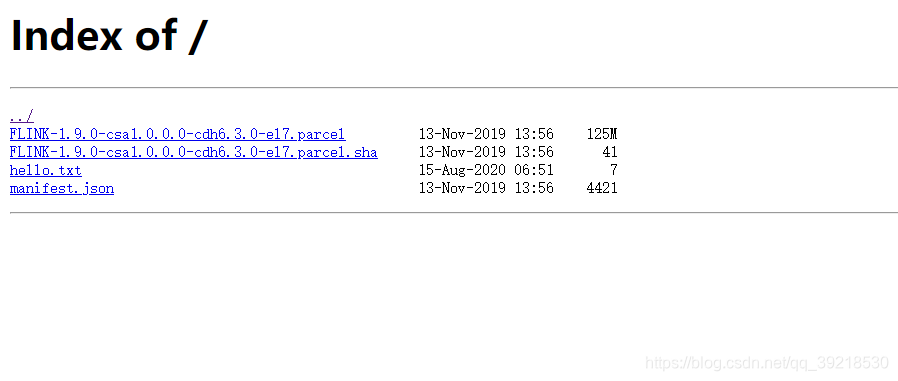
浏览器打开nginx的访问地址就可以看到放在宿主机/root/nginx/download目录下面的文件了
[root@sweet-action-1 nginx]# ll download/
total 127916
-rw-r--r-- 1 root root 130962403 Nov 13  2019 FLINK-1.9.0-csa1.0.0.0-cdh6.3.0-el7.parcel
-rw-r--r-- 1 root root        41 Nov 13  2019 FLINK-1.9.0-csa1.0.0.0-cdh6.3.0-el7.parcel.sha
-rw-r--r-- 1 root root         7 Aug 15 02:51 hello.txt
-rw-r--r-- 1 root root      4421 Nov 13  2019 manifest.json
查看容器运行日志:
docker logs -f nginx
输出日志如下:
[root@sweet-action-1 nginx]# docker logs -f nginx
58.63.0.33 - - [15/Aug/2020:07:26:30 +0000] "GET / HTTP/1.1" 200 629 "-" "Mozilla/5.0 (Windows NT 10.0; WOW64) AppleWebKit/537.36 (KHTML, like Gecko) Chrome/80.0.3987.163 Safari/537.36" "-"
58.63.0.33 - - [15/Aug/2020:07:26:33 +0000] "GET / HTTP/1.1" 200 629 "-" "Mozilla/5.0 (Windows NT 10.0; WOW64) AppleWebKit/537.36 (KHTML, like Gecko) Chrome/80.0.3987.163 Safari/537.36" "-"





 扫一扫
扫一扫


 1249
1249

 被折叠的 条评论
为什么被折叠?
被折叠的 条评论
为什么被折叠?
 到【灌水乐园】发言





