一、环境准备
pip install concurrent-log-handler
pip install pyyaml
二、配置示例
- config/logging_config.py
import logging
import logging.config
import os
import yaml
_logger_initialized = False
def setup_logger(config_path="../config/logging_config.yaml"):
""" 获取打包后资源文件的绝对路径 """
if getattr(sys, 'frozen', False):
base_path = sys._MEIPASS
else:
base_path = os.path.abspath('..')
config_path = os.path.join(base_path, "config/logging_config.yaml")
global _logger_initialized
if _logger_initialized:
return
print(f"正在尝试加载日志配置文件:{os.path.abspath(config_path)}")
if not os.path.exists(config_path):
raise FileNotFoundError(f"日志配置文件未找到: {config_path}")
with open(config_path, "r", encoding="utf-8") as f:
config = yaml.safe_load(f)
handlers = config.get('handlers', {})
for handler in handlers.values():
if 'filename' in handler:
log_file = handler['filename']
log_dir = os.path.dirname(log_file)
if log_dir and not os.path.exists(log_dir):
os.makedirs(log_dir, exist_ok=True)
print(f"已创建日志目录:{log_dir}")
logging.config.dictConfig(config)
_logger_initialized = True
- config/logging_config.yaml
version: 1
disable_existing_loggers: False
formatters:
simple:
format: "%(asctime)s - %(levelname)s - %(name)s.%(funcName)s:%(lineno)d - %(message)s"
handlers:
console:
class: logging.StreamHandler
level: INFO
formatter: simple
stream: ext://sys.stdout
info_file:
class: concurrent_log_handler.ConcurrentTimedRotatingFileHandler
level: INFO
formatter: simple
filename: ../logs/info/log_info.log
when: midnight
backupCount: 7
maxBytes: 104857600
encoding: utf8
error_file:
class: concurrent_log_handler.ConcurrentTimedRotatingFileHandler
level: ERROR
formatter: simple
filename: ../logs/error/log_error.log
when: midnight
backupCount: 7
maxBytes: 104857600
encoding: utf8
loggers:
root:
level: DEBUG
handlers: [console, info_file, error_file]
'spiders.js_spider':
level: INFO
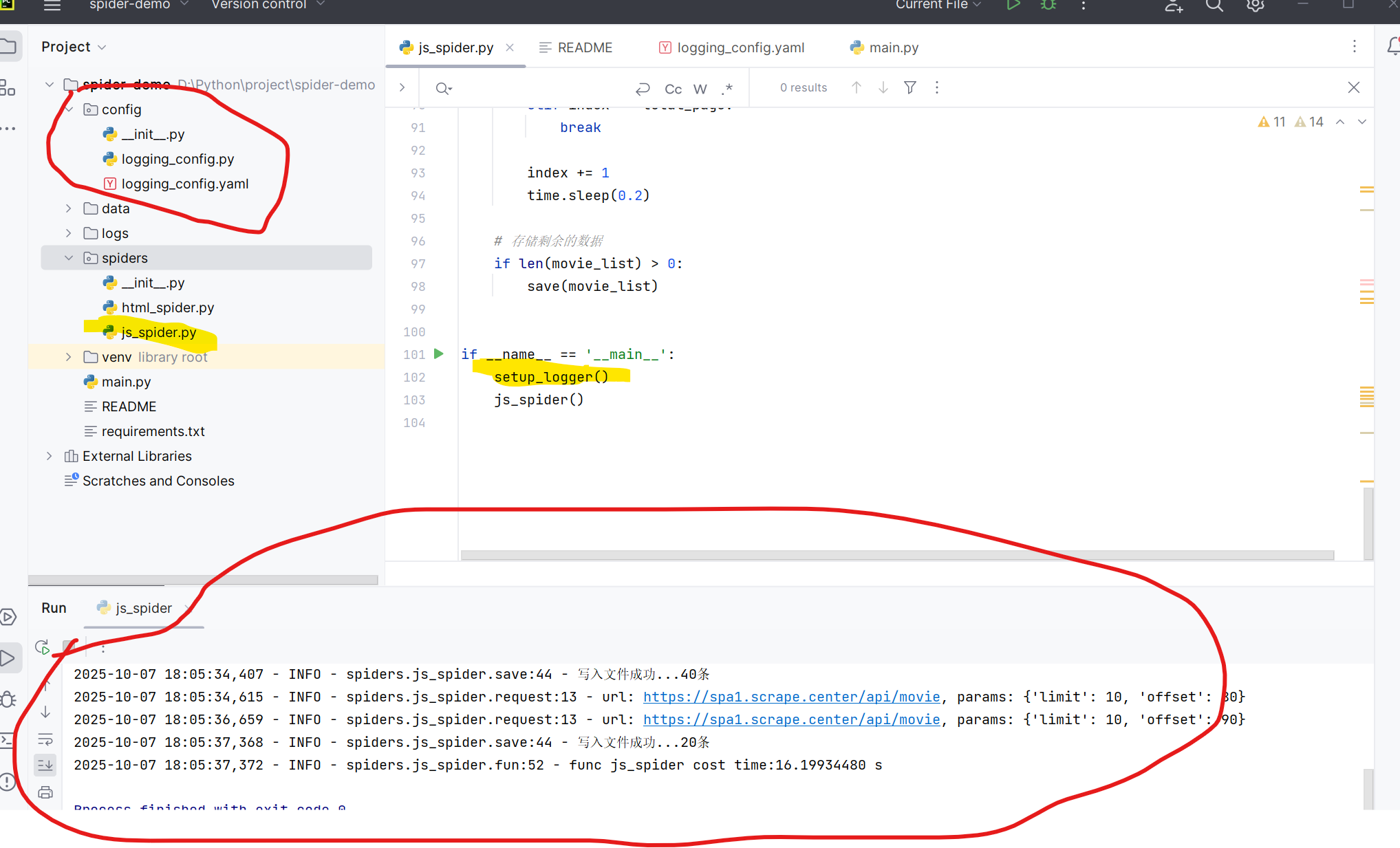
三、目录结构及结果展示
- 执行时需要在主函数main方法中执行setup_logger()初始化日志









 扫一扫
扫一扫


 950
950

 被折叠的 条评论
为什么被折叠?
被折叠的 条评论
为什么被折叠?
 到【灌水乐园】发言





