



 本文介绍了MapReduce中的分区器(partitioner)与组合器(combiner)的作用与实现方法。分区器负责将Map任务的输出数据按规则分配给Reduce任务,而组合器则在Map与Reduce间提供局部聚合功能,以减少网络传输数据量。
MapReduce--partitioner、combiner 详解以及实现自定义partitioner
1. partitioner详解
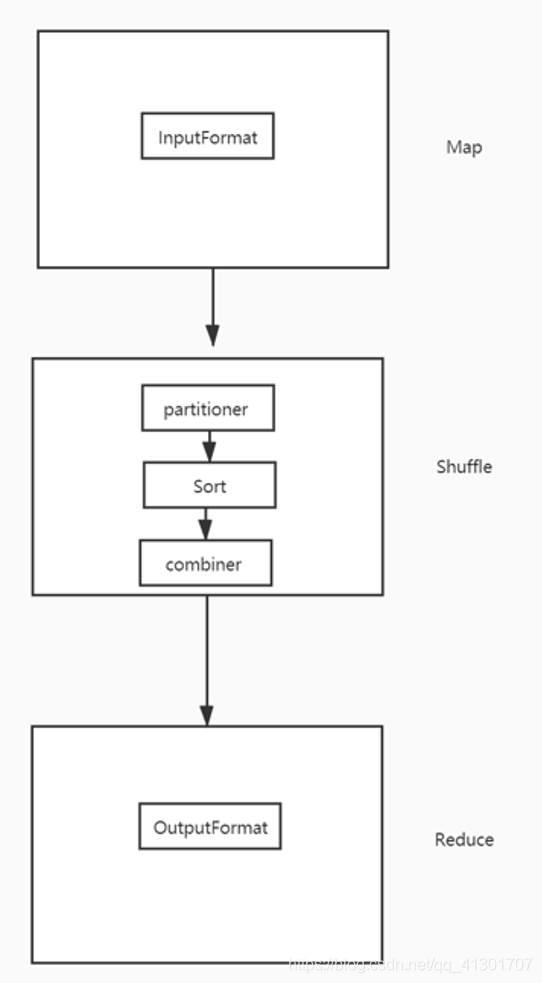
- 之前我们已经说了InputFormat,今天主要来聊聊partitioner
- partitioner是位于Map之后。Reduce之前执行的,是Shuffle中的第一步骤
- partitioner是把map中清洗之后的数据进行分区,把数据分发到相应的机器上面
/**
 * Partitions the key space.
 *
 * <p><code>Partitioner</code> controls the partitioning of the keys of the
 * intermediate map-outputs. The key (or a subset of the key) is used to derive
 * the partition, typically by a hash function. The total number of partitions
 * is the same as the number of reduce tasks for the job. Hence this controls
 * which of the <code>m</code> reduce tasks the intermediate key (and hence the
 * record) is sent for reduction.</p>
 *
 * Note: If you require your Partitioner class to obtain the Job's configuration
 * object, implement the {@link Configurable} interface.
 *
 * @see Reducer
*/- 如果需要实现自定义partitioner,则需要实现getPartition函数
  /**
   * Get the partition number for a given key (hence record) given the total
   * number of partitions i.e. number of reduce-tasks for the job.
   *
   * <p>Typically a hash function on a all or a subset of the key.</p>
   *
   * @param key the key to be partioned.
   * @param value the entry value.
   * @param numPartitions the total number of partitions.
   * @return the partition number for the <code>key</code>.
   */
public abstract int getPartition(KEY key, VALUE value, int numPartitions);- 默认使用的是Partitioner中的一个实现类:HashPartitioner
- HashPartitioner中的getPartition实现方式
public int getPartition(K key, V value,
                      int numReduceTasks) {
return (key.hashCode() & Integer.MAX_VALUE) % numReduceTasks;
}
@Native public static final int MAX_VALUE = 0x7fffffff;- 通过(key取hash code 然后 & MAX_VALUE) % reduce task的个数来确定是属于哪个分区
- 于是相同key会分发到一个分区里面
- 如果要是需要实现自定义partitioner,需要实现Partitioner中的getPartition函数
2 实现自定义partitioner
2.1 需求
第二个字段:手机号
倒数第三个字段:上行流量
倒数第二个字段:下行流量
==> 统计每个手机号所耗费的上行流量之和、下行流量之和、总流量之和
按照手机号前两位分组:
    1. 手机号以13开头的分发到一个partitioner里面
    2. 手机号以18开头的分发到一个partitioner里面
    3. 其他手机号分发到一个partitioner里面
2.2 数据
1363157985066 	13726230503	00-FD-07-A4-72-B8:CMCC	120.196.100.82	i02.c.aliimg.com		24	27	2481	24681	200
1363157995052 	13826544101	5C-0E-8B-C7-F1-E0:CMCC	120.197.40.4			4	0	264	0	200
1363157991076 	13926435656	20-10-7A-28-CC-0A:CMCC	120.196.100.99			2	4	132	1512	200
1363154400022 	13926251106	5C-0E-8B-8B-B1-50:CMCC	120.197.40.4			4	0	240	0	200
1363157993044 	18211575961	94-71-AC-CD-E6-18:CMCC-EASY	120.196.100.99	iface.qiyi.com	视频网站	15	12	1527	2106	200
1363157995074 	84138413	5C-0E-8B-8C-E8-20:7DaysInn	120.197.40.4	122.72.52.12		20	16	4116	1432	200
1363157993055 	13560439658	C4-17-FE-BA-DE-D9:CMCC	120.196.100.99			18	15	1116	954	200
1363157995033 	15920133257	5C-0E-8B-C7-BA-20:CMCC	120.197.40.4	sug.so.360.cn	信息安全	20	20	3156	2936	200
1363157983019 	13719199419	68-A1-B7-03-07-B1:CMCC-EASY	120.196.100.82			4	0	240	0	200
1363157984041 	13660577991	5C-0E-8B-92-5C-20:CMCC-EASY	120.197.40.4	s19.cnzz.com	站点统计	24	9	6960	690	200
1363157973098 	15013685858	5C-0E-8B-C7-F7-90:CMCC	120.197.40.4	rank.ie.sogou.com	搜索引擎	28	27	3659	3538	200
1363157986029 	15989002119	E8-99-C4-4E-93-E0:CMCC-EASY	120.196.100.99	www.umeng.com	站点统计	3	3	1938	180	200
1363157992093 	13560439658	C4-17-FE-BA-DE-D9:CMCC	120.196.100.99			15	9	918	4938	200
1363157986041 	13480253104	5C-0E-8B-C7-FC-80:CMCC-EASY	120.197.40.4			3	3	180	180	200
1363157984040 	13602846565	5C-0E-8B-8B-B6-00:CMCC	120.197.40.4	2052.flash2-http.qq.com	综合门户	15	12	1938	2910	200
1363157995093 	13922314466	00-FD-07-A2-EC-BA:CMCC	120.196.100.82	img.qfc.cn		12	12	3008	3720	200
1363157982040 	13502468823	5C-0A-5B-6A-0B-D4:CMCC-EASY	120.196.100.99	y0.ifengimg.com	综合门户	57	102	7335	110349	200
1363157986072 	18320173382	84-25-DB-4F-10-1A:CMCC-EASY	120.196.100.99	input.shouji.sogou.com	搜索引擎	21	18	9531	2412	200
1363157990043 	13925057413	00-1F-64-E1-E6-9A:CMCC	120.196.100.55	t3.baidu.com	搜索引擎	69	63	11058	48243	200
1363157988072 	13760778710	00-FD-07-A4-7B-08:CMCC	120.196.100.82			2	2	120	120	200
1363157985066 	13726238888	00-FD-07-A4-72-B8:CMCC	120.196.100.82	i02.c.aliimg.com		24	27	2481	24681	200
1363157993055 	13560436666	C4-17-FE-BA-DE-D9:CMCC	120.196.100.99			18	15	1116	954	200
1363157985066 	13726238888	00-FD-07-A4-72-B8:CMCC	120.196.100.82	i02.c.aliimg.com		24	27	10000	20000	200
2.3 Code
2.3.1 MyPartitionerDriver Code
package com.xk.bigata.hadoop.mapreduce.partitioner;

import com.xk.bigata.hadoop.mapreduce.access.AccessDriver;
import com.xk.bigata.hadoop.mapreduce.domain.AccessDomain;
import com.xk.bigata.hadoop.utils.FileUtils;
import org.apache.hadoop.conf.Configuration;
import org.apache.hadoop.fs.Path;
import org.apache.hadoop.io.LongWritable;
import org.apache.hadoop.io.NullWritable;
import org.apache.hadoop.io.Text;
import org.apache.hadoop.mapreduce.Job;
import org.apache.hadoop.mapreduce.Mapper;
import org.apache.hadoop.mapreduce.Reducer;
import org.apache.hadoop.mapreduce.lib.input.FileInputFormat;
import org.apache.hadoop.mapreduce.lib.output.FileOutputFormat;

import java.io.IOException;

public class MyPartitionerDriver {

    public static void main(String[] args) throws Exception {

        String input = "mapreduce-basic/data/access.data";
        String output = "mapreduce-basic/out";

        // 1 创建 MapReduce job
        Configuration conf = new Configuration();
        Job job = Job.getInstance(conf);

        // 删除输出路径
        FileUtils.deleteFile(job.getConfiguration(), output);

        // 2 设置运行主类
        job.setJarByClass(AccessDriver.class);

        // 3 设置Map和Reduce运行的类
        job.setMapperClass(MyMapper.class);
        job.setReducerClass(MyReducer.class);

        // 4 设置Map 输出的 KEY 和 VALUE 数据类型
        job.setMapOutputKeyClass(Text.class);
        job.setMapOutputValueClass(AccessDomain.class);

        // 5 设置Reduce 输出 KEY 和 VALUE 数据类型
        job.setOutputKeyClass(NullWritable.class);
        job.setOutputValueClass(AccessDomain.class);

        // 6 设置输入和输出路径
        FileInputFormat.setInputPaths(job, new Path(input));
        FileOutputFormat.setOutputPath(job, new Path(output));
        // 设置自定义分区器
        // 分区器的输入就是map端的输出
        job.setPartitionerClass(MyPartitioner.class);

        // 设置reduce 输出的task个数为3
        job.setNumReduceTasks(3);

        // 7 提交job
        boolean result = job.waitForCompletion(true);
        System.exit(result ? 0 : 1);

    }

    public static class MyMapper extends Mapper<LongWritable, Text, Text, AccessDomain> {

        @Override
        protected void map(LongWritable key, Text value, Context context) throws IOException, InterruptedException {
            String[] spilts = value.toString().split("\t");
            String phone = spilts[1];
            long up = Long.parseLong(spilts[spilts.length - 3]);
            long down = Long.parseLong(spilts[spilts.length - 2]);
            context.write(new Text(phone), new AccessDomain(phone, up, down));
        }
    }

    public static class MyReducer extends Reducer<Text, AccessDomain, NullWritable, AccessDomain> {
        @Override
        protected void reduce(Text key, Iterable<AccessDomain> values, Context context) throws IOException, InterruptedException {
            Long up = 0L;
            Long down = 0L;
            for (AccessDomain access : values) {
                up += access.getUp();
                down += access.getDown();
            }
            context.write(NullWritable.get(), new AccessDomain(key.toString(), up, down));
        }
    }
}
2.3.2 MyPartitioner Code
package com.xk.bigata.hadoop.mapreduce.partitioner;

import com.xk.bigata.hadoop.mapreduce.domain.AccessDomain;
import org.apache.hadoop.io.Text;
import org.apache.hadoop.mapreduce.Partitioner;

public class MyPartitioner extends Partitioner<Text, AccessDomain> {
    @Override
    public int getPartition(Text text, AccessDomain accessDomain, int numPartitions) {
        String phone = text.toString();
        if (phone.startsWith("13")) {
            return 0;
        } else if (phone.startsWith("18")) {
            return 1;
        } else {
            return 2;
        }
    }
}
2.4 结果展示
2.4.1 part-r-00000里面的数据
13480253104	180	180	360
13502468823	7335	110349	117684
13560436666	1116	954	2070
13560439658	2034	5892	7926
13602846565	1938	2910	4848
13660577991	6960	690	7650
13719199419	240	0	240
13726230503	2481	24681	27162
13726238888	12481	44681	57162
13760778710	120	120	240
13826544101	264	0	264
13922314466	3008	3720	6728
13925057413	11058	48243	59301
13926251106	240	0	240
13926435656	132	1512	1644
2.4.2 part-r-00001里面的数据
18211575961	1527	2106	3633
18320173382	9531	2412	11943
2.4.3 part-r-00002里面的数据
15013685858	3659	3538	7197
15920133257	3156	2936	6092
15989002119	1938	180	2118
84138413 4116 1432 55483 combiner
- combiner是出于Map和Reduce之间进行的
- combiner相当于局部聚合,以WC为例,map端的输出为 <hadoop,<1,1,1,1>>,经过combiner之后会聚合成:<hadoop,4>,为了减少IO传输,先做了一个初步聚合
- combiner的输入就是Map端的输出,combiner的输出为Reduce端的输出
- 有些场景combiner无法使用,最经典的就是求平均值
3.1 需求
使用 combiner 进行一次WC计算3.2 数据
hadoop,spark,flink
hbase,hadoop,spark,flink
spark
hadoop
hadoop,spark,flink
hbase,hadoop,spark,flink
spark
hadoop
hbase,hadoop,spark,flink
3.3 不使用combiner Code
package com.xk.bigata.hadoop.mapreduce.combiner;

import com.xk.bigata.hadoop.utils.FileUtils;
import org.apache.hadoop.conf.Configuration;
import org.apache.hadoop.fs.Path;
import org.apache.hadoop.io.IntWritable;
import org.apache.hadoop.io.LongWritable;
import org.apache.hadoop.io.Text;
import org.apache.hadoop.mapreduce.Job;
import org.apache.hadoop.mapreduce.Mapper;
import org.apache.hadoop.mapreduce.Reducer;
import org.apache.hadoop.mapreduce.lib.input.FileInputFormat;
import org.apache.hadoop.mapreduce.lib.output.FileOutputFormat;

import java.io.IOException;

public class CombinerDirver {

    public static void main(String[] args) throws Exception {
        String input = "mapreduce-basic/data/wc.txt";
        String output = "mapreduce-basic/out";

        // 1 创建 MapReduce job
        Configuration conf = new Configuration();
        Job job = Job.getInstance(conf);

        // 删除输出路径
        FileUtils.deleteFile(job.getConfiguration(), output);

        // 2 设置运行主类
        job.setJarByClass(CombinerDirver.class);

        // 3 设置Map和Reduce运行的类
        job.setMapperClass(MyMapper.class);
        job.setReducerClass(MyReducer.class);

        // 4 设置Map 输出的 KEY 和 VALUE 数据类型
        job.setMapOutputKeyClass(Text.class);
        job.setMapOutputValueClass(IntWritable.class);

        // 5 设置Reduce 输出 KEY 和 VALUE 数据类型
        job.setOutputKeyClass(Text.class);
        job.setOutputValueClass(IntWritable.class);

        // 6 设置输入和输出路径
        FileInputFormat.setInputPaths(job, new Path(input));
        FileOutputFormat.setOutputPath(job, new Path(output));

        // 7 提交job
        boolean result = job.waitForCompletion(true);
        System.exit(result ? 0 : 1);
    }

    public static class MyMapper extends Mapper<LongWritable, Text, Text, IntWritable> {
        IntWritable ONE = new IntWritable(1);

        @Override
        protected void map(LongWritable key, Text value, Context context) throws IOException, InterruptedException {
            String[] spilts = value.toString().split(",");
            for (String word : spilts) {
                context.write(new Text(word), ONE);
            }
        }
    }

    public static class MyReducer extends Reducer<Text, IntWritable, Text, IntWritable> {
        @Override
        protected void reduce(Text key, Iterable<IntWritable> values, Context context) throws IOException, InterruptedException {
            int count = 0;
            for (IntWritable value : values) {
                count += value.get();
            }
            context.write(key, new IntWritable(count));
        }
    }
}
3.4 查看MapReduce 输出日志
Combine input records=0
Combine output records=0- 看出本次MapReduce计算程序并没有使用conbiner
3.5 使用combiner进行MapReduce 计算
- 添加如下代码
// 添加combiner
job.setCombinerClass(MyReducer.class);
3.6 查看输出日志
Combine input records=22
Combine output records=4- 可以看出conbiner里面的input 和output的records
CombinerDirver Code





 扫一扫
扫一扫


 被折叠的 条评论
为什么被折叠?
被折叠的 条评论
为什么被折叠?
 到【灌水乐园】发言





