


要实现的效果如下:
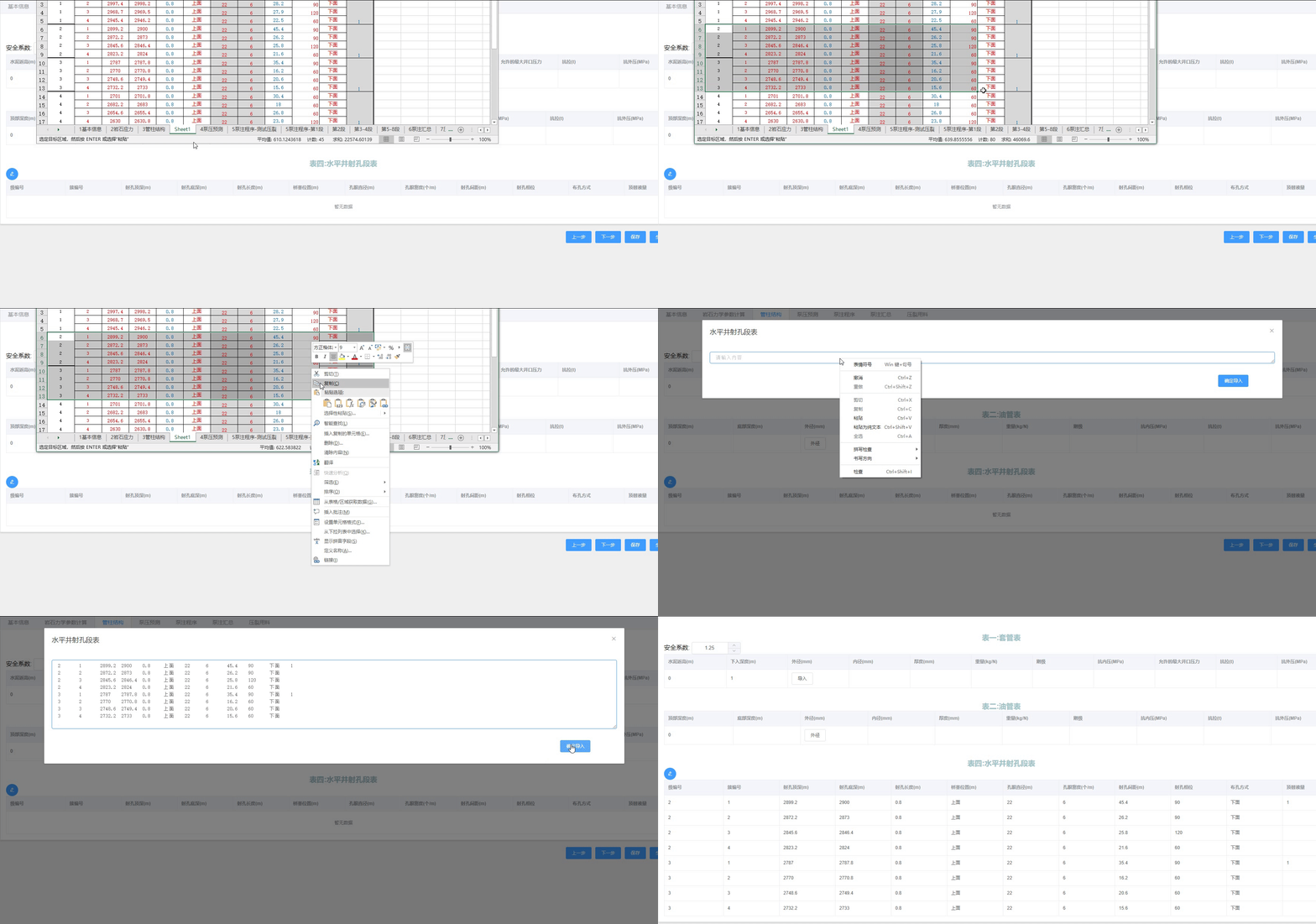
实现效果上有些出入,不过整体功能没太大变化
实现代码如下:
<template>
  <div class="excel-import-container">
    <!-- 页面标题和操作区 -->
    <div class="header-area">
      <div class="title">型材开料优化推荐</div>
      <div class="actions">
        <el-button type="primary" size="small" @click="showImportDialog">
          <i class="el-icon-upload2"></i> 导入Excel数据
        </el-button>
        <el-button size="small" @click="clearData" :disabled="!tableData.length">
          <i class="el-icon-delete"></i> 清除数据
        </el-button>
      </div>
    </div>

    <!-- 使用 el-table 显示粘贴数据 -->
    <div class="table-container">
      <el-table
          :data="tableData"
          border
          stripe
          style="width: 100%"
          :max-height="450"
          size="small"
          v-loading="loading"
      >
        <!-- 固定表头列 -->
        <el-table-column prop="domain" label="域名" align="center" min-width="120"/>
        <el-table-column prop="username" label="用户名" align="center" min-width="100"/>
        <el-table-column prop="email" label="邮箱" align="center" width="100"/>
        <el-table-column prop="password" label="密码" align="center" width="100"/>
      </el-table>
    </div>

    <!-- 底部操作按钮 -->
    <div class="footer-actions" v-if="tableData.length">
      <el-button type="primary" size="small" @click="PrintTableData">确认</el-button>
      <el-button size="small" @click="clearData">取消</el-button>
      <el-button type="danger" size="small">删除</el-button>
    </div>

    <!-- 数据导入弹窗 - 修复visible绑定 -->
    <el-dialog
        title="导入 Excel 数据"
        v-model="dialogVisible"
        width="600px"
        :close-on-click-modal="false"
        @close="handleDialogClose"
    >
      <div class="dialog-content">
        <div class="paste-instruction">
          <i class="el-icon-document-copy instruction-icon"></i>
          <p>请从 Excel 复制数据后粘贴到下方文本框 (Ctrl+V)</p>
        </div>

        <el-input
            type="textarea"
            :rows="10"
            placeholder="请在此处粘贴 Excel 数据..."
            v-model="pasteContent"
            @paste="handleDialogPaste"
            ref="pasteInput"
        ></el-input>

        <div class="paste-tips">
          <p><i class="el-icon-info"></i> 提示:复制 Excel 时请确保包含完整的数据,但不要包含表头</p>
        </div>
      </div>

      <span slot="footer" class="dialog-footer">
        <el-button @click="closeDialog">取消</el-button>
        <el-button type="primary" @click="importData" :disabled="!pasteContent">确定导入</el-button>
      </span>
    </el-dialog>
  </div>
</template>

<script>
export default {
  name: 'ExcelImport',
  data() {
    return {
      // 预定义的表头字段映射
      columnFields: [
        'domain', 'username', 'email', 'password'
      ],
      tableData: [], // 表格数据
      loading: false,
      dialogVisible: false, // 控制弹窗显示
      pasteContent: '', // 弹窗中粘贴的内容
    };
  },
  methods: {
    // 显示导入弹窗
    showImportDialog() {
      this.dialogVisible = true;
      this.pasteContent = '';
      // 在下一个DOM更新周期后聚焦输入框
      this.$nextTick(() => {
        if (this.$refs.pasteInput) {
          this.$refs.pasteInput.focus();
        }
      });
    },

    // 关闭弹窗
    closeDialog() {
      if (this.pasteContent && !this.tableData.length) {
        this.$confirm('您有未导入的数据,确定要关闭吗?', '提示', {
          confirmButtonText: '确定',
          cancelButtonText: '取消',
          type: 'warning'
        }).then(() => {
          this.pasteContent = '';
          this.dialogVisible = false;
        }).catch(() => {
        });
      } else {
        this.dialogVisible = false;
      }
    },

    // 处理弹窗关闭事件
    handleDialogClose() {
      if (this.pasteContent && !this.tableData.length) {
        this.$confirm('您有未导入的数据,确定要关闭吗?', '提示', {
          confirmButtonText: '确定',
          cancelButtonText: '取消',
          type: 'warning'
        }).then(() => {
          this.pasteContent = '';
          // 这里不需要调用done,因为使用.sync绑定
        }).catch(() => {
          // 如果用户取消,需要防止对话框关闭
          // 在element-ui中,使用.sync时取消关闭需要显式设置回true
          this.dialogVisible = true;
        });
      }
    },

    // 处理弹窗中的粘贴事件
    handleDialogPaste() {
      // 此处不阻止默认行为,让内容正常粘贴到 textarea
    },

    // 导入数据
    importData() {
      if (!this.pasteContent.trim()) {
        this.$message.warning('请先粘贴数据');
        return;
      }

      this.loading = true;

      try {
        // 按行分割
        const rows = this.pasteContent.split(/\r\n|\n|\r/).filter(row => row.trim() !== '');

        // 将每行按制表符分割为单元格
        const parsedData = rows.map(row => row.split(/\t/).map(cell => cell.trim()));

        if (parsedData.length > 0) {
          // 检查是否第一行是表头
          const dataStartIndex = this.isFirstRowHeader(parsedData[0]) ? 1 : 0;
          const dataRows = parsedData.slice(dataStartIndex).filter(row => row.some(cell => cell !== ''));

          if (dataRows.length > 0) {
            // 转换数据格式并更新表格
            this.formatTableData(dataRows);
            this.dialogVisible = false;
            this.$message.success(`成功导入 ${dataRows.length} 条数据`);
          } else {
            this.$message.warning('未解析到有效数据');
          }
        } else {
          this.$message.warning('未解析到有效数据');
        }
      } catch (error) {
        console.error('处理粘贴数据时出错:', error);
        this.$message.error('处理粘贴数据时出错,请检查数据格式');
      } finally {
        this.loading = false;
      }
    },

    // 判断行是否为表头
    isFirstRowHeader(row) {
      return row[0] === 'site' || row[0].toLowerCase().includes('domain') ||
          row[0].toLowerCase().includes('site');
    },

    // 将原始数据转换为el-table所需的对象数组格式
    formatTableData(dataRows) {
      const formattedData = dataRows.map(row => {
        const rowData = {};

        // 将每个单元格数据映射到对应的字段
        this.columnFields.forEach((field, index) => {
          if (index < row.length) {
            rowData[field] = row[index] || '';
          } else {
            // 如果粘贴的数据列数少于预定义列,则设为空值
            rowData[field] = '';
          }
        });

        return rowData;
      });

      // 设置到表格数据中
      this.tableData = formattedData;
    },

    // 清空数据
    clearData() {
      this.$confirm('确定要清空所有数据吗?', '提示', {
        confirmButtonText: '确定',
        cancelButtonText: '取消',
        type: 'warning'
      }).then(() => {
        this.tableData = [];
        this.$message.success('数据已清空');
      }).catch(() => {
      });
    },

    PrintTableData() {
      console.info('tableData', this.tableData);
    }
  }
}
</script>

<style scoped>
.excel-import-container {
  width: 100%;
  max-width: 1200px;
  margin: 0 auto;
  padding: 20px;
}

.header-area {
  display: flex;
  justify-content: space-between;
  align-items: center;
  margin-bottom: 20px;
  padding: 10px 0;
  border-bottom: 1px solid #e0e0e0;
}

.title {
  font-size: 18px;
  font-weight: 500;
  color: #333;
}

.actions {
  display: flex;
  gap: 10px;
}

.table-container {
  margin: 20px 0;
}

.footer-actions {
  display: flex;
  justify-content: flex-end;
  gap: 10px;
  margin-top: 20px;
  padding: 10px 0;
  border-top: 1px solid #e0e0e0;
}

/* 弹窗样式 */
.dialog-content {
  display: flex;
  flex-direction: column;
  gap: 15px;
}

.paste-instruction {
  display: flex;
  flex-direction: column;
  align-items: center;
  margin-bottom: 10px;
  color: #606266;
}

.instruction-icon {
  font-size: 32px;
  margin-bottom: 10px;
  color: #409EFF;
}

.paste-tips {
  font-size: 12px;
  color: #909399;
  margin-top: 5px;
}

.paste-tips i {
  margin-right: 5px;
  color: #E6A23C;
}
</style>





 扫一扫
扫一扫


 1972
1972

 被折叠的 条评论
为什么被折叠?
被折叠的 条评论
为什么被折叠?
 到【灌水乐园】发言





