


说明
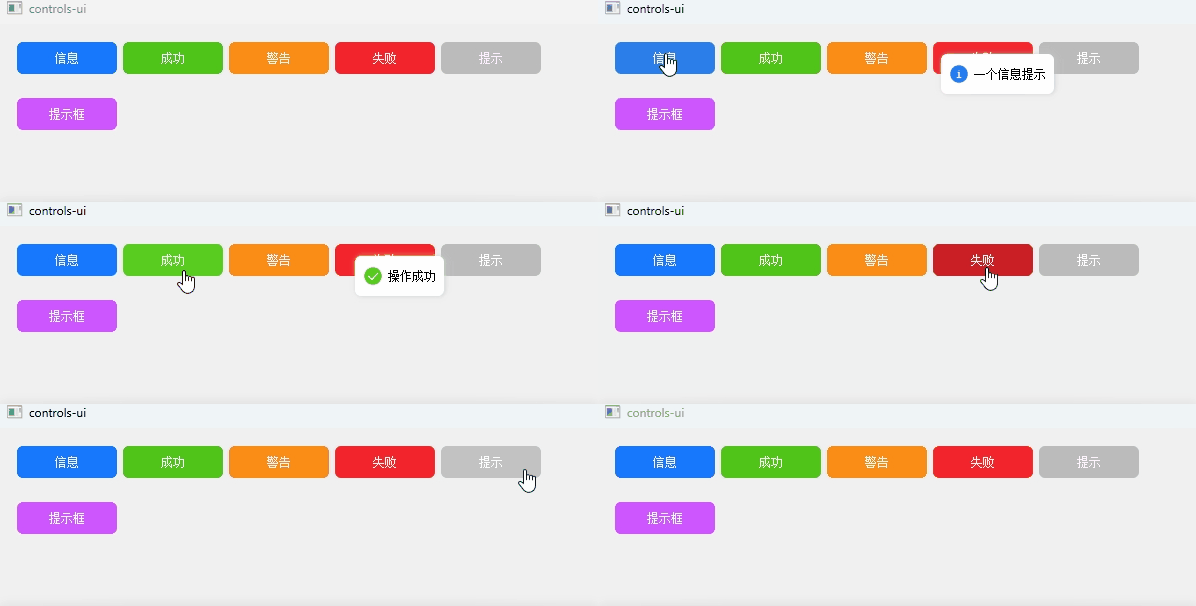
在web开发中各种带动画的提示框随处可见,但在QT中自带的提示框不太美观,所以只能自定义实现弹框组件,源码地址在末尾,实现效果参考 Antd
效果
代码
toast.h
#ifndef CONTROLS_UI_DIALOG_H
#define CONTROLS_UI_DIALOG_H

#include <QHBoxLayout>
#include <QVBoxLayout>
#include <QLabel>
#include <QWidget>
#include <QFrame>
#include <QPushButton>
#include <QDebug>
#include <QPixmap>
#include <QEvent>
#include <QMouseEvent>
#include <QFont>
#include <QPoint>
#include <QGraphicsDropShadowEffect>

class Dialog : public QWidget {


Q_OBJECT
public:
    explicit Dialog(QWidget *parent = nullptr);

public slots:

    void handleClose();

    void handleOn();

    void show(QSize size, QString content);

private:
    int w = 320;
    int h = 180;
    QString content;
    QFrame *frame;
    QGraphicsDropShadowEffect *shadow;
    QVBoxLayout *layout;
    QHBoxLayout *layout_top;
    QHBoxLayout *layout_text;
    QHBoxLayout *layout_btn;
    QFont *font;
    QLabel *title;
    QLabel *label_img;
    QLabel *text;
    QPixmap *close_img;
    QWidget *widget_top;
    QWidget *widget_text;
    QWidget *widget_btn;
    QPushButton *btn_cancel;
    QPushButton *btn_ok;
    QPoint start_point;
    QPoint init_point;
protected:
    bool eventFilter(QObject *obj, QEvent *event);

    void mousePressEvent(QMouseEvent *event);

    void mouseMoveEvent(QMouseEvent *event);

signals:

    void emitOn();
};

#endif //CONTROLS_UI_DIALOG_H
toast.cpp
#include "toast.h"
Toast::Toast(QWidget *parent) : QFrame(parent) {
parentSize = parent->size( 最低0.47元/天 解锁文章






 扫一扫
扫一扫


 1万+
1万+

 被折叠的 条评论
为什么被折叠?
被折叠的 条评论
为什么被折叠?
 到【灌水乐园】发言





