



 本文详细介绍MyBatis框架中的动态SQL技术,包括if、where、trim等标签的使用方法及注意事项,并通过实例演示批量添加和删除操作。
Mybaits笔记框架:https://blog.csdn.net/qq_43751200/article/details/128154837
Mybatis中文官方文档: https://mybatis.org/mybatis-3/zh/index.html
动态SQL
1. 动态sql简介
Mybatis框架的动态SQL技术是一种根据特定条件动态拼装SQL语句的功能,它存在的意义是为了解决拼接SQL语句字符串时的痛点问题
2. if
- if标签可通过test属性(即传递过来的数据)的表达式进行判断,若表达式的结果为true,则标签中的内容会执行;反之标签中的内容不会执行
- 在where后面添加一个恒成立条件
1=1 - 这个恒成立条件并不会影响查询的结果
- 这个
1=1可以用来拼接and语句,例如:当empName为null时 - 如果不加上恒成立条件,则SQL语句为
select * from t_emp where and age = ? and sex = ? and email = ?,此时where会与and连用,SQL语句会报错 - 如果加上一个恒成立条件,则SQL语句为
select * from t_emp where 1= 1 and age = ? and sex = ? and email = ?,此时不报错
- 这个
DynamicSQLMapper接口
  /**
     * 测试if标签使用,返回Emp的list集合
     * @param emp
     * @return
     */
    public List<Emp> getEmpByConditionOne(Emp emp);
DynamicSQLMapper接口对应的DynamicSQLMapper.xml配置文件
<!--public List<Emp> getEmpByConditionOne(Emp emp);-->
    <select id="getEmpByConditionOne" resultType="Emp">
        select * from t_emp where 1 = 1
        <if test="empName != null and empName != ''">
            and emp_name = #{empName}
        </if>
        <if test="age != null and age != ''">
            and age = #{age}
        </if>
        <if test="sex != null and sex != ''">
            and sex = #{sex}
        </if>
        <if test="email != null and email != ''">
            and email = #{email}
        </if>
    </select>
测试方法
    @Test
    public void testGetEmpByCondition(){
        SqlSession sqlSession = SqlSessionFactoryUtils.getSqlSession();
        DynamicSQLMapper dynamicSQLMapper = sqlSession.getMapper(DynamicSQLMapper.class);
        Emp emp = new Emp(null, "", 23, "男", "1234@qq.com");
        List<Emp> empList = dynamicSQLMapper.getEmpByConditionOne(emp);
        for(Emp emp1 : empList){
            System.out.println(emp1);
        }
        sqlSession.close();
    }

3. where
- where和if一般结合使用:
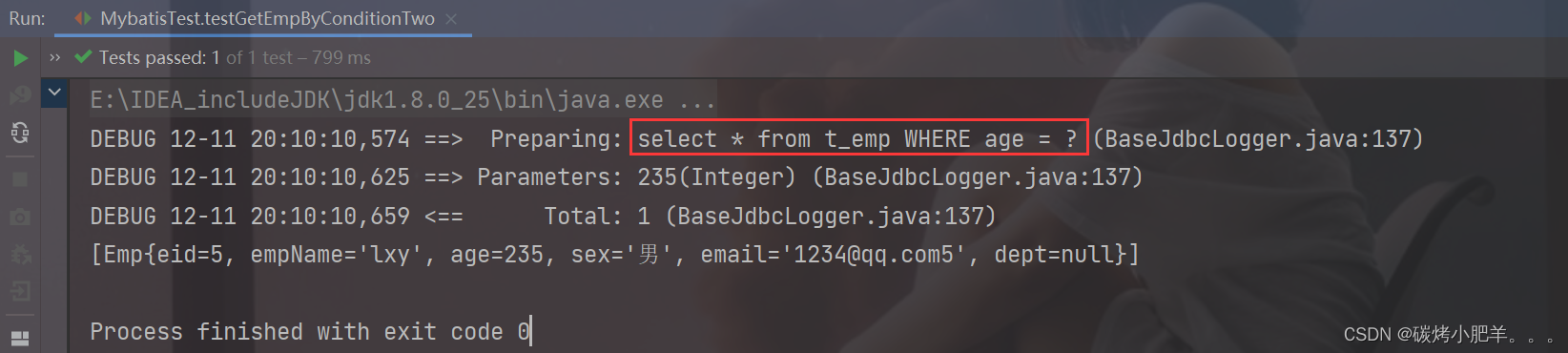
- 若where标签中的if条件都不满足,则where标签没有任何功能,即不会添加where关键字
- 若where标签中的if条件满足,则where标签会自动添加where关键字,并将条件最前方多余的and/or去 ,但是不会去掉条件后面多余的and/or
DynamicSQLMapper接口
    /**
     * 测试where标签的使用,返回Emp的List集合
     * @return
     */
    public List<Emp> getEmpByConditionTwo(Emp emp);
DynamicSQLMapper接口对应的DynamicSQLMapper.xml配置文件
 <!--public List<Emp> getEmpByConditionTwo(Emp emp);-->
    <select id="getEmpByConditionTwo" resultType="Emp">
        select * from t_emp
        <where>
            <if test="empName != null and empName != ''">
                and emp_name = #{empName}
            </if>
            <if test="age != null and age != ''">
                and age = #{age}
            </if>
            <if test="sex != null and sex != ''">
                and sex = #{sex}
            </if>
            <if test="email != null and email != ''">
                and email = #{email}
            </if>
        </where>
    </select>
测试方法
    @Test
    public void testGetEmpByConditionTwo(){
        SqlSession sqlSession = SqlSessionFactoryUtils.getSqlSession();
        DynamicSQLMapper dynamicSQLMapper = sqlSession.getMapper(DynamicSQLMapper.class);
        Emp emp = new Emp(null, "", 235, "", "");
        List<Emp> empList = dynamicSQLMapper.getEmpByConditionTwo(emp);
        System.out.println(empList);
        sqlSession.close();
    }
4. trim
- trim用于去掉或添加标签中的内容
- 常用属性
- prefix:在trim标签中的内容的前面添加某些内容
- suffix:在trim标签中的内容的后面添加某些内容
- prefixOverrides:在trim标签中的内容的前面去掉某些内容
- suffixOverrides:在trim标签中的内容的后面去掉某些内容
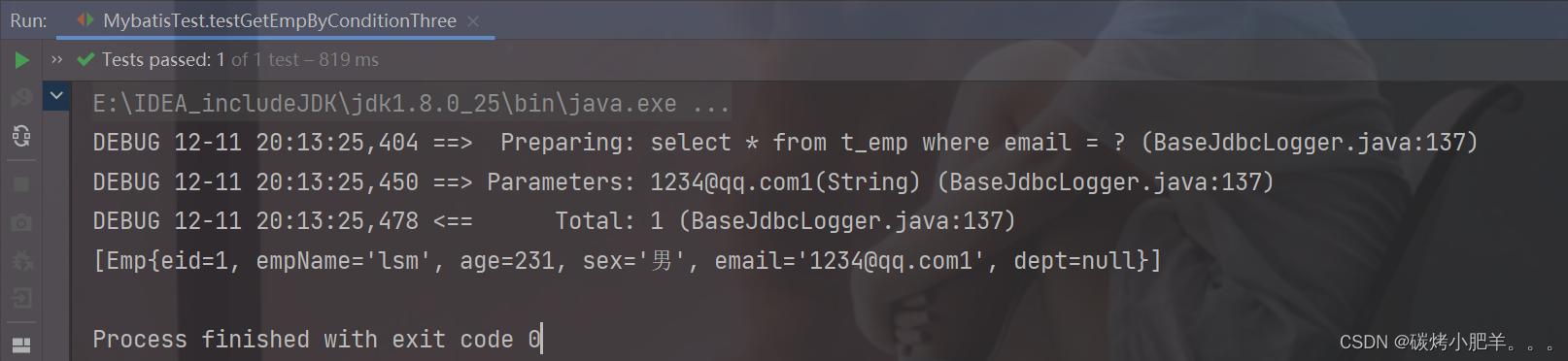
- 若trim中的标签都不满足条件,则trim标签没有任何效果,也就是只剩下
select * from t_emp
DynamicSQLMapper接口
    /**
     * 测试trim标签,返回Emp的List集合
     * @param emp
     * @return
     */
    public List<Emp> getEmpByConditionThree(Emp emp);
DynamicSQLMapper接口对应的DynamicSQLMapper.xml配置文件
<!--  public List<Emp> getEmpByConditionThree(Emp emp);-->
    <select id="getEmpByConditionThree" resultType="Emp">
        select * from t_emp
        <trim prefix="where"  suffixOverrides="and|or">
            <if test="empName != null and empName != ''">
                emp_name = #{empName} and
            </if>
            <if test="age != null and age != ''">
                age = #{age} and
            </if>
            <if test="sex != null and sex != ''">
                sex = #{sex}  and
            </if>
            <if test="email != null and email != ''">
                email = #{email} or
            </if>
        </trim>
    </select>
测试方法
  @Test
    public void testGetEmpByConditionThree(){
        SqlSession sqlSession = SqlSessionFactoryUtils.getSqlSession();
        DynamicSQLMapper mapper = sqlSession.getMapper(DynamicSQLMapper.class);
        Emp emp = new Emp(null, "", null, "", "1234@qq.com1");
        List<Emp> empList = mapper.getEmpByConditionThree(emp);
        System.out.println(empList);
    }
5. choose、when、otherwise
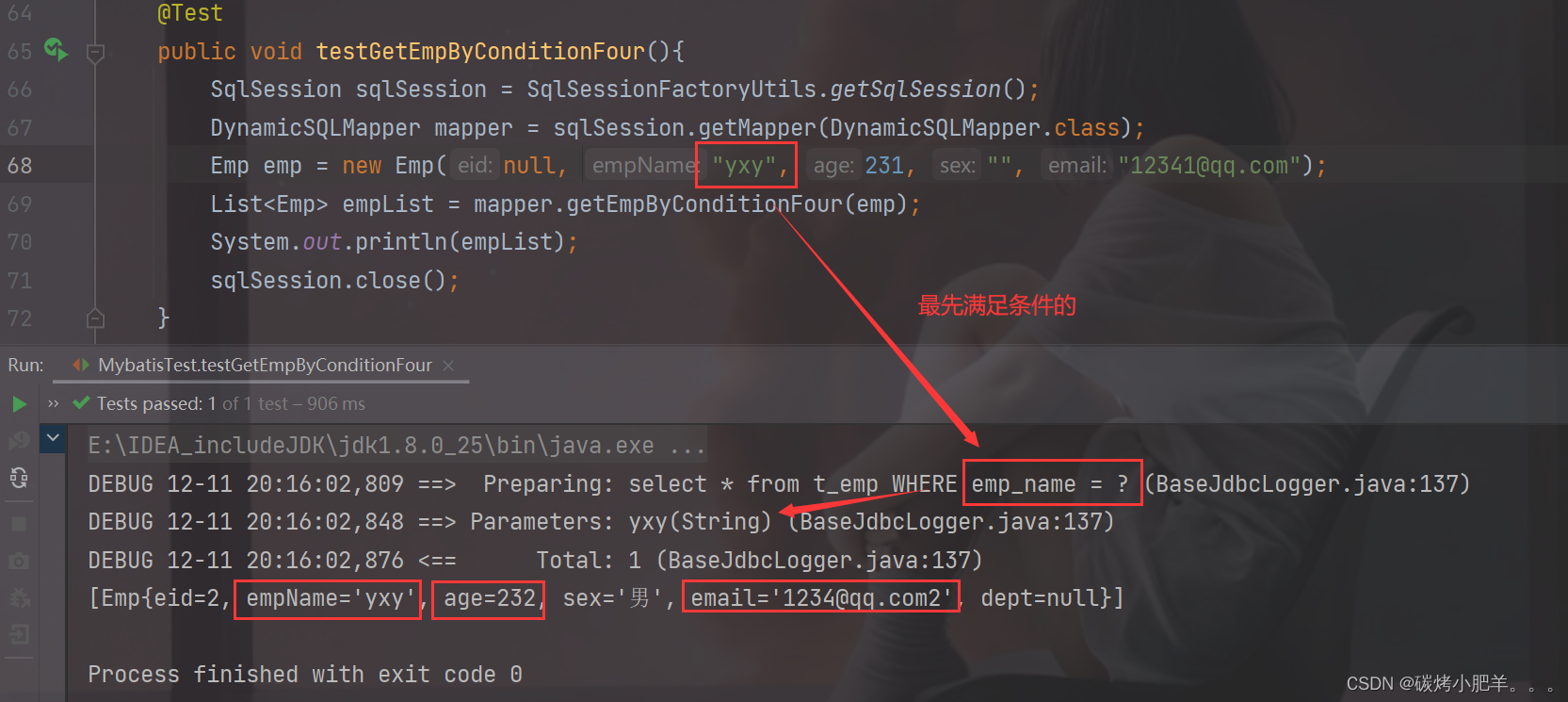
choose、when、otherwise相当于if...else if..else,(只执行其中最先满足条件的一个)- when至少要有一个,otherwise至多只有一个
DynamicSQLMapper接口
    /**
     * 测试choose,when,otherwise标签,
     * @param emp
     * @return
     */
    public List<Emp> getEmpByConditionFour(Emp emp);
DynamicSQLMapper接口对应的DynamicSQLMapper.xml配置文件
<!-- public List<Emp> getEmpByConditionFour(Emp emp);-->
    <select id="getEmpByConditionFour" resultType="Emp">
        select * from t_emp
        <where>
            <choose>
                <when test="empName != null and empName != ''">
                    and emp_name = #{empName}
                </when>
                <when test="age != null and age != ''">
                    and age = #{age}
                </when>
                <when test="sex != null and sex != ''">
                    and sex = #{sex}
                </when>
                <when test="email != null and email != ''">
                    and email = #{email}
                </when>
                <otherwise>
                    and did = 1
                </otherwise>
            </choose>
        </where>
    </select>
测试方法
@Test
    public void testGetEmpByConditionFour(){
        SqlSession sqlSession = SqlSessionFactoryUtils.getSqlSession();
        DynamicSQLMapper mapper = sqlSession.getMapper(DynamicSQLMapper.class);
        Emp emp = new Emp(null, "yxy", null, "", "");
        List<Emp> empList = mapper.getEmpByConditionFour(emp);
        System.out.println(empList);
        sqlSession.close();
    }
6. foreach
- 属性:
- collection:设置要循环的数组或集合
- item:表示集合或数组中的每一个数据
- separator:设置循环体之间的分隔符,分隔符前后默认有一个空格,如
, - open:设置foreach标签中的内容的开始符
- close:设置foreach标签中的内容的结束符
foreach实现批量添加
DynamicSQLMapper接口
 /**
     * 使用foreach标签实现批量添加,使用Param注解,规定变量名
     * @param emps
     * @return
     */
    int insertMoreByList(@Param("emps") List<Emp> emps);
DynamicSQLMapper接口对应的DynamicSQLMapper.xml配置文件
<!--int insertMoreByList(@Param("emps")List<Emp> emps);-->
    <insert id="insertMoreByList">
        insert into t_emp values
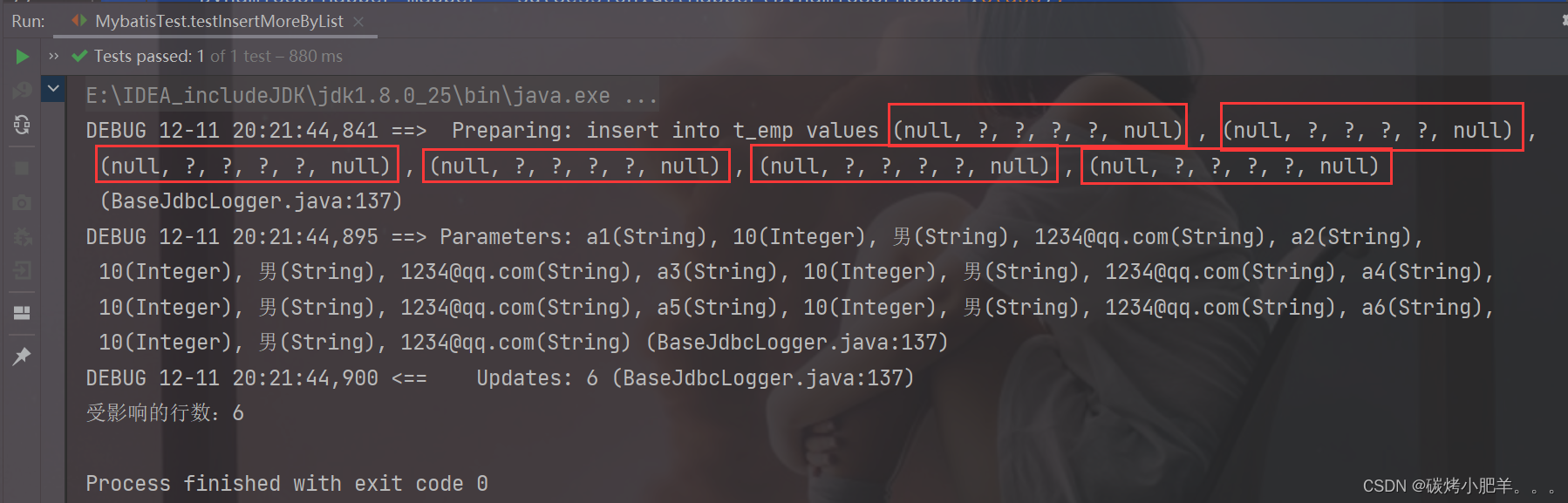
        <foreach collection="emps" item="emp" separator=",">
            (null, #{emp.empName}, #{emp.age}, #{emp.sex}, #{emp.email}, null)
        </foreach>
    </insert>
测试方法
 @Test
    public void testInsertMoreByList(){
        SqlSession sqlSession = SqlSessionFactoryUtils.getSqlSession();
        DynamicSQLMapper mapper = sqlSession.getMapper(DynamicSQLMapper.class);
        Emp emp1 = new Emp(null, "a1", 10, "男", "1234@qq.com", null);
        Emp emp2 = new Emp(null, "a2", 10, "男", "1234@qq.com", null);
        Emp emp3 = new Emp(null, "a3", 10, "男", "1234@qq.com", null);
        Emp emp4 = new Emp(null, "a4", 10, "男", "1234@qq.com", null);
        Emp emp5 = new Emp(null, "a5", 10, "男", "1234@qq.com", null);
        Emp emp6 = new Emp(null, "a6", 10, "男", "1234@qq.com", null);

        List<Emp> empList = Arrays.asList(emp1, emp2, emp3, emp4, emp5, emp6);
        int count = mapper.insertMoreByList(empList);
        System.out.println("受影响的行数:" + count);
    }
foreach实现批量删除
DynamicSQLMapper接口
 /**
     * 使用foreach标签实现批量删除,使用Param注解,规定变量名
     * @param eids
     * @return
     */
    int deleteMoreByArray(@Param("eids") Integer[] eids);
DynamicSQLMapper接口对应的DynamicSQLMapper.xml配置文件
   <!--int deleteMoreByArray(@Param("eids") Integer[] eids);-->
   <!-- delete from t_emp where eid in(id1, id2 id3, ....)-->
    <delete id="deleteMoreByArray">
        delete from t_emp where eid in
        <foreach collection="eids" item="eid" separator="," open="(" close=")">
            #{eid}
        </foreach>
    </delete>
测试方法
    @Test
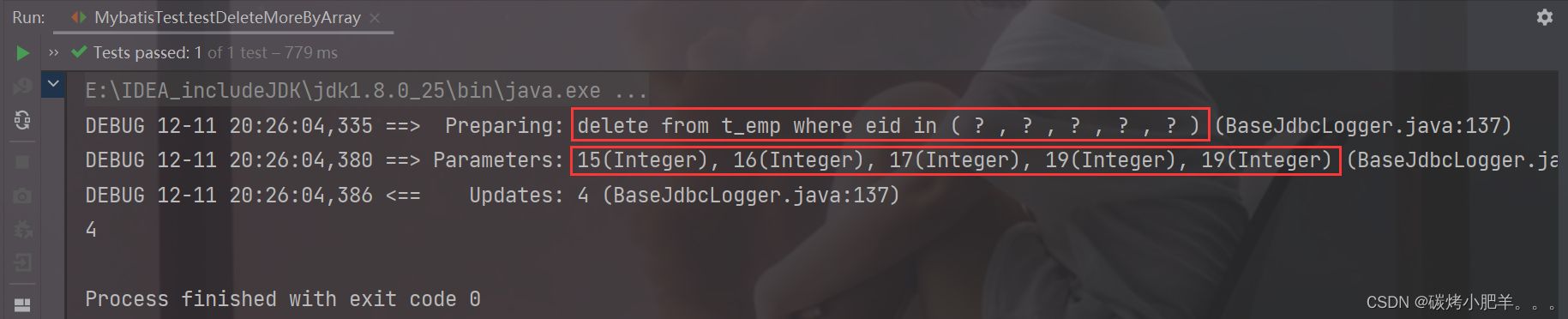
    public void testDeleteMoreByArray(){
        SqlSession sqlSession = SqlSessionFactoryUtils.getSqlSession();
        DynamicSQLMapper mapper = sqlSession.getMapper(DynamicSQLMapper.class);
        int result = mapper.deleteMoreByArray(new Integer[]{15, 16, 17, 19, 19});
        System.out.println(result);
        sqlSession.close();
    }
7. SQL片段
- sql片段,可以记录一段公共sql片段,在使用的地方通过include标签进行引入
- 声明sql片段:
<sql>标签
<sql id="empColumns">eid,emp_name,age,sex,email</sql>
- 引用sql片段:
<include>标签
    <!--public List<Emp> getEmpAll();-->
    <select id="getEmpAll" resultType="Emp">
        select <include refid="empColumns"/> from t_emp;
    </select>
8. 总结
- where和if一般一起使用, where可以自动增加或者删除条件前面的and或者or连接词。
- trim是专门用来处理sql连接词问题。
- choose、when、otherwise相当于if…else if…else if…else条件判断语句,只有一个能够满足条件
- foreach一般用来批量插入数据和删除数据时使用。






 扫一扫
扫一扫


 被折叠的 条评论
为什么被折叠?
被折叠的 条评论
为什么被折叠?
 到【灌水乐园】发言





