



目录
一、 问题
1.后端给的接口都大同小异,怎么样才能快速转换成前端想要的接口呢?
2.每次都自己写太麻烦了。还有时候后端不给到具体的链接地址,找半天都不知道接口在哪里……
二、解决方法
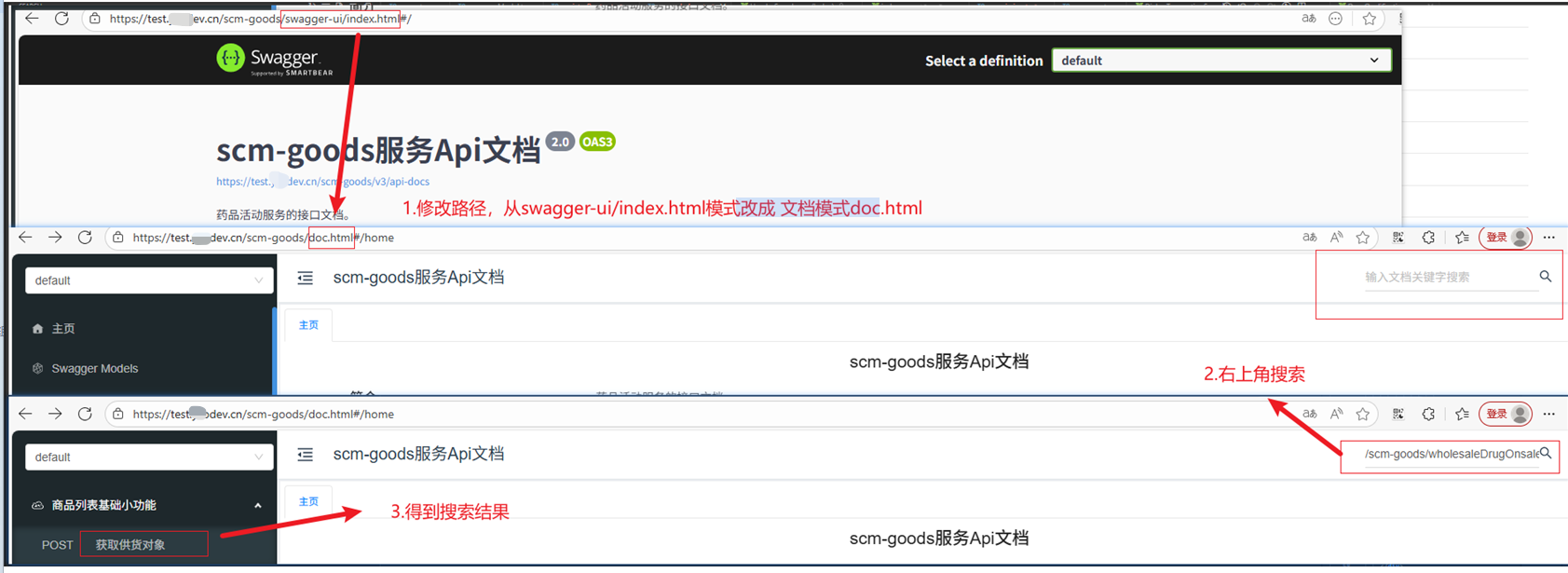
1.针对后端不给到具体的链接地址,找不到具体位置。可以切换到doc.html文档模式,根据接口或者接口中文描述查找对应的接口,具体操作如下图2-1所示
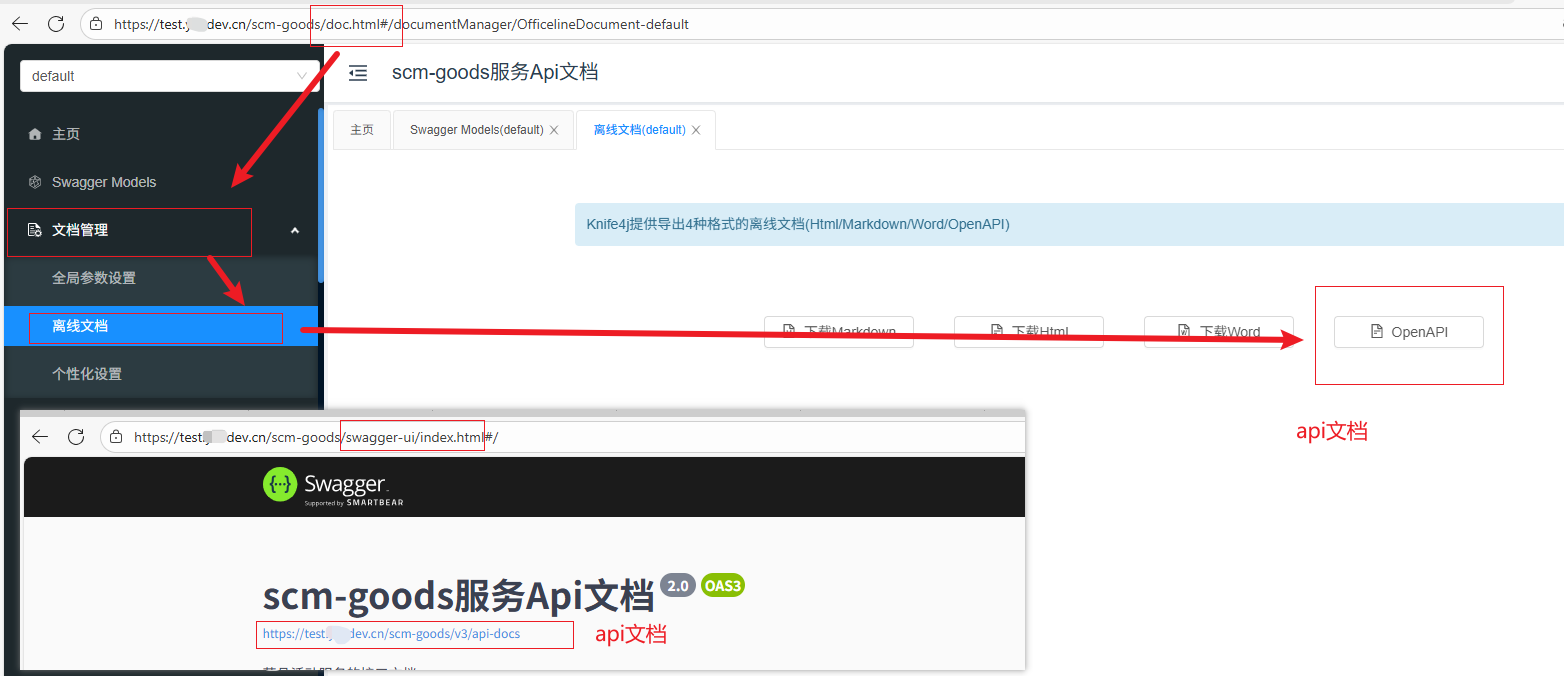
2.怎么根据swagger文档生成ts接口呢?使用swagger-typescript-api插件,具体操作如下:
1)找到接口文档并下载保存下来
2)全局安装swagger-typescript-api 插件
pnpm install swagger-typescript-api3)执行命令 swagger-typescript-api generate -p scm-api.txt -o ./scm-api --modular --module-name-first-tag --clean-output
a.也可以创建 package.json文件,为上述命令指定别名,更方便
swagger-typescript-api generate -p scm-api.txt -o ./scm-api  --modular  --module-name-first-tag --clean-output
-p scm-api.txt :指定swagger文件所在位置
-o ./scm-api  :指定生成目录
--modular --module-name-first-tag:根据 swagger文件中的tag分模块生成 api文件
--clean-output:每次执行时删除已经存在的文件 ./scm-api
b.目录结构如下图所示: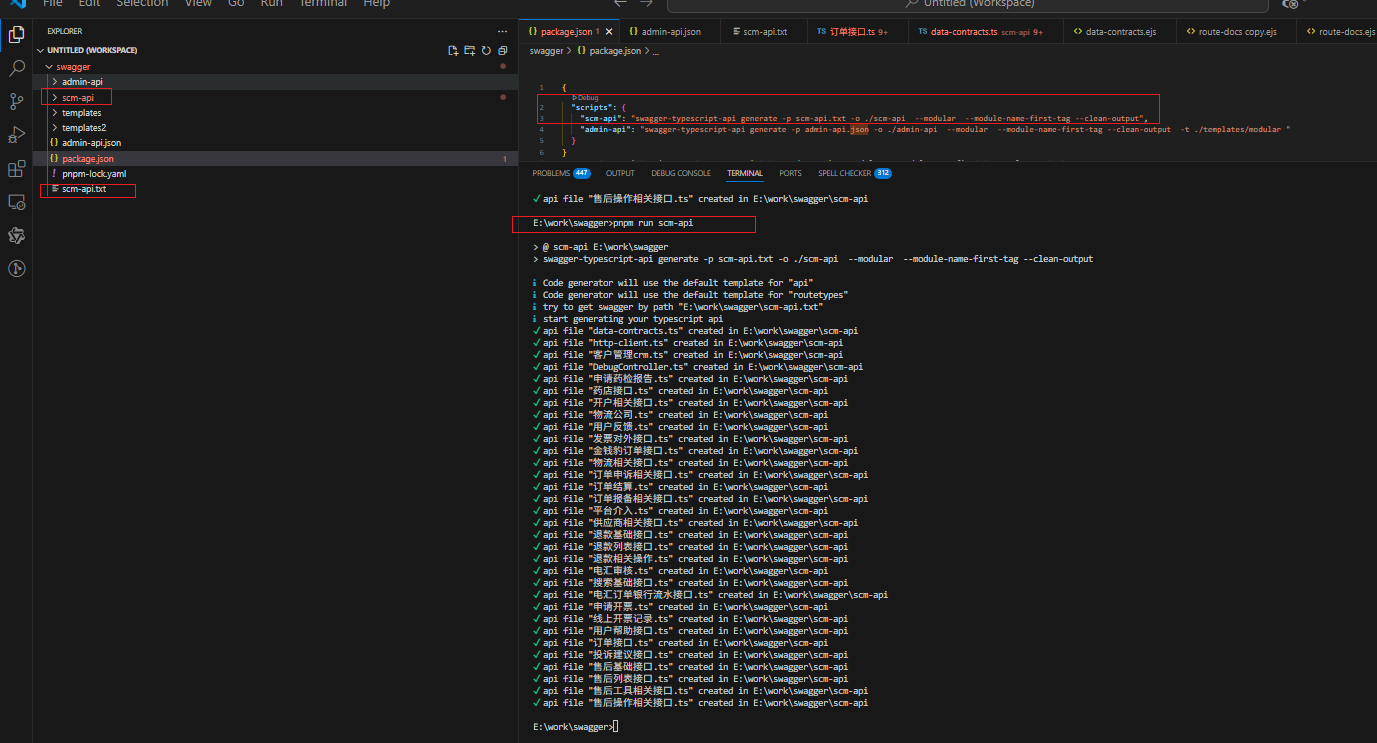
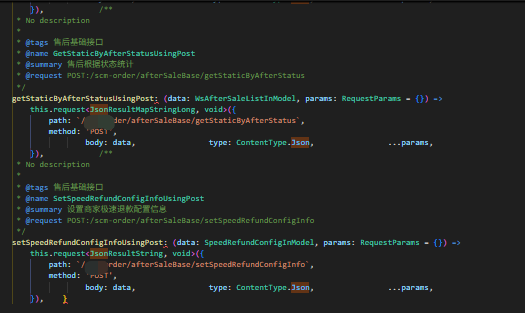
c.生成的结果如下图所示:
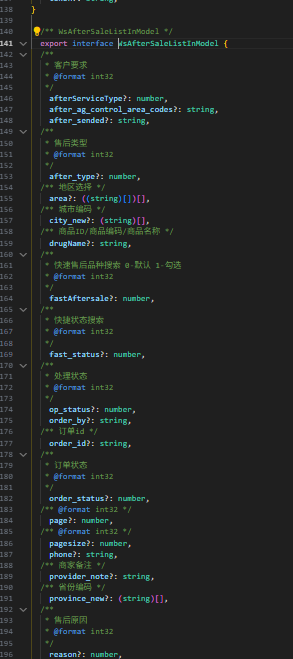
4.ts接口已经生成成功了,但是整体的接口样式和现在项目里面不一致,每次都要手动改,怎么办呢?
a.自定义生成的接口文件模板。通过 -t 参数,指定生成的接口文件模板
b.命令如下:
swagger-typescript-api generate -p admin-api.json -o ./admin-api  --modular  --module-name-first-tag --clean-output  -t ./templates/modular
-t ./templates/modular: 按照./templates/modular模板生成api文件(可以指定生成的api格式)
c.文件目录如下: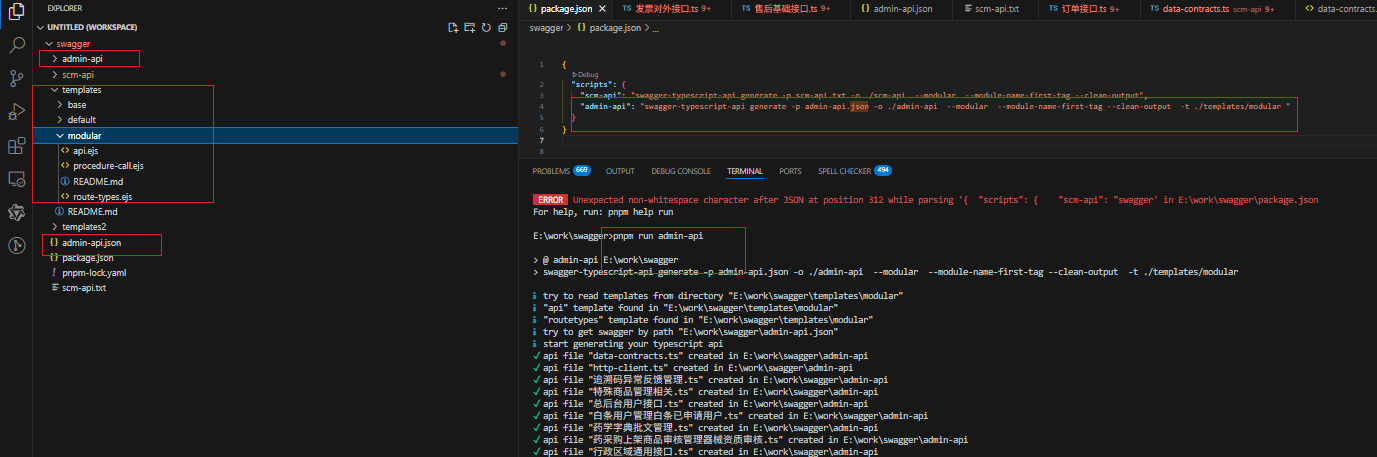
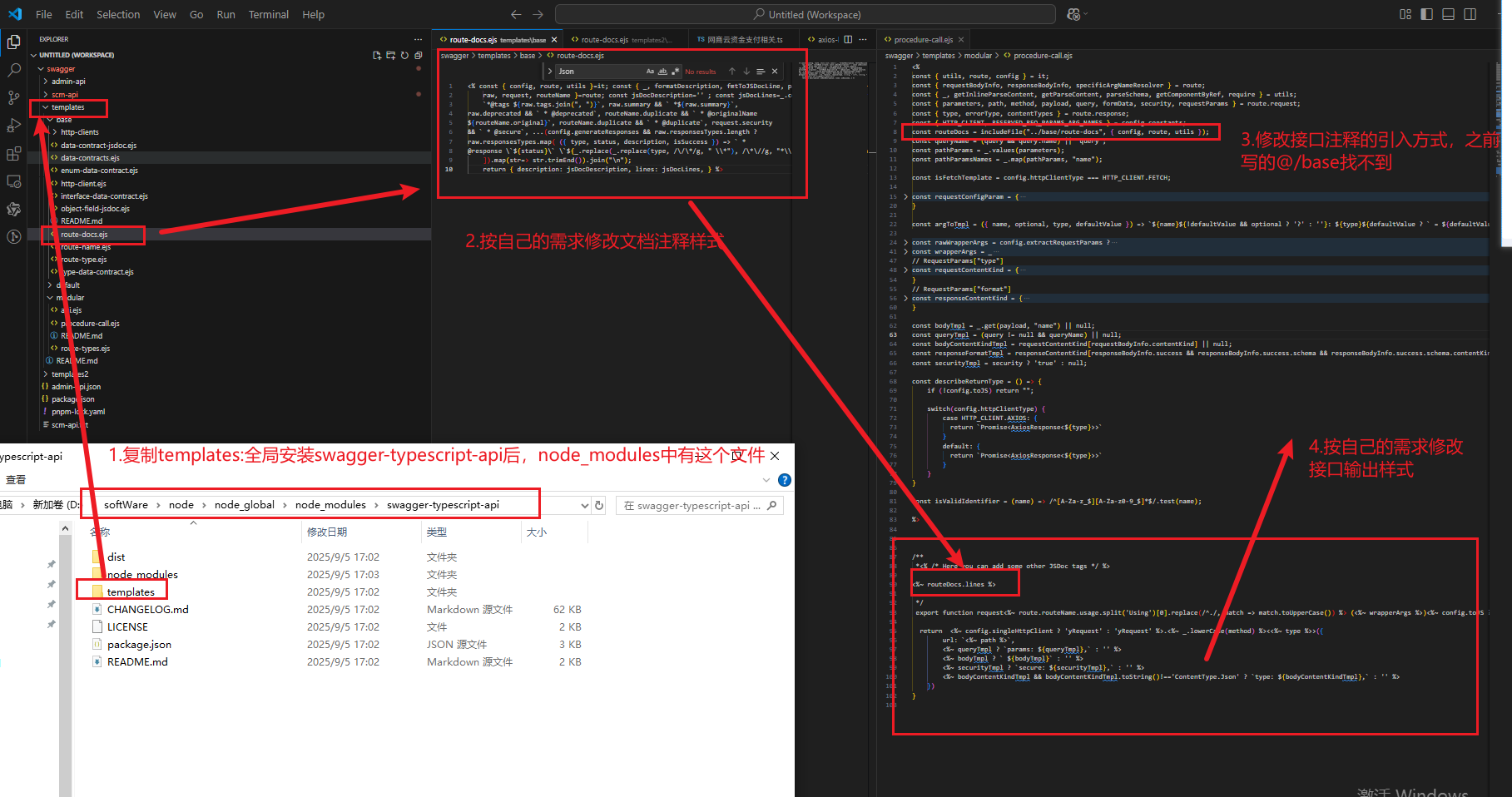
d. 自定义接口输出样式的步骤:
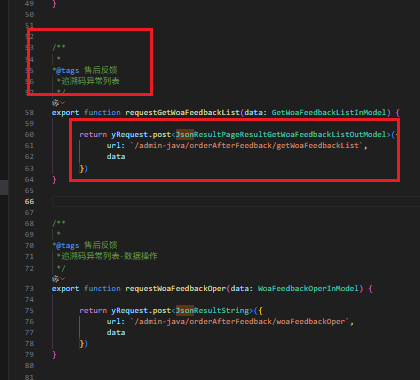
e.最终结果
f.参考templates
route.docs.ejs
<% const { config, route, utils }=it; const { _, formatDescription, fmtToJSDocLine, pascalCase, require }=utils; const {
    raw, request, routeName }=route; const jsDocDescription='' ; const jsDocLines=_.compact([ _.size(raw.tags) &&
    `*@tags ${raw.tags.join(", ")}`, raw.summary && ` *${raw.summary}`,
raw.deprecated && ` * @deprecated`, routeName.duplicate && ` * @originalName
${routeName.original}`, routeName.duplicate && ` * @duplicate`, request.security
&& ` * @secure`, ...(config.generateResponses && raw.responsesTypes.length ?
raw.responsesTypes.map( ({ type, status, description, isSuccess }) => ` *
@response \`${status}\` \`${_.replace(_.replace(type, /\/\*/g, " \\*"), /\*\//g, "*\\" )}\` ${description}`, ) : []),
    ]).map(str=> str.trimEnd()).join("\n");
    return { description: jsDocDescription, lines: jsDocLines, } %>
procedure-call.ejs
<%
const { utils, route, config } = it;
const { requestBodyInfo, responseBodyInfo, specificArgNameResolver } = route;
const { _, getInlineParseContent, getParseContent, parseSchema, getComponentByRef, require } = utils;
const { parameters, path, method, payload, query, formData, security, requestParams } = route.request;
const { type, errorType, contentTypes } = route.response;
const { HTTP_CLIENT, RESERVED_REQ_PARAMS_ARG_NAMES } = config.constants;
const routeDocs = includeFile("../base/route-docs", { config, route, utils });
const queryName = (query && query.name) || "query";
const pathParams = _.values(parameters);
const pathParamsNames = _.map(pathParams, "name");

const isFetchTemplate = config.httpClientType === HTTP_CLIENT.FETCH;

const requestConfigParam = {
    name: specificArgNameResolver.resolve(RESERVED_REQ_PARAMS_ARG_NAMES),
    optional: true,
    type: "RequestParams",
    defaultValue: "{}",
}

const argToTmpl = ({ name, optional, type, defaultValue }) => `${name}${!defaultValue && optional ? '?' : ''}: ${type}${defaultValue ? ` = ${defaultValue}` : ''}`;

const rawWrapperArgs = config.extractRequestParams ?
    _.compact([
        requestParams && {
          name: pathParams.length ? `{ ${_.join(pathParamsNames, ", ")}, ...${queryName} }` : queryName,
          optional: false,
          type: getInlineParseContent(requestParams),
        },
        ...(!requestParams ? pathParams : []),
        payload,
        ,
    ]) :
    _.compact([
        ...pathParams,
        query,
        payload,
    ])

const wrapperArgs = _
    // Sort by optionality
    .sortBy(rawWrapperArgs, [o => o.optional])
    .map(argToTmpl)
    .join(', ')

// RequestParams["type"]
const requestContentKind = {
    "JSON": "ContentType.Json",
    "JSON_API": "ContentType.JsonApi",
    "URL_ENCODED": "ContentType.UrlEncoded",
    "FORM_DATA": "ContentType.FormData",
    "TEXT": "ContentType.Text",
}
// RequestParams["format"]
const responseContentKind = {
    "JSON": '"json"',
    "IMAGE": '"blob"',
    "FORM_DATA": isFetchTemplate ? '"formData"' : '"document"'
}

const bodyTmpl = _.get(payload, "name") || null;
const queryTmpl = (query != null && queryName) || null;
const bodyContentKindTmpl = requestContentKind[requestBodyInfo.contentKind] || null;
const responseFormatTmpl = responseContentKind[responseBodyInfo.success && responseBodyInfo.success.schema && responseBodyInfo.success.schema.contentKind] || null;
const securityTmpl = security ? 'true' : null;

const describeReturnType = () => {
    if (!config.toJS) return "";

    switch(config.httpClientType) {
        case HTTP_CLIENT.AXIOS: {
          return `Promise<AxiosResponse<${type}>>`
        }
        default: {
          return `Promise<AxiosResponse<${type}>>`
        }
    }
}

const isValidIdentifier = (name) => /^[A-Za-z_$][A-Za-z0-9_$]*$/.test(name);

%>


/**
 *<% /* Here you can add some other JSDoc tags */ %>

<%~ routeDocs.lines %>

 */
 export function request<%~ route.routeName.usage.split('Using')[0].replace(/^./, match => match.toUpperCase()) %> (<%~ wrapperArgs %>)<%~ config.toJS ? `: ${describeReturnType()}` : "" %>{

  return  <%~ config.singleHttpClient ? 'yRequest' : 'yRequest' %>.<%~ _.lowerCase(method) %><<%~ type %>>({
        url: `<%~ path %>`,
        <%~ queryTmpl ? `params: ${queryTmpl},` : '' %>
        <%~ bodyTmpl ? ` ${bodyTmpl}` : '' %>
        <%~ securityTmpl ? `secure: ${securityTmpl},` : '' %>
        <%~ bodyContentKindTmpl && bodyContentKindTmpl.toString()!=='ContentType.Json' ? `type: ${bodyContentKindTmpl},` : '' %>
    })
}
三、总结
1.目前使用swagger-typescript-api 插件可以实现根据 swagger-api的 tags对接口进行分模块生成文件,并且能够自定义接口生成结构。
2.如果能够实现typeScript接口定义的分类存储就更好了。但是目前看源码还没有找到解决方法。后续找到再更新
3.如果能够把文件路径指定为线上地址就更好了,这样就可以实时获取到最新的接口文档,无需每次接口更新时,手动下载swagger-api接口文档了。看了swagger-typescript-api官方文档提供的示例是可以的。但是我现在的url地址是加密的需要登录,swagger-typescript-api访问不了,目前没有找到解决方法,找到了后续再更新。
4.如有大佬知道如何解决2,3,希望不吝赐教,非常感谢!
/*
希望对你有帮助!
如有错误,欢迎指正,谢谢!
*/





 扫一扫
扫一扫


 4872
4872

 被折叠的 条评论
为什么被折叠?
被折叠的 条评论
为什么被折叠?
 到【灌水乐园】发言





