


文章目录
实现效果

文件上传
总体来说图片上传主要还是基于流的读写,把指定路径的图片读出来写入到你要放的位置,创建一张图片信息的表,上传成功的时候把图片信息同时存入到表中然后进行数据回显,其他的就是做业务上的一些操作了。
创建两张表对应实体,用户表和图片信息表

学生表
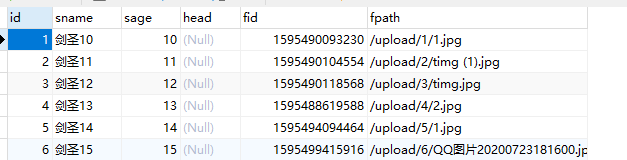
其实方法有好几种我是用本地项目的网络访问。
在电脑上找到当前项目在resources下面创建upload文件夹来放上传好的图片。
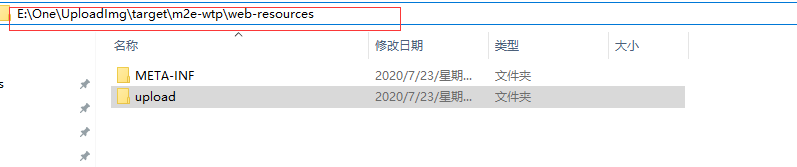
我们来访问一下是可以直接访问的到的并且显示

struts-stu.xml(表格对象配置文件)
注意把文件引入到struts-base.xml中
<?xml version="1.0" encoding="UTF-8"?>
 <!DOCTYPE struts PUBLIC
	"-//Apache Software Foundation//DTD Struts Configuration 2.5//EN"
	"http://struts.apache.org/dtds/struts-2.5.dtd">
<struts>
     <package name="struts-stu" extends="struts-base">
     <action name="stuAction_*"
      class="com.liyingdong.action.studentActon"
      method="{1}" >
       <result name="list" type="dispatcher">/list.jsp</result>
       <!-- 实现刷新 -->
       <result name="success" type="redirect">/stuAction_list.action</result>
      </action>
     </package>
</struts>
struts-upload.xml(图片上传的配置文件)
<?xml version="1.0" encoding="UTF-8"?>
 <!DOCTYPE struts PUBLIC
	"-//Apache Software Foundation//DTD Struts Configuration 2.5//EN"
	"http://struts.apache.org/dtds/struts-2.5.dtd">
<struts>
     <package name="struts-upload" extends="struts-base">
     <action name="fileUploadAction_*"
      class="com.liyingdong.action.FileUploadAction"
      method="{1}" >
      </action>
     </package>
</struts>
前端
1.index.jsp
这里是带个请求去刷新并且跳转到主界面
<a href="stuAction_list.action">查询</a>
2.list.jsp
主界面
<%@ page language="java" contentType="text/html; charset=UTF-8"
pageEncoding="UTF-8"%>
<%@taglib prefix="d" uri="/liyingdong"%>
<%@ taglib uri="http://java.sun.com/jsp/jstl/core" prefix="z"%>
<!DOCTYPE html PUBLIC "-//W3C//DTD HTML 4.01 Transitional//EN" "http://www.w3.org/TR/html4/loose.dtd">
<html>
<head>
<meta http-equiv="Content-Type" content="text/html; charset=UTF-8">
<title>Insert title here</title>
<link
href="https://cdn.bootcdn.net/ajax/libs/twitter-bootstrap/4.5.0/css/bootstrap.css"
rel="stylesheet">
<script
src="https://cdn.bootcdn.net/ajax/libs/twitter-bootstrap/4.5.0/js/bootstrap.js"></script>
</head>
<body>
<form action="stuAction_list.action" method="post">
名字:<input name="sname" ><input type="submit" value="搜索">
</form>
<table border="1px">
<tr>
<td>学号</td>
<td>姓名</td>
<td>年龄</td>
<td>头像</td>
<td>操作</td>
</tr>
<z:forEach items="${studentList }" var="d">
<tr>
<td>${d.id }</td>
<td>${d.sname }</td>
<td>${d.sage }</td>
<td ><img style="width: 120px;height: 120px" alt="" src="${pageContext.request.contextPath }/${d.fpath}"/></td>
<td>
<a href="stuAction_del.action?id=${d.id }">删除</a>
<a
href="${pageContext.request.contextPath }/upload.jsp?id=${d.id}">图片上传</a>
<a href="fileUploadAction_download.action?id=${d.id }&fid=${d.fid}">图片下载</a>
</td>
</tr>
</z:forEach>
</table>
<d:page pageBean="${pageBean }"></d:page>
</body>
</html>
3.upload.jsp
图片上传界面,从主界面带id跳转到此界面进行上传处理,enctype="multipart/form-data"注意一定要加上去不然后台获取不到值,这一行加入到表单的头部是指当前是一个媒体的意思。
<form action="fileUploadAction_upload.action?id=${param.id}" method="post" enctype="multipart/form-data">
   <input type="hidden" name="id" value="${param.id}"/>
   <input type="file" name="img">
   <input type="submit" value="上传">
</form>
后台
1.baseAction通用Action
package com.liyingdong.util;

import javax.servlet.ServletContext;
import javax.servlet.http.HttpServletRequest;
import javax.servlet.http.HttpServletResponse;
import javax.servlet.http.HttpSession;

import org.apache.struts2.interceptor.ServletRequestAware;
import org.apache.struts2.interceptor.ServletResponseAware;

public class baseAction implements ServletRequestAware, ServletResponseAware{
	/**
	 * 为了传值使用
	 */
	protected HttpServletResponse response;
	protected HttpServletRequest request;
	protected HttpSession session;
	protected ServletContext application;

	/**
	 * 为了配置跳转页面所用
	 */
	protected final static String SUCCESS = "success";
	protected final static String FAIL = "fail";
	protected final static String LIST = "list";
	protected final static String ADD = "add";
	protected final static String EDIT = "edit";
	protected final static String DETAIL = "detail";

	/**
	 * 具体传值字段	后端向jsp页面传值所用字段
	 */
	protected Object result;
	protected Object msg;
	protected int code;

	public Object getResult() {
		return result;
	}

	public Object getMsg() {
		return msg;
	}

	public int getCode() {
		return code;
	}

	@Override
	public void setServletResponse(HttpServletResponse arg0) {
		this.response = arg0;

	}

	@Override
	public void setServletRequest(HttpServletRequest arg0) {
		this.request = arg0;
		this.session = arg0.getSession();
		this.application = arg0.getServletContext();
	}


}
2.studentAction
package com.liyingdong.action;
import java.util.List;
import com.liyingdong.dao.StudentDao;
import com.liyingdong.entity.Student;
import com.liyingdong.util.PageBean;
import com.liyingdong.util.baseAction;
import com.opensymphony.xwork2.ModelDriven;
public class studentActon  extends  baseAction implements  ModelDriven<Student>{

	private StudentDao sd=new StudentDao();
	private Student student=new Student();
	@Override
	public Student getModel() {
		// TODO Auto-generated method stub
		return student;
	}

	public  String list() throws Exception {
		PageBean pageBean = new PageBean();//实列分页类
		pageBean.setRequest(request);
		List<Student> list = sd.list(student, pageBean);//查询所有,因为有ModelDriven赋值,就不需要手动赋值
		request.setAttribute("studentList", list);//这个request是通过辅助类BaseAction调过来的
		request.setAttribute("pageBean", pageBean);
		return  LIST;
	}

	public  String del() throws Exception {
		sd.del(student);
		return  SUCCESS;
	}


}
3.FileUploadAction
这里要注意三个属性是必不可少的,没有的话将会获取不到图片的具体信息
java.io.File img;//xxx
String imgContentType;//xxxContentType
String imgFileName;//xxxFileName
package com.liyingdong.action;
import java.io.File;
import javax.servlet.ServletContext;
import javax.servlet.ServletOutputStream;
import javax.servlet.http.HttpServletRequest;
import javax.servlet.http.HttpServletResponse;
import javax.servlet.http.HttpSession;
import org.apache.commons.io.FileUtils;
import org.apache.struts2.ServletActionContext;
import com.liyingdong.dao.MyFileDao;
import com.liyingdong.dao.StudentDao;
import com.liyingdong.entity.MyFile;
import com.liyingdong.entity.Student;
import com.opensymphony.xwork2.ModelDriven;

public class FileUploadAction  implements  ModelDriven<MyFile>
{
	MyFile myFile=new MyFile();
	MyFileDao md=new MyFileDao();
	StudentDao sd=new StudentDao();


 	java.io.File img;//xxx
    String imgContentType;//xxxContentType
    String imgFileName;//xxxFileName

    private int id;


    @Override
	public MyFile getModel() {
		// TODO Auto-generated method stub
		return myFile;
	}


    public String upload() throws Exception {
    	//目的地
    	String  targetpath="/upload/"+this.id+"/"+this.imgFileName;

    	HttpServletRequest request = ServletActionContext.getRequest();
    	HttpSession session = request.getSession();
    	ServletContext application =session.getServletContext();


    	//获取到真正目的地的路径
		String realPath = application.getRealPath(targetpath);


    	System.out.println(realPath);
    	//copy 源 ,目的地

    	FileUtils.copyFile(img, new File(realPath));

    	//赋值
    	MyFile mf=new MyFile();
    	long fileId=System.currentTimeMillis();
    	mf.setFid(fileId);
    	mf.setReal_name(this.imgFileName);
    	mf.setFpath(targetpath);
    	mf.setContent_type(this.imgContentType);
    	//添加文件上传的记录
    	this.md.add(mf);


    	//修改学生头像
    	Student stu=new Student();
    	stu.setId(this.id);
    	 Student s = this.sd.load(stu).get(0);
    	s.setFid(fileId);
    	s.setFpath(targetpath);
    	this.sd.editImage(s);
    	return null;

    }

    //图片下载
    public String download() throws Exception {
    	System.out.println("-----------");

    	 MyFile f = md.load(myFile).get(0);
    	 System.out.println(f.toString());
    	//目的地
    	String  targetpath="/upload/"+this.id+"/"+f.getReal_name();


    	HttpServletRequest request = ServletActionContext.getRequest();
    	HttpServletResponse response = ServletActionContext.getResponse();
    	HttpSession session = request.getSession();
    	ServletContext application =session.getServletContext();
    	//获取到真正目的地的路径
		String realPath = application.getRealPath(targetpath);
    	System.out.println(realPath);

    	// 1.设置文件的内容类型
    	response.setContentType(f.getContent_type());
    	// 2.处理文件名的中文乱码(必须设置响应头前面)
    	String realName = new String(f.getReal_name().getBytes("utf-8"), "iso8859-1");
    	// 3.设置响应头
    	response.setHeader("Content-Disposition", "attachment;filename=" + realName);// 文件名

    	//从响应里面获取到流
    	ServletOutputStream os = response.getOutputStream();

    	//copy 源 ,目的地
    	FileUtils.copyFile(new File(realPath), os);
    	return null;

    }

	public int getId() {
		return id;
	}


	public void setId(int id) {
		this.id = id;
	}


	public java.io.File getImg() {
		return img;
	}
	public void setImg(java.io.File img) {
		this.img = img;
	}
	public String getImgContentType() {
		return imgContentType;
	}
	public void setImgContentType(String imgContentType) {
		this.imgContentType = imgContentType;
	}
	public String getImgFileName() {
		return imgFileName;
	}
	public void setImgFileName(String imgFileName) {
		this.imgFileName = imgFileName;
	}

}





 扫一扫
扫一扫


 342
342

 被折叠的 条评论
为什么被折叠?
被折叠的 条评论
为什么被折叠?
 到【灌水乐园】发言





