


 本文介绍了通过Java使用FreeMarker生成固定Word文档的方法。需有.ftl类型的固定模板文档,将Word中需填充数据用占位符替换,另存为.xml格式并检查。还说明了处理普通文本和表格的方式,以及导入依赖、生成工具类、准备数据等步骤。
该方法也就是通过freemarker生成固定的word文档,动态的word模板布局不能用该方法。
也就是必须有一个固定的模板文档是.ftl类型
如果初始文件为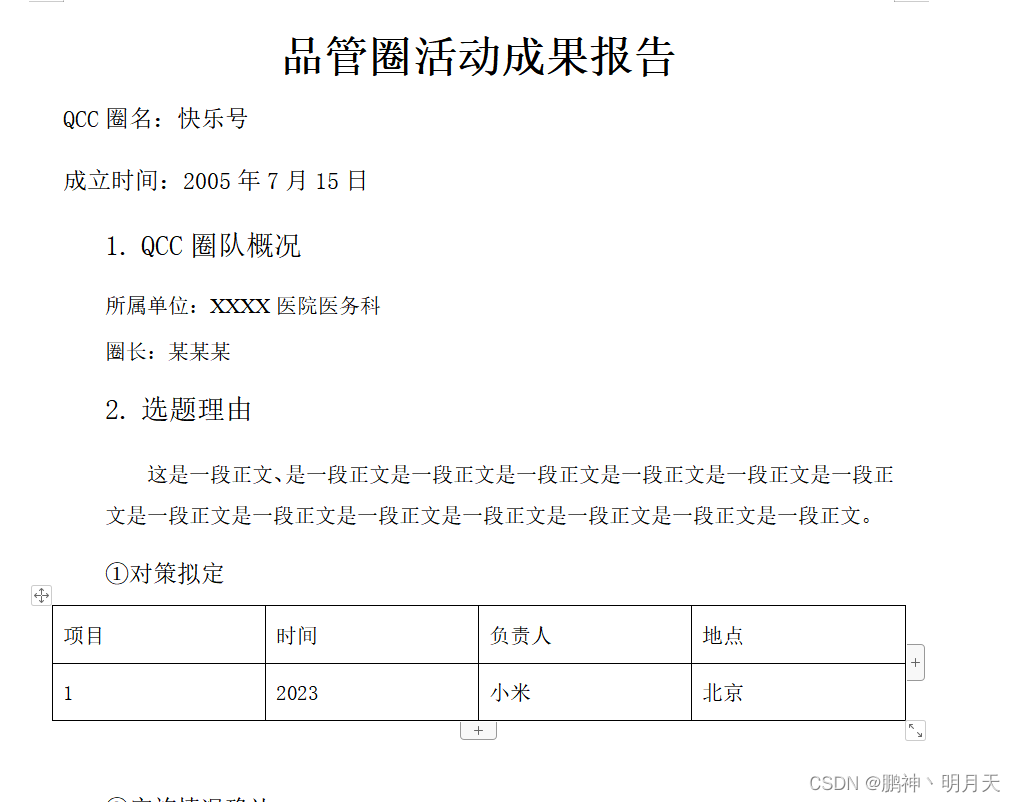
需要手动改为:
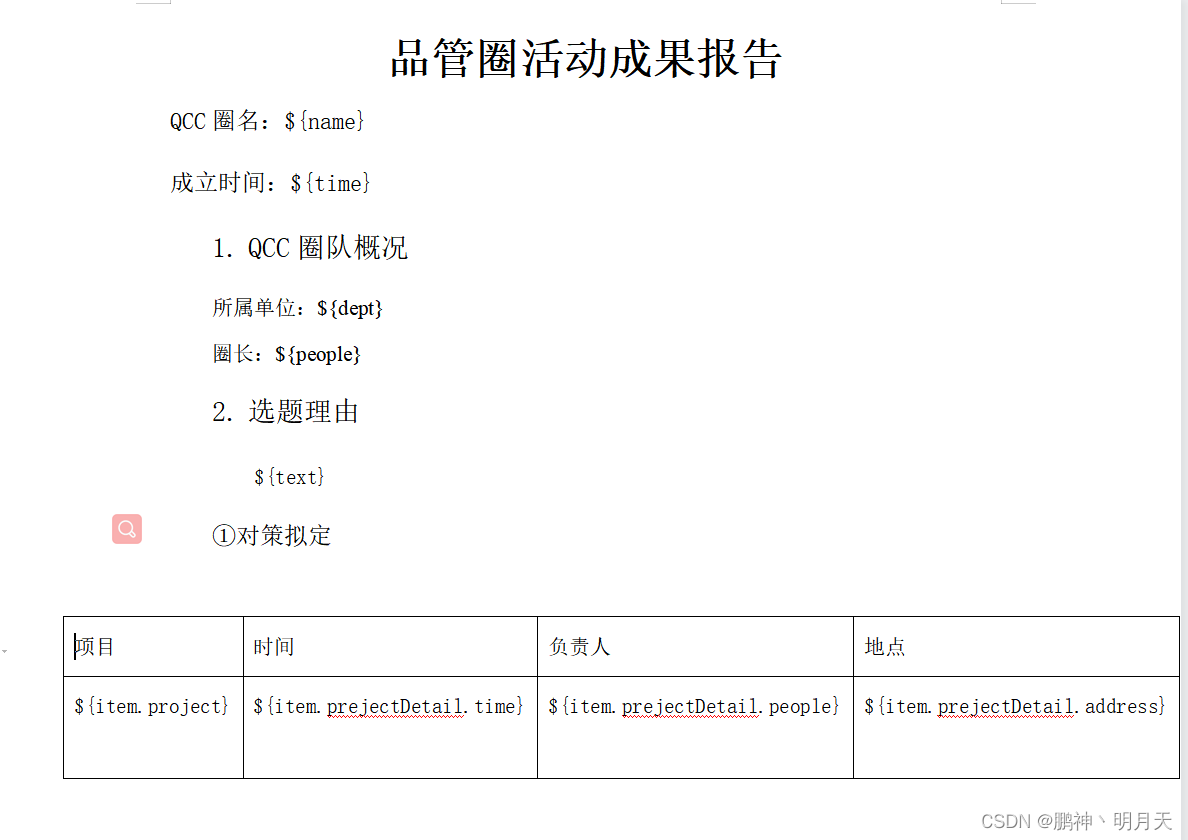
也就是所有需要替换的地方,都需要有${XX}替换。
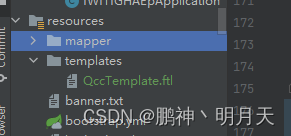
主要步骤为:
- 将 word 中需要填充的数据用占位符
${变量名}替换。 - 将该 word 另存为 .xml 的格式,并检查看格式是否有误(主要看占位符有没被分割开来)。
- 将后缀
.xml改成.ftl后,再调用相关 API 即可生成 word 文档。
特别注意,一定是将word另存为xml格式,而不是在外面修改后缀,不然会乱码。
其次一定要在xml或者ftl格式下检查格式,查询${XX}是否正确,看是否有占位符被分隔开的情况,如果有,只需将中间多余的部分删除即可。
处理普通文本
处理文本比较简单,在原文件中直接用占位符 ${} 替换即可。
处理表格
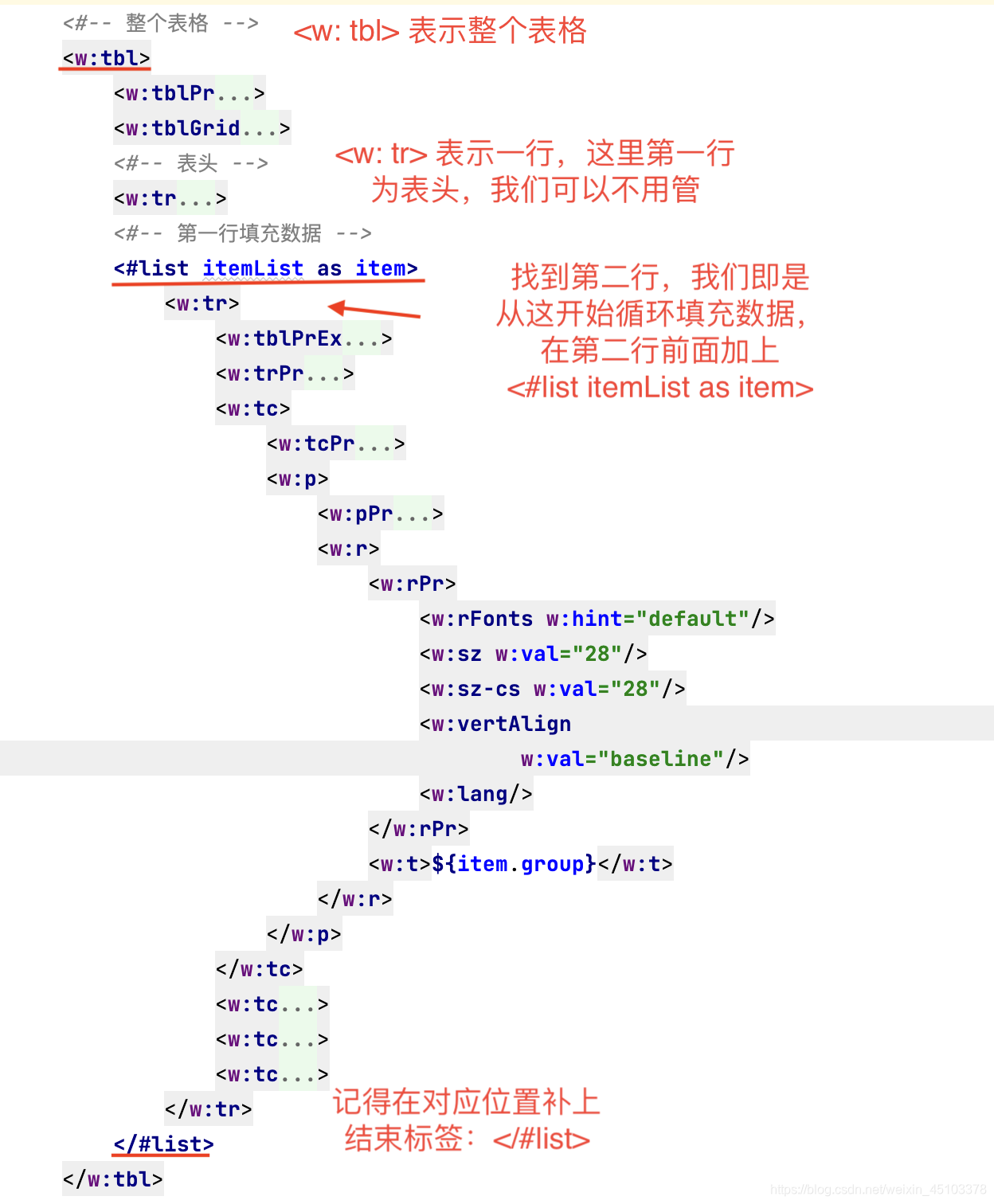
处在生成 word 表格时,FreeMarker 是利用列表一行一行循环填充的,而表头只会生成一次,因此我们还需手动改动一下 .ftl 文件。
注意:<w:tbl> 表示一个表格 、<w: tr> 表示一行、<w: tc> 表示一列,我们先找到第一行填充数据的那行,在前后分别加上如下语句即可:
<#list itemList as item>
</#list>
另一种情况:还有一种情况,即需要进行单元格的合并操作,前面和上面都差不多,不过还要加上另一种标签:
<w:vmerge w:val='restart'/>
<w:vmerge/>
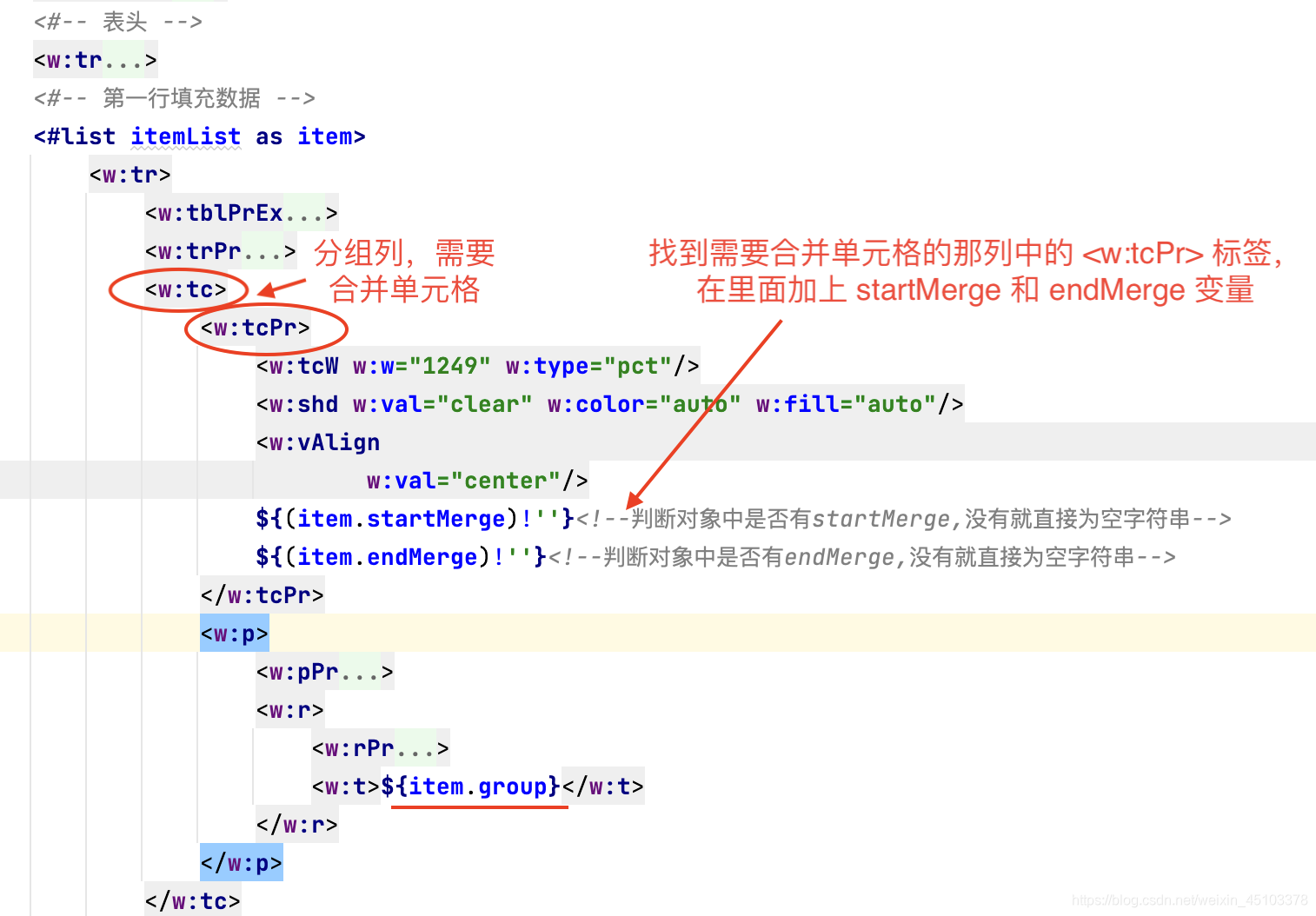
我们先用 ${item.startMerge}(开始合并)和 ${item.endMerge}(结束合并)分别替换上面2行。
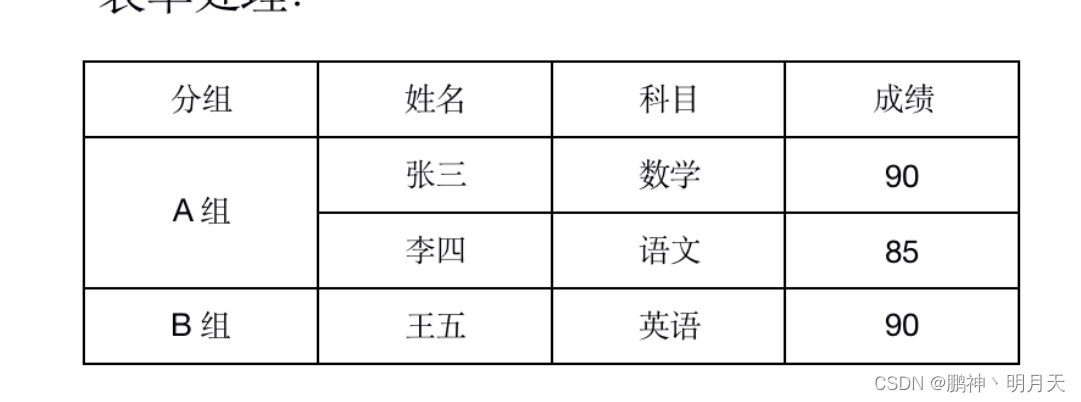 我们可以看到第一列分组是有合并单元格存在的,因此,找到第一列的
 <w: tc> 那,如下图所示:
1.导入相关依赖
我们主要用到了 FreeMarker,在这里,只需要导入以下依赖即可:
 <dependency>
     <groupId>org.springframework.boot</groupId>
     <artifactId>spring-boot-starter-freemarker</artifactId>
</dependency>
2.生成 word 的工具类
此方法将生成的文档传到前端;
import freemarker.template.Configuration;
import freemarker.template.Template;
import freemarker.template.Version;

import javax.servlet.ServletOutputStream;
import javax.servlet.http.HttpServletResponse;
import java.io.*;
import java.net.URLEncoder;
import java.nio.charset.StandardCharsets;
import java.util.Map;

public class WordUtils {

    /**
     * 生成 word 文档方法
     *
     * @param dataMap      要填充的数据
     * @param templateName 模版名称
     * @param fileName     要输出的文件路径
     * @throws Exception 抛出的异常
     */
    public static void generateWord(HttpServletResponse response,Map<String, Object> dataMap, String templateName, String fileName) throws Exception {

        // 设置FreeMarker的版本和编码格式
        Configuration configuration = new Configuration(new Version("2.3.28"));
        configuration.setDefaultEncoding("UTF-8");

        // 设置FreeMarker生成Word文档所需要的模板的路径
        // configuration.setDirectoryForTemplateLoading(new File("/Users/xxx/Desktop/"));
        // 此处把模版文件都放在 resources 下的 templates 中
        configuration.setClassForTemplateLoading(WordUtils.class, "/templates");

        // 设置FreeMarker生成Word文档所需要的模板
        Template tem = configuration.getTemplate(templateName, "UTF-8");
        // 创建一个Word文档的输出流
//        Writer out = new BufferedWriter(new OutputStreamWriter(new FileOutputStream(new File(fileName)), StandardCharsets.UTF_8));
//         FreeMarker使用Word模板和数据生成Word文档
//        response.setCharacterEncoding("UTF-8");
////        response.setContentType("multipart/form-data");
//        response.setHeader("content-type", "application/octet-stream");
//        response.setHeader("Content-Disposition", "attachment;filename=" + URLEncoder.encode(fileName, "UTF-8"));

        response.setCharacterEncoding("utf-8");
        response.setContentType("applicaiton/msword");
//        response.setHeader("Content-disposition", "attachment;filename=" + fileName + ".docx");
        response.addHeader("Content-Disposition", "attachment; filename=" + URLEncoder.encode(fileName, "UTF-8"));
        PrintWriter writer = response.getWriter();
        //tem.process(dataMap,new FileWriter("C:\\Users\\14017\\Desktop\\word.docx"));
        tem.process(dataMap, writer);
        writer.close();
        //tem.process(dataMap,response.getWriter());
//        writer.flush();
//        writer.close();
//        tem.process(dataMap,out);
//        out.flush();
//        out.close();
    }
}
此方法是将生成的文档存储到固定位置--目前在桌面
package com.iwiti.qcc.manage;
import freemarker.template.Configuration;
import freemarker.template.Template;
import freemarker.template.Version;

import javax.servlet.ServletOutputStream;
import javax.servlet.http.HttpServletResponse;
import java.io.*;
import java.net.URLEncoder;
import java.nio.charset.StandardCharsets;
import java.util.Map;

public class WordUtils {

    /**
     * 生成 word 文档方法
     *
     * @param dataMap      要填充的数据
     * @param templateName 模版名称
     * @param fileName     要输出的文件路径
     * @throws Exception 抛出的异常
     */
    public static void generateWord(HttpServletResponse response,Map<String, Object> dataMap, String templateName, String fileName) throws Exception {

        // 设置FreeMarker的版本和编码格式
        Configuration configuration = new Configuration(new Version("2.3.28"));
        configuration.setDefaultEncoding("UTF-8");

        // 设置FreeMarker生成Word文档所需要的模板的路径
        // configuration.setDirectoryForTemplateLoading(new File("/Users/xxx/Desktop/"));
        // 此处把模版文件都放在 resources 下的 templates 中
        configuration.setClassForTemplateLoading(WordUtils.class, "/templates");

        // 设置FreeMarker生成Word文档所需要的模板
        Template tem = configuration.getTemplate(templateName, "UTF-8");
        // 创建一个Word文档的输出流
//        Writer out = new BufferedWriter(new OutputStreamWriter(new FileOutputStream(new File(fileName)), StandardCharsets.UTF_8));
//         FreeMarker使用Word模板和数据生成Word文档
//        response.setCharacterEncoding("UTF-8");
////        response.setContentType("multipart/form-data");
//        response.setHeader("content-type", "application/octet-stream");
//        response.setHeader("Content-Disposition", "attachment;filename=" + URLEncoder.encode(fileName, "UTF-8"));

//        response.setCharacterEncoding("utf-8");
//        response.setContentType("applicaiton/msword");
////        response.setHeader("Content-disposition", "attachment;filename=" + fileName + ".docx");
//        response.addHeader("Content-Disposition", "attachment; filename=" + URLEncoder.encode(fileName, "UTF-8"));
//        PrintWriter writer = response.getWriter();
        tem.process(dataMap,new FileWriter("C:\\Users\\14017\\Desktop\\word.docx"));
//        tem.process(dataMap, writer);
//        writer.close();
        //tem.process(dataMap,response.getWriter());
//        writer.flush();
//        writer.close();
//        tem.process(dataMap,out);
//        out.flush();
//        out.close();
    }
}
3.准备填充所需的数据
一般来说,我们的数据可能是从数据库中查询出来的各种对象,这里为了方便,就直接利用 HashMap 存储数据了。
 public static Map<String,Object> initData(){
        // 对应单元格的合并
        final String startMerge = "<w:vmerge w:val='restart'/>";
        final String endMerge = "<w:vmerge/>";

        final LocalDate nowDate = LocalDate.now();
        Map<String, Object> data = new HashMap<>();
        data.put("name", "张三");
        data.put("dept", "办公室");
        data.put("time", nowDate);

        List<Item> itemList = new ArrayList<>();
        Item item1 = new Item();
        item1.setProject("分组A")
                .setProjectDetail.setTime("2-13")
                .setProjectDetail.setPeople("小米")
                ..setProjectDetail.setAddress("北京")
                .setStartMerge(startMerge);
        itemList.add(item1);

        Item item2 = new Item();
        item2.setProject("分组A")
                .setProjectDetail.setTime("2-13")
                .setProjectDetail.setPeople("小米")
                ..setProjectDetail.setAddress("北京")
                .setEndMerge(endMerge);
        itemList.add(item2);Project

        Item item3 = new Item();
        item3.setProject("分组B")
                 .setProjectDetail.setTime("2-13")
                .setProjectDetail.setPeople("小米")
                ..setProjectDetail.setAddress("北京")
        itemList.add(item3);
        data.put("itemList", itemList);


        return data;
    }
注意的是表格的map的value是实体类,且这个实体类还有一个实体类嵌套,其次在修改模板是,将itemList as item, 所以占位符就是${item.project}与${item.projectDetail.time}
4.生成 word 文档
         String templateName = QCC_TEMPLATE_WORD;
        String fileName = DateUtil.format(new Date(), "yyyyMMddHH") + QCC__WORD ;
        WordUtils.generateWord(response,data, templateName, fileName);


    //Qcc模板文件
    public static final String QCC_TEMPLATE_WORD = "QccTemplate.ftl";

    //Qcc生成文件名
    public static final String QCC__WORD = "QCC_REPORT.docx";





 扫一扫
扫一扫


 886
886

 被折叠的 条评论
为什么被折叠?
被折叠的 条评论
为什么被折叠?
 到【灌水乐园】发言





