



目录
SpringAI 快速入门
maven依赖: 注意SpringAI 对于使用JDK的版本必须要求是 17^
<properties>
  <java.version>17</java.version>
  <spring-ai.version>1.0.0</spring-ai.version>
</properties>
<dependencies>
  <dependency>
    <groupId>org.springframework.boot</groupId>
    <artifactId>spring-boot-starter-web</artifactId>
  </dependency>
  <dependency>
    <groupId>org.springframework.ai</groupId>
    <artifactId>spring-ai-starter-model-openai</artifactId>
  </dependency>

  <dependency>
    <groupId>org.springframework.boot</groupId>
    <artifactId>spring-boot-starter-test</artifactId>
    <scope>test</scope>
  </dependency>
  <dependency>
    <groupId>org.projectlombok</groupId>
    <artifactId>lombok</artifactId>
  </dependency>
</dependencies>
<dependencyManagement>
  <dependencies>
    <dependency>
      <groupId>org.springframework.ai</groupId>
      <artifactId>spring-ai-bom</artifactId>
      <version>${spring-ai.version}</version>
      <type>pom</type>
      <scope>import</scope>
    </dependency>
  </dependencies>
</dependencyManagement>

<build>
  <plugins>
    <plugin>
      <groupId>org.springframework.boot</groupId>
      <artifactId>spring-boot-maven-plugin</artifactId>
    </plugin>
  </plugins>
</build>
hello world入门
1.配置模型
spring:
  application:
    name: spring-ai
  ai:
    ollama:
      base-url: http://localhost:11434
      chat:
        model: deepseek-r1:7b


logging:
  level:
    org.springframework.ai.chat.client.advisor: debug
    com.xiao.ai: debug
2.配置客户端
package com.yang.ai.config;

import org.springframework.ai.chat.client.ChatClient;
import org.springframework.ai.chat.client.advisor.MessageChatMemoryAdvisor;
import org.springframework.ai.chat.client.advisor.SimpleLoggerAdvisor;
import org.springframework.ai.chat.memory.ChatMemory;
import org.springframework.ai.ollama.OllamaChatModel;
import org.springframework.context.annotation.Bean;
import org.springframework.context.annotation.Configuration;

@Configuration
public class CommonConfiguration {


    @Bean
    public ChatClient chatClient(OllamaChatModel model, ChatMemory chatMemory){
        return ChatClient
                .builder(model)  //创建chatClient工厂实例
                .defaultSystem("你是一个热心、可爱的智能助手,你的名字叫小钢,请以小钢的身份和语气回答问题。")
                .defaultAdvisors(
                        new SimpleLoggerAdvisor(),
                        MessageChatMemoryAdvisor.builder(chatMemory).build())   //配置日志Advisor
                .build();   //构建ChatClient实例
    }
}
3.创建ChatController
package com.xiao.ai.controller;

import com.xiao.ai.repository.ChatHistoryRepository;
import lombok.RequiredArgsConstructor;
import org.springframework.ai.chat.client.ChatClient;
import org.springframework.ai.chat.memory.ChatMemory;
import org.springframework.web.bind.annotation.RequestMapping;
import org.springframework.web.bind.annotation.RestController;
import reactor.core.publisher.Flux;

@RequiredArgsConstructor
@RestController
@RequestMapping("/ai")
public class ChatController {

    private final ChatClient chatClient;

    private final ChatHistoryRepository chatHistoryRepository;


    @RequestMapping(value = "/chat", produces = "text/html;charset=utf-8")
    public Flux<String> chat(String prompt, String chatId){
        //1.保存会话id
        chatHistoryRepository.save("chat",chatId);
        //2.请求模型
        return chatClient.prompt()
                .user(prompt)
                .advisors(a -> a.param(ChatMemory.CONVERSATION_ID, chatId))
                .stream().
                content();
    }
}
4.测试
curl http://localhost:8080/ai/chat?message=你是谁?

#输出: 你好呀!我是小钢,一个专门为你提供帮助和陪伴的AI机器人~我的任务是回答你的问题、聊天解闷,或者帮你解决各种小难题。有什么需要尽管告诉我吧! 😊
日志记录
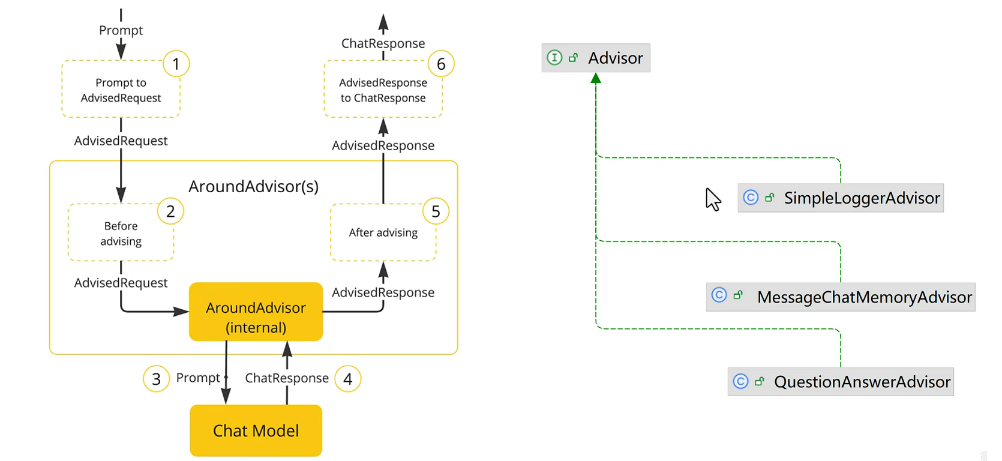
SpringAI 利用 AOP 的原理对会话进行了增强拦截等功能叫做
Advisor
1.修改 application.yaml
logging:
  level:
    org.springframework.ai.chat.client.advisor: debug
    com.xiao.ai: debug
2.在CommonConfiguration解释
package com.xiao.ai.config;

import org.springframework.ai.chat.client.ChatClient;
import org.springframework.ai.chat.client.advisor.MessageChatMemoryAdvisor;
import org.springframework.ai.chat.client.advisor.SimpleLoggerAdvisor;
import org.springframework.ai.chat.memory.ChatMemory;
import org.springframework.ai.ollama.OllamaChatModel;
import org.springframework.context.annotation.Bean;
import org.springframework.context.annotation.Configuration;

@Configuration
public class CommonConfiguration {


    @Bean
    public ChatClient chatClient(OllamaChatModel model, ChatMemory chatMemory){
        return ChatClient
                .builder(model)  //创建chatClient工厂实例
                .defaultSystem("你是一个热心、可爱的智能助手,你的名字叫小钢,请以小钢的身份和语气回答问题。")
                .defaultAdvisors(
                        new SimpleLoggerAdvisor(),
                        MessageChatMemoryAdvisor.builder(chatMemory).build())   //配置日志Advisor
                .build();   //构建ChatClient实例
    }
}
会话记忆
首先需要检查一项内容,就是你的
maven 依赖是否与我的一致,因为官方可能会对jar包进行修改;所以一定要与我的保持一致
1.增加记忆功能
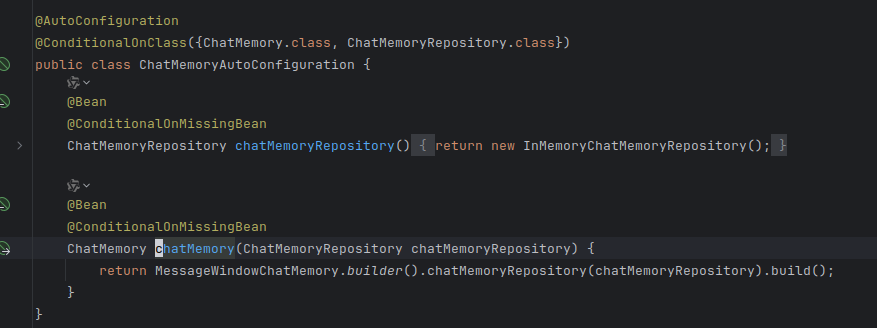
CommonConfiguration.java 中对ChatClient进行添加切面对象,在方法中导入ChatMemory这是系统自动装配的聊天记录对象
@Bean
    public ChatClient chatClient(OllamaChatModel model, ChatMemory chatMemory){
        return ChatClient
                .builder(model)  //创建chatClient工厂实例
                .defaultSystem("你是一个热心、可爱的智能助手,你的名字叫小钢,请以小钢的身份和语气回答问题。")
                .defaultAdvisors(
                        new SimpleLoggerAdvisor(),
                        MessageChatMemoryAdvisor.builder(chatMemory).build())   //配置日志Advisor
                .build();   //构建ChatClient实例
    }
自动装配配置类,默认装了ChatMemoryRepository对象
2.会话隔离
在controller中,请求的方法中做如下修改
@RequestMapping(value = "/chat", produces = "text/html;charset=utf-8")
    public Flux<String> chat(String prompt, String chatId){
        //1.保存会话id
        chatHistoryRepository.save("chat",chatId);
        //2.请求模型
        return chatClient.prompt()
                .user(prompt)
                .advisors(a -> a.param(ChatMemory.CONVERSATION_ID, chatId))
                .stream().
                content();
    }
主要代码,主要在请求上下文中设置 CONVERSATION_ID 通过这个 ID 在ChatMemory中进行查找出他的会话信息,加载到AI请求中完成。
3.解决跨域问题
package com.xiao.ai.config;

import org.springframework.context.annotation.Configuration;
import org.springframework.web.servlet.config.annotation.CorsRegistry;
import org.springframework.web.servlet.config.annotation.WebMvcConfigurer;

@Configuration
public class MvcConfiguration implements WebMvcConfigurer {

    @Override
    public void addCorsMappings(CorsRegistry registry){
        registry.addMapping("/**")
                .allowedOrigins("*")
                .allowedMethods("GET","POST","PUT","DELETE","OPTIONS")
                .allowedMethods("*");

    }
}
4.聊天历史访问
package com.xiao.ai.controller;

import com.xiao.ai.entity.vo.MessageVO;
import com.xiao.ai.repository.ChatHistoryRepository;
import lombok.RequiredArgsConstructor;
import org.springframework.ai.chat.memory.ChatMemory;
import org.springframework.ai.chat.messages.Message;
import org.springframework.web.bind.annotation.GetMapping;
import org.springframework.web.bind.annotation.PathVariable;
import org.springframework.web.bind.annotation.RequestMapping;
import org.springframework.web.bind.annotation.RestController;

import java.util.List;

@RequiredArgsConstructor
@RestController
@RequestMapping("/ai/history")
public class ChatHistoryController {

    private final ChatHistoryRepository chatHistoryRepository;

    private final ChatMemory chatMemory;

    @GetMapping("/{type}")
    public Object getChatIds(@PathVariable("type") String type){
        return chatHistoryRepository.getChatIds(type);
    }

    @GetMapping("/{type}/{chatId}")
    public List<MessageVO> getChatHistory(@PathVariable("type") String type, @PathVariable("chatId") String chatId){
        List<Message> messages = chatMemory.get(chatId);
        if(messages == null){
            return List.of();
        }
        return messages.stream().map(MessageVO::new).toList();
    }
}
5.聊天历史保存
package com.xiao.ai.repository;

import org.springframework.stereotype.Component;

import javax.lang.model.type.ArrayType;
import java.util.ArrayList;
import java.util.HashMap;
import java.util.List;
import java.util.Map;

@Component
public class InMemoryChatHistoryRepository implements ChatHistoryRepository{

    private final Map<String,List<String>> chatHistory = new HashMap<>();
    @Override
    public void save(String type, String chatId) {
        List<String> chatIds = chatHistory.computeIfAbsent(type, k -> new ArrayList<>());
        if(chatIds.contains(chatId)){
            return;
        }
        chatIds.add(chatId);
    }

    @Override
    public List<String> getChatIds(String type) {
        return chatHistory.getOrDefault(type,List.of());
    }
}





 扫一扫
扫一扫


 3206
3206

 被折叠的 条评论
为什么被折叠?
被折叠的 条评论
为什么被折叠?
 到【灌水乐园】发言





