



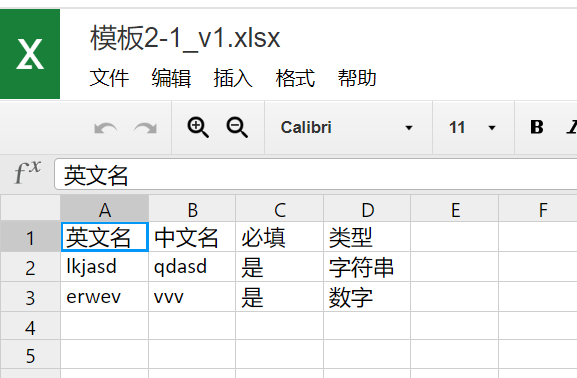
先来看效果:
json =[{"englishName": "lkjasd","chineseName": "qdasd","ifFillIn": "是","fieldsType": "字符串"},{"englishName": "erwev","chineseName": "vvv","ifFillIn": "是","fieldsType": "数字"}]
输出excel文件内容:
一. 添加依赖
这里使用阿里云镜像来下载依赖项
将以下内容复制到pom.xml文件中,也可复制Apache POI和JSON库添加到已有的pom.xml中。
<project xmlns="http://maven.apache.org/POM/4.0.0" xmlns:xsi="http://www.w3.org/2001/XMLSchema-instance"
         xsi:schemaLocation="http://maven.apache.org/POM/4.0.0 http://maven.apache.org/xsd/maven-4.0.0.xsd">

    <modelVersion>4.0.0</modelVersion>
    <groupId>com.example</groupId>
    <artifactId>json-to-excel</artifactId>
    <version>1.0.0</version>

    <properties>
        <maven.compiler.source>1.8</maven.compiler.source>
        <maven.compiler.target>1.8</maven.compiler.target>
    </properties>

    <repositories>
        <repository>
            <id>aliyun</id>
            <url>https://maven.aliyun.com/repository/public</url>
        </repository>
    </repositories>

    <dependencies>
        <dependency>
            <groupId>org.apache.poi</groupId>
            <artifactId>poi</artifactId>
            <version>4.1.2</version>
        </dependency>
        <dependency>
            <groupId>org.apache.poi</groupId>
            <artifactId>poi-ooxml</artifactId>
            <version>4.1.2</version>
        </dependency>
        <dependency>
            <groupId>org.json</groupId>
            <artifactId>json</artifactId>
            <version>20210307</version>
        </dependency>
    </dependencies>

</project>
二. 实现代码
     /**
     * json导出exec
     * jsonString json的字符串数据
     * head 首行标题
     * sheet 标签页名称
     * name 文档名称
     */
    @Override
    public void exportExecByJson(String jsonString,List<String> head , String sheet , String name) throws Exception {

        List<String> headNew = new ArrayList<>();
        //自定义首行  --如果没设置首行则添加默认值
        if (head == null || head.isEmpty()){
            headNew.add("英文名");
            headNew.add("中文名");
            headNew.add("必填");
            headNew.add("类型");
        }


        if (StringUtils.isBlank(jsonString)){
            throw new CommonAlertException("未获取到需要导出的数据!");
        }


        //将json字符串转换成list<map<string,string>>
        Gson gson = new Gson();
        Type listType = new TypeToken<List<Map<String, Object>>>() {}.getType();
        List<Map<String, String>> listMap = gson.fromJson(jsonString, listType);
        String filePath = desktopPath() + "/"+name+".xlsx";

        //使用多线程导出
        ExecutorService executorService = Executors.newFixedThreadPool(1);
        executorService.submit(new Runnable() {
            @Override
            public void run() {
                try {
                    exportJsonToExcel(listMap,filePath,sheet,head!=null ?head : headNew);
                }catch (Exception e){
                    e.printStackTrace();
                }finally {
                    log.info("导出结束");
                }
            }
        });


    }

    /**
     * 获取桌面路径
     */
    public String desktopPath(){
        String os = System.getProperty("os.name").toLowerCase();
        String path;

        if (os.contains("win")){
            path= System.getProperty("user.home")+"\\Desktop";
        }else if (os.contains("nix") || os.contains("nux") || os.contains("mac")){
            path = System.getProperty("user.home")+"/Desktop";
        }else {
            throw new CommonAlertException("未知的操作系统");
        }
        return path;
    }


    public void exportJsonToExcel( List<Map<String, String>> maps, String filePath , String sheet , List<String> head) throws Exception{

        Workbook workbook = new XSSFWorkbook();
        Sheet workbookSheet = workbook.createSheet(sheet);

        //插入首行数据
        Row headRow = workbookSheet.createRow(0);
        int columnIndex = 0;
        for (String s : head) {
            Cell cell = headRow.createCell(columnIndex++);
            cell.setCellValue(s);
        }

        int rowIndex = 1;
        //插入内容
        for (Map<String, String> map : maps) {
            Row dataRow = workbookSheet.createRow(rowIndex++);
            columnIndex = 0;
            for (String value : map.values()){
                Cell cell = dataRow.createCell(columnIndex++);
                cell.setCellValue(value);
            }
        }

        FileOutputStream fileOutputStream = new FileOutputStream(filePath);
        workbook.write(fileOutputStream);
        fileOutputStream.close();
        workbook.close();


    }





 扫一扫
扫一扫


 2549
2549

 被折叠的 条评论
为什么被折叠?
被折叠的 条评论
为什么被折叠?
 到【灌水乐园】发言





