


1.1.版本
使用update-alternatives --config java配置的jdk-17.0.15没有问题,没有配置环境变量JAVA_HOME,不配置JAVA_HOME会使用自带的,以下为未配置jdk环境变量的启动日志
[root@worker0 bin]# ./startup.sh
Using CATALINA_BASE:   /usr/local/apache-tomcat-8.5.42
Using CATALINA_HOME:   /usr/local/apache-tomcat-8.5.42
Using CATALINA_TMPDIR: /usr/local/apache-tomcat-8.5.42/temp
Using JRE_HOME:        /usr
Using CLASSPATH:       /usr/local/apache-tomcat-8.5.42/bin/bootstrap.jar:/usr/local/apache-tomcat-8.5.42/bin/tomcat-juli.jar
Tomcat started.
apache-tomcat-8.5.79.tar.gz
1.2.安装
tar -zxvf apache-tomcat-8.5.79.tar.gz -C /usr/local
目录结构说明
| 目录 | 目录下文件 | 说明 |
|---|---|---|
| bin | / | 存放Tomcat的启动、停止等批处理脚本文件 |
| startup.bat , startup.sh | 用于在windows和linux下的启动脚本 | |
| shutdown.bat , shutdown.sh | 用于在windows和linux下的停止脚本 | |
| conf | / | 用于存放Tomcat的相关配置文件 |
| Catalina | 用于存储针对每个虚拟机的Context配置 | |
| context.xml | 用于定义所有web应用均需加载的Context配置,如果web应用指定了自己的context.xml ,该文件将被覆盖 | |
| catalina.properties | Tomcat 的环境变量配置 | |
| catalina.policy | Tomcat 运行的安全策略配置 | |
| logging.properties | Tomcat 的日志配置文件, 可以通过该文件修改Tomcat 的日志级别及日志路径等 | |
| server.xml | Tomcat 服务器的核心配置文件 | |
| tomcat-users.xml | 定义Tomcat默认的用户及角色映射信息配置 | |
| web.xml | Tomcat 中所有应用默认的部署描述文件, 主要定义了基础Servlet和MIME映射。 | |
| lib | / | Tomcat 服务器的依赖包 |
| logs | / | Tomcat 默认的日志存放目录 |
| webapps | / | Tomcat 默认的Web应用部署目录 |
| work | / | Web 应用JSP代码生成和编译的临时目录 |
1.3.配置
配置jvm参数
vim bin/catalina.sh
JAVA_OPTS="-server -Xms2048m -Xmx2048m -XX:MetaspaceSize=256m -XX:MaxMetaspaceSize=512m -XX:SurvivorRatio=8 -XX:+UseConcMarkSweepGC -XX:+PrintGCDetails"
配置远程JMX监控
JAVA_OPTS="-server -Xms2048m -Xmx2048m -XX:MetaspaceSize=256m -XX:MaxMetaspaceSize=512m -XX:SurvivorRatio=8 -XX:+UseConcMarkSweepGC -XX:+PrintGCDetails -Djava.rmi.server.hostname=192.168.245.130 -Dcom.sun.management.jmxremote.port=8999 -Dcom.sun.management.jmxremote.rmi.port=8999 -Dcom.sun.management.jmxremote.ssl=false -Dcom.sun.management.jmxremote.authenticate=false"

#通用的开启java服务器的jmx远程监控配置
-Djava.rmi.server.hostname=192.168.245.128 -Dcom.sun.management.jmxremote.port=8999 -Dcom.sun.management.jmxremote.rmi.port=8999 -Dcom.sun.management.jmxremote.ssl=false -Dcom.sun.management.jmxremote.authenticate=false
配置端口
vim conf/server.xml
<?xml version="1.0" encoding="UTF-8"?>
<!--
Licensed to the Apache Software Foundation (ASF) under one or more
contributor license agreements. See the NOTICE file distributed with
this work for additional information regarding copyright ownership.
The ASF licenses this file to You under the Apache License, Version 2.0
(the "License"); you may not use this file except in compliance with
the License. You may obtain a copy of the License at
http://www.apache.org/licenses/LICENSE-2.0
Unless required by applicable law or agreed to in writing, software
distributed under the License is distributed on an "AS IS" BASIS,
WITHOUT WARRANTIES OR CONDITIONS OF ANY KIND, either express or implied.
See the License for the specific language governing permissions and
limitations under the License.
-->
<!-- Note: A "Server" is not itself a "Container", so you may not
define subcomponents such as "Valves" at this level.
Documentation at /docs/config/server.html
-->
<Server port="8005" shutdown="SHUTDOWN">
<Listener className="org.apache.catalina.startup.VersionLoggerListener" />
<!-- Security listener. Documentation at /docs/config/listeners.html
<Listener className="org.apache.catalina.security.SecurityListener" />
-->
<!-- APR library loader. Documentation at /docs/apr.html -->
<Listener className="org.apache.catalina.core.AprLifecycleListener" SSLEngine="on" />
<!-- Prevent memory leaks due to use of particular java/javax APIs-->
<Listener className="org.apache.catalina.core.JreMemoryLeakPreventionListener" />
<Listener className="org.apache.catalina.mbeans.GlobalResourcesLifecycleListener" />
<Listener className="org.apache.catalina.core.ThreadLocalLeakPreventionListener" />
<!-- Global JNDI resources
Documentation at /docs/jndi-resources-howto.html
-->
<GlobalNamingResources>
<!-- Editable user database that can also be used by
UserDatabaseRealm to authenticate users
-->
<Resource name="UserDatabase" auth="Container"
type="org.apache.catalina.UserDatabase"
description="User database that can be updated and saved"
factory="org.apache.catalina.users.MemoryUserDatabaseFactory"
pathname="conf/tomcat-users.xml" />
</GlobalNamingResources>
<!-- A "Service" is a collection of one or more "Connectors" that share
a single "Container" Note: A "Service" is not itself a "Container",
so you may not define subcomponents such as "Valves" at this level.
Documentation at /docs/config/service.html
-->
<Service name="Catalina">
<!--The connectors can use a shared executor, you can define one or more named thread pools-->
<!--
<Executor name="tomcatThreadPool" namePrefix="catalina-exec-"
maxThreads="150" minSpareThreads="4"/>
-->
<!-- A "Connector" represents an endpoint by which requests are received
and responses are returned. Documentation at :
Java HTTP Connector: /docs/config/http.html
Java AJP Connector: /docs/config/ajp.html
APR (HTTP/AJP) Connector: /docs/apr.html
Define a non-SSL/TLS HTTP/1.1 Connector on port 8080
-->
<!--修改这里的port以配置访问端口-->
<Connector port="8080" protocol="HTTP/1.1"
connectionTimeout="20000"
redirectPort="8443" />
<!-- A "Connector" using the shared thread pool-->
<!--
<Connector executor="tomcatThreadPool"
port="8080" protocol="HTTP/1.1"
connectionTimeout="20000"
redirectPort="8443" />
-->
<!-- Define an SSL/TLS HTTP/1.1 Connector on port 8443
This connector uses the NIO implementation. The default
SSLImplementation will depend on the presence of the APR/native
library and the useOpenSSL attribute of the AprLifecycleListener.
Either JSSE or OpenSSL style configuration may be used regardless of
the SSLImplementation selected. JSSE style configuration is used below.
-->
<!--
<Connector port="8443" protocol="org.apache.coyote.http11.Http11NioProtocol"
maxThreads="150" SSLEnabled="true">
<SSLHostConfig>
<Certificate certificateKeystoreFile="conf/localhost-rsa.jks"
type="RSA" />
</SSLHostConfig>
</Connector>
-->
<!-- Define an SSL/TLS HTTP/1.1 Connector on port 8443 with HTTP/2
This connector uses the APR/native implementation which always uses
OpenSSL for TLS.
Either JSSE or OpenSSL style configuration may be used. OpenSSL style
configuration is used below.
-->
<!--
<Connector port="8443" protocol="org.apache.coyote.http11.Http11AprProtocol"
maxThreads="150" SSLEnabled="true" >
<UpgradeProtocol className="org.apache.coyote.http2.Http2Protocol" />
<SSLHostConfig>
<Certificate certificateKeyFile="conf/localhost-rsa-key.pem"
certificateFile="conf/localhost-rsa-cert.pem"
certificateChainFile="conf/localhost-rsa-chain.pem"
type="RSA" />
</SSLHostConfig>
</Connector>
-->
<!-- Define an AJP 1.3 Connector on port 8009 -->
<!--
<Connector protocol="AJP/1.3"
address="::1"
port="8009"
redirectPort="8443" />
-->
<!-- An Engine represents the entry point (within Catalina) that processes
every request. The Engine implementation for Tomcat stand alone
analyzes the HTTP headers included with the request, and passes them
on to the appropriate Host (virtual host).
Documentation at /docs/config/engine.html -->
<!-- You should set jvmRoute to support load-balancing via AJP ie :
<Engine name="Catalina" defaultHost="localhost" jvmRoute="jvm1">
-->
<Engine name="Catalina" defaultHost="localhost">
<!--For clustering, please take a look at documentation at:
/docs/cluster-howto.html (simple how to)
/docs/config/cluster.html (reference documentation) -->
<!--
<Cluster className="org.apache.catalina.ha.tcp.SimpleTcpCluster"/>
-->
<!-- Use the LockOutRealm to prevent attempts to guess user passwords
via a brute-force attack -->
<Realm className="org.apache.catalina.realm.LockOutRealm">
<!-- This Realm uses the UserDatabase configured in the global JNDI
resources under the key "UserDatabase". Any edits
that are performed against this UserDatabase are immediately
available for use by the Realm. -->
<Realm className="org.apache.catalina.realm.UserDatabaseRealm"
resourceName="UserDatabase"/>
</Realm>
<Host name="localhost" appBase="webapps"
unpackWARs="true" autoDeploy="true">
<!-- SingleSignOn valve, share authentication between web applications
Documentation at: /docs/config/valve.html -->
<!--
<Valve className="org.apache.catalina.authenticator.SingleSignOn" />
-->
<!-- Access log processes all example.
Documentation at: /docs/config/valve.html
Note: The pattern used is equivalent to using pattern="common" -->
<Valve className="org.apache.catalina.valves.AccessLogValve" directory="logs"
prefix="localhost_access_log" suffix=".txt"
pattern="%h %l %u %t "%r" %s %b" />
</Host>
</Engine>
</Service>
</Server>
配置角色
从早期的Tomcat版本开始,就提供了Web版的管理控制台,他们是两个独立的Web应用,位于webapps目录下。Tomcat 提供的管理应用有用于管理的Host的host-manager和用于管理Web应用的manager。
Tomcat启动之后,可以通过 http://localhost:8080/host-manager/html 访问该Web应用。 host-manager 默认添加了访问权限控制,当打开网址时,需要输入用户名和密码(conf/tomcat-users.xml中配置) 。所以要想访问该页面,需要在conf/tomcatusers.xml 中配置,并分配对应的角色:
vim conf/tomcat-users.xml
<?xml version="1.0" encoding="UTF-8"?>
<!--
  Licensed to the Apache Software Foundation (ASF) under one or more
  contributor license agreements.  See the NOTICE file distributed with
  this work for additional information regarding copyright ownership.
  The ASF licenses this file to You under the Apache License, Version 2.0
  (the "License"); you may not use this file except in compliance with
  the License.  You may obtain a copy of the License at

      http://www.apache.org/licenses/LICENSE-2.0

  Unless required by applicable law or agreed to in writing, software
  distributed under the License is distributed on an "AS IS" BASIS,
  WITHOUT WARRANTIES OR CONDITIONS OF ANY KIND, either express or implied.
  See the License for the specific language governing permissions and
  limitations under the License.
-->
<tomcat-users xmlns="http://tomcat.apache.org/xml"
              xmlns:xsi="http://www.w3.org/2001/XMLSchema-instance"
              xsi:schemaLocation="http://tomcat.apache.org/xml tomcat-users.xsd"
              version="1.0">
<!--
  By default, no user is included in the "manager-gui" role required
  to operate the "/manager/html" web application.  If you wish to use this app,
  you must define such a user - the username and password are arbitrary.

  Built-in Tomcat manager roles:
    - manager-gui    - allows access to the HTML GUI and the status pages
    - manager-script - allows access to the HTTP API and the status pages
    - manager-jmx    - allows access to the JMX proxy and the status pages
    - manager-status - allows access to the status pages only

  The users below are wrapped in a comment and are therefore ignored. If you
  wish to configure one or more of these users for use with the manager web
  application, do not forget to remove the <!.. ..> that surrounds them. You
  will also need to set the passwords to something appropriate.
-->
<!--
  <user username="admin" password="<must-be-changed>" roles="manager-gui"/>
  <user username="robot" password="<must-be-changed>" roles="manager-script"/>
-->
<!--
  The sample user and role entries below are intended for use with the
  examples web application. They are wrapped in a comment and thus are ignored
  when reading this file. If you wish to configure these users for use with the
  examples web application, do not forget to remove the <!.. ..> that surrounds
  them. You will also need to set the passwords to something appropriate.
-->
<!--
  <role rolename="tomcat"/>
  <role rolename="role1"/>
  <user username="tomcat" password="<must-be-changed>" roles="tomcat"/>
  <user username="both" password="<must-be-changed>" roles="tomcat,role1"/>
  <user username="role1" password="<must-be-changed>" roles="role1"/>
-->
  <!--访问host-manager-->
  <role rolename="admin-gui"/>
  <role rolename="admin-script"/>
  <!--访问manager-->
  <role rolename="manager-gui"/>
  <role rolename="manager-script"/>
  <user username="admin" password="admin" roles="admin-gui,admin-script,manager-gui,manager-script"/>
</tomcat-users>
manager的访问地址为 http://localhost:8080/manager, 同样, manager也添加了页面访问控制,因此我们需要为登录用户分配角色为:
<?xml version="1.0" encoding="UTF-8"?>
<!--
  Licensed to the Apache Software Foundation (ASF) under one or more
  contributor license agreements.  See the NOTICE file distributed with
  this work for additional information regarding copyright ownership.
  The ASF licenses this file to You under the Apache License, Version 2.0
  (the "License"); you may not use this file except in compliance with
  the License.  You may obtain a copy of the License at

      http://www.apache.org/licenses/LICENSE-2.0

  Unless required by applicable law or agreed to in writing, software
  distributed under the License is distributed on an "AS IS" BASIS,
  WITHOUT WARRANTIES OR CONDITIONS OF ANY KIND, either express or implied.
  See the License for the specific language governing permissions and
  limitations under the License.
-->
<tomcat-users xmlns="http://tomcat.apache.org/xml"
              xmlns:xsi="http://www.w3.org/2001/XMLSchema-instance"
              xsi:schemaLocation="http://tomcat.apache.org/xml tomcat-users.xsd"
              version="1.0">
<!--
  By default, no user is included in the "manager-gui" role required
  to operate the "/manager/html" web application.  If you wish to use this app,
  you must define such a user - the username and password are arbitrary.

  Built-in Tomcat manager roles:
    - manager-gui    - allows access to the HTML GUI and the status pages
    - manager-script - allows access to the HTTP API and the status pages
    - manager-jmx    - allows access to the JMX proxy and the status pages
    - manager-status - allows access to the status pages only

  The users below are wrapped in a comment and are therefore ignored. If you
  wish to configure one or more of these users for use with the manager web
  application, do not forget to remove the <!.. ..> that surrounds them. You
  will also need to set the passwords to something appropriate.
-->
<!--
  <user username="admin" password="<must-be-changed>" roles="manager-gui"/>
  <user username="robot" password="<must-be-changed>" roles="manager-script"/>
-->
<!--
  The sample user and role entries below are intended for use with the
  examples web application. They are wrapped in a comment and thus are ignored
  when reading this file. If you wish to configure these users for use with the
  examples web application, do not forget to remove the <!.. ..> that surrounds
  them. You will also need to set the passwords to something appropriate.
-->
<!--
  <role rolename="tomcat"/>
  <role rolename="role1"/>
  <user username="tomcat" password="<must-be-changed>" roles="tomcat"/>
  <user username="both" password="<must-be-changed>" roles="tomcat,role1"/>
  <user username="role1" password="<must-be-changed>" roles="role1"/>
-->
  <!--访问host-manager-->
  <role rolename="admin-gui"/>
  <role rolename="admin-script"/>
  <!--访问manager-->
  <role rolename="manager-gui"/>
  <role rolename="manager-script"/>
  <user username="admin" password="admin" roles="admin-gui,admin-script,manager-gui,manager-script"/>
</tomcat-users>
配置虚拟主机
https://blog.csdn.net/m0_54434140/article/details/122490378,这个文档写的有点问题,基于域名的虚拟主机,/etc/hosts配置的两个域名应该映射为同一个ip,而不是20和30两个不同ip
https://blog.csdn.net/weixin_45075226/article/details/149045348,这个文档少了一种场景,少了基于IP的虚拟主机,并且对基于IP的虚拟主机解释为每个网站使用不同的IP地址,我感觉不对,应该是每个网站使用相同的ip不同的端口,后来查资料说一台服务器可以绑定多个ip,就是一台服务器有多个网卡,这样就可以有多个ip
https://blog.csdn.net/gitblog_00031/article/details/151376696,这个提示了我一台机器可以有多个ip,从而实现一台机器不同ip的虚拟主机
1:基于域名的虚拟主机
多个域名解析到同一个IP地址,在WEB服务器里添加多个站点,每个站点绑定一个域名。HTTP协议请求里包含了域名信息,当WEB服务器收到访问请求时,就可以根据不同的域名来访问不同的网站。
ip相同,域名不同,即通过域名区分同一台服务器上的不同网站
vim etc/hosts
192.468.245.130 www.a.com www.b.com
本地机器hosts配置
192.468.245.130 www.a.com www.b.com
vim conf/server.xml
<Host name="www.a.com" appBase="webapps"
unpackWARs="true" autoDeploy="true">
<Context docBase="/web/a" path="" reloadable="flase" />
<Valve className="org.apache.catalina.valves.AccessLogValve" directory="logs"
prefix="localhost_access_log" suffix=".txt"
pattern="%h %l %u %t "%r" %s %b" />
</Host>
<Host name="www.b.com" appBase="webapps"
unpackWARs="true" autoDeploy="true">
<Context docBase="/web/b" path="" reloadable="flase" />
<Valve className="org.apache.catalina.valves.AccessLogValve" directory="logs"
prefix="localhost_access_log" suffix=".txt"
pattern="%h %l %u %t "%r" %s %b" />
</Host>
2:基于端口的虚拟主机
主机只拥有一个IP地址,通过不同的端口实现不同WEB站点的访问。在server.xml 中设置两个service组件)
ip相同,端口不同,即通过端口区分同一台服务器上的不同网站
vim etc/hosts
192.468.245.130 www.a.com www.b.com
本地机器hosts配置
192.468.245.130 www.a.com www.b.com
vim conf/server.xml
Catalina1
<Service name="Catalina1">
<Connector port="8080" protocol="HTTP/1.1"
connectionTimeout="20000"
redirectPort="8443" />
<Connector port="8009" protocol="AJP/1.3" redirectPort="8443" />
<Engine name="Catalina" defaultHost="localhost">
<Realm className="org.apache.catalina.realm.LockOutRealm">
<Realm className="org.apache.catalina.realm.UserDatabaseRealm"
resourceName="UserDatabase"/>
</Realm>
<Host name="www.a.com" appBase="webapps"
unpackWARs="true" autoDeploy="true">
<Context docBase="/web/a" path="" reloadable="flase" />
<Valve className="org.apache.catalina.valves.AccessLogValve" directory="logs"
prefix="localhost_access_log" suffix=".txt"
pattern="%h %l %u %t "%r" %s %b" />
</Host>
</Engine>
</Service>
Catalina2
<Service name="Catalina2">
<Connector port="8090" protocol="HTTP/1.1"
connectionTimeout="20000"
redirectPort="8443" />
<Connector port="8010" protocol="AJP/1.3" redirectPort="8443" />
<Engine name="Catalina" defaultHost="localhost">
<Realm className="org.apache.catalina.realm.LockOutRealm">
<Realm className="org.apache.catalina.realm.UserDatabaseRealm"
resourceName="UserDatabase"/>
</Realm>
<Host name="www.a.com" appBase="webapps"
unpackWARs="true" autoDeploy="true">
<Context docBase="/web/b" path="" reloadable="flase" />
<Valve className="org.apache.catalina.valves.AccessLogValve" directory="logs"
prefix="localhost_access_log" suffix=".txt"
pattern="%h %l %u %t "%r" %s %b" />
</Host>
</Engine>
</Service>
配置https访问
首先需要生成密钥库文件
keytool -genkey -alias tomcat -keyalg RSA -keystore tomcatkey.keystore
[root@worker0 ~]# keytool -genkey -alias tomcat -keyalg RSA -keystore tomcatkey.keystore
Enter keystore password:
Re-enter new password:
What is your first and last name?
  [Unknown]:  itcast
What is the name of your organizational unit?
  [Unknown]:  itcast
What is the name of your organization?
  [Unknown]:  itcast
What is the name of your City or Locality?
  [Unknown]:  jinan
What is the name of your State or Province?
  [Unknown]:  jinan
What is the two-letter country code for this unit?
  [Unknown]:  CN
Is CN=itcast, OU=itcast, O=itcast, L=jinan, ST=jinan, C=CN correct?
  [no]:  yes

Enter key password for <tomcat>
        (RETURN if same as keystore password):
Re-enter new password:

Warning:
The JKS keystore uses a proprietary format. It is recommended to migrate to PKCS12 which is an industry standard format using "keytool -importkeystore -srckeystore tomcatkey.keystore -destkeystore tomcatkey.keystore -deststoretype pkcs12".
[root@worker0 ~]# ls
anaconda-ks.cfg  initial-setup-ks.cfg  logs  mysql  nacos  software  tomcatkey.keystore
[root@worker0 ~]#
将密钥库文件复制到tomcat的conf目录下,然后配置conf/server.xml文件
<Connector port="8443"
	protocol="org.apache.coyote.http11.Http11NioProtocol"
	maxThreads="150" schema="https" secure="true" SSLEnabled="true">
	<SSLHostConfig certificateVerification="false">
		<Certificate
			certificateKeystoreFile="conf/tomcatkey.keystore"
			certificateKeystorePassword="itcast" type="RSA" />
			<!--这里的certificateKeystorePassword为创建tomcatkey.keystore时的密码-->
		</SSLHostConfig>
</Connector>

或者

 <Connector port="8443" protocol="org.apache.coyote.http11.Http11AprProtocol"
               maxThreads="150" SSLEnabled="true" >
        <UpgradeProtocol className="org.apache.coyote.http2.Http2Protocol" />
        <SSLHostConfig>
            <Certificate certificateKeyFile="conf/localhost-rsa-key.pem"
                         certificateFile="conf/localhost-rsa-cert.pem"
                         certificateChainFile="conf/localhost-rsa-chain.pem"
                         type="RSA" />
        </SSLHostConfig>
    </Connector>
然后通过https://localhost:8443以https方式访问tomcat
1.4.启动
cd bin
#启动
sh startup.sh

#停止
sh shutdown.sh
1.5.访问
ROOT
http://localhost:8080
host-manager
http://localhost:8080/host-manager/html
manager
http://localhost:8080/manager
1.6.学习案例
course-demo性能测试
course-demo项目运行
| 条目 | 描述 |
|---|---|
| 说明 | 该项目为H:\中间件\Tomcat核心原理解析\资料-Tomcat核心原理解析\Tomcat-02\资料\WAR\ROOT.war反编译得到的,为springmvc项目 |
| 源码位置 | 项目源代码在learn/learn-tomcat目录下 |
| course_db.sql | H:\中间件\Tomcat核心原理解析\资料-Tomcat核心原理解析\Tomcat-02\资料\WAR\course_db.sql |
| 运行环境 | jdk需要使用jdk1.8,jdk17不行,否则mybatis的mapper类编译不通过 |
| idea配置 | idea运行项目时首先需要将项目的main/resources目录修改为Source Folders,通过idea的Project Structure修改,否则启动会报找不到配置文件 |
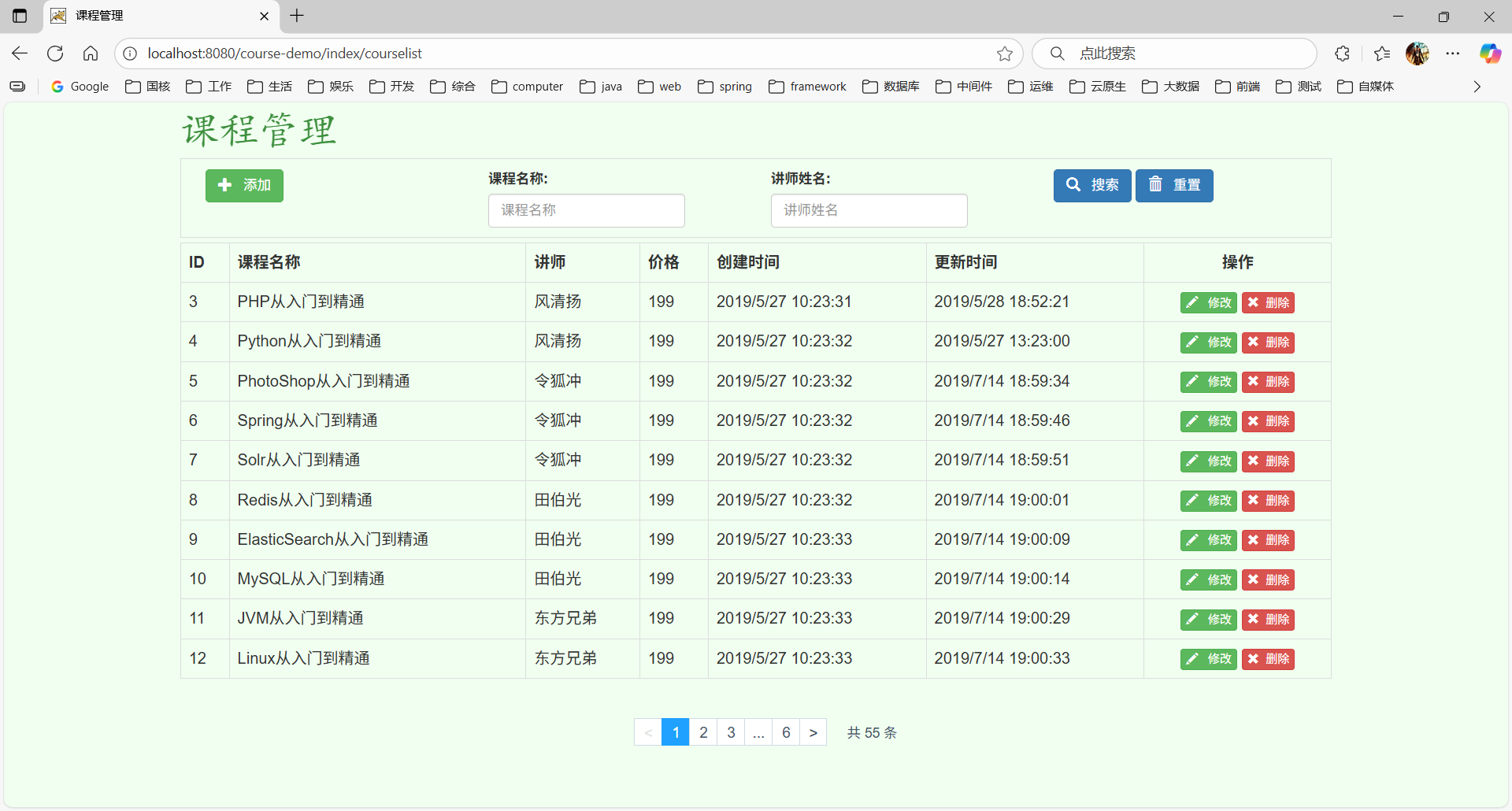
| context-path配置 | 在idea中运行时可以指定项目的context-path为/或/course-demo都行,打好的war包放到tomcat的webapps目录下,其context-path自动变为/course-demo(war包部署到tomcat时,tomcat默认以 webapps下的文件夹来作为 context-path路径的,配置文件中的context-path只是对于springboot 打包成jar包才有用),为了让context-path随着部署环境动态变为,可以使用${pageContext.request.contextPath }拼接在页面的静态资源路径或接口路径前面,不要写死context-path |
服务启动后,访问课程管理,可以看到页面长这样(这里context-path设置为course-demo)
ApacheBench安装
ApacheBench(ab)是一款ApacheServer基准的测试工具,用户测试Apache Server的服务能力(每秒处理请求数),它不仅可以用户Apache的测试,还可以用于测试Tomcat、Nginx、lighthttp、IIS等服务器。
首先需要安装测试工具
yum install httpd-tools -y
然后通过idea调试运行course-demo成功后,将其打包为war包后,放到tomcat的webapps目录下,注意是webapps目录,不是其子目录,然后访问http://localhost:8080/course-demo/course/search?page=1&pageSize=10确保服务能正常访问
curl http://localhost:8080/course-demo/course/search?page=1&pageSize=10
通过ab命令测试tomcat服务器性能
ab -n 1000 -c 100 -p data.json -T application/json http://localhost:8080/course-demo/course/search?page=1&pageSize=10
data.json为运行上述命令的当前目录下的文件,内容为接口需要传的json数据
{
	"name":"",
	"teacherName":""
}
观察命令运行结果即可
tomcat集群
参考资料:H:\中间件\Java-nginx分布式框架\day05\笔记\Nginx_day05.md
demo.war:H:\中间件\Java-nginx分布式框架\day05\资料\demo.war
demo.war
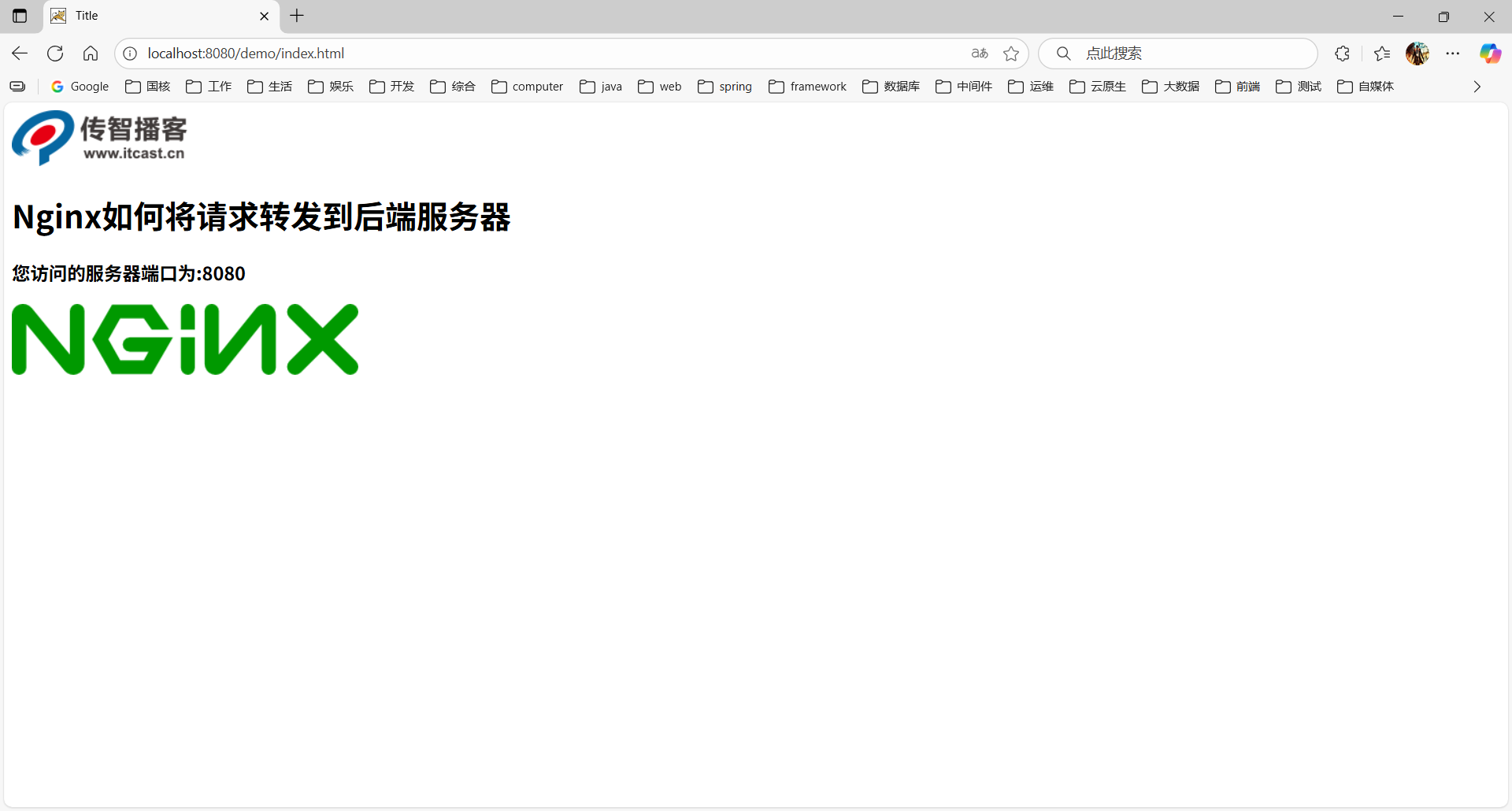
demo.war是一个简单的springmvc项目,只提供了一个接口,代码如下
spring-mvc.xml
<?xml version="1.0" encoding="UTF-8"?>
<beans xmlns="http://www.springframework.org/schema/beans"
       xmlns:context="http://www.springframework.org/schema/context"
       xmlns:xsi="http://www.w3.org/2001/XMLSchema-instance" xmlns:mvc="http://www.springframework.org/schema/mvc"
       xsi:schemaLocation="http://www.springframework.org/schema/context
        http://www.springframework.org/schema/context/spring-context.xsd
        http://www.springframework.org/schema/beans
        http://www.springframework.org/schema/beans/spring-beans.xsd http://www.springframework.org/schema/mvc https://www.springframework.org/schema/mvc/spring-mvc.xsd">

    <context:component-scan base-package="com.itheima.controller"/>

    <mvc:default-servlet-handler/>

    <mvc:annotation-driven/>
</beans>
DemoController,反编译得到
//
// Source code recreated from a .class file by IntelliJ IDEA
// (powered by FernFlower decompiler)
//

package com.itheima.controller;

import java.net.InetAddress;
import javax.servlet.http.HttpServletRequest;
import org.springframework.web.bind.annotation.RequestMapping;
import org.springframework.web.bind.annotation.RestController;

@RestController
public class DemoController {
    @RequestMapping(
        value = {"/getAddress"},
        produces = {"text/html;charset=utf-8"}
    )
    public String getAddress(HttpServletRequest request) throws Exception {
        InetAddress inetAddress = InetAddress.getLocalHost();
        String host = inetAddress.getHostAddress();
        return "您访问的服务器端口为:" + request.getLocalPort();
    }
}
index.html
<!DOCTYPE html>
<html lang="en">
<head>
    <meta charset="UTF-8">
    <title>Title</title>
    <script src="js/jquery.min.js"></script>
    <script>
        $(function(){
           $.get('getAddress',function(data){
               $("#msg").html(data);
           });
        });
    </script>
</head>
<body>
    <img src="images/logo.png"/>
    <h1>Nginx如何将请求转发到后端服务器</h1>
    <h3 id="msg"></h3>
    <img src="images/mv.png"/>
</body>
</html>
放到tomcat服务器中启动之后,访问http://localhost:8080/demo/index.html,可看到页面效果
集群搭建
这里采用同一台服务器的不同端口部署3台tomcat实例(改成3个不同端口号的虚拟主机使用同一个tomcat实例也行),端口分别为8080 、8180、8280,每台tomcat实例部署相同的demo.war包,组成集群,使用nginx作反向代理负载均衡请求,各tomcat实例配置如下
tomcat01
 <Connector port="8080" protocol="HTTP/1.1"
               connectionTimeout="20000"
               redirectPort="8443" />
               .....
tomcat02
 <Connector port="8180" protocol="HTTP/1.1"
               connectionTimeout="20000"
               redirectPort="8443" />
               .....
tomcat03
 <Connector port="8280" protocol="HTTP/1.1"
               connectionTimeout="20000"
               redirectPort="8443" />
               .....
为方便3台实例启动,建立了一个tomcat-cluster文件夹,将3个软件包放到这个文件夹下,并创建了两个脚本
startup.sh
# !/bin/bash
./tomcat01/bin/startup.sh
./tomcat02/bin/startup.sh
./tomcat03/bin/startup.sh
shutdown.sh
#!/bin/bash
./tomcat01/bin/shutdown.sh
./tomcat02/bin/shutdown.sh
./tomcat03/bin/shutdown.sh
然后赋权
chmod +777 startup.sh shutdown.sh
ngxin.conf配置如下
upstream webservice{
        server 192.168.245.130:8080;
        server 192.168.245.130:8180;
        server 192.168.245.130:8280;
    }

server{
    listen		80;
    server_name localhost;
    location /demo {
    	proxy_pass http://webservice;
    }
}
访问http://localhost:80/demo,观察不同tomcat控制台,可看到不同端口号的日志打印;或者不停刷新http://localhost:8080/demo/index.html,可以看到页面显示不同的端口,说明请求负载到后端的不同tomcat实例上。
1.7.问题排查
1.idea中打包course-demo有maven的警告和报错
[WARNING] The POM for com.alibaba:druid:jar:1.2.11 is invalid, transitive dependencies (if any) will not be available: 2 problems were encountered while building the effective model for com.alibaba:druid:1.2.11
删除maven仓库中的所有druid包也不行,还报这个警告

[ERROR] 'dependencies.dependency.systemPath' for com.sun:tools:jar must specify an absolute path but is ${project.basedir}/lib/openjdk-1.8-tools.jar @
[ERROR] 'dependencies.dependency.systemPath' for com.sun:jconsole:jar must specify an absolute path but is ${project.basedir}/lib/openjdk-1.8-jconsole.jar @
关键也不知道这两个error是哪个jar包引入的,看项目的pom中没有显式引入这两个jar包的地方
最终将druid版本升级到1.2.27最新版,以上3个问题都好了
Parameter 'compilerVersion' (user property 'maven.compiler.compilerVersion') is deprecated: This parameter is no longer evaluated by the underlying compilers, instead the actual version of the javac binary is automatically retrieved.
观察项目的pom中根本就没这个配置参数,看下settingx.xml中有没有,settings.xml中有
<profiles>
		<profile>
			<id>jdk-1.8</id>
			<activation>
				<activeByDefault>true</activeByDefault>
				<jdk>1.8</jdk>
			</activation>
			<properties>
				<maven.compiler.source>1.8</maven.compiler.source>
				<maven.compiler.target>1.8</maven.compiler.target>
				<maven.compiler.compilerVersion>1.8</maven.compiler.compilerVersion>
			</properties>
		</profile>
		...
网上查资料,参考:https://blog.csdn.net/weixin_62015493/article/details/140660685
方法一
<!--直接注释掉这行就好了-->
<!--<maven.compiler.compilerVersion>1.8</maven.compiler.compilerVersion>-->
方法二
 <properties>
        <project.build.sourceEncoding>UTF-8</project.build.sourceEncoding>
        <maven.compiler.source>1.8</maven.compiler.source>
        <maven.compiler.target>1.8</maven.compiler.target>
       	...
    </properties>


<plugin>
    <groupId>org.apache.maven.plugins</groupId>
    <artifactId>maven-compiler-plugin</artifactId>
    <!-- 确保使用最新版本 -->
    <version>3.8.1</version>
    <configuration>
		<!--这里指定源码和编译版本-->
        <source>${maven.compiler.source}</source>
        <target>${maven.compiler.target}</target>
    </configuration>
</plugin>
但maven-war-plugin没有这两个配置,只能使用方法一了,注释掉再打包就不报警告了





 扫一扫
扫一扫


 76
76

 被折叠的 条评论
为什么被折叠?
被折叠的 条评论
为什么被折叠?
 到【灌水乐园】发言





