



 当遇到Spring Boot项目启动失败,提示端口8080已被占用时,可以通过两种方法解决。一是使用CMD命令行,通过netstat找出占用8080端口的进程PID,然后使用taskkill命令强制关闭该进程。二是直接修改Spring Boot的配置文件application.properties或application.yml,将应用监听的端口更改为其他未使用的端口。
常见报错:
Description:
Web server failed to start. Port 8080 was already in use.

Action:
Identify and stop the process that's listening on port 8080 or configure this application to listen on another port.

Process finished with exit code 1
这个是有项目监听8080端口,可以将其关闭,可以更改spring boot 项目所监听的端口
方法一:关闭监听8080的进程
- windows + r,输入cmd 回车

- 输入 netstat -ano|findstr 8080,可能会有很多其他东西,但你只需要记住自己项目所监听端口,对应的pid 9604 即可

- 输入 taskkill /f /pid 9604

- 完成,现在重新启动springboot项目即可
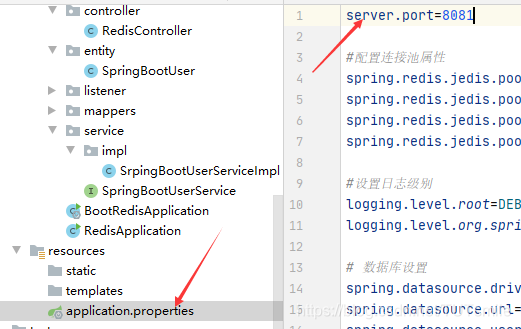
方法二:修改spring boot项目所监听的端口
在application.propertyies文件添加代码
server.port = 8081
即可,若是使用application.yml,则添加代码:
server:
	port = 8081





 扫一扫
扫一扫


 1万+
1万+

 被折叠的 条评论
为什么被折叠?
被折叠的 条评论
为什么被折叠?
 到【灌水乐园】发言





