





 本文介绍了在Spring Boot中遇到@NotBlank注解无效的问题,分析了原因——Spring Boot 2.3.1及以上版本不再内置验证。解决方案包括引入相关验证包或降级Spring Boot版本至2.1.1。同时提到即使与@Valid结合也无法生效的情况,并提供了解决这个问题需要导入的特定包。
我们的Controller如下所示
import org.springframework.web.bind.annotation.PostMapping;
import org.springframework.web.bind.annotation.RequestBody;
import org.springframework.web.bind.annotation.RestController;

import javax.validation.Valid;

@RestController
public class controller {
    @PostMapping("testMyBlank")
    // @Valid注解也可以加载此处,我的写法为@RequestBody @Valid User user
    public User testMyBlank(@RequestBody @Valid User user) {
        return user;
    }
}
import lombok.Data;
import org.springframework.stereotype.Component;

import javax.validation.Valid;
import javax.validation.constraints.NotBlank;

/**
 * @Author: HuangZeyu
 * @DATE: 2020/8/24 17:28
 */
@Data
@Component
//@Valid可放在Controllr处
@Valid
public class User {
    @NotBlank(message = "name不能为空")
    String name;
}
用Postman进行测试,成功进行校验
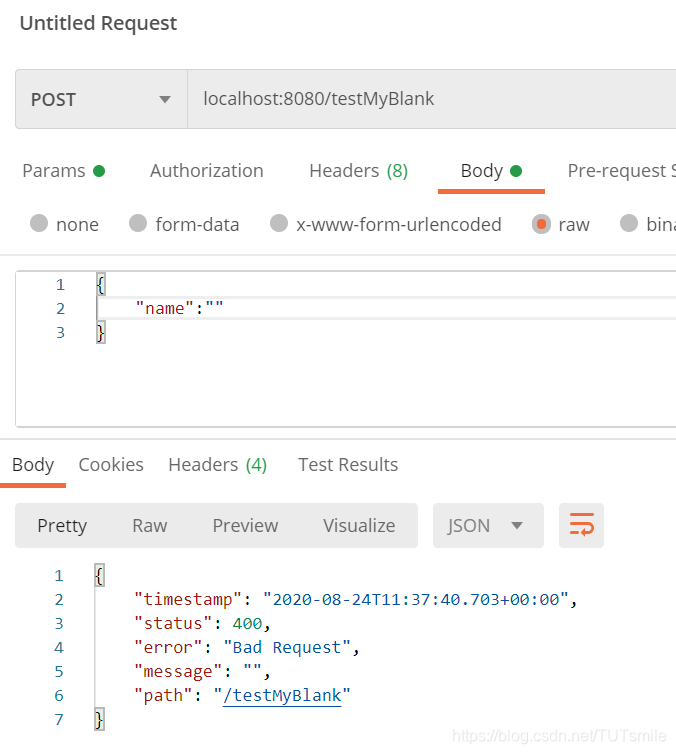
没有报错,
@NotBlank无效
可能你为了使用@NotBlank引入了包
        <dependency>
            <groupId>jakarta.validation</groupId>
            <artifactId>jakarta.validation-api</artifactId>
            <version>2.0.2</version>
        </dependency>
之所以需要引入这个包,是因为你的spring boot 版本是2.3.1或者更高,此时的spring boot 已经不在内置验证。
此时需要引入包
哪怕与@Valid搭配也是没有效果,大概率是因为我们少导入了一个包hibernate-validator,我们需要同时导入以下两个包
<dependency>
      <groupId>org.springframework.boot</groupId>
      <artifactId>spring-boot-starter-validation</artifactId>
</dependency>
或者是不导入以上两个包,直接将spring boot修改为2.1.1均可以解决此问题
        <dependency>
            <groupId>org.springframework.boot</groupId>
            <artifactId>spring-boot-starter-web</artifactId>
            <version>2.1.1.RELEASE</version>
        </dependency>





 扫一扫
扫一扫


 8033
8033

 被折叠的 条评论
为什么被折叠?
被折叠的 条评论
为什么被折叠?
 到【灌水乐园】发言





