


文章目录
各种灯光示意图
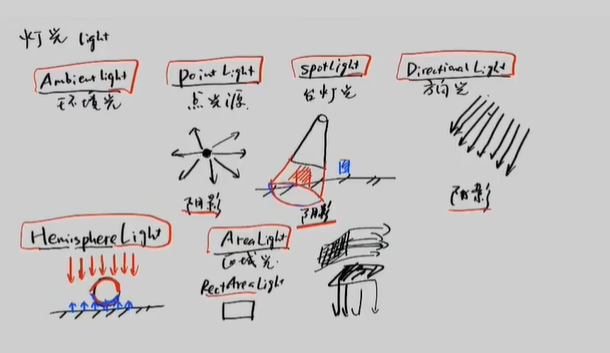
1. AmbientLight(环境光)
不是作为单独使用,整体提亮,比如有一个物体,对着光的面,亮的,背对着的,暗,有环境光的存在,背面不会一片漆黑,环境光不产生阴影
const aLight = new THREE.AmbientLight(0xffffff, 0.2);
// scene.add(aLight);
参数详解:
- 0xffffff - 光的颜色(白色)
- 0.2 - 光的强度(0-1之间)
特点验证: - ✅ 不是单独使用:通常配合其他光源使用
- ✅ 整体提亮:均匀照亮所有物体表面
- ✅ 背面不会漆黑:给阴影区域提供基础照明
- ❌ 不产生阴影:环境光无法产生投影
- 使用场景:
- 基础照明,避免完全黑暗的区域
- 模拟间接光照(光线反弹)
2. PointLight(点光源)
灯泡:最常见的类比对象,如台灯或灯泡,从固定位置向四周发射光线。 或者蜡烛:似蜡烛的火焰,光线从中心点向四周扩散,(可以产生阴影) 点光源方向是四面八方的
const pointLight = new THREE.PointLight(0xffffff);
pointLight.position.y = 2;
pointLight.intensity = 1;
pointLight.distance = 5;
参数详解:
0xffffff - 光的颜色
-
position - 光源在3D空间中的位置
-
intensity - 光的强度(0-1)
-
distance - 光的照射距离,超过此距离光线衰减为0
特点验证:
-
✅ 像灯泡:从一点向所有方向发射光线
-
✅ 四面八方:没有明确的方向性
-
✅ 可以产生阴影:点光源可以投射阴影
-
类比: 灯泡、蜡烛、发光球体
3. SpotLight(聚光灯)
台订光---像台灯,圆锥的光源,在锥形范围内是亮的(可以产生阴影)
const spotLight = new THREE.SpotLight(0xffffff);
spotLight.position.set(1, 1, 1);
spotLight.angle = (60 / 180) * Math.PI;
spotLight.distance = 0.1;  // GUI中可调 0.1-10
参数详解:
-
position - 光源位置
-
angle - 光锥的角度(弧度制),60度转换为弧度
-
distance - 光的最大照射距离
-
penumbra - 光锥边缘的模糊程度(0-1)
-
decay - 光的衰减率
特点验证:
-
✅ 像台灯:圆锥形的光照区域
-
✅ 锥形范围内亮:有明显的照射范围
-
✅ 可以产生阴影:聚光灯可以投射阴影
-
类比: 台灯、手电筒、舞台追光灯
4. DirectionalLight(平行光)
方向光,太阳光,真实界的平行光是不存在的,太阳光最接近 迎着光的一面,发亮,背对着的是阴影(可以产生阴影)
const dLight = new THREE.DirectionalLight(0xffffff);
dLight.intensity = 1;
dLight.position.set(1, 1, 1);
参数详解:
-
position - 不表示光源位置,而是表示光线方向
-
intensity - 光的强度
-
target - 光线指向的目标点(默认指向原点)
特点验证:
-
✅ 像太阳光:所有光线平行传播
-
✅ 迎着光亮,背对阴影:产生明确的亮面和暗面
-
✅ 可以产生阴影:平行光可以投射清晰的阴影
重要概念:
-
平行光在现实中不存在,是计算机图形学的近似
-
太阳光严格来说不是平行光,但在图形学中这样处理
5. HemisphereLight(半球光)
两束光,上边照,下边照(户外可能用到)
const hLight = new THREE.HemisphereLight(0xff0000, 0x0000ff, 1);
scene.add(hLight);
参数详解:
-
0xff0000 - 天空颜色(红色)
-
0x0000ff - 地面颜色(蓝色)
-
1 - 光的强度
特点验证:
-
✅ 两束光:上半球天空光 + 下半球地面反射光
-
✅ 户外使用:模拟自然室外光照环境
-
❌ 不常用在室内:室内通常没有这么明显的颜色区分
6. RectAreaLight(矩形区域光)–仅影响 MeshStandardMaterial 和 MeshPhysicalMaterial
const rectAreaLight = new THREE.RectAreaLight(0xffffff, 1, 2, 2);
rectAreaLight.position.set(0, 1, 0);
rectAreaLight.rotation.x = -0.5 * Math.PI;
参数详解:
-
0xffffff - 光的颜色
-
1 - 光的强度
-
2 - 光的宽度
-
2 - 光的高度
重要限制:
❗ 只对特定材质有效:仅影响 MeshStandardMaterial 和 MeshPhysicalMaterial
-
其他材质无法正确显示区域光效果
-
类比: 灯箱、LED屏幕、窗户透光
以下是完整代码:
<template>
  <div class="container" ref="containerRef"></div>
</template>

<script setup>
import * as THREE from "three";
import { onMounted, ref } from "vue";
// Controls鼠标交互
import { OrbitControls } from "three/examples/jsm/controls/OrbitControls";
import Stats from "three/examples/jsm/libs/stats.module";
import * as dat from "dat.gui";
// RectAreaLight用这个需要导入
import { RectAreaLightHelper } from 'three/examples/jsm/helpers/RectAreaLightHelper';

const gui = new dat.GUI();
const containerRef = ref(null);
const stat = new Stats();

// 场景、相机、渲染器
const scene = new THREE.Scene();
const camera = new THREE.PerspectiveCamera(
  75,
  window.innerWidth / window.innerHeight,
  0.1,
  1000
);
camera.position.set(4, 2, 5);
camera.lookAt(0, 0, 0);

const renderer = new THREE.WebGLRenderer();
renderer.setSize(window.innerWidth, window.innerHeight);

// 坐标轴
const axes = new THREE.AxesHelper(50);
scene.add(axes);

// 场景物体
const planeM = new THREE.MeshStandardMaterial({ color: 0xcccccc });
const PlaneG = new THREE.PlaneGeometry(4, 4);
const plane = new THREE.Mesh(PlaneG, planeM);
plane.rotation.x = -0.5 * Math.PI;
scene.add(plane);

const material = new THREE.MeshStandardMaterial({ color: 0xff00ff });

// 球体
const shaereG = new THREE.SphereGeometry(0.25);
const sphere = new THREE.Mesh(shaereG, material);
sphere.position.y = 0.25;
scene.add(sphere);

// 立方体
const cubeG = new THREE.BoxGeometry(0.5, 0.5, 0.5);
const cube = new THREE.Mesh(cubeG, material);
cube.position.set(1, 0.8, 0);
scene.add(cube);

// 圆环
const torusG = new THREE.TorusGeometry(0.3, 0.1, 10, 20);
const torus = new THREE.Mesh(torusG, material);
torus.position.set(-1, 0.8, 0);
torus.rotation.x = -0.5 * Math.PI;
scene.add(torus);

// 灯光配置
const colors = {
  dLight: 0xffffff,
  sLight: 0xffffff,
  pLight: 0xffffff,
};

// 环境光
const aLight = new THREE.AmbientLight(0xffffff, 0.2);
// scene.add(aLight);

// 平行光
const dLight = new THREE.DirectionalLight(0xffffff);
dLight.intensity = 1;
dLight.position.set(1, 1, 1);
// scene.add(dLight);

const dFol = gui.addFolder("DirectionalLight");
dFol.addColor(colors, "dLight").onChange(() => {
  dLight.color.set(colors.dLight);
});
dFol.add(dLight, "intensity", 0, 1, 0.01);
dFol.add(dLight.position, "x", -5, 5);
dFol.add(dLight.position, "y", -5, 5);
dFol.add(dLight.position, "z", -5, 5);

const dLightHelper = new THREE.DirectionalLightHelper(dLight);
// scene.add(dLightHelper);

// 聚光灯
const spotLight = new THREE.SpotLight(0xffffff);
spotLight.position.set(1, 1, 1);
spotLight.angle = (60 / 180) * Math.PI;
// scene.add(spotLight);

const sFol = gui.addFolder("SpotLight");
sFol.addColor(colors, "sLight").onChange(() => {
  spotLight.color.set(colors.sLight);
});
sFol.add(spotLight, "intensity", 0, 1, 0.01);
sFol.add(spotLight.position, "x", -5, 5);
sFol.add(spotLight.position, "y", -5, 5);
sFol.add(spotLight.position, "z", -5, 5);
sFol.add(spotLight, "distance", 0.1, 10);
sFol.add(spotLight, "angle", 0.01, 3.14);

const spotLightHelper = new THREE.SpotLightHelper(spotLight);
// scene.add(spotLightHelper);

// 点光源
const pointLight = new THREE.PointLight(0xffffff);
pointLight.position.y = 2;
pointLight.intensity = 1;
pointLight.distance = 5;
// scene.add(pointLight);

const PFol = gui.addFolder("PointLight");
PFol.addColor(colors, "pLight").onChange(() => {
  pointLight.color.set(colors.pLight);
});
PFol.add(pointLight, "intensity", 0, 1, 0.01);
PFol.add(pointLight.position, "x", -5, 5);
PFol.add(pointLight.position, "y", -5, 5);
PFol.add(pointLight.position, "z", -5, 5);
PFol.add(pointLight, "distance", 0.1, 10);

const pointLightHelper = new THREE.PointLightHelper(pointLight);
// scene.add(pointLightHelper);

// 矩形区域光
const rectAreaLight = new THREE.RectAreaLight(0xffffff, 1, 2, 2);
rectAreaLight.position.set(0, 1, 0);
rectAreaLight.rotation.x = -0.5 * Math.PI;
// scene.add(rectAreaLight);

const rectAreaLightHelper = new RectAreaLightHelper(rectAreaLight);
// scene.add(rectAreaLightHelper);

// 半球光
const hLight = new THREE.HemisphereLight(0xff0000, 0x0000ff, 1);
scene.add(hLight);

// 控制器和动画
let orbitControls; // 在外部声明,确保在animate中可访问
const clock = new THREE.Clock();

function animate() {
  const time = clock.getElapsedTime();

  // 物体动画
  cube.rotation.x = time * 0.4;
  cube.rotation.y = time * 0.4;
  torus.rotation.y = time * 0.4;
  torus.rotation.x = time * 0.4;

  // 更新控制器
  if (orbitControls) {
    orbitControls.update();
  }

  // 更新辅助线
  if (spotLightHelper.parent) {
    spotLightHelper.update();
  }

  // 渲染
  renderer.render(scene, camera);
  stat.update();

  requestAnimationFrame(animate);
}

// 挂载
onMounted(() => {
  // 初始化轨道控制器
  orbitControls = new OrbitControls(camera, containerRef.value);
  orbitControls.enableDamping = true;

  // 添加到DOM
  containerRef.value.appendChild(renderer.domElement);
  containerRef.value.appendChild(stat.domElement);

  // 开始动画
  animate();
});

// 窗口大小调整
window.addEventListener('resize', () => {
  camera.aspect = window.innerWidth / window.innerHeight;
  camera.updateProjectionMatrix();
  renderer.setSize(window.innerWidth, window.innerHeight);
});
</script>

<style>
.container {
  width: 100%;
  height: 100vh;
  overflow: hidden;
}
</style>
代码中的GUI控制
// 每种灯光都有对应的控制面板
const dFol = gui.addFolder("DirectionalLight");
dFol.addColor(colors, "dLight").onChange(() => {
  dLight.color.set(colors.dLight);
});
dFol.add(dLight, "intensity", 0, 1, 0.01);
// ... 位置控制
可调整参数:
*颜色:实时改变光的颜色
*强度:0-1范围的光照强度
*位置:X/Y/Z坐标调整
*特殊参数:聚光灯角度、点光源距离等
灯光辅助线
const dLightHelper = new THREE.DirectionalLightHelper(dLight);
const spotLightHelper = new THREE.SpotLightHelper(spotLight);
const pointLightHelper = new THREE.PointLightHelper(pointLight);
const rectAreaLightHelper = new RectAreaLightHelper(rectAreaLight);
其中// RectAreaLight用这个需要导入
import { RectAreaLightHelper } from ‘three/examples/jsm/helpers/RectAreaLightHelper’;
这个需要引入
const rectAreaLightHelper = new RectAreaLightHelper(rectAreaLight); 这里不需要THREE.
辅助线帮助可视化:
平行光:显示光线方向
聚光灯:显示光锥范围
点光源:显示光源位置
区域光:显示光面大小和方向
我本来想把每种光辅助线截图的,可是我太累了,有时间再弄吧





 扫一扫
扫一扫


 1062
1062

 被折叠的 条评论
为什么被折叠?
被折叠的 条评论
为什么被折叠?
 到【灌水乐园】发言





