


代码
<!DOCTYPE html>
<html lang="en">
<head>
    <meta charset="UTF-8">
    <style>
        div {
            background-color: red;
        }
        .toolbar {
            position: absolute;
            display: none;
            background: #f9f9f9;
            border: 1px solid #ccc;
            padding: 5px;
            border-radius: 5px;
            z-index: 1000;
        }
        div {
            float: left;
            clear: both;
        }
    </style>
</head>

<body>
    <div>
        abcdefghijklmn
    </div>
    <div>
        abcdefghijklmn
    </div>
    <div>
        abcdefghijklmn
    </div>
    <div id="toolbar" class="toolbar">
        <button id="copy-btn">Copy</button>
    </div>
</body>

<script>
    document.addEventListener('selectionchange', (e) => {
        let selection = window.getSelection()
        const selectedText = selection.toString();
        console.log('selectedText:', selectedText)
        if (selectedText.length > 0) {
            var range = selection.getRangeAt(0);
            var rect = range.getBoundingClientRect();
            // Show the toolbar when text is selected
            var toolbar = document.getElementById('toolbar');
            console.log('rect:', rect)
            toolbar.style.display = 'block';
            toolbar.style.top = rect.top + window.scrollY + 'px';
            toolbar.style.left = rect.right + window.scrollX + 5 + 'px';
            // debugger
            // var pageX = e.pageX || e.clientX + document.documentElement.scrollLeft;
            // var pageY = e.pageY || e.clientY + document.documentElement.scrollTop;
            // console.log('pageX:', pageX, 'pageY:', pageY)
            // toolbar.style.left = pageX - 20 + 'px';
            // toolbar.style.top = pageY + 10 + 'px';

            // const startContainer = range.startContainer;
            // debugger
            // console.log('startContainer:', startContainer)
            // const x = startContainer.offsetLeft;
            // const y = startContainer.offsetTop;
            // console.log(`X: ${x}, Y: ${y}`);

        } else {
            console.log('hidehidehidehidehidehide')
            // Hide the toolbar when no text is selected
            document.getElementById('toolbar').style.display = 'none';
        }
    });

    document.getElementById('copy-btn').addEventListener('click', () => {
        const selectedText = window.getSelection().toString();
        navigator.clipboard.writeText(selectedText);
    });

</script>
实例效果
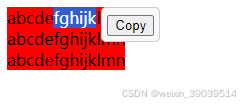
注意事项
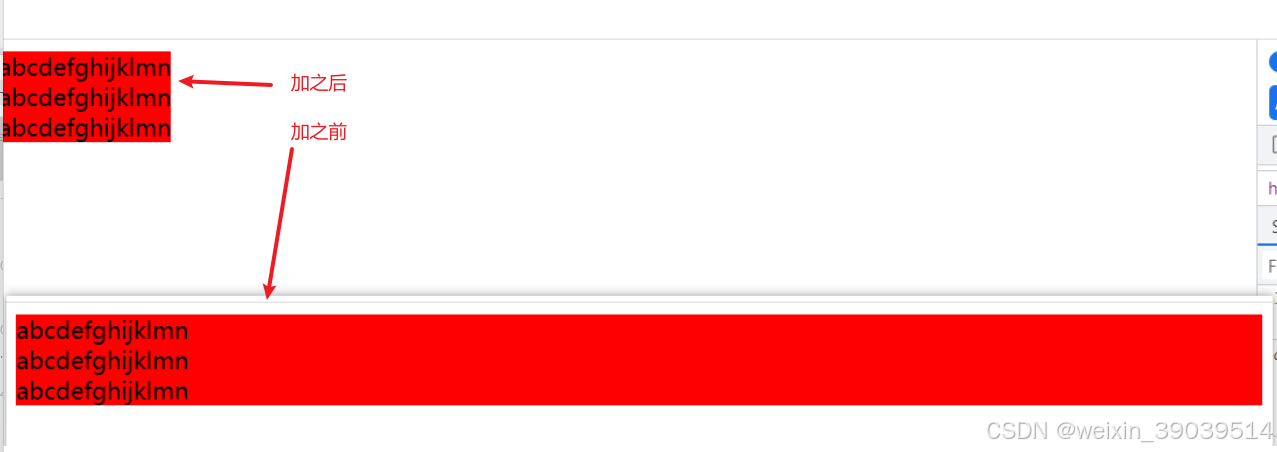
对div要加float和clear属性,不然宽度会拉满100%,选中多行时,弹出来的Copy按钮会在最右边很远的位置
        div {
            float: left;
            clear: both;
        }





 扫一扫
扫一扫


 323
323

 被折叠的 条评论
为什么被折叠?
被折叠的 条评论
为什么被折叠?
 到【灌水乐园】发言





