
ajax nginx 转发 sessionid_Nginx + FastCGI 程序(C/C++) 搭建高性能web service

本文介绍如何配置Nginx与FastCGI程序协同工作,实现动态内容的高效处理。涵盖Nginx和FastCGI的工作原理、环境部署步骤、示例程序的编译与运行。

1.介绍

Nginx - 高性能web server,这个不用多说了,大家都知道。

FastCGI程序 - 常驻型CGI程序,它是语言无关的、可伸缩架构的CGI开放扩展,其主要行为是将CGI解释器进程保持在内存中并因此获得较高的性能。

Nginx要调用FastCGI程序,需要用到FastCGI进程管理程序(因为nginx不能直接执行外部的cgi程序,我们可使用lighttpd中的spawn-fastcgi来让nginx可支持外部cgi运行。也有其他方法安装nginx-fcgi来让nginx支持cgi,这里是使用spawn-fastcgi的方法),来达到调用FastCGI程序的目的。Nginx本身没有集成类似的模块,而Apache具备该功能模块,所以不需要额外安装FastCGI进程管理程序。

2.工作原理

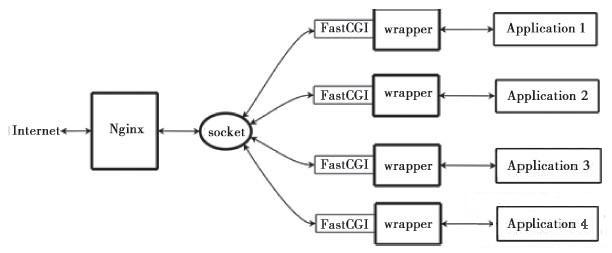
Nginx不支持对外部程序的直接调用或者解析,所有的外部程序(包括PHP)必须通过FastCGI接口来调用。FastCGI接口在Linux下是socket(这个socket可以是文件socket,也可以是ip socket)。为了调用CGI程序,还需要一个FastCGI的wrapper(wrapper可以理解为用于启动另一个程序的程序),这个wrapper绑定在某个固定socket上,如端口或者文件socket。

当Nginx将CGI请求发送给这个socket的时候,通过FastCGI接口,wrapper接收到请求,然后派生出一个新的线程,这个线程调用解释器或者外部程序处理脚本并读取返回数据;接着,wrapper再将返回的数据通过FastCGI接口,沿着固定的socket传递给Nginx;最后,Nginx将返回的数据发送给客户端。这就是Nginx+FastCGI的整个运作过程,如图所示。 ​
2321a79c5814e207eaeee3702e66164d.png

Nginx+FastCGI运行过程

FastCGI接口方式在脚本解析服务器(CGI应用程序服务器)上启动一个或者多个守护进程对动态脚本进行解析,这些进程就是FastCGI进程管理器,或者称为FastCGI引擎。 spawn-fcgi与PHP-FPM都是FastCGI进程管理器(支持PHP和C/C++​)。​

介绍到这里,大家应该都对该模式有了一定的了解,下面开始进行实战!

3.环境部署

3.1.Nginx的安装、部署与配置

nginx使用的是nginx-1.5.10

[安装]

下载以后解压并安装(请记得看README)

./configure (注意了类似checking for *** ... not found项,可能是依赖包没有,则需要安装依赖包)

缺少pcre,则需要额外安装 http://www.pcre.org/ (或者采用apt-get或yum的安装方式)

缺少zlib,则需要额外安装 http://www.zlib.net/ (或者采用apt-get或yum的安装方式)

缺少OpenSSL,则需要额外安装 http://www.openssl.org (或者采用apt-get或yum的安装方式)

如果需要配置安装额外的功能模块,可以参考这里 http://wiki.codemongers.com/NginxChsInstall

make

make install (默认安装到/usr/local/nginx)

[配置和管理]

1)执行选项

-c 为 Nginx 指定一个配置文件,来代替缺省的。不输入则使用默认的配置文件。

-t 不运行,而仅仅测试配置文件。nginx 将检查配置文件的语法的正确性,并尝试打开配置文件中所引用到的文件。

-v 显示 nginx 的版本。

-V 显示 nginx 的版本,编译器版本和配置参数。

2)检查配置文件

sudo ./nginx -t

nginx: the configuration file /usr/local/nginx/conf/nginx.conf syntax is ok

nginx: configuration file /usr/local/nginx/conf/nginx.conf test is successful

3)启动 - 默认和特殊

/usr/local/nginx/sbin/nginx (默认启动方式)

/usr/local/nginx/sbin/nginx -c /usr/local/nginx/conf/nginx.conf (指定配置文件启动)

4)查看nginx进程号(master是主进程)

ps -ef | grep nginx

5)重新加载配置文件

sudo kill -HUP [nginx主进程号]

通过系统的信号控制 Nginx

可以使用信号系统来控制主进程。默认,nginx 将其主进程的 pid 写入到 /usr/local/nginx/logs/nginx.pid 文件中。通过传递参数 给 ./configure 或使用 pid 指令,来改变该文件的位置。

主进程可以处理以下的信号:

命令 说明 备注

TERM, INT 快速关闭

QUIT 从容关闭

HUP 重载配置 用新的配置开始新的工作进程 从容关闭旧的工作进程

USR1 重新打开日志文件

USR2 平滑升级可执行程序

WINCH 从容关闭工作进程

6)默认目录结构

主目录:/usr/local/nginx/

配置目录:/usr/local/nginx/conf/

root目录:/usr/local/nginx/html/

可执行文件路径:/usr/local/nginx/sbin/

3.2.spawn_fastcgi的安装、部署与配置

spawn_fastcgi https://github.com/lighttpd/spawn-fcgi

这里使用的是1.6.3的版本

下载以后解压并安装(请记得看README)

如果没有configure,请先执行./autogen.sh,生成configure

./configure

make

编译好以后,将可执行文件移动到nginx的sbin目录下

cp ./src/spawn-fcgi /usr/local/nginx/sbin/ (cp到nginx的安装目录下)

3.3.fastcgi库的安装(库绝对不是必须的,觉得技术好的大牛可以自己写)

下载以后,解压并安装 (默认安装)

./configure

make

make install

4.Demo和web发布

4.1.Demo程序

[CGI程序]

#include

#include

int main() {

int count = 0;

while (FCGI_Accept() >= 0) {

printf("Content-type: text/html"

""

""

"FastCGI Hello!"

"Request number %d running on host%s "

"Process ID: %d", ++count, getenv("SERVER_NAME"), getpid());

}

return 0;

}

[编译]

g++ demo.cc -o demo -lfcgi​

直接运行可执行文件,看看能否正常运行。如果出现缺少库libfcgi.so.0,则自己需要手动把/usr/local/lib/libfcgi.so.0库建立一个链接到/usr/lib/目录下:ln -s /usr/local/libfcgi.so.0 /usr/lib/(或者把so的库路径添加到/etc/ld.so.conf,并执行ldconfig更新一下)

4.2.Web发布

1)将CGI可执行程序移动到nginx的安装目录下 /usr/local/nginx/cgibin (文件夹不存在则自己创建)

2)启动spawn-fcgi管理进程,并绑定server IP和端口(不要跟nginx的监听端口重合)

/usr/local/nginx/sbin/spawn-fcgi -a 127.0.0.1 -p 8088 -f /usr/local/nginx/cgibin/demo

查看一下9002端口是否已成功:netstat -na | grep 8088

3)更改nginx.conf配置文件,让nginx转发请求

在http节点的子节点-"server节"点中下添加配置

location ~ .cgi$ {

fastcgi_pass 127.0.0.1:8088;

fastcgi_index index.cgi;

fastcgi_param SCRIPT_FILENAME fcgi$fastcgi_script_name;

include fastcgi_params;

}

4)重启nginx或者重新加载配置文件

重新加载配置文件

sudo kill -HUP [pid]

或者

重启nginx

killall nginx

​ ./nginx

5)最后打开浏览器访问一下吧

注:需要C/C++ Linux服务器开发学习资料私信“资料”(资料包括C/C++,Linux,golang技术,Nginx,ZeroMQ,MySQL,Redis,fastdfs,MongoDB,ZK,流媒体,CDN,P2P,K8S,Docker,TCP/IP,协程,DPDK,ffmpeg等),免费分享

root@k8s-harbor:/apps/harbor# vim /etc/hosts root@k8s-harbor:/apps/harbor# docker login https://harbor.wh02.com Username: admin Password: Error response from daemon: Get "https://harbor.wh02.com/v2/": EOF root@k8s-harbor:/apps/harbor# docker-compose ps Name Command State Ports ------------------------------------------------------------------------------------------------------------------------------------------------ harbor-core /harbor/entrypoint.sh Up (healthy) harbor-db /docker-entrypoint.sh 96 13 Up (healthy) harbor-jobservice /harbor/entrypoint.sh Up (healthy) harbor-log /bin/sh -c /usr/local/bin/ ... Up (healthy) 127.0.0.1:1514->10514/tcp harbor-portal nginx -g daemon off; Up (healthy) nginx nginx -g daemon off; Up (healthy) 0.0.0.0:80->8080/tcp,:::80->8080/tcp, 0.0.0.0:443->8443/tcp,:::443->8443/tcp redis redis-server /etc/redis.conf Up (healthy) registry /home/harbor/entrypoint.sh Up (healthy) registryctl /home/harbor/start.sh Up (healthy) root@k8s-harbor:/apps/harbor# docker ps -a CONTAINER ID IMAGE COMMAND CREATED STATUS PORTS NAMES 80ede735181e goharbor/nginx-photon:v2.3.2 "nginx -g 'daemon of…" 29 minutes ago Up 29 minutes (healthy) 0.0.0.0:80->8080/tcp, :::80->8080/tcp, 0.0.0.0:443->8443/tcp, :::443->8443/tcp nginx 838fdddd2ad0 goharbor/harbor-jobservice:v2.3.2 "/harbor/entrypoint.…" 29 minutes ago Up 29 minutes (healthy) harbor-jobservice a02c880ae42e goharbor/harbor-core:v2.3.2 "/harbor/entrypoint.…" 29 minutes ago Up 29 minutes (healthy) harbor-core 5a71eb2ecbe0 goharbor/redis-photon:v2.3.2 "redis-server /etc/r…" 29 minutes ago Up 29 minutes (healthy) redis e3adbe4a366b goharbor/registry-photon:v2.3.2 "/home/harbor/entryp…" 29 minutes ago Up 29 minutes (healthy) registry ed9f68f8bb1b goharbor/harbor-registryctl:v2.3.2 "/home/harbor/start.…" 29 minutes ago Up 29 minutes (healthy) registryctl 6f2c5b29eb71 goharbor/harbor-db:v2.3.2 "/docker-entrypoint.…" 29 minutes ago Up 29 minutes (healthy) harbor-db de2010ade2c0 goharbor/harbor-portal:v2.3.2 "nginx -g 'daemon of…" 29 minutes ago Up 29 minutes (healthy) harbor-portal f296beb7e53f goharbor/harbor-log:v2.3.2 "/bin/sh -c /usr/loc…" 29 minutes ago Up 29 minutes (healthy) 127.0.0.1:1514->10514/tcp harbor-log afe88215ab76 minio/minio:RELEASE.2022-04-12T06-55-35Z "/usr/bin/docker-ent…" 18 months ago Up 2 days 0.0.0.0:9000->9000/tcp, :::9000->9000/tcp, 0.0.0.0:9999->9999/tcp, :::9999->9999/tcp minio root@k8s-harbor:/apps/harbor# docker exec -it 80ede735181e bash nginx [ / ]$ cat /etc/nginx/nginx.conf worker_processes auto; pid /tmp/nginx.pid; events { worker_connections 3096; use epoll; multi_accept on; } http { client_body_temp_path /tmp/client_body_temp; proxy_temp_path /tmp/proxy_temp; fastcgi_temp_path /tmp/fastcgi_temp; uwsgi_temp_path /tmp/uwsgi_temp; scgi_temp_path /tmp/scgi_temp; tcp_nodelay on; include /etc/nginx/conf.d/*.upstream.conf; # this is necessary for us to be able to disable request buffering in all cases proxy_http_version 1.1; upstream core { server core:8080; } upstream portal { server portal:8080; } log_format timed_combined '$remote_addr - ' '"$request" $status $body_bytes_sent ' '"$http_referer" "$http_user_agent" ' '$request_time $upstream_response_time $pipe'; access_log /dev/stdout timed_combined; map $http_x_forwarded_proto $x_forwarded_proto { default $http_x_forwarded_proto; "" $scheme; } include /etc/nginx/conf.d/*.server.conf; server { listen 8443 ssl; # server_name harbordomain.com; server_tokens off; # SSL ssl_certificate /etc/cert/server.crt; ssl_certificate_key /etc/cert/server.key; # Recommendations from https://raymii.org/s/tutorials/Strong_SSL_Security_On_nginx.html ssl_protocols TLSv1.2; ssl_ciphers '!aNULL:kECDH+AESGCM:ECDH+AESGCM:RSA+AESGCM:kECDH+AES:ECDH+AES:RSA+AES:'; ssl_prefer_server_ciphers on; ssl_session_cache shared:SSL:10m; # disable any limits to avoid HTTP 413 for large image uploads client_max_body_size 0; # required to avoid HTTP 411: see Issue #1486 (https://github.com/docker/docker/issues/1486) chunked_transfer_encoding on; # Add extra headers add_header Strict-Transport-Security "max-age=31536000; includeSubdomains; preload"; add_header X-Frame-Options DENY; add_header Content-Security-Policy "frame-ancestors 'none'"; # customized location config file can place to /etc/nginx dir with prefix harbor.https. and suffix .conf include /etc/nginx/conf.d/harbor.https.*.conf; location / { proxy_pass http://portal/; proxy_set_header Host $http_host; proxy_set_header X-Real-IP $remote_addr; proxy_set_header X-Forwarded-For $proxy_add_x_forwarded_for; proxy_set_header X-Forwarded-Proto $x_forwarded_proto; proxy_cookie_path / "/; HttpOnly; Secure"; proxy_buffering off; proxy_request_buffering off; } location /c/ { proxy_pass http://core/c/; proxy_set_header Host $host; proxy_set_header X-Real-IP $remote_addr; proxy_set_header X-Forwarded-For $proxy_add_x_forwarded_for; proxy_set_header X-Forwarded-Proto $x_forwarded_proto; proxy_cookie_path / "/; Secure"; proxy_buffering off; proxy_request_buffering off; } location /api/ { proxy_pass http://core/api/; proxy_set_header Host $host; proxy_set_header X-Real-IP $remote_addr; proxy_set_header X-Forwarded-For $proxy_add_x_forwarded_for; proxy_set_header X-Forwarded-Proto $x_forwarded_proto; proxy_cookie_path / "/; Secure"; proxy_buffering off; proxy_request_buffering off; } location /chartrepo/ { proxy_pass http://core/chartrepo/; proxy_set_header Host $host; proxy_set_header X-Real-IP $remote_addr; proxy_set_header X-Forwarded-For $proxy_add_x_forwarded_for; proxy_set_header X-Forwarded-Proto $x_forwarded_proto; proxy_cookie_path / "/; Secure"; proxy_buffering off; proxy_request_buffering off; } location /v1/ { return 404; } location /v2/ { proxy_pass http://core/v2/; proxy_set_header Host $http_host; proxy_set_header X-Real-IP $remote_addr; proxy_set_header X-Forwarded-For $proxy_add_x_forwarded_for; proxy_set_header X-Forwarded-Proto $x_forwarded_proto; proxy_buffering off; proxy_request_buffering off; proxy_send_timeout 900; proxy_read_timeout 900; } location /service/ { proxy_pass http://core/service/; proxy_set_header Host $http_host; proxy_set_header X-Real-IP $remote_addr; proxy_set_header X-Forwarded-For $proxy_add_x_forwarded_for; proxy_set_header X-Forwarded-Proto $x_forwarded_proto; proxy_cookie_path / "/; Secure"; proxy_buffering off; proxy_request_buffering off; } location /service/notifications { return 404; } } server { listen 8080; #server_name harbordomain.com; return 308 https://$host:443$request_uri; } }
最新发布
06-22
评论
添加红包

请填写红包祝福语或标题

红包个数最小为10个

红包金额最低5元

当前余额3.43前往充值 >
需支付:10.00
成就一亿技术人!
领取后你会自动成为博主和红包主的粉丝 规则
hope_wisdom
发出的红包
实付
使用余额支付
点击重新获取
扫码支付
钱包余额 0

抵扣说明:

1.余额是钱包充值的虚拟货币,按照1:1的比例进行支付金额的抵扣。
2.余额无法直接购买下载,可以购买VIP、付费专栏及课程。

余额充值


