 Apollo配置动态更新与监听机制解析





 本文介绍了Apollo配置变更的原理,包括两种使用方式:启动配置文件使用ApolloApplicationContextInitializer和使用注解@EnableApolloConfig。文章详细阐述了配置的加载、更新流程,包括首次同步、定时刷新和长轮询机制,并探讨了两种方式的异同及使用中可能遇到的坑,强调了配置优先级和监听namespace的注意事项。
我们经常用到apollo的两个特性:
1.动态更新配置:apollo可以动态更新@Value的值,也可以修改environment的值。
2.实时监听配置:实现apollo的监听器ConfigChangeListener,通过onChange方法来实时监听配置变化。
你知道apollo客户端是如何实现这些功能的吗?使用过程中,需要注意什么呢?
文章目录
大致流程
在启动spring容器时,即会先后触发ApolloApplicationContextInitializer和ApolloConfigRegistrar为监听的namespace生成对应的config,并封装成propertySource放入env,后续更新就直接操作config,env的数据就被联动更新。
所以我们可以认为有两种方式(注解、配置)使用apollo,两者之间存在一些隐性关系(看到最后你会发现是坑哦)。
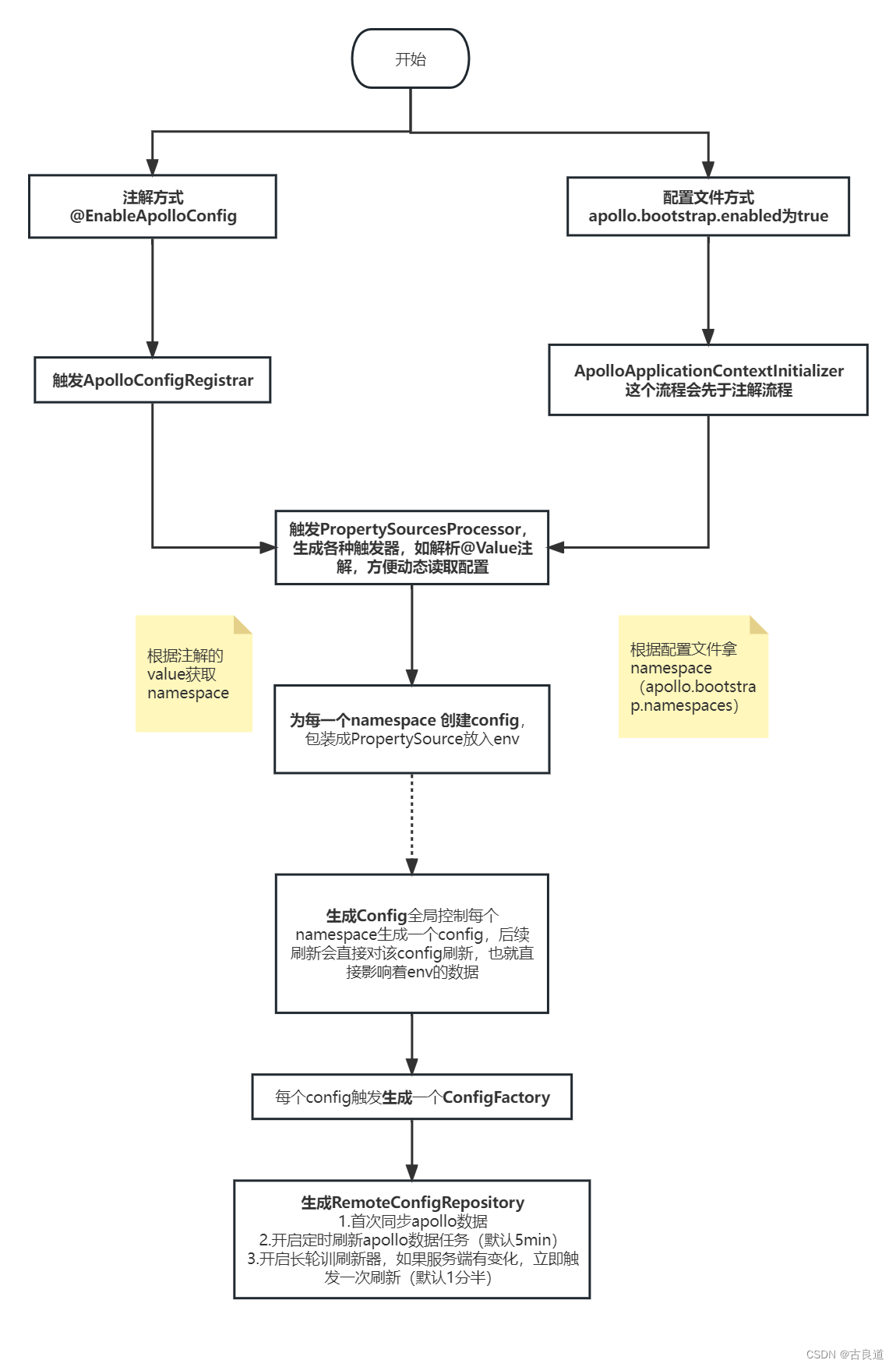
方式一:启动配置文件使用apollo——ApolloApplicationContextInitializer
com.ctrip.framework.apollo.spring.boot.ApolloApplicationContextInitializer#initialize(org.springframework.context.ConfigurableApplicationContext)
public void initialize(ConfigurableApplicationContext context) {
    ConfigurableEnvironment environment = context.getEnvironment();

	//必须开启apollo.bootstrap.enabled
    String enabled = environment.getProperty(PropertySourcesConstants.APOLLO_BOOTSTRAP_ENABLED, "false");
    if (!Boolean.valueOf(enabled)) {
      logger.debug("Apollo bootstrap config is not enabled for context {}, see property: ${{}}", context, PropertySourcesConstants.APOLLO_BOOTSTRAP_ENABLED);
      return;
    }
    logger.debug("Apollo bootstrap config is enabled for context {}", context);
    //!!!生成config,刷新器,将config塞入environment配置列表最前面(顺序决定优先级)
    initialize(environment);
  }

protected void initialize(ConfigurableEnvironment environment) {

    if (environment.getPropertySources().contains(PropertySourcesConstants.APOLLO_BOOTSTRAP_PROPERTY_SOURCE_NAME)) {
      //already initialized
      return;
    }
	//从apollo.bootstrap.namespaces获取namespace,默认还是application
    String namespaces = environment.getProperty(PropertySourcesConstants.APOLLO_BOOTSTRAP_NAMESPACES, ConfigConsts.NAMESPACE_APPLICATION);
    logger.debug("Apollo bootstrap namespaces: {}", namespaces);
    List<String> namespaceList = NAMESPACE_SPLITTER.splitToList(namespaces);

	//生成名为ApolloBootstrapPropertySources的CompositePropertySource ,所有namespace共用该propertysource,namespace的顺序也是优先级顺序
    CompositePropertySource composite = new CompositePropertySource(PropertySourcesConstants.APOLLO_BOOTSTRAP_PROPERTY_SOURCE_NAME);
    for (String namespace : namespaceList) {
    	//生成config(该部分公用,后续分析)
      Config config = ConfigService.getConfig(namespace);
      //封装为propertsource
     composite.addPropertySource(configPropertySourceFactory.getConfigPropertySource(namespace, config));
    }
    //最后添加到environment中,这里决定了优先级比注解高
    environment.getPropertySources().addFirst(composite);
  }
开启配置方式(apollo.bootstrap.enabled为true),则会触发ApolloAutoConfiguration 创建对应的处理器监听器,如动态修改@Value数据
@Configuration
@ConditionalOnProperty(PropertySourcesConstants.APOLLO_BOOTSTRAP_ENABLED)
@ConditionalOnMissingBean(PropertySourcesProcessor.class)
public class ApolloAutoConfiguration {

  @Bean
  public ConfigPropertySourcesProcessor configPropertySourcesProcessor() {
    return new ConfigPropertySourcesProcessor();
  }
}

public class ConfigPropertySourcesProcessor extends PropertySourcesProcessor
    implements BeanDefinitionRegistryPostProcessor {

  @Override
  public void postProcessBeanDefinitionRegistry(BeanDefinitionRegistry registry) throws BeansException {
    Map<String, Object> propertySourcesPlaceholderPropertyValues = new HashMap<>();
    // to make sure the default PropertySourcesPlaceholderConfigurer's priority is higher than PropertyPlaceholderConfigurer
    propertySourcesPlaceholderPropertyValues.put("order", 0);

    BeanRegistrationUtil.registerBeanDefinitionIfNotExists(registry, PropertySourcesPlaceholderConfigurer.class.getName(),
        PropertySourcesPlaceholderConfigurer.class, propertySourcesPlaceholderPropertyValues);
    BeanRegistrationUtil.registerBeanDefinitionIfNotExists(registry, ApolloAnnotationProcessor.class.getName(),
        ApolloAnnotationProcessor.class);
    BeanRegistrationUtil.registerBeanDefinitionIfNotExists(registry, SpringValueProcessor.class.getName(), SpringValueProcessor.class);
    BeanRegistrationUtil.registerBeanDefinitionIfNotExists(registry, ApolloJsonValueProcessor.class.getName(),
        ApolloJsonValueProcessor.class);

    processSpringValueDefinition(registry);
  }

  /**
   * For Spring 3.x versions, the BeanDefinitionRegistryPostProcessor would not be
   * instantiated if it is added in postProcessBeanDefinitionRegistry phase, so we have to manually
   * call the postProcessBeanDefinitionRegistry method of SpringValueDefinitionProcessor here...
   */
  private void processSpringValueDefinition(BeanDefinitionRegistry registry) {
    SpringValueDefinitionProcessor springValueDefinitionProcessor = new SpringValueDefinitionProcessor();

    springValueDefinitionProcessor.postProcessBeanDefinitionRegistry(registry);
  }
}
方式二:使用注解@EnableApolloConfig开启apollo
通过导入ApolloConfigRegistrar,触发PropertySourcesProcessor。
【创建application的beandefinition以后】
 public void registerBeanDefinitions(AnnotationMetadata importingClassMetadata, BeanDefinitionRegistry registry) {
    AnnotationAttributes attributes = AnnotationAttributes.fromMap(importingClassMetadata
        .getAnnotationAttributes(EnableApolloConfig.class.getName()));
        //从注解@EnableApolloConfig的value获取namespace
    String[] namespaces = attributes.getStringArray("value");
    int order = attributes.getNumber("order");
    //在PropertySourcesProcessor添加namespace,order信息
    PropertySourcesProcessor.addNamespaces(Lists.newArrayList(namespaces), order);

    Map<String, Object> propertySourcesPlaceholderPropertyValues = new HashMap<>();
    // to make sure the default PropertySourcesPlaceholderConfigurer's priority is higher than PropertyPlaceholderConfigurer
    propertySourcesPlaceholderPropertyValues.put("order", 0);

    BeanRegistrationUtil.registerBeanDefinitionIfNotExists(registry, PropertySourcesPlaceholderConfigurer.class.getName(),
        PropertySourcesPlaceholderConfigurer.class, propertySourcesPlaceholderPropertyValues);
	//创建PropertySourcesProcessor为namespace生成config等
    BeanRegistrationUtil.registerBeanDefinitionIfNotExists(registry, PropertySourcesProcessor.class.getName(),
        PropertySourcesProcessor.class);

    BeanRegistrationUtil.registerBeanDefinitionIfNotExists(registry, ApolloAnnotationProcessor.class.getName(),
        ApolloAnnotationProcessor.class);

    BeanRegistrationUtil.registerBeanDefinitionIfNotExists(registry, SpringValueProcessor.class.getName(), SpringValueProcessor.class);
    BeanRegistrationUtil.registerBeanDefinitionIfNotExists(registry, SpringValueDefinitionProcessor.class.getName(), SpringValueDefinitionProcessor.class);

    BeanRegistrationUtil.registerBeanDefinitionIfNotExists(registry, ApolloJsonValueProcessor.class.getName(),
            ApolloJsonValueProcessor.class);
  }
PropertySourcesProcessor初始化config(namespace排序),自动更新spring @Value的值
【在创建完所有beandefinition后触发】
public void postProcessBeanFactory(ConfigurableListableBeanFactory beanFactory) throws BeansException {
	//1.初始化config,刷新器,关联environment
    initializePropertySources();
    //2.初始化AutoUpdateConfigChangeListener,自动更新spring @Value的值
    initializeAutoUpdatePropertiesFeature(beanFactory);
  }

private void initializePropertySources() {
    if (environment.getPropertySources().contains(PropertySourcesConstants.APOLLO_PROPERTY_SOURCE_NAME)) {
      //already initialized
      return;
    }
    //生成名为ApolloPropertySources的CompositePropertySource ,所有namespace共用该propertysource
    CompositePropertySource composite = new CompositePropertySource(PropertySourcesConstants.APOLLO_PROPERTY_SOURCE_NAME);

    //排序
    ImmutableSortedSet<Integer> orders = ImmutableSortedSet.copyOf(NAMESPACE_NAMES.keySet());
    Iterator<Integer> iterator = orders.iterator();

    while (iterator.hasNext()) {
      int order = iterator.next();
      //按照order为每个namespace创建config(公用部分,后续分析)
      for (String namespace : NAMESPACE_NAMES.get(order)) {
        Config config = ConfigService.getConfig(namespace);
        composite.addPropertySource(configPropertySourceFactory.getConfigPropertySource(namespace, config));
      }
    }

    // clean up
    NAMESPACE_NAMES.clear();

    // 在environment的ApolloBootstrapPropertySources后面或者直接在第一个位置加上前面封装的compsite propertysource,保证注解优先级低于配置方式
    if (environment.getPropertySources()
        .contains(PropertySourcesConstants.APOLLO_BOOTSTRAP_PROPERTY_SOURCE_NAME)) {

      // ensure ApolloBootstrapPropertySources is still the first
      ensureBootstrapPropertyPrecedence(environment);

      environment.getPropertySources()
          .addAfter(PropertySourcesConstants.APOLLO_BOOTSTRAP_PROPERTY_SOURCE_NAME, composite);
    } else {
      environment.getPropertySources().addFirst(composite);
    }
  }
创建Config的系列操作
触发创建RemoteConfigRepository(内部包含首次同步apollo,启动定时刷新器,长轮训刷新器)
创建RemoteConfigRepository
之前说的 ConfigService.getConfig(namespace) ,获取不到config,就会创建一个config,最终创建RemoteConfigRepository。看其构造方法,除了各种属性赋值后,还会调用三个方法,它们很关键哈。
public RemoteConfigRepository(String namespace) {
  m_namespace = namespace;
  m_configCache = new AtomicReference<>();
  m_configUtil = ApolloInjector.getInstance(ConfigUtil.class);
  m_httpUtil = ApolloInjector.getInstance(HttpUtil.class);
  m_serviceLocator = ApolloInjector.getInstance(ConfigServiceLocator.class);
  remoteConfigLongPollService = ApolloInjector.getInstance(RemoteConfigLongPollService.class);
  m_longPollServiceDto = new AtomicReference<>();
  m_remoteMessages = new AtomicReference<>();
  m_loadConfigRateLimiter = RateLimiter.create(m_configUtil.getLoadConfigQPS());
  m_configNeedForceRefresh = new AtomicBoolean(true);
  m_loadConfigFailSchedulePolicy = new ExponentialSchedulePolicy(m_configUtil.getOnErrorRetryInterval(),
      m_configUtil.getOnErrorRetryInterval() * 8);
  gson = new Gson();
  // 首次同步apollo
  this.trySync();
  // 定时刷新配置(大部分情况返回304,定时刷新在于可以防止长轮询失败)
  this.schedulePeriodicRefresh();
  // 长轮询刷新配置(最主要的实时获取配置的途径)
  this.scheduleLongPollingRefresh();
}
首次同步apollo
@Override
protected synchronized void sync() {
  Transaction transaction = Tracer.newTransaction("Apollo.ConfigService", "syncRemoteConfig");

  try {
    ApolloConfig previous = m_configCache.get();
    // 根据你设定的apollo地址,appId,maxRetries等信息,发送get请求,获取当前apollo配置信息
    ApolloConfig current = loadApolloConfig();

    // 更新本地的apollo配置信息
    if (previous != current) {
      logger.debug("Remote Config refreshed!");
      m_configCache.set(current);
      // 刷新配置的任务可能会调用该方法,获取配置,并且通知客户端的监听器
      this.fireRepositoryChange(m_namespace, this.getConfig());
    }

    if (current != null) {
      Tracer.logEvent(String.format("Apollo.Client.Configs.%s", current.getNamespaceName()),
          current.getReleaseKey());
    }

    transaction.setStatus(Transaction.SUCCESS);
  } catch (Throwable ex) {
    transaction.setStatus(ex);
    throw ex;
  } finally {
    transaction.complete();
  }
}
开启定时刷新配置
private void schedulePeriodicRefresh() {
  logger.debug("Schedule periodic refresh with interval: {} {}",
      m_configUtil.getRefreshInterval(), m_configUtil.getRefreshIntervalTimeUnit());
  m_executorService.scheduleAtFixedRate(
      new Runnable() {
        @Override
        public void run() {
          Tracer.logEvent("Apollo.ConfigService", String.format("periodicRefresh: %s", m_namespace));
          logger.debug("refresh config for namespace: {}", m_namespace);
          // 和上述首次同步的trySync是同一个方法
          trySync();
          Tracer.logEvent("Apollo.Client.Version", Apollo.VERSION);
        }
          //时间间隔默认是5分钟
      }, m_configUtil.getRefreshInterval(), m_configUtil.getRefreshInterval(),
      m_configUtil.getRefreshIntervalTimeUnit());
}
开启长轮询刷新配置
public boolean submit(String namespace, RemoteConfigRepository remoteConfigRepository) {
  boolean added = m_longPollNamespaces.put(namespace, remoteConfigRepository);
  m_notifications.putIfAbsent(namespace, INIT_NOTIFICATION_ID);
  if (!m_longPollStarted.get()) {
    // 开启拉取
    startLongPolling();
  }
  return added;
}

private void doLongPollingRefresh(String appId, String cluster, String dataCenter) {
  final Random random = new Random();
  ServiceDTO lastServiceDto = null;
  while (!m_longPollingStopped.get() && !Thread.currentThread().isInterrupted()) {
    if (!m_longPollRateLimiter.tryAcquire(5, TimeUnit.SECONDS)) {
      // 等待5秒
      try {
        TimeUnit.SECONDS.sleep(5);
      } catch (InterruptedException e) {
      }
    }

      // 获取各种信息,发起请求,看apollo中配置有无变更
      ......

      //200说明 配置发生变化,则主动获取新配置,且调用ConfigChangeListener的实现类的onChange方法
      if (response.getStatusCode() == 200 && response.getBody() != null) {
        updateNotifications(response.getBody());
        updateRemoteNotifications(response.getBody());
        transaction.addData("Result", response.getBody().toString());
        notify(lastServiceDto, response.getBody());
      }

    //需要重新长链接
    //长链接可以监听服务端动态,不需要频繁与服务器建连访问,可以降低资源消耗,也可以得到及时变更通知
    if (response.getStatusCode() == 304 && random.nextBoolean()) {
      lastServiceDto = null;
    }

       ......
    } finally {
      transaction.complete();
    }
  }
}
notify方法会最终进入fireRepositoryChange
sync->fireRepositoryChange
该方法是之前介绍的sync()方法里面提到的,两类刷新配置的任务都会执行此方法,来通知各个监听器,有哪些配置变更。
1.获取新配置
2.统计各种配置的变更
3.通知各个监听器
protected void fireRepositoryChange(String namespace, Properties newProperties) {
  // 遍历所有的监听器
  for (RepositoryChangeListener listener : m_listeners) {
    try {
      // 把最新的配置信息传递给监听器
      listener.onRepositoryChange(namespace, newProperties);
    } catch (Throwable ex) {
      Tracer.logError(ex);
      logger.error("Failed to invoke repository change listener {}", listener.getClass(), ex);
    }
  }
}

@Override
public synchronized void onRepositoryChange(String namespace, Properties newProperties) {
  if (newProperties.equals(m_configProperties.get())) {
    return;
  }

  ConfigSourceType sourceType = m_configRepository.getSourceType();
  Properties newConfigProperties = new Properties();
  newConfigProperties.putAll(newProperties);

  // 整理且更新配置信息,确定配置的变更类型
  Map<String, ConfigChange> actualChanges = updateAndCalcConfigChanges(newConfigProperties, sourceType);

  //check double checked result
  if (actualChanges.isEmpty()) {
    return;
  }

  // 调用各个ConfigChangeListener实现类的onChange方法,发送配置信息
  this.fireConfigChange(new ConfigChangeEvent(m_namespace, actualChanges));

  Tracer.logEvent("Apollo.Client.ConfigChanges", m_namespace);
}

private Map<String, ConfigChange> updateAndCalcConfigChanges(Properties newConfigProperties,
    ConfigSourceType sourceType) {
  // 初次统计变化的配置
  List<ConfigChange> configChanges =
      calcPropertyChanges(m_namespace, m_configProperties.get(), newConfigProperties);

  ImmutableMap.Builder<String, ConfigChange> actualChanges =
      new ImmutableMap.Builder<>();

  /** === Double check since DefaultConfig has multiple config sources ==== **/

  //1. 为配置设置旧值
  for (ConfigChange change : configChanges) {
    change.setOldValue(this.getProperty(change.getPropertyName(), change.getOldValue()));
  }

  //2. 更新 m_configProperties,该处本地env配置被更新
  updateConfig(newConfigProperties, sourceType);
  clearConfigCache();

  //3. 遍历所有的新配置,最后确认各个配置的type(ADDED/MODIFIED/DELETED)
  for (ConfigChange change : configChanges) {
    change.setNewValue(this.getProperty(change.getPropertyName(), change.getNewValue()));
    switch (change.getChangeType()) {
      case ADDED:
        if (Objects.equals(change.getOldValue(), change.getNewValue())) {
          break;
        }
        if (change.getOldValue() != null) {
          change.setChangeType(PropertyChangeType.MODIFIED);
        }
        actualChanges.put(change.getPropertyName(), change);
        break;
      case MODIFIED:
        if (!Objects.equals(change.getOldValue(), change.getNewValue())) {
          actualChanges.put(change.getPropertyName(), change);
        }
        break;
      case DELETED:
        if (Objects.equals(change.getOldValue(), change.getNewValue())) {
          break;
        }
        if (change.getNewValue() != null) {
          change.setChangeType(PropertyChangeType.MODIFIED);
        }
        actualChanges.put(change.getPropertyName(), change);
        break;
      default:
        //do nothing
        break;
    }
  }
  return actualChanges.build();
}
总结两种方式的异同
相同之处:
1.创建config的流程和最终关联environment的方式。
2.默认情况下,都是使用application namespace。
不同之处:
1.注解模式优先级低于配置方式。
2. 注解可以在多个地方使用,可以批量设置注解的namespace的优先级;配置文件只能按照配置的顺序来决定优先级。
可能存在的坑
1.如果配置方式和注解方式同时使用,则优先从配置方式里面的namespace读取配置,没有则会从注解的namespace读取配置,不要误以为只会用配置文件指定的namespace!!!
2.如果只是监听application 这个namespace,可以使用ConfigService.getAppConfig(),如果是监听其他XXX namespace,一定要用ConfigService.getAppConfig(“XXX”),不然,就会因为你是用的api触发监听application!!!也就是,即便你只用了配置方式,明确了使用XXXnamespace,还是会以application作为兜底!!!






 扫一扫
扫一扫


 4420
4420


 到【灌水乐园】发言



